Is My Phone Compatible with Mint Mobile? A Practical Guide
Learn how to determine if your phone works with Mint Mobile. This step-by-step guide covers unlocked status, SIM/eSIM options, activation, and troubleshooting for a smooth switch or new setup.


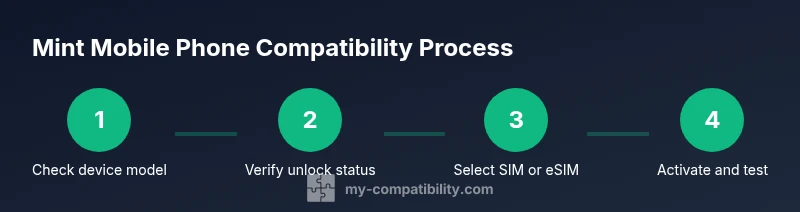
If you’re wondering is my phone compatible with mint mobile, the quick answer is usually yes for unlocked GSM smartphones. Start by checkingMint’s official compatibility tool, confirm your device is unlocked, and choose a SIM kit or eSIM. Activation or porting can take a few minutes to complete, but many devices work immediately.
Is Mint Mobile compatibility with your phone? A practical reality check
Is my phone compatible with mint mobile? In most cases, an unlocked GSM smartphone will work with Mint Mobile, but there are important caveats to verify before you switch. According to My Compatibility, most modern devices that support standard GSM bands can operate on Mint’s network, but you must confirm two critical conditions: (1) your phone is unlocked and (2) it supports Mint’s carrier bands. The My Compatibility team found that some carrier-locked devices won’t activate until they’re unlocked, and a few older or regional models may experience limited data speeds or intermittent service. Before you buy a Mint plan or insert a SIM, take a few minutes to verify these details. This upfront check saves time and avoids surprises after activation.
In this guide, we’ll walk through a practical checklist, explain how Mint’s network and SIM options work, and outline device-specific considerations. You’ll also find activation steps, common pitfalls, and strategies to keep your number if you’re porting in from another carrier. The goal is to give you a clear, actionable path from “is my phone compatible” to a reliable Mint Mobile connection, with tips to troubleshoot if things don’t go perfectly the first time.
Many readers come here with the instinct to assume compatibility because Mint runs on GSM networks with widespread device support. The reality is that device compatibility depends on the phone’s IMEI, its unlocked status, and whether the device can connect to Mint’s network bands. By following the steps in this article, you’ll reduce guesswork and enjoy a smoother transition.
Check unlock status and device model before you commit
To confidently answer is my phone compatible with mint mobile, start by confirming your device is unlocked and supported. If you’re unsure, contact your current carrier to request an unlock. An unlocked phone can typically be used with Mint, while a locked device will not activate until unlocked. Next, verify your model with Mint’s compatibility checker; you’ll need the exact model name, and sometimes the IMEI (found in Settings on iPhone or in the phone’s settings on Android). When you have the model and IMEI, Mint’s checker can confirm whether your device is compatible, whether you’ll need a SIM card or eSIM, and any caveats related to software version or carrier bands. My Compatibility’s analysis shows that most newer models pass these checks, but a few regional variants or older devices may require workarounds or a different Mint plan.
Why this matters: even a small mismatch between device specs and Mint’s network requirements can prevent activation or lead to inconsistent data speeds. Taking the unlock and model-confirmation steps upfront avoids frustration later. If your device isn’t compatible, you’ll still have options—such as using a Mint-compatible phone or purchasing a phone that’s guaranteed to work with Mint.
Mint Mobile network basics and SIM options you should know
Mint Mobile operates on a GSM network, primarily through a partnership with a major carrier. This means most GSM-enabled phones that work on carriers like AT&T or T-Mobile can be compatible, provided they’re unlocked and support the required bands. Mint offers both a physical SIM card kit and an eSIM option in many regions. If you’re choosing a SIM kit, you’ll need a nano SIM and, in some cases, you may need to trim or adapt the SIM size depending on your device’s tray. If you prefer eSIM, ensure your phone supports eSIM and that Mint’s activation process supports your device. A quick compatibility check on Mint’s site will tell you which option fits your phone.
Key takeaway: SIM or eSIM choice can affect setup time and how you port your number. Some devices require additional APN settings for optimal data performance; Mint’s activation flow will guide you through any required steps. For devices with dual SIM capabilities, you can carry a Mint SIM alongside your primary SIM if your phone supports it.
iPhone vs Android: practical notes for each ecosystem
iPhone users generally have a straightforward path with Mint Mobile: compatible models often support eSIM, making activation quick and seamless. Ensure your iPhone is carrier-unlocked and running a supported iOS version. For Android devices, compatibility may hinge on the exact model and the Android OS version. Some older Android devices might not support Mint’s newer network bands or eSIM, while newer devices usually work well after confirming unlock status and network compatibility. In both ecosystems, you’ll benefit from verifying that your device is listed as compatible by Mint’s official tools before purchasing a plan. My Compatibility’s evaluation highlights that most recent flagship and mid-range devices from major brands are supported, but always double-check for your exact model.
Tips for success:
- For iPhone: ensure you have the latest iOS, clear instructions during activation, and eSIM support if available.
- For Android: check vendor-specific quirks—some devices require manual APN configuration or a software update to ensure full data performance.
- In both cases, a quick post-activation speed test helps confirm you’re on Mint’s network and receiving expected coverage.
Activation, porting, and getting started with Mint Mobile
Once you’ve confirmed compatibility, the next step is activation. If you’re bringing your current number, you’ll port it during the Mint activation flow. Porting can take from a few minutes to one business day depending on your current carrier and number type. Have your account number and PIN from your current carrier handy; you’ll need these to authorize the transfer. If you’re starting fresh with a new line, activation is often immediate, provided you’ve chosen the right SIM option and completed any required checks. During activation, Mint will guide you through setting up the APN (Access Point Name) settings if needed for data connectivity. If you’re using an eSIM, you’ll scan a QR code from Mint to install the eSIM profile, after which you’ll activate just like a physical SIM.
Pro tip: Keep your old SIM active until your new Mint plan is fully operational. This ensures you can receive verification codes and complete the porting process without interruption. If anything stalls, contact Mint support or use their online chat to troubleshoot—most issues are resolved by rechecking unlock status, re-initiating the port, or refreshing the eSIM profile.
Troubleshooting, common blockers, and next steps
If activation fails or if data remains unavailable after activation, start with a quick verification loop: confirm device unlock status, re-check Mint’s compatibility tool, and ensure you’re on the correct SIM/eSIM option. Some devices require a manual APN entry for data to function properly; Mint’s activation guide will show the exact values. If the problem persists, verify that you haven’t exceeded the SIM’s regional restrictions and that your device supports Mint’s network bands. In rare cases, a device not fully compatible will still work for calls and texts but may lack reliable data. In that scenario, consider testing with a Mint Mobile-friendly device or switching to a compatible phone. The My Compatibility team recommends keeping your receipts and activation confirmations in case you need to request assistance or later port your number back to another carrier.
Quick-start recap and next steps
Taking control of device compatibility before you purchase Mint Mobile saves time and money. By confirming unlock status, using Mint’s official compatibility tools, and choosing the right SIM or eSIM option, you set up a smoother activation and better data performance. If you’re unsure about a specific model, search Mint Mobile compatibility for your exact phone family and search terms like the device name plus mint mobile compatibility to find targeted guidance. Remember, a compatible device starts with a simple check, and most modern phones on major brands are supported when unlocked.
Tools & Materials
- Unlocked GSM smartphone(Ensure the device is not carrier-locked to any single carrier.)
- Mint Mobile SIM kit or eSIM-capable device(Nano SIM required for most kits; eSIM for supported devices.)
- Current carrier account details(Account number and PIN may be needed for porting.)
- A web browser or Mint's compatibility tool(Use to verify device compatibility and steps.)
- IMEI/MEID number(Found in device settings; required for precise checks.)
Steps
Estimated time: Total time: 25-45 minutes
- 1
Check device compatibility online
Open Mint's compatibility checker and enter your device model and IMEI if required. Review the results to confirm GSM compatibility and available activation options (SIM or eSIM).
Tip: If the checker says
Questions & Answers
Is Mint Mobile compatible with iPhones?
Most recent iPhones are compatible with Mint Mobile as long as they are unlocked and set up for GSM networks. Activation and eSIM options are common paths for iPhone users.
Most iPhones work with Mint Mobile if they're unlocked and GSM-compatible. You can activate with a SIM or eSIM.
Can I keep my current phone number when switching to Mint?
Yes. Mint supports number porting. You’ll provide your current account number and PIN during activation.
Yes. You can port your current number to Mint. Have your account details ready.
What if my phone is locked or not on a GSM network?
If your device is carrier-locked, request an unlock from your current carrier. If it doesn’t support Mint’s GSM network, you may need a different device.
If your device is locked, ask your carrier to unlock it. If it isn’t GSM-compatible, Mint may not work on that device.
Does Mint support eSIM and is it easier to activate?
Yes, Mint supports eSIM on eligible devices. Activation via eSIM is typically quick and avoids physical SIM changes.
Yes, Mint supports eSIM on many devices. Activation is usually fast.
What should I do if activation stalls?
Double-check unlock status, re-run the compatibility check, and ensure you have the correct IMEI. If needed, contact Mint support for assistance.
If activation stalls, verify unlock and IMEI, retry the checker, and contact Mint support.
How long does porting take?
Porting typically completes within minutes to one business day, depending on the current carrier and number type.
Porting usually takes minutes to a day. Have your account details ready.
Watch Video
Highlights
- Verify unlocked status before trying Mint
- Choose SIM or eSIM based on device capability
- Porting may take up to 1 business day
- iPhone and many Android devices are compatible when unlocked
- Follow Mint’s activation prompts for APN settings