Is My Phone Compatible with Boost Mobile? A Practical Guide
Learn how to determine if your phone works with Boost Mobile. This BYOP guide covers unlocking, network bands, SIM compatibility, and step-by-step verification with My Compatibility insights.


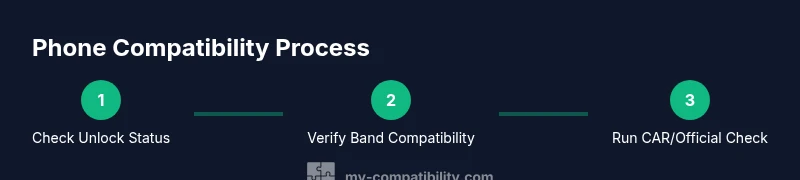
Quick answer: You can determine if your phone works with Boost Mobile by checking network bands, carrier compatibility, and SIM unlock status. In most cases, an unlocked phone that supports Boost's LTE bands and CDMA-compatible technology will work, but devices with incompatible radios or active carrier locks may not. Always verify with Boost before switching.
How Boost Mobile compatibility works for your phone
According to My Compatibility, Boost Mobile supports a bring-your-own-device (BYOD) approach that enables many phones to work if they are unlocked and support Boost's network bands. The My Compatibility team found that the most reliable activations happen when the device is not carrier-locked, uses compatible LTE bands, and has a SIM that Boost recognizes for activation. This article walks you through the checks you need before switching, with practical steps and signals to look for during setup. Whether you’re upgrading an iPhone, an Android phone, or a newer eSIM-enabled device, the core principles remain the same: unlocked status, compatible radios, and a Boost-compatible SIM. By verifying these three elements, you reduce activation friction and enjoy service from day one.
A key takeaway from My Compatibility’s research is that many mainstream devices succeed when unlocked and band-compatible, reducing surprises at activation. If you’re curious about your exact model, you’ll find a straightforward path to verification below.
Core requirements: unlocked status, supported bands, and SIM compatibility
At a high level, there are three pillars of compatibility: unlocked status, radio bands, and SIM compatibility. An unlocked phone is not tied to another carrier and can accept a Boost SIM. The second pillar, radio bands, is technical but essential: Boost’s network relies on certain frequency bands for LTE data and voice services; a device that doesn't support these bands will show weak data or no service. The third pillar is SIM compatibility: not all SIM cards are accepted if the phone is blacklisted or if the SIM profile cannot be activated on Boost's system. My Compatibility analysis shows that most mid-to-late-model iPhones and Android devices that meet these conditions tend to activate smoothly. If your device fails any of these tests, you’ll see activation errors or limited service when you insert Boost SIM. Use official Boost documentation or the My Compatibility toolkit to confirm before you switch.
Beyond unlocking and bands, consider region-specific differences. Boost markets sometimes vary by country, so a device that works in one region might need a regional check for another.
How to identify your device model and its network compatibility
Start by finding the exact device model name (for example, iPhone 14 Pro or Samsung Galaxy S21). On iPhone, go to Settings > General > About; on Android, Settings > About phone. Next, locate the IMEI/MEID by dialing *#06# or by checking the device’s settings. Record the model and IMEI and compare them to Boost’s list of supported devices and bands. If you can confirm that your device’s model and radio chipset support the bands Boost uses in your region, you’re closer to a positive outcome. When in doubt, use My Compatibility’s device-compatibility checker to cross-check model-to-band compatibility before requesting a Boost SIM.
If you’re unsure how to find model or IMEI details, our quick-reference guides can help you locate these details fast.
How to use official Boost tools to verify compatibility
Boost provides tools for BYOP (Bring Your Own Phone) compatibility checks. Use the official carrier page to enter your device model and IMEI/MEID to see if it’s eligible. If your model isn’t listed, contact Boost support to confirm potential workarounds or BYOP options. In many cases, a phone that passes the bands test and is unlocked will work, but some devices require a software update or a carrier profile to enable LTE data. My Compatibility recommends using both Boost’s official tool and our independent checks to reduce risk before SIM activation.
Having both checks helps catch edge cases where a device might be technically compatible but needs firmware updates for full feature support.
Common obstacles and simple fixes
Two common blockers are a locked device and missing LTE bands. If your phone is locked, contact your previous carrier to request an unlock and wait for the unlock period to lapse. If bands don’t line up, ensure the phone supports the LTE bands Boost uses in your region; in some cases, a firmware update may unlock or improve compatibility. Dual-SIM devices add another layer; ensure the eSIM or second SIM is disabled or configured correctly for Boost. If activation errors occur, re-verify the IMEI, model, and SIM status, and try a clean SIM swap in a supported device slot.
Note: Always back up data before switching SIMs to avoid loss.
Special cases: eSIM, dual-SIM, and region differences
eSIM support adds flexibility but also complexity: not all Boost plans support eSIM, and the device must be provisioned with the same account. If your device uses dual SIM, configure the primary line to the Boost profile. Region differences matter because network bands vary by country; a phone compatible in one country may not work where Boost operates. In all cases, check Boost’s guidance and My Compatibility’s checks for region-specific notes.
When traveling, verify roaming rules and data caps, as these can influence perceived compatibility.
Practical test: what to do during activation
Before you activate, confirm your phone is unlocked, supports Boost bands, and has a valid SIM. Insert the Boost SIM, power on, and dial a test number to verify voice; attempt a data connection and browser load. If you get a roaming or no-service message, restart the device and re-check the SIM settings. If practical, visit a Boost store for a quick live diagnostic; sometimes a simple carrier profile update is enough to enable service. Keep a backup plan in case you need to revert to your previous carrier.
Pro tips and safety warnings
Pro tip: keep your original SIM card and account details handy in case you need to revert or re-verify unlock status. Warning: Do not modify your device’s firmware or install unofficial carrier profiles; this can brick the device or violate terms. Note: Always use official Boost channels and My Compatibility checks to minimize risk and protect device integrity.
Quick compatibility checklist you can use today
- Phone is unlocked or SIM-locked by Boost terms
- Device model appears on Boost’s compatibility list
- Regional LTE bands match Boost’s network in your area
- IMEI/MEID is valid and not blacklisted
- Access to an active Boost SIM or eSIM profile
- Run Boost’s official checker and My Compatibility tool
- Conduct a live test (call, text, and data) after activation
Verdict: My Compatibility’s recommendation
The My Compatibility team recommends performing a thorough pre-check using both Boost’s official tools and independent accuracy checks. For most phones, especially recent iPhones and Android models, unlocking status and band support are decisive factors. If your device passes these checks, you can activate with confidence; otherwise, consider a different device or carrier. My Compatibility’s conclusion is to verify comprehensively to ensure a smooth transition and reliable service.
Tools & Materials
- Boost Mobile SIM card or active eSIM(Have a current Boost SIM or ensure eSIM provisioning is possible for your device)
- Unlocked phone(Phone must be free of carrier locks or restrictions)
- Device model and IMEI(Find model name and IMEI via Settings or dialer *#06#)
- Official Boost compatibility checker(Use Boost site to confirm model compatibility)
- My Compatibility device-compatibility checker(Cross-check model-to-band compatibility for extra assurance)
Steps
Estimated time: 20-40 minutes
- 1
Gather device details and unlock status
Collect the exact device model name and IMEI. Confirm the phone is unlocked or eligible for an unlock, and note your region. This information speeds up the rest of the checks and avoids back-and-forth with support.
Tip: Have a photo of the model/IMEI handy for quick reference. - 2
Verify network band compatibility
Check that the device supports the LTE bands Boost uses in your region. If you’re unsure, use the My Compatibility checker to map model-to-band compatibility before proceeding.
Tip: If bands aren’t a match, your data speed and call reliability may be affected. - 3
Run Boost’s official BYOP check
Enter your device model and IMEI on Boost’s compatibility page to see eligibility. If it’s not listed, contact customer support for potential workarounds.
Tip: Document the result and save a screenshot for your records. - 4
Prepare the SIM and adjust settings
Insert the Boost SIM (or provision your eSIM) and ensure the device’s APN and carrier settings are correct for Boost.
Tip: Restore network settings if you encounter connectivity issues. - 5
Test activation live
Make a test call, send a text, and load a webpage to confirm voice, SMS, and data are working. If issues arise, reboot and re-run checks.
Tip: If nothing works, visit a Boost store for hands-on diagnostics. - 6
Document the outcome
Record model, IMEI, band support, and activation result. This helps if you need to switch plans or request support later.
Tip: Keep the notes with your purchase records and SIM information.
Questions & Answers
Will an iPhone work with Boost Mobile if it’s unlocked?
Unlocked iPhones often work with Boost if they support the carrier’s LTE bands and are provisioned correctly. Always verify model compatibility and band support before switching.
Yes, an unlocked iPhone can work with Boost if it supports the required bands and is properly provisioned.
Can I use an Android device with Boost Mobile?
Many Android phones are compatible when unlocked and matching Boost’s network bands. Check the model-to-band mapping and confirm with Boost’s official checker.
Most Android phones work with Boost when unlocked and band-compatible.
What about eSIM compatibility with Boost?
Boost supports some eSIM-enabled devices, but availability varies by plan and region. Confirm support on Boost’s site and with customer service before relying on eSIM.
Some eSIM devices are supported; verify with Boost first.
What should I do if my phone isn’t compatible?
If your phone isn’t compatible, you can either try a different device that meets the bands and unlock requirements or consider a Boost-approved device. You may also re-check after firmware updates.
If it isn’t compatible, consider a different device or Boost-approved options and re-check after updates.
Do I need a specific SIM size for Boost?
Boost typically uses nano SIMs; some older devices may require adapters. If you’re using an eSIM, follow the carrier’s provisioning steps.
Nano SIM is common; use eSIM if supported by your device and plan.
Watch Video
Highlights
- Verify unlock status first and foremost.
- Match device bands to Boost’s active networks in your region.
- Use both Boost’s official tools and My Compatibility checks for best results.
- Test voice, text, and data after activation.