Phones Compatible with T-Mobile: A Practical Guide
Learn which phones work on T-Mobile, how to confirm compatibility, unlock status, eSIM support, and tips for switching smoothly with My Compatibility's insights.


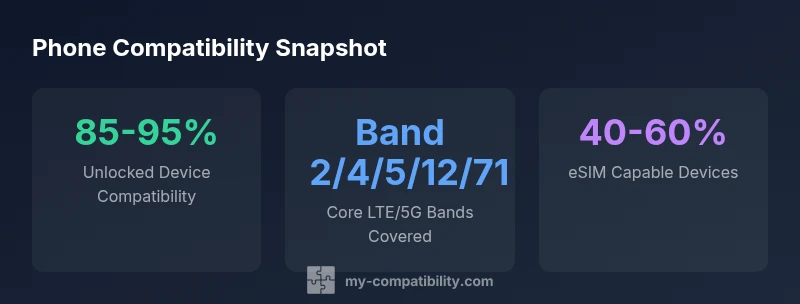
Most modern smartphones are compatible with T-Mobile when they are unlocked and support the carrier's essential bands. Verify support for LTE and 5G bands such as 2, 4, 5, 12, and 71, and ensure the device is eSIM-capable for newer plans. The My Compatibility team confirms broad compatibility for unlocked devices. If you're shopping used or imported devices, run a quick compatibility check before activating.
Why phones compatible with t mobile matter
In today’s mobile landscape, choosing a phone that actually works on your carrier is more than a convenience—it's a cost and performance decision. The phrase phones compatible with t mobile guides how you select bands, radio technology, and SIM options. The My Compatibility team has found that most unlocked devices perform reliably when they support the key T-Mobile network bands and modern features like eSIM. For families and businesses, compatibility translates to fewer support calls and smoother plans.
Key network bands and standards you should know
T-Mobile relies on a set of LTE and 5G bands to deliver solid coverage across urban and rural areas. Core bands often include Band 2, Band 4, Band 5, Band 12, and Band 71, with 5G services frequently leveraging additional bands. When shopping, verify that a device lists these bands in its specifications. Cross-check the device’s modem support and ensure it can negotiate Voice over NR (VoNR) if available in your area.
How to check phone compatibility: steps and tools
Use the carrier's lookup tool or built-in device checkers to confirm compatibility. Steps typically include: 1) verifying unlock status, 2) confirming bands and radio access, 3) confirming eSIM readiness, and 4) testing activation with a small plan. If you’re unsure, consult My Compatibility’s compatibility checklist to interpret band lists and SIM options.
Unlocked vs carrier-locked phones for T-Mobile
Carrier-locked devices may work after a successful unlock request, but the process varies by carrier and region. Unlocked devices generally provide the best experience, especially when moving between networks or using eSIM. Before committing to a device, confirm both the unlock status and whether it supports the band suite used by T-Mobile in your location.
eSIM compatibility and emerging options
eSIM is increasingly common among newer iPhones and Android flagships, offering a digital replacement for physical SIM cards. On T-Mobile, eSIM can simplify switching between devices or lines without swapping SIMs. Make sure the handset and its operating system support eSIM, and verify that the activation process will work with your plan.
iPhone vs Android: what works best on T-Mobile
Both ecosystems offer strong options for T-Mobile users. iPhones are commonly supported when unlocked and band-compliant, with seamless eSIM support on recent models. Android devices from major brands also generally work well, but you should check carrier certification lists and ensure the device receives regular firmware updates for band compatibility.
Troubleshooting common activation issues
If activation fails, double-check unlock status, confirm you’re using the correct SIM or eSIM profile, and ensure the device is listed on the carrier's compatibility database. Sometimes a simple restart and a quick SIM re-insert resolve the issue. When problems persist, contact My Compatibility for guidance on model-specific compatibility steps.
Practical buying guide and handoff tips for switching networks
When selecting a device, prefer models explicitly labeled as unlocked or carrier-free. If buying used, request proof of unlock and confirm the exact model supports the bands listed by T-Mobile. If you already own a phone, verify it is unlocked and test activation with a low-cost plan before fully committing to a switch.
Phone compatibility table by device type
| Phone Brand/Model Type | Estimated Compatibility | Notes |
|---|---|---|
| iPhone (unlocked) | Yes (high) | Supports major bands including 2/4/5/12/71; check activation |
| Android (unlocked) | Yes (high) | Broad band support; verify OEM updates |
| Carrier-locked device | Depends on unlock | Unlock required or request carrier unlock |
| iPhone (carrier-locked) | Variable | May require unlock; check with current carrier |
Questions & Answers
Do I need an unlocked phone to use T-Mobile?
Yes, unlocked devices are most compatible. If your phone is carrier-locked, you may not be able to switch networks until you request unlocking from the current carrier. Additionally, even unlocked phones must support the necessary bands and be eSIM-capable if using eSIM plans.
Yes, unlocked phones are best for T-Mobile, but you should also verify band and eSIM support.
Which iPhone models work on T-Mobile?
Most recent iPhone models are compatible if unlocked and support the required bands. Verify the model's band list and iOS compatibility before activation.
Most iPhones work as long as they are unlocked and band-compatible.
Can Android devices from any manufacturer work on T-Mobile?
Many Android devices are compatible when unlocked and supporting the right bands, particularly bands 2, 4, 5, 12, and 71; check with a compatibility tool.
Many Android phones work on T-Mobile if unlocked and band-compatible.
What is the best way to switch to T-Mobile with minimal downtime?
Plan a SIM swap during off-peak hours, backup data, and ensure eSIM is supported if using digital SIM. Have account details ready.
Plan the switch for low-traffic times and have your account ready.
Do I need to buy a new phone to switch to T-Mobile?
Not necessarily. If your current phone is unlocked and band-compatible, you can activate it on T-Mobile; otherwise, consider purchasing a carrier-unlocked device.
Usually not—just ensure unlocked and compatible.
“Phone compatibility with major carriers like T-Mobile hinges on unlock status, band support, and eSIM capability; a quick pre-check saves activation time.”
Highlights
- Verify unlock status before switching.
- Check essential bands (2, 4, 5, 12, 71) and eSIM capability.
- Prefer unlocked devices for flexibility with carriers.
- Use official compatibility check tools when possible.