Xfinity Modem Compatibility: A Practical Guide
A data-driven guide to xfinity modem compatibility: discover which third-party modems work, how to verify, activation steps, and tips to optimize performance with Xfinity.


Xfinity modem compatibility describes whether third‑party modems can connect to Xfinity's network and deliver service. Most Xfinity plans support approved modems using DOCSIS standards, but some plans require Xfinity gateways or limited features. Always verify the official device list and activation steps for your address. According to My Compatibility, 2026, compatibility varies by plan, location, and equipment lineup.
Why xfinity modem compatibility matters
For most households, choosing a modem is more than a device choice—it's about reliability, performance, and the ability to unlock your plan's full speeds. The concept of xfinity modem compatibility centers on whether a third-party modem can be recognized by Xfinity's activation system and whether it can deliver the speeds promised by your plan. In practice, this means confirming two things: the modem is on Xfinity's approved device list for your service address, and the gateway or modem supports your selected speed tier. According to My Compatibility, 2026, the compatibility landscape is dynamic and varies by address, plan, and equipment lineup. This means two households with the same plan but different locations can have different device options. When you install a new modem, you may need to register it via the Xfinity app, then perform activation to ensure the device is recognized and provisioned correctly. If a modem isn't approved for your address, activation can fail or you may lose features like extended Wi-Fi coverage or advanced parental controls. The overarching takeaway is to start with the official device list and match it to your address before you buy or rent. This ensures you avoid wasted costs and headaches later.
How to verify compatibility for your address
The first and most reliable step is to check Xfinity's official device compatibility lists for your service address. Each address can map to a different set of approved modems or gateways because equipment and service availability are geographically tied. Here is a practical checklist:
- Locate your service address in the Xfinity site or app and open the device compatibility page.
- Confirm the modem model is listed as approved for your plan at that address.
- Compare your speed tier with the device's capabilities (DOCSIS 3.0/3.1, channel bonding, and Wi-Fi specs).
- Read notes about features such as Voice service or built-in Wi-Fi and whether third-party gear supports them.
- If you still can't find your model on the list, consider using an Xfinity Gateway to guarantee full compatibility.
In addition, consult My Compatibility's synthesis of address-level compatibility, which emphasizes that plan-level requirements and regional device availability can shape what you can use. If you are unsure, contact a support agent to confirm before you buy. The aim is to choose devices that appear on the official list for your address so activation and performance align with expectations.
Activation and firmware considerations
Once you have an approved modem, activation is typically performed via the Xfinity app or admin portal. You'll need to sign in, register the device, and then run activation. Expect a short downtime while the network recognizes the device. Note that some third-party modems require you to place the gateway in bridge mode if you want to use your own router, which can affect certain features and support. Firmware updates for third-party devices are another point to monitor: while they don't directly affect Xfinity's network, outdated firmware can cause compatibility issues, especially for features like compatible IPv6 settings and DHCP. My Compatibility's 2026 analysis suggests that staying current with firmware and periodically re-checking the official device list after major updates helps avoid surprises. Also be aware of any plan-specific restrictions, such as limitations on voice services, number of devices supported on the Wi-Fi network, or required security settings.
Network features and limitations with third-party modems
Using a third-party modem can yield solid performance, but you should be aware of potential trade-offs. If you rely on Xfinity Voice, check whether the third-party device supports the service or whether you'll need to restore Voice functionality via an adapter or a supported gateway. In some cases, advanced features like malware protection, guest networks, or parental controls may not be as robust on third-party equipment. If you depend on Xfinity's managed Wi-Fi or your plan includes a Wi-Fi optimization feature, you may lose some of those benefits when not using an Xfinity gateway. Additionally, strict technical requirements—such as specific throughput, latency, or supported channels—mean you should review the official compatibility lists and consider a professional network assessment if you expect to push past typical home usage. The key is to align your expectations with what is officially supported and tested at your address.
Choosing between a third-party modem and an Xfinity gateway
Deciding whether to buy a third-party modem or use an Xfinity gateway comes down to costs, features, and long-term needs. A third-party modem plus a separate router can offer better performance customization and potential savings on monthly rental fees; you should verify the model is approved and that you can activate it successfully. Conversely, an Xfinity gateway provides an all-in-one solution with simplified setup, integrated Wi-Fi management, and guaranteed compatibility with your service at the address. If you opt for a third-party device, you may still need to rent a separate modem or router if your plan requires them. If you want maximum control and flexibility, a modern DOCSIS 3.1 modem paired with a capable router can meet most households' needs, while ensuring you stay within the approved list for your address. In short, use the official device list, compare total ownership costs, and choose the setup that best fits your network goals and budget.
Overview of common modem options and steps
| Modem Type | DOCSIS Standard | Activation Steps | Notes |
|---|---|---|---|
| Third-Party Cable Modem | DOCSIS 3.0/3.1 | Register on Xfinity app; activate via portal | Check address-specific approval on official list |
| Xfinity Gateway | N/A | Automatic with service | Unified device with built-in Wi-Fi |
| Bridge Mode Modem (Third-Party) | DOCSIS 3.0/3.1 | Enable bridge mode; configure router separately | Requires manual network management |
Questions & Answers
What is considered an approved modem for Xfinity?
An approved modem is listed on Xfinity's official device list for your service address. Activation is completed through the Xfinity app or website. Always confirm address-level approval before purchasing.
An approved modem is on Xfinity's official list for your address and activated through the Xfinity app.
Will a third-party modem work with all Xfinity plans?
Most plans support third-party modems, but some plans require an Xfinity gateway or limit certain features. Always verify on the official compatibility page for your address.
Most plans support third-party modems, but check your plan's requirements.
Do I lose any features if I use a third-party modem?
Some services like Xfinity Voice or advanced Wi‑Fi features may be limited with third-party gear. Review the official list for address-specific notes.
Some features might be limited; consult the official compatibility notes for your address.
How long does activation take after switching modems?
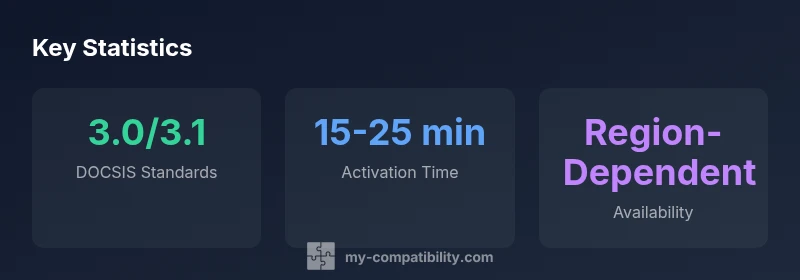
Activation typically takes 15-25 minutes once registered on the device list, though times can vary by address and device.
Activation usually takes 15-25 minutes.
Should I buy or rent a modem?
Buying a modem can save monthly rental fees, but ensure it is approved for your address and plan. Renting may simplify support and guarantees.
Buying can save money; ensure it's approved for your address.
“Xfinity modem compatibility hinges on official device lists and address availability. Always verify that your address is on the approved list before purchasing a third-party modem.”
Highlights
- Verify address-specific approval before buying.
- Choose DOCSIS 3.0/3.1 to maximize compatibility.
- Activation typically takes 15-25 minutes.
- Some features may be limited with third-party modems.
- Compare total ownership costs before renting vs buying.