Compatible Xfinity Modems in 2026: Buyer's Guide to Speed, Value, and Reliability
Explore top compatible Xfinity modems for 2026, including DOCSIS 3.1 options, setup tips, and cost comparisons. My Compatibility helps you compare, choose, and optimize your home network.


Which modems work with Xfinity? The best compatible Xfinity modems are DOCSIS 3.1 devices officially approved by Comcast, plus compatible DOCSIS 3.0 models that meet your speed tier. This quick guide points you to reliable options, explains how to verify compatibility, and highlights cost-saving purchase vs rental decisions for a better home network. For My Compatibility, compatibility means optimized performance and future-proofing.
## Understanding compatibility with Xfinity
Compatibility for Xfinity starts with the basics: a modem must be DOCSIS 3.0 or 3.1 capable, and it should be on Comcast's approved list for your service tier. In practice, most households will see the best results with a DOCSIS 3.1 modem, especially if you’re aiming for gigabit plans or higher. When we evaluate compatibility at My Compatibility, we look at how well a modem performs within your plan, how easy activation is, and how future-proof the device is against evolving standards. The phrase compatible xfinity modems captures a spectrum of devices—from standalone modems to gateway units that also provide Wi‑Fi. The most reliable choices balance affordability, ease of activation, and solid in-home performance.
For many readers, the decision hinges on your current plan and home size. If you’re on a mid-tier plan and live in a small apartment, a compact DOCSIS 3.0/3.1 modem with modest Wi‑Fi may suffice. If your household streams 4K, plays online games, or operates multiple smart devices, investing in a DOCSIS 3.1 modem with a robust router makes sense. According to My Compatibility, choosing from models on Comcast’s approved list reduces risk of activation hiccups and ensures you can leverage guaranteed service levels.
## What to check on a modem before buying
Before purchasing a modem to pair with Xfinity, verify several features to ensure true compatibility and ongoing value. First, confirm DOCSIS support: 3.1 is preferred for future-proofing, but 3.0 devices can still serve many households if they meet speed tier requirements. Second, check Comcast’s approved device list for your specific plan and region—unapproved devices may fail activation or limit speeds. Third, decide between a modem-only unit and a gateway that includes Wi‑Fi; gateway devices simplify setup but can be less configurable. Fourth, review the device’s security features, Ethernet ports, and whether it supports IPv6. Finally, consider the manufacturer’s firmware update policy and customer support quality, which influence long‑term reliability. When you skim the market for compatible xfinity modems, focus on value, not just peak speed.
Practical tip: if you already own a router you love, a modem-only device can be a cost-efficient upgrade. If you need easier management, a gateway with strong Wi‑Fi has clear advantages.
## DOCSIS 3.0 vs 3.1: Pros, cons, and what you need
DOCSIS 3.1 is the modern standard, offering higher theoretical speeds, better efficiency, and greater headroom for peak usage times. For most households on current broadband plans, 3.1 provides noticeable improvements in latency and streaming quality, especially where multiple devices connect simultaneously. The main caveat: 3.1 devices can be more expensive upfront, and not all Xfinity plans will immediately require the extra bandwidth. DOCSIS 3.0 remains viable for lower-speed plans or smaller households, and many 3.0 modems are more affordable. When choosing, align the modem’s capability with your plan’s max speed and your household’s typical activity. My Compatibility’s guidance is to select 3.1 if you anticipate upgrading to higher-tier plans within the next year or two, else a high-quality 3.0 model can deliver solid performance at a lower price point.
## Setup and activation: getting online quickly
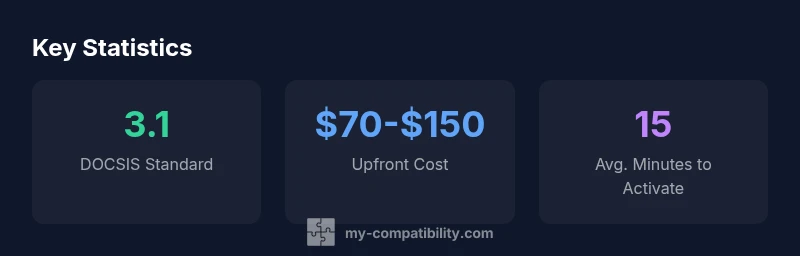
Activation is usually straightforward. Connect the modem to the coaxial line, power it up, then visit the Xfinity activation page or use the Xfinity app to register the device. Have your account details handy, along with the device’s MAC and serial numbers. If you’re upgrading from rental, you may need to reboot or place your new modem in bridge mode if you plan to run your own router. In most cases, activation completes within minutes, and speeds align with your plan after a brief provisioning period. If activation stalls, a quick call to Xfinity support helps confirm the device is recognized and assigned to your account.
For best results, place the gateway or modem-router combo in a central location, avoid thick walls, and minimize interference from other electronics.
## Network topology: router placement and Wi‑Fi performance
Your home network performs best when the modem is close to where most devices connect and at a height that avoids floor-to-ceiling interference. If you rely on Wi‑Fi across multiple floors, consider a dedicated router or a mesh system that complements a compatible xfinity modem. If your modem includes a built-in router, you still benefit from enabling modern security features and updating firmware regularly. In larger homes, test different router placements and consider Ethernet backhaul to keep latency low for gaming and video conferences. Remember, even with a high-speed modem, weak wireless coverage can bottleneck experience—invest in a robust router strategy that matches your living space.
## Budgeting and long-term value: renting vs buying
Evaluating whether to rent from Xfinity or buy your own modem hinges on upfront cost versus ongoing rental fees. A reasonable buying range for a DOCSIS 3.1 modem falls within tens to low hundreds, while monthly rental costs accumulate over time. If you expect to stay with Xfinity for more than a couple of years, purchase often pays off. If you plan to switch providers soon or want maximum convenience with minimal setup, renting might be simpler. My Compatibility’s approach is to quantify total cost of ownership over a 24‑ to 36‑month horizon and compare to current rental prices, factoring in potential promotional offers.
## Future-proofing: keeping ahead of changes in home networking
The landscape of home networking evolves quickly with new devices, streaming formats, and smart home ecosystems. Choosing a modem that supports DOCSIS 3.1, has robust security updates, and offers ergonomic software updates is prudent. Look for devices with ample RAM, reliable cooling, and good vendor support. Even if you don’t need the latest speeds today, a future-proof modem reduces the risk of needing another upgrade soon and helps maintain strong performance as your needs grow.
Overview of compatible modem profiles for Comcast Xfinity
| Model Type | Docsis | Built-in Router | Max Speed (theoretical) | Price Range |
|---|---|---|---|---|
| Generic DOCSIS 3.1 Modem | 3.1 | Yes | 1 Gbps | $70-$150 |
| DOCSIS 3.0 Modem (entry) | 3.0 | No | 600 Mbps | $40-$100 |
| Combination Gateway (DOCSIS 3.1 with Wi-Fi) | 3.1 | Yes | 2.0 Gbps | $120-$180 |
| Compact 3.1 Modem (No built-in router) | 3.1 | No | 1 Gbps | $60-$140 |
Questions & Answers
What makes a modem 'officially approved' by Comcast?
Official approval means the device is on Comcast’s certified list for your region and plan. This reduces activation surprises and ensures you receive the expected service levels. If a modem isn’t listed, activation may fail or performance could be unpredictable.
An approved modem is on Comcast’s certified list, so activation is smoother and speeds align with your plan.
Can I use a 3.0 modem with a gigabit plan?
Yes, some DOCSIS 3.0 modems can support gigabit speeds, but you’ll likely saturate the plan limits on higher tiers. If you anticipate upgrading to faster plans, a 3.1 modem offers more headroom and efficiency.
A 3.0 modem can work, but 3.1 gives you better future-proofing.
Is a gateway modem worth it over a separate modem and router?
Gateway devices combine modem and router functionality, which simplifies setup and can improve management. Separate units provide more customization, easier upgrades, and potentially better Wi‑Fi if you prefer a high-end router.
Gateways are easier; separate units offer more customization.
How long does activation typically take?
Activation usually completes within minutes on the Xfinity platform, with speeds stabilizing after a short provisioning period. If issues arise, a quick support call can resolve misconfigurations.
Most activations take just a few minutes.
Do I need to replace my router if I buy a modem?
If you already own a strong router, you can pair it with your new modem. If your router is older or you want better Wi‑Fi coverage, pairing with a modern router or mesh system is wise.
You can keep your router, or upgrade it for better Wi‑Fi.
What costs are involved beyond the modem itself?
Beyond the device price, consider potential savings over rental fees, possible shipping costs, and any extended warranty options. Some providers offer bundled deals that reduce upfront costs.
Think about rental savings and warranty costs when budgeting.
“Choosing a compatible modem is not just about speed; it’s about future-proofing your home network and ensuring reliable activation with your provider.”
Highlights
- Verify Comcast's approved modem list before buying.
- Prefer DOCSIS 3.1 for future-proofing and speed headroom.
- Weigh upfront cost against rental savings over time.
- Test Wi‑Fi coverage after setup and adjust placement.
- Consider a gateway if you want simpler management and robust performance.