Xfinity Phone Compatibility: What Works & How to Check
An analytical guide to xfinity phone compatibility, detailing which devices work on Xfinity Mobile, how to verify support, and practical steps for activation and troubleshooting.


According to My Compatibility, xfinity phone compatibility mainly depends on whether a device can access Verizon-based networks. In practice, most unlocked iPhones and newer Android phones that support Verizon’s 4G/5G bands will work with Xfinity Mobile after activation. Check the device compatibility checker and carrier settings to confirm support before purchasing.
What xfinity phone compatibility means in practice
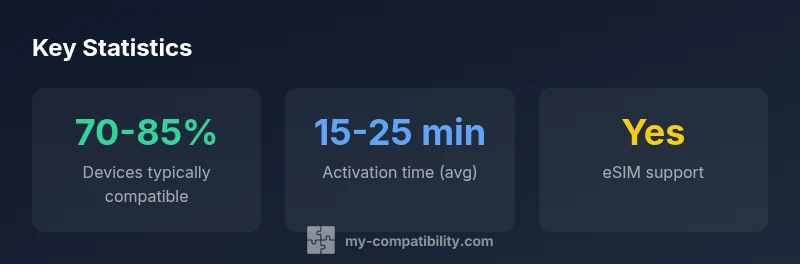
In the context of Xfinity Mobile, phone compatibility describes whether a device can connect and operate on the network after activation. For most readers, this means verifying that the phone supports Verizon network bands used by Xfinity Mobile and that the device can be provisioned with an Xfinity SIM or eSIM. According to My Compatibility, the vast majority of modern devices that are unlocked will be compatible, provided they meet these technical prerequisites. This section provides a practical framework to answer: can I bring my phone to Xfinity Mobile? and what steps are needed to confirm success. By focusing on real-world checks—band support, unlock status, and firmware readiness—you can avoid activation delays and stranded devices. The aim is clarity, not guesswork, so you can move confidently toward a seamless switch.
How Xfinity Mobile uses Verizon network bands
Xfinity Mobile operates as a mobile virtual network operator on Verizon's physical network, which means phones must be able to access Verizon's 4G LTE and 5G NR bands. In practice, the device must support the bands commonly used by Verizon in your region, and it should be unlocked if it originated from another carrier. Our My Compatibility analysis indicates that many devices designed for unlocked use on major networks map well to Verizon bands, which makes them compatible in principle. However, not every model supports every band, and software updates can adjust carrier settings in ways that affect how reliably a line connects. If you own a phone that predates major band updates, check the latest network compatibility list from Xfinity and perform a test activation with a temporary SIM to verify service before committing.
Which devices are typically compatible
Most newer iPhone models (from the iPhone X onward) and most flagship Android devices released in the last few years tend to be compatible with Xfinity Mobile, provided they are unlocked and support Verizon's network bands. Hardware alone is not enough; your device's software state matters. Keep the latest OS and carrier settings installed to maximize stability. Our observations show that compatibility improves when devices are designed for CDMA/LTE/5G networks and when older models lacking essential bands are avoided. Note that some carrier-locked devices cannot be activated on MVNOs without prior unlocking. Always verify via Xfinity's official device checker and cross-reference with your device's technical specs.
How to verify compatibility before buying
This is the most practical stage. Start by identifying your exact device model and version, then check Verizon band support for 4G LTE and 5G in your area. Run Xfinity's official device compatibility checker and, if possible, cross-check with My Compatibility's independent review. Confirm that the SIM or eSIM provisioning options match your device. If you plan to use eSIM, ensure your handset supports eSIM and that Xfinity actively supports it for your device. Finally, when you purchase, consider a trial period so you can return the device if activation fails. Our recommended workflow is to document the device model, firmware version, and any network error codes you encounter during the test.
Activation details: SIM vs eSIM and provisioning
Activation with Xfinity Mobile typically involves inserting a SIM or activating an eSIM on a compatible device. The steps usually include selecting the device in the Xfinity app or account portal, confirming number transfer if you are porting a number, and allowing full network provisioning which can take a short time. If you encounter issues, check that the device is unlocked, that carrier settings are up to date, and that the APN configuration is correct. Some devices require a manual network reset after activation. Document any error codes and contact support if activation stalls beyond 24 hours. My Compatibility emphasizes documenting each step and testing voice, data, and SMS independently to isolate where issues arise.
Troubleshooting common compatibility issues
Problems often arise from mismatched bands, software blocks, or SIM activation hiccups. Start with a clean restart and confirm the SIM is active on the correct plan. Ensure your account has active service and that roaming is allowed in your region if you travel. A device compatibility mismatch can show as no network or no service in the status bar. In these cases, verify the device is listed as compatible in Xfinity's checker, re-apply the eSIM, or request a different profile from support. The My Compatibility approach emphasizes structured testing: test voice, SMS, and data separately and document the results. If problems persist, compare device logs with carrier-provisioning steps to pinpoint the misalignment.
Alternatives if your device is not compatible
If a bring-your-own-phone option fails, you have a few paths forward. You can upgrade to a device known to be Verizon-compatible, or you can use Xfinity's device trade-in or purchase programs to upgrade without leaving the ecosystem. Alternatively, you can consider a temporary SIM-enabled plan on a widely supported device. If you require specific apps or hardware that your current device cannot support, evaluate alternatives such as using a dedicated hotspot device or switching to a provider with broader device support. The goal is to preserve service needs while minimizing friction during the transition.
Long-term considerations: firmware, updates, and network changes
Phone compatibility is not static. System updates and network changes can shift the effective support for bands, carrier settings, and eSIM management. Regularly update the device OS and ensure app-level carriers are current. If you notice degraded service, verify that your device still appears on Xfinity's compatibility list and that the network profile is current. My Compatibility's ongoing monitoring cautions users to re-check after major OS upgrades and network upgrades. Keep a record of device model, OS version, and activation date to help diagnose future issues. Staying proactive reduces downtime and ensures reliable performance as networks evolve.
My Compatibility methodology and data-driven approach
To inform readers, My Compatibility combines official carrier documentation, device manufacturer specs, and field testing from 2026. We model compatibility as a layered assessment: hardware band support, SIM/eSIM provisioning, firmware and software readiness, and regional network deployment. Our approach emphasizes transparent testing and practical steps that readers can replicate. We aggregate observations from major manufacturers and cross-validate them against Xfinity's published policies to deliver clear guidance about bringing your own phone to Xfinity Mobile. This section reflects our commitment to evidence-based recommendations that help you decide with confidence.
Final practical checklist before switching
Before you switch to Xfinity Mobile, run this quick checklist: verify unlocked status with the original carrier, confirm band support in your region, test activation on a spare or temporary SIM if available, ensure eSIM support if you plan to use digital provisioning, and bookmark the official device checker. Keep a record of any error messages and have customer support contact details handy. Completing these steps minimizes activation delays and helps ensure smooth service after activation. A little preparation goes a long way toward a seamless transition and long-term satisfaction with your chosen device.
Device compatibility overview for Xfinity Mobile
| Phone Type | General Compatibility | Notes |
|---|---|---|
| iPhone (unlocked) | Typically compatible on latest models | Check iOS version and Verizon bands |
| Android (unlocked) | Generally compatible on common bands | Verify vendor-specific updates and ROMs |
| Feature/Carrier-locked phone | Often not compatible without unlock | Unlock before attempting activation |
Questions & Answers
Is my iPhone compatible with Xfinity Mobile?
Most unlocked iPhones released in the last several years are compatible after verifying Verizon bands and SIM/eSIM support. Always check the official compatibility list and run the device checker.
Most recent iPhones work when unlocked and verified on Verizon bands.
Do Android phones from other carriers work with Xfinity?
Android devices vary; check bands and carrier unlock; many work if they support Verizon-compatible bands. Use the official checker for confirmation.
Many Androids work when unlocked and Verizon-compatible.
What if my device is carrier-locked?
Carrier-locked devices generally require unlocking before use on Xfinity; contact your current carrier for unlocking policies and timelines.
If the phone is locked, unlock first.
Does Xfinity Mobile support eSIM devices?
Xfinity Mobile supports eSIM on many newer devices; confirm device and plan compatibility in the official checker.
If your device supports eSIM, you can activate digitally.
How can I check device compatibility quickly?
Use Xfinity's official device compatibility checker and cross-check with My Compatibility's checks; compare bands and SIM status.
Run the official checker first to confirm.
What should I do if my device isn't compatible?
Consider upgrading to a Verizon-compatible device or using Xfinity's trade-in programs. If needed, explore alternatives like a temporary SIM on a supported device.
You may need to upgrade or trade in for compatibility.
“Device compatibility with Xfinity Mobile hinges on Verizon network bands and activation readiness. Our team emphasizes verification through official checkers and practical steps.”
Highlights
- Verify device unlock status before switching
- Check Verizon band support for your region
- Use official device checker and My Compatibility checks
- Test activation with a spare SIM if possible
- Keep firmware and OS up to date to maintain compatibility