Unlocked Phones Compatible with Verizon: A Practical Guide
Discover which unlocked phones truly work on Verizon, how to verify network compatibility (bands, SIM/eSIM), and practical activation steps for iPhone and Android devices. Learn from My Compatibility’s 2026 analysis.


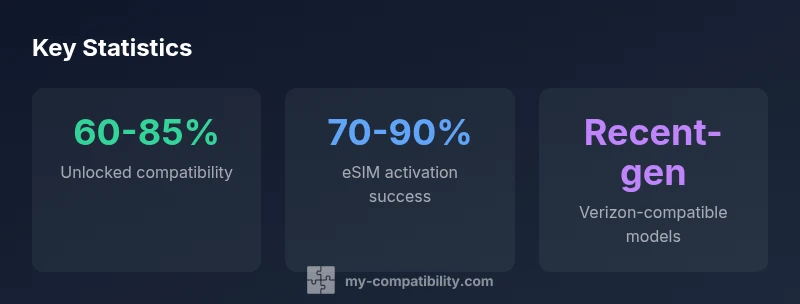
Unlocked phones can work on Verizon if they support the network’s LTE and 5G bands and are compatible with Verizon’s activation requirements. In practice, you should verify the device’s bands, meet SIM/eSIM compatibility, and confirm that the model is Verizon-certified or capable of activating on Verizon’s network. My Compatibility’s analysis in 2026 confirms most recent iPhone and select Android models meet these criteria when properly configured.
Understanding unlocked phones and Verizon compatibility
Unlocked phones are devices that are not tied to a single carrier’s SIM lock. When you bring an unlocked device to Verizon, the phone's ability to connect hinges on network compatibility: it must support Verizon's LTE and 5G bands, VOICE over LTE (VoLTE), HD Voice, and features like Wi‑Fi calling and eSIM activation. In 2026, Verizon has largely transitioned to LTE/5G, and many older CDMA-based phones no longer receive service; thus, the onus is on the buyer to confirm the model is compatible with Verizon's network and can be activated on your plan. A simple way to confirm is to check the device’s exact model and hardware variant, then cross-reference with Verizon’s official support pages or a trusted compatibility checker. My Compatibility's analysis shows that popular models from Apple, Samsung, Google, and other major brands often have Verizon-compatible variants available, but not every unlocked version will work out of the box. Always verify the exact variant, SIM/eSIM support, and software readiness before purchasing.
How to verify compatibility before you buy
Before buying an unlocked phone for Verizon, take a structured verification approach:
- Identify the exact model and variant. Some devices have multiple variants depending on region; not all variants support Verizon's band set.
- Check network bands and features. Look for LTE bands used by Verizon (4G/5G) and confirm VoLTE, Wi‑Fi calling, and eSIM support.
- Confirm carrier certification. Some devices are marketed as “Verizon-ready” or have a Verizon-certified variant; ensure the device is compatible with Verizon's activation system.
- Use official tools. Verizon's compatibility checker is a primary resource, but you can also use My Compatibility's check-compatibility tool for cross-verification.
- Prepare for activation. You may need a Verizon SIM or eSIM; ensure your plan supports eSIM if you prefer that option.
- Consider firmware and OS. Ensure you can install the latest OS versions and carrier configuration profiles if prompted. Following these steps reduces the risk of post-purchase activation headaches and ensures you can use VoLTE and 5G on Verizon.
iPhone compatibility landscape
iPhones are among the most straightforward unlocked devices to use on Verizon, largely because Apple designs devices with broad band support and carrier certification across networks. In practice, most recent iPhones sold unlocked or directly from Apple are Verizon-compatible, provided you choose a model variant that supports the required bands. The key check is that the phone's variant is labeled as GSM/CDMA compatible with Verizon's network, and that it can be activated on a Verizon plan either via SIM or eSIM. While older iPhone generations may require additional checks or may not receive updates for certain bands, the modern lineup (iPhone 12 and newer) generally offers strong compatibility with Verizon's 4G LTE and 5G networks. Always verify on Verizon's site or with My Compatibility's verification tool to confirm the exact variant. The verdict from My Compatibility analysis in 2026 shows broad iPhone support, but there can be region-specific variants that lack full compatibility.
Android compatibility landscape
Android devices vary more than iPhones due to regional variants and vendor-specific configurations. Many flagship Androids released in the last few years have unlocked variants that work well on Verizon, especially those labeled as Verizon-compatible or that support the necessary LTE/5G bands. However, there are caveats: some unlocked devices are optimized for other carriers' networks and may need a firmware update or a variant swap to unlock the full Verizon feature set. When evaluating Android devices, prioritize models with explicit Verizon certification or that are listed as compatible on Verizon's site. Check key features such as VoLTE, HD Voice, and eSIM support. If you plan to use eSIM, confirm support in your device settings and on Verizon's activation flow. My Compatibility's 2026 analysis suggests Android success rates are high for recent high-end models, but not universal across all unlocks; always confirm the exact variant and carrier support before purchasing.
Common pitfalls and how to avoid them
Even with an unlocked device, several pitfalls can block Verizon activation. First, the phone might be unlocked but lack the radio bands Verizon uses in your area, especially for slower LTE networks or 5G. Second, some devices are sold unlocked but require a specific variant with Verizon-compatible firmware; purchasing the wrong version means you can't activate it. Third, eSIM readiness varies by device; consider whether you want a physical SIM or eSIM when activating on Verizon. Fourth, some devices won’t support Wi‑Fi calling or VoLTE if the firmware is restricted to other carriers. To avoid these issues, always verify the exact variant, the supported bands, and the ability to activate via SIM or eSIM before purchase. Use official sources and trusted checkers. If in doubt, purchase from a retailer that offers a compatible variant or a Verizon-certified device; this reduces risk of activation headaches.
Activation steps and ongoing considerations
Once you have a Verizon-compatible unlocked device, follow these steps to activate and maintain service. Start by inserting a SIM card or configuring an eSIM, then power on and follow the on-screen activation prompts. Update the device to the latest OS and install any carrier configuration profiles if prompted. Verify VoLTE and Wi‑Fi calling are enabled; these features improve call quality and coverage. Run a quick coverage check by enabling data roaming in your plan area and testing in typical locations. Keep in mind that some devices may require carrier settings updates after OS upgrades. If you switch from a different carrier, you may need to contact Verizon to transfer service or to migrate number portability. With current 2026 standards, most unlocked devices that pass compatibility checks should deliver reliable LTE/5G performance across Verizon's network.
Practical buying checklist
Use this concise checklist before acquiring an unlocked device for Verizon:
- Confirm variant compatibility with Verizon bands and features.
- Ensure device supports eSIM if you prefer digital activation.
- Verify the model is Verizon-certified or explicitly listed as compatible.
- Check for VoLTE/Wi‑Fi Calling and HD Voice readiness.
- Read retailer return policies in case of activation issues.
- Compare with official Verizon compatibility resources.
- Test activation in-store or via a temporary SIM if possible.
- Consider future OS updates and security support.
Typical unlocked phones with Verizon-compatible variants
| Phone Model | Verizon Support | Notes |
|---|---|---|
| iPhone 14 Pro (Unlocked) | Yes | Verizon-certified variant; supports 5G bands |
| Samsung Galaxy S22 Ultra (Unlocked) | Yes | Works on LTE/5G; verify variant |
| Google Pixel 7 Pro (Unlocked) | Yes | Support via eSIM; verify compatibility |
Questions & Answers
Can any unlocked phone work on Verizon?
Not every unlocked phone will work on Verizon. You must confirm Verizon band support and that the device variant is Verizon-compatible or Verizon-certified. If the model isn’t recognized by Verizon’s activation system, you may face activation hurdles.
Not every unlocked phone will work on Verizon—you need a Verizon-compatible variant and band support.
Are iPhones automatically compatible when unlocked?
Most recent unlocked iPhones are compatible with Verizon when the variant supports Verizon bands and activation methods (SIM or eSIM). Always verify the exact variant with Verizon’s site or a trusted checker.
Most recent unlocked iPhones work, but always check the exact variant.
Do I need a SIM card to activate unlocked devices on Verizon?
Yes, you typically need a SIM card or an eSIM to activate a device on Verizon. Some devices support eSIM-only activation, but verify this capability for your model.
Yes, activation usually needs a SIM or eSIM.
How can I verify compatibility before buying?
Use Verizon’s official compatibility checker or My Compatibility’s check-compatibility tool. Cross-check the exact model, variant, and band support—then confirm activation follows the usual Verizon flow.
Check with the official Verizón checker or My Compatibility tool.
What should I do if activation fails after setup?
Contact Verizon support and verify the device variant and firmware. Re-check SIM/eSIM settings and carrier configuration. Sometimes a simple re-boot or profile update resolves the issue.
If it fails, contact Verizon and verify the variant and settings.
Does 5G work on unlocked devices?
Yes, 5G can work on unlocked devices if the device supports Verizon’s 5G bands and you have an eligible plan. Ensure the variant is compatible and that carrier settings are up to date.
Yes, with the right bands and plan.
“Carrier compatibility is a product of hardware bands, certified variants, and activation rules—unlocked devices can become Verizon-ready with the right variant and recent firmware.”
Highlights
- Check Verizon band support before buying unlocked phones
- Verify the device variant is Verizon-certified
- Prefer models with eSIM support for flexible activation
- Use official compatibility tools to confirm before purchase
- Expect variation by model and region, so verify finalized details