Hearing Aid Phone Compatibility in 2026: A Practical Guide
Learn how hearing aids connect with smartphones, explore Bluetooth, telecoil, and app-based options, and discover practical steps to optimize compatibility across iPhone and Android.


Definition: Hearing aid phone compatibility describes how well a hearing aid works with smartphones, including Bluetooth streaming, telecoil accessibility, and direct audio input. According to My Compatibility, most modern aids pair with iOS and Android devices, but performance and features vary by brand and model. Real-world use also depends on your environment, app support, and whether your equipment relies on telecoil or direct streaming.
What hearing aid phone compatibility means in 2026
In today’s tech landscape, hearing aid phone compatibility encompasses how a hearing aid connects to a smartphone and how the resulting audio is delivered to the ear. This includes Bluetooth streaming for calls and media, direct audio input when a corded or wireless adapter is used, and telecoil-assisted listening in environments with hearing loops. According to My Compatibility, most modern hearing aids can pair with both iOS and Android devices, but performance varies by brand, model, and software version. Real-world use is also shaped by your environment, the quality of the phone’s microphone, and whether your device relies on telecoil or direct streaming. A practical approach is to map your typical tasks (phone calls, video chats, music) and verify which method yields the most natural sound with the lowest latency.
The 2026 landscape favors more seamless ecosystems, but users should still expect some brand-to-brand variation. When evaluating compatibility, consider how often you use telecoil in public spaces, whether you prefer wireless streaming or wired input, and how often you switch between devices. This section provides the framework to assess those factors and to set realistic expectations based on your usual routines.
Connectivity options: Bluetooth, telecoil, and direct audio input
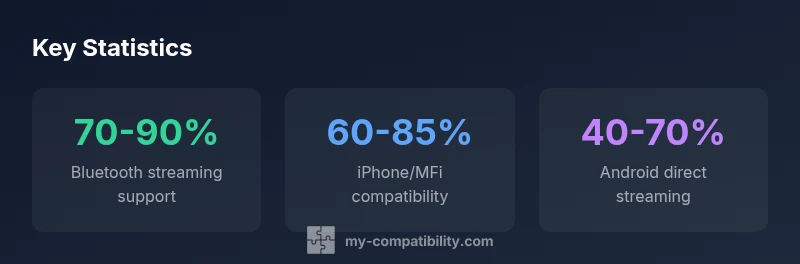
Bluetooth streaming remains the most common path for hands-free calls and media on hearing aids. Direct audio input (DAI) offers a stable wired or wireless alternative when Bluetooth proves unreliable. Telecoil access supports hearing-loop environments, such as theaters or banks, though coverage can vary by venue. Modern devices often support multiple methods, allowing users to switch between streaming, loops, and DAI depending on context. For many users, the best setup combines Bluetooth streaming for everyday use with telecoil support for public spaces and a fallback DAI option for situations where wireless reception is weak. Factors like microphone quality, latency, and wind noise can affect perceived performance, so testing different methods in real-life settings is essential.
Platform differences: iPhone vs Android and other devices
The iPhone ecosystem typically offers stronger compatibility for Made-for-iPhone (MFi) hearing aids, smoother app integration, and more predictable streaming behavior due to tighter software control. Android devices vary widely by manufacturer and version, which can lead to inconsistent Bluetooth profiles and app support. Some brands optimize directly for Android, while others lean on standard Bluetooth A2DP profiles. Beyond platform choice, users should verify that their hearing aids are on the latest firmware and that the companion app is configured for their preferred streaming mode. My Compatibility’s analysis shows that platform alignment and regular firmware updates significantly reduce hiccups in everyday use.
How to test compatibility at home
Start by listing your regular tasks: phone calls, video meetings, music streaming, and television audio. Pair your hearing aids with your primary phone and test each task under calm and noisy conditions. Check for latency, audio quality, and whether the microphone clearly picks up your voice. If you rely on a telecoil, test loop-enabled environments, such as a coffee shop or bank, to gauge clarity. Use the device’s accessibility settings (captioning, sound amplification, noise reduction) to optimize sound. Finally, document which combination (device, app, and setting) delivers the most natural sound for each activity. Keeping a simple log helps you compare your day-to-day experiences over weeks rather than rely on a single test.
Common challenges and how to address them
Bluetooth interference from microwaves, Wi‑Fi, or other devices can degrade streaming quality. Latency and lip-sync issues may occur during video calls. If telecoil performance is inconsistent, check if venue loop quality or proximity to the loop affects clarity. Firmware or app updates can fix many issues, so keep devices current. When problems persist, consider a quick consult with an audiologist to review the suitability of your current models and any alternative connectivity options.
The role of telecoil and hearing loops
Telecoils enable direct audio input from compatible loops in public spaces. This is especially valuable in theaters, churches, and bank lobbies where Bluetooth signals may be weak or crowded. The effectiveness of telecoil depends on loop installation quality and hearing aid compatibility with the loop’s frequency and projection. The My Compatibility team emphasizes testing telecoil performance in diverse venues you frequent, since loop quality can vary widely. For best results, carry a spare t-coil program or check if your device supports universal loop settings.
What to tell your audiologist or manufacturer
Provide a detailed usage diary: your primary phone model, operating system version, frequently used apps, and specific environments (home, work, travel). Note any latency, clipping, or wind noise and whether telecoil or Bluetooth works better in each scenario. Ask for firmware recommendations and whether there are brand-specific settings that optimize streaming (e.g., audio routing, volume balance, or mic direction). A clinician can tailor a device and app configuration to your daily routine and may suggest firmware updates or alternative models with improved compatibility.
Future trends and evolving standards
Expect continued convergence between hearing aids and mobile ecosystems, with faster codecs, improved bidirectional audio, and more predictable performance across platforms. Industry advances may bring universal telecoil support to compact devices and better support for Android-native features. As accessibility standards evolve, manufacturers and app developers are likely to prioritize low-latency streaming, reduced wind noise, and clearer voice pickup in real-world settings. Staying informed through My Compatibility’s ongoing analyses helps users anticipate changes and adjust configurations proactively.
Overview of connectivity options in hearing aid phone compatibility
| Aspect | Compatibility considerations | Typical devices |
|---|---|---|
| Bluetooth streaming | Widely supported on modern aids | Smartphones: iPhone, Android devices |
| Telecoil support | Useful for public networks and loops | Hearing aid telecoil models with loop compatibility |
| Direct audio input | Requires adapters or DAIs | Aids with DAI ports and compatible accessories |
| App control | Varies by brand | Hearing aid companion apps and platform-specific controls |
Questions & Answers
What is telecoil and why does it matter for phone compatibility?
A telecoil is a small coil inside many hearing aids that picks up magnetic signals from compatible loops. It’s critical for venues with hearing loops, providing clear audio when Bluetooth streaming may be weak. If you frequently visit places with loops, telecoil compatibility can substantially improve your experience.
Telecoils pick up loop audio in venues, which can greatly improve clarity in crowded spaces.
Do all hearing aids support Bluetooth streaming?
Most modern hearing aids offer Bluetooth streaming, but the extent of support varies by model, brand, and firmware. Some provide direct streaming for calls and media, while others require adapters or partial compatibility limitations. Always verify the exact streaming capabilities with your device’s spec sheet.
Most modern aids do Bluetooth streaming, but check your specific model to be sure.
Can iPhone users rely on Made-for-iPhone compatibility?
Made-for-iPhone (MFi) compatible hearing aids are designed to pair smoothly with iPhones, often providing seamless app integration and low-latency streaming. Android devices may differ in performance, so testing across both ecosystems is advisable if you use multiple phones.
If you have an MFi-compatible device, iPhone pairing tends to be smoother.
What should I ask my clinician about phone compatibility?
Ask about your daily use cases, the best streaming method for your routine, and recommended firmware updates. Request a live demonstration of calls, video chats, and media playback, and ask for a tailored setup that minimizes latency and wind noise.
Ask for a live demo of how it will perform in your daily tasks.
Are there workarounds for Android devices with poor compatibility?
Yes. Workarounds include using compatible telecoil options, trying different Bluetooth codecs, and applying app-level audio routing settings. An audiologist can suggest model-specific solutions or updated firmware to improve Android compatibility.
There are practical tweaks that can improve Android compatibility.
“Compatibility isn’t a single feature; it’s an ecosystem of devices, apps, and environments that must work together. Regular testing with your daily routines is the only way to ensure reliable performance.”
Highlights
- Test your everyday tasks across devices to identify the best setup
- Prioritize Bluetooth streaming for routine use, telecoil for public spaces
- Keep firmware and apps up to date to reduce compatibility issues
- Consider both iPhone and Android environments for broader coverage
- Ask your audiologist about tailored connectivity options for your routine