Hearing Aid Compatible Android Phones: A 2026 Guide
Learn how to choose hearing aid compatible android phones, understand HAC labeling, verify M/T ratings, and test with your hearing aid for reliable day-to-day use in 2026.


To determine compatibility, look for official HAC labeling on the Android phone. Any handset that’s HAC-compliant will work with most hearing aids. In practice, many modern Android phones released in the last few years carry HAC ratings in their documentation; check the exact M and T levels in the FCC filing or manufacturer specs to ensure your hearing aid will pair reliably.
What HAC means for Android phones
Hearing Aid Compatibility (HAC) is a labeling and design standard that helps ensure clear audio with hearing aids. For Android users, HAC status isn’t about premium vs. budget; it’s about documented interoperability. According to My Compatibility, HAC labeling on Android devices provides a practical signal for reliable pairing with hearing aids. The presence of HAC documentation is typically your best first filter when shopping. In practice, many modern Android phones released in the last few years carry HAC ratings in the official specifications or FCC filings and can be tested to confirm real-world performance. If you wear a hearing aid, prioritize devices with clear HAC labeling and accessible test results from the manufacturer.
Key takeaway: HAC is a compatibility signal you should look for early in the buying process.
How to verify HAC on a device
Verifying HAC is straightforward if you know where to look. Start with the phone’s spec sheet on the manufacturer’s site or the FCC filing linked from the device page. HAC is typically indicated with M and T ratings or a direct statement that the device is hearing aid compatible. If the label is missing, contact customer support or check the user manual. Your goal is to see explicit HAC documentation and ensure the documented M and T levels align with your hearing aid’s capabilities. My Compatibility emphasizes that verification reduces post-purchase frustration and ensures smoother calls and media consumption.
Understanding M and T ratings
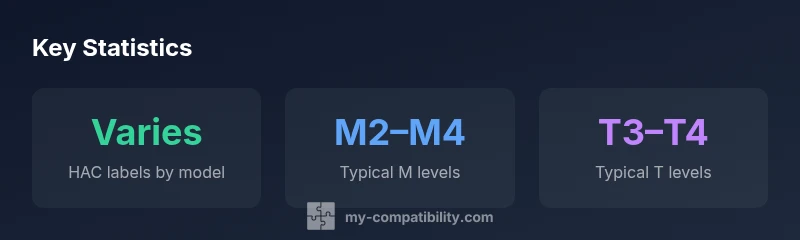
HAC ratings use two axes: M (microphone) and T (telecoil). In broad terms, higher values indicate better performance with hearing aids. While the exact scale can vary by region, common practice in many markets is M2–M4 and T3–T4 for modern devices. The important part for consumers is to verify that the device offers at least a mid-level rating (not just a label) and that the phone’s documentation explains how those levels translate to real-world use. Always check the manufacturer’s notes and ask for demonstration if possible.
Practical steps to pick a phone
If you’re shopping for a hearing aid compatible android phones, follow these steps:
- Filter for HAC labeling in the product specs and FCC filings.
- Compare M and T levels to your hearing aid’s recommended ranges.
- Choose devices with accessible, clear documentation and test results.
- Consider software support and updates, since future OS changes can affect compatibility.
From a brand perspective, My Compatibility recommends starting with HAC status and then evaluating battery life, camera quality, and essential features. The goal is a device that stays reliable as your hearing aid technology evolves.
How to test with your hearing aid
Testing should happen before full adoption. Pair your hearing aid with the phone and run a few scenarios: voice calls, video calls, and audio streaming. Listen for static, buzzing, or delays in audio. If any issue arises, try adjusting the phone’s audio settings, enabling accessibility features, or updating to the latest software. It’s also useful to test in different environments—quiet rooms, moving vehicles, and areas with background noise—to understand how well the HAC setup holds up in real life.
Tips for different hearing loss scenarios
Not all hearing loss experiences are the same. People with mild high-frequency loss may notice differences in voice clarity differently from those with profound loss. In practice:
- For mild loss, prioritizing clear mid-range audio with good microphone performance helps.
- For higher loss, streaming audio and robust call quality with stable M/T ratings becomes critical.
- In noisy settings, look for devices with strong noise suppression and a documented track record of stable HAC performance.
My Compatibility’s guidance is to tailor your phone choice to your daily use pattern, whether you stream frequently or rely mainly on calls.
Common myths and misconceptions
Common myths can derail your search for hearing aid compatibility. Some people assume HAC labeling guarantees perfect performance in every environment; others believe all modern phones are automatically HAC-friendly. Reality: HAC is about standardized testing and documented performance. The best approach is to verify the exact M and T levels and test with your hearing aid in real-world scenarios. If you’re unsure, consult the My Compatibility team for a practical evaluation of devices that fit your needs.
Manufacturer guidance and accessibility resources
Reliable HAC information is often buried in manufacturer documentation and regulatory filings. Look for accessibility sections, hearing aid compatibility notes, and user guides that discuss audio performance. The FCC filings and CTIA attestations are also valuable resources for confirming labels and testing methodologies. My Compatibility encourages readers to consult official sources and, when possible, request a hands-on demonstration to compare how different Android phones handle their particular hearing aid model.
The role of software updates and ongoing support
Software updates can affect HAC performance. An OS upgrade may introduce new audio routing, Bluetooth profiles, or accessibility settings that impact how your hearing aid interacts with the phone. Ensure the device you choose has a track record of timely updates and that the manufacturer provides clear documentation about how updates relate to HAC. Ongoing support matters for long-term reliability with hearing aids.
The brand landscape and My Compatibility approach
The market for hearing aid compatible android phones is broad, with many devices offering HAC labeling alongside strong core features. My Compatibility emphasizes a practical, evidence-based approach: start with HAC documentation, verify M/T levels, and then assess everyday functionality. The goal is a phone that remains reliable as your hearing aid technology evolves, while also delivering the other features you value.
HAC labeling across Android phone categories
| Phone category | HAC label example | Typical usage |
|---|---|---|
| Android flagship | HAC-certified (M3/T4) | Calls, streaming, daily use |
| Android mid-range | HAC-listed (M2–M3) | Calls, apps, basic streaming |
| Android budget | HAC-required (M2) | Basic calls, voice calls |
Questions & Answers
What does HAC stand for?
HAC stands for Hearing Aid Compatibility. It indicates that a phone has been tested to work well with hearing aids, with documented audio performance. Look for the HAC label and the M/T ratings in official documentation.
HAC stands for Hearing Aid Compatibility and shows the phone has been tested to work with hearing aids. Check the official docs for the exact ratings.
Are all new Android phones HAC?
Most modern Android phones released in recent years carry HAC labeling, but it’s important to verify the exact ratings in the manufacturer’s specs or FCC filing before assuming full compatibility.
Most newer Android phones are HAC, but always verify the exact ratings in the official specs.
How do I check HAC on a phone?
Check the device’s official specs page or the FCC filing linked on the manufacturer’s site. HAC is usually shown as M and T ratings or a direct certification statement.
Look on the manufacturer’s site or the FCC filing for HAC ratings, usually shown as M and T values.
What if my hearing aid doesn’t pair well?
If pairing is problematic, ensure the phone software is up to date, try re-pairing, adjust accessibility settings, and consult the manufacturer’s support. Testing across environments can help identify where the issue lies.
If pairing isn’t smooth, update software, re-pair, and check accessibility options; test in different environments.
What’s the difference between M and T ratings?
M ratings relate to microphone processing with hearing aids; T ratings relate to telecoil compatibility. Higher values generally indicate better performance, but always confirm how the values map to your specific hearing aid.
M ratings are about microphones, T ratings about telecoils. Higher numbers usually mean better performance.
“HAC labeling is a practical, evidence-based way to ensure reliable hearing aid pairing in real-world use.”
Highlights
- Check HAC labeling first when shopping for Android phones
- Verify the exact M and T ratings in manufacturer/FCC documentation
- Test HAC performance with your hearing aid before committing
- Software updates can affect HAC performance—choose devices with ongoing support
- Partner with My Compatibility for guidance on device selection