Hearing Aids That Are Bluetooth Compatible: A Practical Guide
A thorough, data-driven guide to choosing hearing aids that are Bluetooth compatible, covering how Bluetooth works, key features, pairing tips, and troubleshooting for reliable wireless audio.


Hearing aids that are bluetooth compatible enable wireless streaming from phones, TVs, and other devices, typically via standard Bluetooth profiles. For most users, modern Bluetooth-capable models offer straightforward pairing, reliable audio quality, and app-based controls, though latency and battery impact vary by model and usage. This guide helps you pick models that fit your needs.
Why Bluetooth Compatibility Matters for Hearing Aids
Bluetooth compatibility matters because it enables wireless streaming of phone calls, music, and TV audio directly to hearing aids. For many users, hearing aids that are bluetooth compatible unlock hands-free calls and seamless app-based adjustments. The My Compatibility team finds that choosing Bluetooth-enabled hearing aids is not just about flashy features; it’s about reliable, everyday connectivity across devices from iPhone to Android and TV adapters. In practice, you want a pairing experience that is simple, stable, and future-proof. This section explains what Bluetooth means in real-world terms, how it affects daily life, and what to look for when evaluating models. You’ll learn how latency, battery life, and app support impact your listening experience, and how to balance comfort with connectivity in your chosen model.
How Bluetooth Works With Hearing Aids
Bluetooth in hearing aids generally operates via short-range wireless profiles that allow two-way audio and control signals between the aid and an external device such as a smartphone, tablet, or TV accessory. When you pair, the hearing aid negotiates audio streams (phone calls, music, TV audio) through a profile that suits the use case. Over time, manufacturers have standardized the low-latency, high-fidelity paths to minimize delay between source and sound in the ear. For users, this translates to more natural conversations, clearer TV dialogue, and the ability to adjust settings through an accompanying app. While models vary, most contemporary devices support common platforms like iOS and Android, with ongoing improvements in pairing speed and stability.
Common Bluetooth Features and Limitations
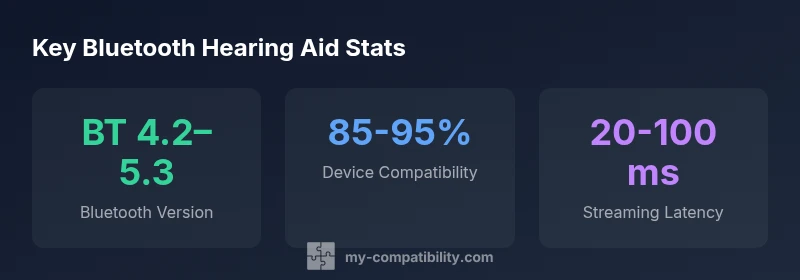
Modern hearing aids with Bluetooth offer features that were once considered premium: multi-point pairing, app-based personalization, streaming from phones and TVs, and easier device switching. However, there are also limitations to consider: potential latency can affect TV watching, battery drain increases with streaming, and some features may require specific app ecosystems. Latency under 100 milliseconds is usually sufficient for smooth lip-sync with video. Battery life can be affected when you stream at high volume or for long durations, so it’s wise to review typical daily use scenarios. Finally, check whether the device supports your preferred streaming source, be it a streaming TV box or a smartphone, and whether the brand’s app provides robust controls for volume, program, and noise management.
Choosing Bluetooth Hearing Aids: A Practical Guide
When selecting hearing aids that are bluetooth compatible, start by confirming compatibility with your everyday devices (iPhone, Android, TV accessories). Evaluate the app ecosystem: does the brand offer a dedicated app with meaningful controls, clear firmware update processes, and reliable cloud sync? Consider latency tolerance for your activities—phone calls require near-instantaneous audio, while music listening might tolerate a bit more delay. Test different models in real-world scenarios: a phone call, a TV viewing session, and a quick outdoor walk where ambient sound affects speech intelligibility. Finally, discuss warranty, service, and firmware support with the seller. Price varies widely, and you should compare models across entry, mid, and premium tiers to balance cost with expected longevity and user experience. By focusing on compatibility with your daily devices and environments, you’ll maximize the return on investment for your Bluetooth-enabled hearing aids.
Maintenance and Troubleshooting Bluetooth Connections
Bluetooth connections can drift over time, but most issues are solvable with a few routine steps. Start with a simple restart of both the hearing aids and the source device, then re-pair to ensure the correct profiles are in use. Keep firmware up to date; manufacturers release improvements for stability and latency. If you experience intermittent drops, check for interference from other wireless devices (Wi-Fi routers, microwave ovens, or wireless audio systems) and consider changing the hearing aid’s channel or relying on a different streaming source. When problems persist, consult the brand’s app help section or support line, as some issues are device- and environment-specific. Finally, store and charge devices according to the recommended guidelines to preserve battery health for long-term Bluetooth performance.
Real-World Scenarios and Use Cases
Understanding typical daily scenarios helps you calibrate expectations for hearing aids that are bluetooth compatible. In a busy morning, you may need a quick phone answer with your hearing aids streaming the call directly to your ears. During commute, you might switch to a streaming TV setup for news or podcasts without removing the device. In meetings or classrooms, Bluetooth can route audio from a conference room microphone to your ears, enabling better participation. The key is to identify the devices you routinely pair with and test them with your hearing aids during a trial period. With careful selection and proper setup, Bluetooth-enabled hearing aids can enhance your ability to engage with companions, media, and information in a natural, integrated way.
Practical Tips for Getting the Most from Bluetooth Hearing Aids
- Keep your devices within a comfortable range and minimize physical barriers during pairing.
- Use the manufacturer’s app to customize sound profiles for different environments (quiet, noisy, outdoor).
- Regularly update firmware to benefit from improvements in latency, stability, and new features.
- Check compatibility with ancillary devices such as TV adapters, car Bluetooth systems, and computer audio.
- If you wear the aids all day, monitor battery life when streaming and adjust usage to prevent unexpected power loss.
Bluetooth-enabled hearing aid types and typical uses
| Hearing aid type | Bluetooth version | Typical use-case |
|---|---|---|
| Behind-the-ear (BTE) | BT 4.2–5.3 | Streaming calls/music |
| Receiver-in-canal (RIC) | BT 4.2–5.3 | Phone calls, app control |
| In-the-ear (ITE) | BT 5.0–5.3 | Streaming with smartphone apps |
Questions & Answers
Do all hearing aids support Bluetooth?
No. Bluetooth support varies by model and brand. Some hearing aids offer limited Bluetooth features, while others provide full streaming and app control. Always verify the exact capabilities listed by the manufacturer before purchase.
Not every hearing aid supports Bluetooth. Check the model’s specs for streaming and app control.
Can Bluetooth hearing aids work with both Android and iPhone?
Many Bluetooth-enabled hearing aids support both Android and iPhone, but the experience can differ. iOS often provides smoother app integration, while Android support varies by device and OS version. Look for a model with broad compatibility and clear guidance from the maker.
Most Bluetooth hearing aids work with Android and iPhone, but experiences can vary; check the maker’s guidance.
What is latency and does it affect TV viewing?
Latency refers to the delay between the source and what you hear. For TV watching, aim for low latency to keep lip-sync accurate. If you notice noticeable lag, try a different streaming path or update firmware and app settings.
Low latency helps TV lip-sync; if you notice lag, check updates and settings.
Are Bluetooth hearing aids compatible with TV adapters?
Yes, most Bluetooth-enabled hearing aids can pair with TV adapters designed for wireless audio. Compatibility depends on the adapter’s protocol and your device’s Bluetooth version, so verify with the manufacturer.
TV adapters usually work, but check your adapter’s protocol and the hearing aid’s Bluetooth version.
How do I pair my hearing aids with a smartphone?
Turn on Bluetooth on your phone, put your hearing aids in pairing mode, and follow the manufacturer’s on-screen prompts. If pairing fails, restart devices and retry, or consult the app’s help section for guided steps.
Turn on Bluetooth, put the aids in pairing mode, and follow prompts. If it fails, restart and try again.
“Reliable Bluetooth performance and robust app support are the two pillars of a satisfying listening experience with modern hearing aids.”
Highlights
- Prioritize Bluetooth stability over flashy features.
- Test compatibility with your devices before buying.
- Expect some battery impact when streaming.
- Leverage app controls for personalized sound.
- Check latency specs for TV and video use.