Resound Compatible Phones: A Practical Guide to Compatibility
Learn which phones pair best with Resound hearing aids, how direct streaming works on iPhone and Android, and how to verify compatibility for your device with My Compatibility’s 2026 analysis.


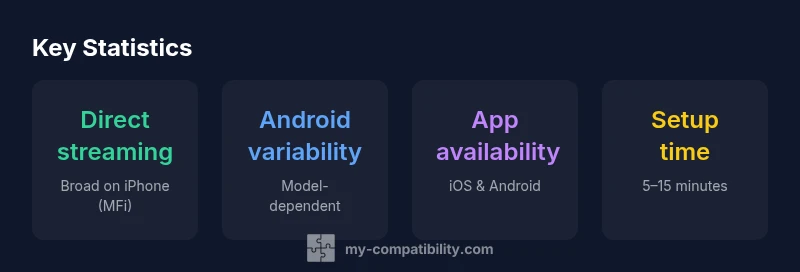
Resound compatible phones are devices that can pair with Resound hearing aids, enabling direct streaming or app-based control. Core support is strongest on iPhones with Made for iPhone certification; Android compatibility varies by model and OS version. See our detailed comparison to verify yours.
Overview of the Resound Phone Compatibility Landscape
For readers investigating resound compatible phones, the landscape blends hardware, software, and ecosystem choices. The strongest compatibility is typically found on iPhone models that support direct streaming through the Made for iPhone framework, coupled with the Resound Smart 3D app for fine-tuning and program switching. On Android, compatibility is more diverse: some devices offer direct streaming, while others rely on app-based control or limited audio routing. The My Compatibility team notes that your experience depends on OS version, Bluetooth support, and whether your hearing aids are current on firmware. Beyond model families, consider factors like microphone performance, latency, battery life, and how you plan to use streaming in daily life. The goal is to minimize friction during pairing and maximize reliable audio delivery across calls, media, and environmental sounds. In practice, many users find that starting with a supported phone and updating both the OS and the hearing aids firmware yields the smoothest experience for resound compatible phones.
How Direct Streaming Works With iPhone
Apple's iPhone ecosystem offers the strongest path for direct streaming to Resound hearing aids. When a phone is labeled as Made for iPhone, it can send audio directly to both ears with minimal latency, enabling hands-free calls, music, and TV audio. Setup typically involves pairing through Bluetooth in iOS settings and granting microphone and accessibility permissions to the Resound app. From there, you can customize programs, volume, and mute options within the app. The benefit is not only convenience but also the ability to route audio in noisy environments via the hearing aid's directional microphones. For many users, the synergy between iPhone hardware and Resound software reduces the steps needed to reach comfortable hearing levels in everyday tasks. The My Compatibility analysis highlights that iPhone users often experience fewer compatibility edge cases than Android users, due to standard Bluetooth streaming and Apple's accessory ecosystem.
Android Compatibility: What You Need to Know
Most modern Android devices support some level of streaming, but the experience varies by manufacturer, Bluetooth version, and OS updates. In many cases, direct streaming hinges on the device's ability to support low-latency audio over Bluetooth and on-system permissions. For features beyond streaming—such as program changes, volume control, and tinnitus management via the Resound app—Android users should verify that the device runs a compatible OS version and that the Resound app is granted the necessary permissions. Some devices require enabling 'Phone audio routing' in accessibility settings or using the app to control settings rather than relying on direct streaming. If your model isn't explicitly listed as compatible, you can still rely on the app for adjustments, though you may lose certain streaming capabilities. The My Compatibility analysis emphasizes that Android support is mixed, which makes pre-purchase verification essential for a positive experience.
Verifying Compatibility: A Practical Checklist
Begin by listing your phone model and OS version. Then check Resound's official compatibility matrix or run the My Compatibility checker to confirm direct streaming support and app features. Update your phone to the latest OS version and ensure the Resound app is up to date. Pairing usually takes a few minutes: enable Bluetooth on the phone, place the hearing aids in pairing mode, and follow on-screen prompts. Test with a live call, a music track, and a video to confirm latency and clarity. If you rely on Android, look for devices with strong Bluetooth support and positive user reviews for audio streaming. Keep in mind that some features may require firmware updates on the hearing aids themselves. If you encounter issues, restarting the phone and the hearing aids, re-pairing, and checking permissions in the app are common fixes.
Everyday Scenarios: Calls, Music, TV, and Apps
Direct streaming shines in calls, podcasts, and music because the sound is routed to both ears with consistent volume. For TV and gaming, verify if your phone supports 'audio passthrough' or if the Resound app offers a streamer option. In busy environments, use the hearing aids' programs to emphasize speech and reduce background noise. App-based control allows quick switching between listening modes, adjusting volume, and customizing telecoil settings if available. For those who use voice assistants, ensure that the microphone on the Resound device remains accessible and that the phone's assistant can trigger the hearing aid's controls. The goal is to create a seamless, hands-free experience across common daily tasks, while preserving natural sound cues and avoiding listening fatigue. The My Compatibility insights suggest testing your exact model with typical daily activities to compute a practical reliability score.
Troubleshooting and Best Practices
If pairing fails, start by confirming Bluetooth is enabled on the phone and that the Resound app has permission to access notifications and microphone. Check for firmware updates for your hearing aids and ensure your phone is on a supported OS version. Re-pair the devices if necessary and reset network settings on the phone as a last resort. Some issues stem from conflicts with other Bluetooth accessories, so temporarily disable other connected devices during setup. For Android users, ensure the Resound app is the default audio route in cases where direct streaming is not supported by the device. Finally, keep expectations aligned: even with 'Resound compatible phones,' occasional disruptions can occur in crowded wireless environments. By following these steps and maintaining updated software, you’ll maximize reliability.
Compatibility matrix for Resound phone pairing
| Phone Type | Direct Streaming | App Availability | Notes |
|---|---|---|---|
| iPhone (Made for iPhone) | Yes | Yes | Optimized for streaming via iOS |
| Android smartphones (Resound app) | Varies by model | Yes | Depends on Bluetooth support |
| Non-smartphones | No | App-based control only | Not compatible for direct streaming |
Questions & Answers
What makes a phone 'Resound compatible'?
Phone compatibility is determined by direct streaming support or robust app-based control with the Resound hearing aids. iPhones with Made for iPhone certification typically offer the easiest experience, while Android devices vary by model and OS version.
Compatibility mainly comes from direct streaming or solid app support; iPhones are usually the easiest.
Do iPhones with iOS support direct streaming for Resound devices?
Yes, most iPhones with iOS support direct streaming due to Made for iPhone certification, enabling hands-free calls, music, and TV audio. Pairing is straightforward via Bluetooth and the Resound app.
Most iPhones support direct streaming with Resound; pairing is straightforward.
Can Android phones stream audio directly to Resound hearing aids?
Android support is model-dependent; some devices support direct streaming, others rely on the Resound app for features. Verify your model to confirm the exact capabilities.
Android streaming varies by model; check your device.
What if my phone isn't on the list of Resound compatible devices?
You can still use the Resound app for control, but direct streaming may not be available. You may rely on app-based features for adjustments and listening modes.
If not listed, use the app for control and be aware streaming may be limited.
How can I verify compatibility for a specific phone model?
Consult Resound's official compatibility matrix or use the My Compatibility checker. Enter the exact phone model and OS version to get guidance on direct streaming and app features.
Use the compatibility checker to verify your model.
Are there common issues when pairing with phones and how to fix them?
Common issues include Bluetooth pairing failures and outdated firmware. Solutions include updating OS and apps, re-pairing devices, and resetting network settings if needed.
Update software, re-pair, and check permissions if you have trouble pairing.
“Phone compatibility with Resound hearing aids hinges on direct streaming capability and app support; if you start with a compatible device, setup is straightforward and you can customize hearing experience easily.”
Highlights
- Check device before purchase using the compatibility matrix
- iPhone with MFi offers the simplest experience
- Android support varies; verify model and OS
- Keep OS and app updated for best results