AT&T Compatibility Check: A Step-by-Step Guide
Learn to verify device compatibility for AT&T with a clear, step-by-step guide. Check bands, unlock status, and SIM/eSIM readiness to avoid buying a non-working device.


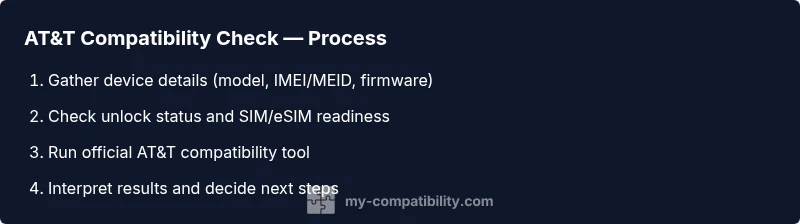
This AT&T compatibility check guide walks you through validating whether your device will work on AT&T’s network. You’ll confirm model support, unlock status, and SIM/eSIM readiness using your IMEI/MEID and AT&T’s official tools. Completing this check upfront helps you avoid wasted purchases and incompatible devices.
Why AT&T Compatibility Check Matters
According to My Compatibility, performing an AT&T compatibility check helps you avoid wasted purchases and plan mismatches. In a market where devices support different network bands and technologies, confirming compatibility before you buy or switch saves time and money. A thorough check covers device model support, unlock status, SIM/eSIM readiness, and whether your current plan can accommodate the device. This upfront diligence also helps you spot potential roaming limitations and ensures a smooth transition to AT&T’s network. By taking a few strategic steps, you reduce the risk of ending up with a phone that cannot connect to calls, texts, or data when you most need it.
Beyond personal convenience, a proper AT&T compatibility check supports long-term satisfaction with your device and carrier, especially as 5G and newer features continue to roll out. As you read, keep a simple checklist in mind: verify the device model, confirm unlock status, check SIM/eSIM compatibility, and use AT&T’s official tools for validation. These steps yield a clear yes-or-no answer and guide your next purchase or activation decision.
Understanding AT&T Network Bands and Technologies
AT&T’s network relies on a mix of 4G LTE and 5G technologies, with devices needing to support compatible bands for reliable service. The essence of compatibility is not only the phone’s hardware but also its software settings and activation state. Different regions may use different band combinations, so a device that works in one city might exhibit limitations elsewhere. Modern devices often support multiple bands and can adapt, but some regional restrictions or carrier-specific features can impact service. When evaluating compatibility, you should consider voice and data modes, 5G availability, eSIM support, and vendor-specific firmware updates. Keeping these factors in mind helps you choose a device that will stay operable as AT&T expands its network.
To stay informed about evolving standards, reference industry materials and carrier guidelines. This knowledge helps you interpret compatibility results and plan for future upgrades without surprise costs or activation delays.
Tools and Information You Need
Before testing compatibility, assemble the essentials:
- Your device (phone, tablet, or modem) and its model number
- The device’s identifiers: IMEI, MEID, or EID (for eSIM)
- A working SIM card or confirmation of eSIM setup
- Access to AT&T account or SIM status information
- A quiet space to read official guidance and take notes
Having these items on hand makes the check precise and quick. If you’re testing a used device, note its previous carrier status and any unlock documentation. The goal is to confirm, not guess, so collect all relevant identifiers in one place.
Step-by-Step: Prepare Before You Test
Preparation sets the stage for a smooth check. Start by capturing your device’s exact model name, hardware revision, and software version. Locate the IMEI/MEID from the device settings or physical labeling and verify it matches the device’s reporting in its system settings. Confirm whether the device is unlocked or carrier-locked, as locked devices often require a carrier unlock request before AT&T compatibility checks can yield a positive result. Finally, ensure you have a current SIM or eSIM plan details to complete any activation prerequisites.
Tip: Write down soft reset steps you might need if the tool requires a restart or re-check after updates. This reduces back-and-forth and speeds up the process.
Step-by-Step: Run AT&T’s Official Compatibility Check
With preparation complete, perform the official compatibility check. Enter your device model or IMEI/MEID into AT&T’s compatibility tool or support page, and follow the prompts to verify network band support, 5G readiness, and SIM/eSIM compatibility. If the tool flags any issues, take note of the exact band or feature missing and cross-check with your device’s specifications. Some checks may require you to update firmware or reset network settings to reflect current configurations.
Tip: If you encounter a non-clear result, try testing with a different SIM or re-entering the device’s identifiers to rule out input errors. Patience and careful data entry reduce the chance of misinterpretation.
Step-by-Step: Interpret Results and Decide Next Steps
Results will typically yield a clear pass/fail indication along with notes on any limitations. If compatible, proceed to activate or migrate your service and test basic calling, SMS, and data. If not compatible, review alternatives: a different device that matches AT&T’s bands, an unlock solution if permissible, or switching carriers where your device is already supported. Save all results for future reference and consider documenting any firmware or software updates that might alter compatibility in the future.
Tip: Maintain a log of results and dates to track changes as AT&T expands coverage or updates device support.
Common Pitfalls and How to Avoid Them
Pitfalls commonly arise from assumptions rather than confirmed data. Avoid assuming that a device with similar model numbers will have identical compatibility; carriers vary by region and firmware. Don’t skip unlocking steps when required, and never rely on a single source of truth—cross-check with the device manufacturer’s specs and AT&T’s official tool results. Also beware of counterfeit or unofficial sources claiming to certify compatibility; these can mislead you into purchase mistakes. Always validate with AT&T’s official resources and keep your documentation organized.
If you’re unsure, pause before activation and re-verify inputs. A second pass often reveals a missed flag or misreported IMEI.
Using the Official AT&T Tools: A Practical Guide
AT&T provides a device compatibility tool to help customers confirm network readiness. Access the tool from AT&T’s support portal and follow the prompts to input your device identifiers. Review the listed supported bands, network modes, and eSIM information. If the tool returns a positive result for your exact model, you’re typically clear to proceed with activation. If not, AT&T’s support can advise on possible unlock options or alternative devices that meet the network criteria. This section also highlights the importance of firmware updates that can influence compatibility.
Note: Always ensure you are using the official AT&T tool to avoid misinformation from third-party sites.
What If Your Device Isn’t Compatible? Options and Next Steps
If the check shows incompatibility, you have several paths forward. You can look for a compatible device that specifically lists AT&T support, consider unlocking the current device if allowed by the carrier, or explore other carriers with broader compatibility. For smartphones, verify both the hardware bands and carrier software support. For devices in the high-expense range, consider upgrading to a model that explicitly states AT&T compatibility to minimize post-purchase friction. If you plan to travel, check roaming capabilities and whether eSIM travel options exist for the device.
Always compare total costs—device price, unlocking fees, and activation charges—before making a purchase.
Authority Sources
To deepen your understanding, consult authoritative resources:
- https://www.fcc.gov
- https://www.att.com
- https://www.cnet.com
Tools & Materials
- Unlocked device(Device should be unlocked or eligible for unlock; check with current carrier if uncertain)
- IMEI/MEID/eSIM identifier(Extract from device settings or hardware labeling; ensure accuracy)
- Current SIM card or eSIM details(Have SIM card ready or know eSIM activation steps)
- AT&T account access(Needed to validate plan compatibility and activation status)
- Notepad or digital notes(Record results, dates, and any additional instructions)
- Firmware update availability(Check for updates that could affect compatibility)
Steps
Estimated time: 15-30 minutes
- 1
Identify device model and identifiers
Locate the exact device model name, hardware revision, and software version. Retrieve the IMEI/MEID from the device settings or physical labeling. Confirm these identifiers match the documentation you will use for the compatibility check.
Tip: Double-check IMEI/MEID spelling; a single character error invalidates the check. - 2
Confirm device unlock status
Verify whether the device is carrier unlocked or locked to a specific carrier. A locked device often requires a separate unlock process before AT&T compatibility checks can be conclusive.
Tip: If locked, contact the original carrier for unlock eligibility and timing. - 3
Prepare SIM/eSIM and activation details
Have your current SIM card or eSIM activation steps ready. Activation readiness can influence the check’s final outcome, especially for eSIM devices.
Tip: For eSIM, ensure you have the QR code or activation data handy. - 4
Run the official AT&T compatibility check
Enter the device model or IMEI/MEID into AT&T’s official compatibility tool and follow prompts to obtain the result. Note any limitations or required firmware updates.
Tip: If the tool asks for region-specific information, provide the primary-use region first. - 5
Review results and plan next steps
Assess whether the device passes, partially passes, or fails. If pass, proceed with activation; if not, explore alternatives such as a compatible device or unlock options.
Tip: Document the result with date and tool version for future reference. - 6
Confirm options and wallet impact
Consider firmware updates, warranty implications, and activation costs. Decide whether to proceed, exchange, or choose another device.
Tip: Keep a budget note to compare total cost of ownership.
Questions & Answers
How do I know if my device is compatible with AT&T?
You determine compatibility by verifying model support, confirming unlock status, and ensuring SIM/eSIM readiness via AT&T’s official compatibility tool. Cross-check with the device’s technical specs and regional availability.
Check your device model and IMEI, confirm unlocking, and use AT&T’s official tool to validate network compatibility.
Is unlocking my device required for AT&T compatibility?
Unlocking is often required for full compatibility. If your device is carrier-locked, you’ll need to request an unlock from the original carrier before AT&T checks can pass.
Yes, unlock your device if it’s locked, then recheck compatibility with AT&T.
What if my device isn’t listed in AT&T’s compatibility tool?
If your exact model isn’t listed, verify the hardware bands and software capabilities through the manufacturer’s specs and contact AT&T support for guidance on regional compatibility or firmware updates.
If it isn’t listed, reach out to AT&T support for a definitive answer and consider official firmware updates.
Does AT&T compatibility work with eSIM devices?
Most eSIM devices are supported if the hardware and firmware support AT&T’s eSIM activation process. Verify eSIM compatibility in the tool and ensure your carrier plan supports eSIM.
Yes, but confirm eSIM activation options in AT&T’s tool before purchase.
Can I use AT&T compatibility checks while traveling abroad?
Roaming services depend on the destination and device capabilities. Check the roaming terms for your plan and confirm supported bands in the tool for the regions you’ll visit.
Travel plans may affect compatibility abroad; verify roaming and bands for your destinations.
How long does it take to get a device verified?
Most checks take a few minutes online once you have all identifiers. If you need support or firmware updates, allow extra time for guidance from AT&T.
Usually a few minutes online; may take longer if support is needed.
Watch Video
Highlights
- Verify device model and identifiers before testing.
- Unlock status directly affects compatibility results.
- Use AT&T’s official tool for accurate validation.
- SIM/eSIM readiness is essential for activation.
- Have a plan for next steps if compatibility fails.