US Mobile Compatibility Check: Quick, Practical Guide
Learn how to perform a US mobile compatibility check, including carrier bands, SIM/eSIM support, unlock status, and practical steps to avoid service gaps when upgrading or traveling.


A US mobile compatibility check confirms whether your device supports the right US carrier bands, SIM options, and plan requirements. It also verifies unlock status and eSIM availability so your phone stays connected on US networks. This quick assessment helps prevent service gaps when you travel or switch carriers.
What a US mobile compatibility check really covers
In today’s mobile landscape, a compatibility check isn’t just about whether a phone can connect to a network. It’s about whether the device supports the exact frequency bands used by US carriers (including LTE and 5G bands), whether a physical SIM or eSIM can be activated, and whether the device is unlocked or tied to a carrier. A comprehensive check also considers whether certain features, like VoLTE or Wi‑Fi calling, are supported by the US carrier you intend to use. By understanding these components, you can forecast which carriers work best with your device, how easy it will be to switch, and what limitations you might encounter. Throughout this guide, we reference best practices from My Compatibility to help you navigate these decisions with clarity and confidence.
What a US mobile compatibility check really covers
In today’s mobile landscape, a compatibility check isn’t just about whether a phone can connect to a network. It’s about whether the device supports the exact frequency bands used by US carriers (including LTE and 5G bands), whether a physical SIM or eSIM can be activated, and whether the device is unlocked or tied to a carrier. A comprehensive check also considers whether certain features, like VoLTE or Wi‑Fi calling, are supported by the US carrier you intend to use. By understanding these components, you can forecast which carriers work best with your device, how easy it will be to switch, and what limitations you might encounter. Throughout this guide, we reference best practices from My Compatibility to help you navigate these decisions with clarity and confidence.
How networks and bands affect your device
US networks rely on a mix of licensed bands for 4G LTE and 5G services. If your phone lacks a needed band (for example, a mid-band 5G slice used by some carriers), you may experience slower speeds or intermittent service. Regional differences also matter: some devices perform better on certain networks due to antenna design or firmware customization. The key takeaway is that a device can be technically capable of connecting, but the experience may vary based on the band support and the network’s optimization. This section helps you map your current hardware to the bands you expect to use in the US.
Why SIM options and eSIM status matter
Two common paths exist for US connectivity: a traditional physical SIM and an embedded/eSIM. Some devices released outside the US may not include compatibility with US eSIM profiles, while others require a carrier-provided eSIM activation to access LTE/5G. Confirming eSIM support and the activation process with your target carrier prevents post-purchase surprises. If you’re planning to travel, ensure your device supports roaming with the chosen SIM and that your plan includes US access when abroad.
Unlock status, carrier policies, and what to expect
If your device is locked to a previous carrier, you’ll need to request an unlock before using another US network. Carrier unlocking timelines vary, but most major carriers grant unlock after satisfying contract terms or payment plans. Some devices may be carrier-restricted due to financing arrangements or security policies. Understanding your device’s unlock status in advance saves you from mid-setup roadblocks and helps you schedule a carrier switch or upgrade with less downtime.
Practical verification: testing in real-world use cases
Theory is helpful, but real-world testing confirms compatibility. Start by inserting a US SIM (or activating a US eSIM) and verify basic voice and data functionality in a representative area. Test LTE/5G speeds, call quality, text messaging, VoLTE, and any carrier-specific features like visual voicemail or hotspot capability. If you travel, check roaming behavior and handoffs between networks. Document any anomalies and compare them to your target carriers’ published coverage.
Tools and resources to help you check
Gather your device, current carrier details, and a planned US carrier list. Use official carrier coverage maps to set expectations, and consult device support pages for band lists and firmware notes. My Compatibility recommends collecting serial numbers, model numbers, and firmware versions to correlate with the carrier’s compatibility matrix. Online forums and carrier support portals can offer practical user experiences but verify with official sources before making decisions.
Common issues and practical fixes
If your device lacks a needed band, consider a firmware update, a hardware upgrade, or selecting a carrier whose US bands align with your device. If your SIM is blocked, request an unlock from the original carrier or consider a prepaid plan that supports unlocked devices. For eSIM-only devices, ensure your OS supports the eSIM profile and that you have a plan that authenticates correctly with the carrier. When in doubt, contact support with your device’s exact model number and firmware version for precise guidance.
Privacy, security, and best practices during the check
Only share essential device identifiers when seeking help, and avoid posting sensitive information in public forums. Use official carrier portals whenever possible to verify unlock status and SIM activation steps. Back up important data before sim swaps or firmware updates, and enable two-factor authentication on carrier accounts to protect your mobile profile during transitions.
Getting to the next step after a successful check
Document your findings, including which carriers are compatible, any required firmware versions, and whether SIM/ESIM work is confirmed. Create a plan for upgrading, switching carriers, or traveling with confidence. If your device is ready for US use, you can proceed with a targeted carrier choice and a smooth activation flow, ensuring continuous service.
Tools & Materials
- Your smartphone(Ensure you know model number and current firmware version)
- Current carrier details(Account status, plan type, unlock status)
- US SIM card or eSIM access(For testing data, calling, and SMS on US networks)
- Carrier coverage maps(Check bands and network availability by location)
- Device unlocking tool (if applicable)(Only if the carrier confirms unlock eligibility)
- Time for testing(Estimated 30–60 minutes for a thorough test)
Steps
Estimated time: 30-60 minutes
- 1
Prepare your device and gather info
Collect your device model, firmware version, current carrier, and unlock status. This sets the baseline for compatibility and avoids surprises during testing.
Tip: Record the exact model number (e.g., SM-G991U) and firmware version. - 2
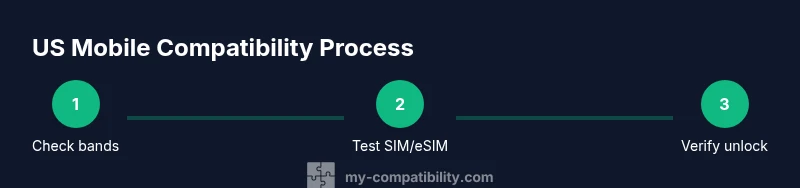
Check US carrier band support
Review the device’s official band list and compare it to US carrier bands. Identify any gaps that might affect data speeds or coverage.
Tip: Use a carrier’s official spec page matched to your device model. - 3
Test SIM/eSIM activation
Insert a US SIM or activate a US eSIM. Verify basic calls, SMS, and data connectivity under normal conditions.
Tip: If testing abroad, ensure roaming is enabled on the plan. - 4
Verify unlock status
Confirm the device is unlocked or meets carrier unlock requirements. Locked devices may prevent activation on another network.
Tip: Contact the original carrier for official unlock instructions. - 5
Check advanced features
Test VoLTE, Wi‑Fi calling, hotspot, and any carrier-specific features your plan requires.
Tip: If a feature doesn’t work, note firmware or carrier limitations. - 6
Assess data speed and reliability
Run quick speed tests and verify handoffs between bands and towers. Ensure performance meets your needs.
Tip: Test in multiple locations (home, work, transit) for consistency. - 7
Document issues and remedies
Record any issues with steps taken and potential fixes. This creates a reference if you switch carriers later.
Tip: Keep a log with timestamps and carrier names. - 8
Plan next steps
Decide whether to upgrade your device, switch carriers, or rely on your current setup with minimal changes.
Tip: Create a timeline and budget for any upgrades. - 9
Review privacy and security
Ensure you’ve secured carrier accounts and avoided exposing sensitive device data during testing.
Tip: Enable 2FA and avoid sharing account credentials.
Questions & Answers
Do I need to pay for a US mobile compatibility check?
Most basic checks can be done using official carrier specs and your device information at no cost. Paid services may offer deeper analysis or hands-on testing, but a thorough self-check is usually sufficient for personal planning.
Most checks are free if you use official sources, though paid services can offer deeper analysis.
What if my phone is older and lacks modern bands?
Older devices may not support newer US 5G bands. In this case, you may be limited to 4G or need a new device that supports the required bands for optimal service.
Older phones may not support newer US bands, limiting performance.
How do I test eSIM compatibility?
Ensure your OS supports the eSIM profile and contact the carrier for activation steps. Some devices require a carrier QR or provisioning app.
Check OS support and carrier-provisioning steps for eSIM activation.
Can I use roaming to test US networks abroad?
Roaming can help test network behavior, but it may not reflect native US performance. Before traveling, verify roaming rates and coverage with your carrier.
Roaming helps test behavior, but native US use is best for accuracy.
Which carriers should I compare for best US coverage?
Typical top considerations include major US carriers like AT&T, Verizon, and T-Mobile. Compare bands, coverage maps, and plan compatibility with your device.
Compare AT&T, Verizon, and T-Mobile for best coverage with your device.
What if the device unlock isn’t available yet?
If unlock isn’t available, you may need to wait until the carrier completes terms or consider a temporary plan that supports your current device until unlock is possible.
Wait for carrier unlock or use a temporary compatible plan.
Is privacy protected during the check?
Yes. Use official portals, avoid sharing credentials publicly, and limit data exposure to essential device identifiers.
Use official portals and protect your data during checks.
What’s the fastest way to complete the check?
Focus on verifying unlock status, SIM/eSIM activation, and basic band compatibility. Then test critical features like calls and data in your usual locations.
Verify unlock, test SIM, then confirm basic calls and data.
Watch Video
Highlights
- Verify device band compatibility with US networks before committing.
- Test SIM/eSIM activation and unlock status early.
- Document results to guide future carrier decisions.
- Check advanced features like VoLTE and hotspot for full usability.
- Prioritize privacy and security during checks.