Cars Compatible with Android Auto in 2026
Discover how to identify cars compatible with Android Auto, compare wired and wireless setups, and verify compatibility before you buy. A data-driven guide by My Compatibility.


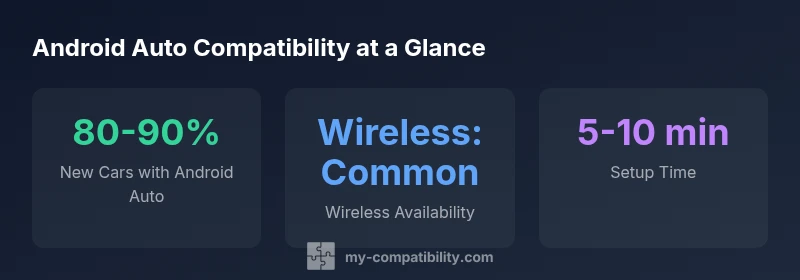
Most new cars now include Android Auto, and you can connect either via USB or wirelessly where supported. To be compatible, use an Android phone with version 6.0+ and a head unit that supports Android Auto. While exact features vary by trim, the market is moving toward broad compatibility, simplifying the search for cars compatible with android auto.
What Android Auto is and why it matters for car buyers
Android Auto is a software interface that mirrors parts of your Android phone on your car’s infotainment display. It brings familiar apps for navigation, messaging, music, and voice control into the driving experience, with safety in mind through simplified interactions and hands-free control. For shoppers, understanding Android Auto helps you quickly identify which vehicles will deliver a seamless smartphone experience. In 2026, the market has shifted from a niche feature to a near-standard expectation, especially in mainstream models. The phrase cars compatible with android auto is now a practical criterion during model-by-model comparisons, not a speculative add-on. My Compatibility analyses indicate that buyers who prioritize consistent Android Auto support tend to have more trouble-free ownership over the first few years of the vehicle.
Wired vs wireless: what to expect in cars
Wired Android Auto uses a USB connection to project your phone’s interface onto the car screen. Wireless Android Auto relies on Wi‑Fi or Bluetooth to stream the interface without cables. Wireless is increasingly common in newer trims, but not universal; some brands reserve wireless for higher-end variants. If you frequently charge your phone or drive in areas with limited USB ports, wireless can be a meaningful convenience. Regardless of method, ensure your head unit supports the latest Android Auto protocol and that your phone remains compatible with future updates. This distinction matters when comparing vehicles because it affects ease of use and the likelihood of future updates.
Phone requirements and app ecosystem
To maximize compatibility, you’ll need an Android phone running Android 6.0 or newer, with the Android Auto app updated to the latest version. The app ecosystem matters too: most core navigation apps and popular messaging tools are supported, but availability can vary by region and vehicle firmware. In practice, a broad app roster translates to a more versatile driving experience. If you rely on niche apps, verify their compatibility with the specific head unit in your prospective car before purchase.
How manufacturers implement Android Auto
Automakers integrate Android Auto in several ways: through built-in infotainment systems that run the feature natively, or via aftermarket head units installed by dealers. Some brands allow OTA firmware updates for the head unit, while others require dealer visits for upgrades. The level of integration can influence responsiveness, map accuracy, and app performance. In recent years, many manufacturers have moved toward standardizing Android Auto across trims, though premium variants may offer expanded controls and faster processor options. This means your choice of trim can influence the depth of Android Auto features you experience.
Common misconceptions and pitfalls
A common misunderstanding is assuming Android Auto and Android Automotive OS are the same thing. Android Auto is the phone-projected interface; Android Automotive OS is the vehicle’s onboard operating system. Confusion can lead to wrong expectations about updates and app availability. Another pitfall is assuming wireless is always available; some markets and trims still rely on wired connections. Finally, some older models may require a head-unit upgrade to gain full Android Auto support, so verify compatibility before deciding.
How to verify compatibility before purchase
Start by checking the model year and trim sheet on the manufacturer’s site; confirm Android Auto support and mode (wired vs wireless). Ask the dealer for the exact infotainment version and whether an OTA update is available. If possible, test a live unit in a showroom vehicle to confirm app responsiveness and screen mirroring quality. For used-car purchases, obtain the VIN and verify the OEM head unit’s capabilities, as retrofit options may vary by model year. This proactive check helps avoid disappointment after delivery.
Practical setup tips for new cars
On day one, connect your phone using the recommended method (wired or wireless). Update both Android Auto and your phone’s firmware, then calibrate any voice controls or steering-wheel shortcuts. Create a default navigation and music app setup to minimize distraction while driving. Regularly check for OTA updates to keep the infotainment software aligned with your phone’s OS. If you use multiple phones, consider profiles that switch automatically without repeated reconfiguration.
Regional differences and future-proofing
Android Auto support is robust in North America and Europe, with growing availability in other regions. Regional firmware variations can affect app availability and map data. To future-proof, prioritize models with OTA update capabilities, strong processor hardware, and a head unit that supports wireless projection in addition to wired connections. By staying aware of regional changes and manufacturer upgrade paths, you can limit the risk of feature obsolescence as Android Auto evolves.
Beyond Android Auto: additional features to look for
Beyond the basic projection, look for deep Google Assistant integration, voice-activated navigation, and reliable real-time information like traffic and weather. Some vehicles pair Android Auto with Google services for broader ecosystem access, while others emphasize compatibility with CarPlay or native apps. If you frequently use smart home routines or frequently navigate complex routes, seek a system with fast processing, reliable wireless connectivity, and regular software updates to keep Android Auto fresh over the lifetime of the car.
Android Auto compatibility table
| Feature Area | Android Auto Support | Notes |
|---|---|---|
| Connectivity | Yes (wired) | USB-C or USB-A; check cable quality |
| Wireless Projection | Yes (where available) | Requires compatible head unit and phone |
| App Support | 100+ apps | Varies by vehicle and region |
| OTA Updates | Common in many models | Check dealer update policy |
Questions & Answers
Do all new cars support Android Auto?
Not every model includes Android Auto, especially in budget trims or certain regional markets. Most mainstream brands offer it, but always confirm the exact trim’s infotainment features before purchase.
Most new cars offer Android Auto, but check the specific trim’s infotainment details to be sure.
Is Android Auto wireless always available in every model?
Wireless Android Auto is common in newer models and higher trims, but not universal. If wireless projection is important, verify it on the exact trim and region you’re considering.
Support for wireless Android Auto depends on the model and region, so verify before buying.
Can you retrofit Android Auto to an older car?
Official retrofit options vary by model year. In many cases you can install an aftermarket head unit that supports Android Auto, but factory upgrades may be limited or unavailable for older cars.
You can often upgrade with an aftermarket head unit if your car’s interior supports it.
Does Android Auto drain my phone battery?
Running Android Auto will consume your phone’s battery, especially with navigation and constant connectivity. Use a charger on long trips and enable power-saving features where suitable.
Yes, using Android Auto can use more battery; keep a charger handy on long drives.
What should I do if my phone or car has compatibility issues?
First, ensure both the phone and head unit have the latest updates. Reconnect the USB cable or re-pair wireless agents, and check regional compatibility notes. If problems persist, consult the dealer to verify firmware versions.
Update both devices, re-connect, and check regional compatibility; contact the dealer if needed.
What is the difference between Android Auto and Android Automotive OS?
Android Auto is a phone-based projection interface, while Android Automotive OS is the car’s own operating system built into the vehicle. Their updates and app ecosystems operate on different paths and may offer different levels of integration.
Android Auto mirrors your phone; Android Automotive OS runs inside the car itself.
“Android Auto is now mainstream in the market, but true compatibility varies by head unit and trim. Always verify the exact model-year and dealer-installed features.”
Highlights
- Check trim-level specs for wireless Android Auto availability.
- Prefer models with OTA infotainment updates for future-proofing.
- Verify your phone runs Android 6.0+ and the app is up to date.
- Consider a test drive to confirm responsiveness.
- Compare wired versus wireless setups to match your usage.