What Type of Controllers Are Compatible With Switch
Explore which controllers work with Nintendo Switch, including official Joy-Con and Pro Controllers, licensed third-party pads, and adapters. Learn pairing steps, limitations, and how licensing affects long-term compatibility.


Most official and licensed controllers work with Nintendo Switch, including Joy-Con, Pro Controller, and many third-party options when used with the correct adapter or built-in Bluetooth. Compatibility varies by model and firmware, so it’s important to verify each controller’s license status and any required adapters before purchase. This article breaks down current options and practical pairing steps.
What counts as a compatible controller?
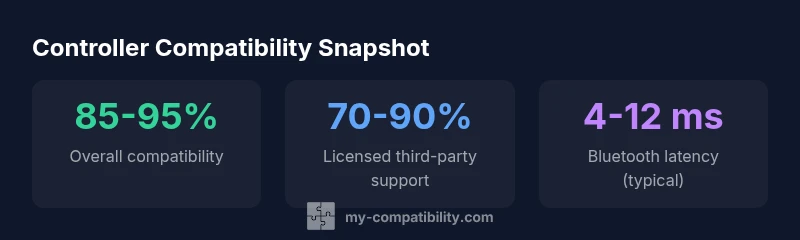
According to My Compatibility, controller compatibility depends on licensing, hardware, and firmware. At a high level, you can categorize into official Nintendo controllers, licensed third-party controllers, and unlicensed devices that rely on adapters or DIY solutions. Each category has different guarantees: native support across all modes for Nintendo controllers; licensed third-party controllers often offer full functionality when properly licensed; unlicensed devices can work inconsistently or only in certain modes. The Nintendo Switch system uses Bluetooth for wireless controllers and supports USB connections in docked mode via the dock, but some features like rumble or gyro may behave differently depending on the controller. For gamers who want reliable performance, understanding licensing and firmware updates is essential, because these two factors determine long-term compatibility.
Hardware basics: how Switch handles controllers
The Switch ecosystem relies on a mix of built-in and external controllers. Joy-Cons are the system’s native wireless pairings, while the Pro Controller offers a traditional gamepad experience with longer battery life. Switch Lite and standard Switch units support Bluetooth pairing for compatible controllers, and wired connections are possible when the console is in docked mode. Compatibility considerations vary by connection type: Bluetooth pairing is convenient for portable play, but some lower-latency or feature-rich controllers may require specific firmware or licensed adapters. Understanding these basics helps you plan for handheld, tabletop, or docked play without surprises.
Licensing and third-party controllers: what is officially supported
Nintendo maintains a certification program for third-party controllers. Licensed controllers from reputable brands tend to offer broad compatibility, including rumble and motion sensors, when paired correctly. Unlicensed devices may work inconsistently or not at all on certain firmware versions. If you plan to use a non-Nintendo pad, verify licensing on the product page and look for explicit Switch compatibility notes. My Compatibility’s research indicates that choosing licensed hardware reduces the risk of controller dropouts during multiplayer sessions and minimizes driver conflicts with system updates.
Wireless vs wired: pros, cons, and recommended setups
Wireless controllers provide flexibility and a cleaner setup, especially in handheld or tabletop modes. Bluetooth variants are popular, but latency and connection stability can vary by device and environment. Wired controllers deliver consistent latency and reliability, useful for competitive play or streaming setups. If you use wireless gear, consider models with proven Switch compatibility and ensure firmware is up to date. For docking stations, wired controllers can simplify charging while keeping latency low.
Adapters: bridging gaps for non-licensed devices
Adapters act as bridges between non-certified devices and the Switch. They can enable wireless operation for PS4/PS5 or Xbox controllers, and some licensed adapters also add features like gyro support. When selecting an adapter, check the compatibility list for your controller model, firmware version, and Switch firmware. Quality adapters from reputable brands typically provide the most stable results and reduce input lag compared with DIY hacks. Always read user reviews to confirm real-world performance with the switch version you own.
Pairing guide: Joy-Con, Pro Controller, and third-party devices
To pair Joy-Cons: navigate to System Settings > Controllers and Sensors > Pair New Controllers, then press the sync button on the Joy-Con until it appears. For the Pro Controller, hold the sync button on the top until it appears in the list and tap it to pair. For licensed third-party controllers, follow the manufacturer’s pairing procedure, which often mirrors the Pro Controller method. If using an adapter, connect the device to the Switch dock or USB port, then use the adapter’s pairing sequence. After pairing, test in both handheld and docked modes to confirm full feature support.
Troubleshooting common issues
If a controller won’t pair, ensure it is charged and that firmware is current. Re-pair from the Controllers menu and reset the adapter if used. For latency or disconnects, move closer to the Switch, reduce wireless interference, and update firmware on both the controller and Switch. If features like rumble or gyro aren’t working, check licensing status and confirm that the controller model is explicitly listed as compatible with Switch. When in doubt, reset connections and try a different USB-C or Bluetooth configuration.
Model-by-model overview of controller compatibility with Switch
| Controller Type | Switch Compatibility | Notes |
|---|---|---|
| Joy-Con | Full native support | Built-in to Switch; optional pairing when used in handheld or docked mode |
| Pro Controller | Full native support | Traditional gamepad; excellent battery life and latency |
| Licensed third-party controllers | High compatibility | Check licensing; some models require adapters or firmware updates |
| Unlicensed / DIY devices via adapters | Varies | Compatibility depends on adapter quality and firmware |
| Wired controllers (dock mode) | Full compatibility | Reliability for competitive play |
| Bluetooth adapters for non-certified pads | Variable | Best used with reputable brands and documented Switch support |
Questions & Answers
Do all Bluetooth controllers work with Switch?
Not all Bluetooth controllers are compatible. Many require licensing and specific firmware to ensure proper pairing and feature support. Always check the official compatibility list for your controller model and consider licensed options for the most reliable experience.
Not every Bluetooth controller works with Switch; check licensing and firmware, and use licensed options for reliable pairing.
Can I use a PS4 or Xbox controller with Switch?
Yes, often via a compatible adapter or Bluetooth bridge, but features such as motion controls or HD rumble may be limited. Look for adapters with broad Switch compatibility and read user reviews.
You can use PS4 or Xbox controllers with a Switch through adapters, but some features might be limited.
Will Nintendo Switch Lite support wireless controllers?
Yes. The Switch Lite supports Bluetooth for pairing with compatible wireless controllers, though not all models are guaranteed to work and some modes may have feature limitations. Verify device-specific notes before buying.
Switch Lite can pair with some wireless controllers via Bluetooth, but check compatibility first.
Are third-party licensed controllers reliable on Switch?
Licensed third-party controllers generally offer solid compatibility and features when properly licensed and updated. If in doubt, select brands with clear Switch compatibility statements and check recent user feedback.
Licensed third-party controllers are usually reliable on Switch, especially when updated.
Do I need a special adapter for wireless non-certified controllers?
Often, yes. Non-certified controllers usually require a licensed adapter to communicate with the Switch. Read product notes carefully and choose adapters with documented Switch support.
Usually you’ll need a licensed adapter for non-certified wireless controllers.
Is there a difference in compatibility between Docked and Handheld modes?
Docked mode primarily uses USB connections for wired controllers, while handheld relies on built-in Joy-Cons or Bluetooth pairing. Some features can differ across modes, so test your setup in both to confirm compatibility.
Yes—Docked and Handheld modes can behave differently; test both.
“Controller compatibility is increasingly defined by licensing and firmware updates as much as by hardware alone. Verify licenses and stay current with firmware for the best experience.”
Highlights
- Verify licensing before buying any third-party controller
- Prefer licensed controllers for broad, stable support
- Choose wired for lowest latency in docked play
- Use reputable adapters if you need non-certified wireless support
- Regular firmware updates improve long-term compatibility