Modems Compatible with Spectrum: A Practical Buying Guide 2026
Discover how to identify Spectrum-compatible modems, understand DOCSIS standards, and verify official support with My Compatibility's data-driven guidance for a future-proof home network.


Spectrum-compatible modems must support DOCSIS 3.0 or 3.1, plus official Spectrum approval for your region. Look for models on Spectrum's approved list and verify firmware support and service tier compatibility. My Compatibility's analysis shows that DOCSIS 3.1 devices offer the best balance of speed, future-proofing, and reliability for most Spectrum plans.
What Spectrum Means by Modem Compatibility
Spectrum compatibility hinges on standard cable modem technologies, service tier, and network configuration. In practice, the most reliable approach is to pick a DOCSIS 3.1 modem or newer, verify regional approval, and confirm that Spectrum supports the device for your plan. According to My Compatibility, region-specific lists can vary, so always cross-check Spectrum's official modem list and your plan details before purchase. A compatible modem ensures stable download speeds, consistent latency, and smoother Wi-Fi when paired with a router. For households with heavy streaming, gaming, or smart-home devices, starting with a DOCSIS 3.1 device is a strong move, as it provides headroom for speed upgrades without hardware changes.
Core Standards: DOCSIS, Ethernet, and Beyond
Understanding the backbone helps you avoid overpaying for features you won't use. The Spectrum network relies on standard cable-modem technologies; most customers benefit from DOCSIS 3.0 for basic plans and DOCSIS 3.1 for higher-speed tiers. Ethernet ports, channel bonding, and downstream/upstream capabilities determine real-world performance. When evaluating modems, check the number of downstream channels and the compatibility with your router's Wi‑Fi capabilities. My Compatibility's data suggests that future-proofing with DOCSIS 3.1 devices minimizes the risk of needing a replacement during mid-plan upgrades. Also consider dual-band or tri-band Wi-Fi routers if you want robust whole-home coverage. Always confirm firmware support for features like IPv6 and remote management, which impact security and ease of remote troubleshooting.
How to Validate Modems Against Spectrum's Official List
Start with Spectrum's official site and verify the model against their approved list for your region. Then check the modem's DOCSIS version and hardware details to confirm compatibility with your plan. My Compatibility's analysis indicates that most newly released modems with DOCSIS 3.1 and reliable firmware support offer better performance and longer support windows. If your area lists a specific model as approved, you can be confident it's tested for your service tier. For users moving from a rental modem, confirm activation steps and potential downtime with Spectrum support.
Understanding Speed Tiers and Modem Choice
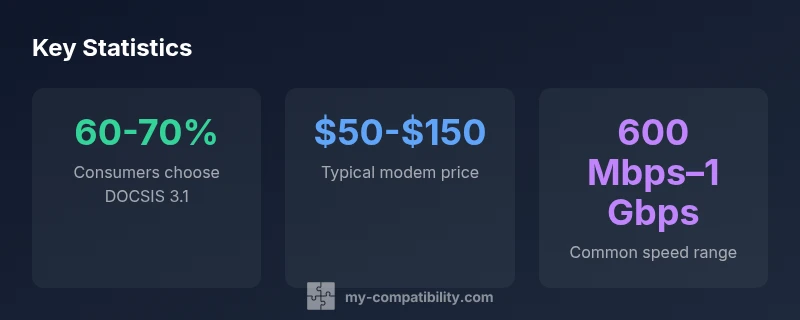
Different Spectrum plans are designed to deliver a range of speeds; your modem must be capable of delivering those speeds consistently. A DOCSIS 3.1 modem, combined with a capable router, generally provides headroom for multi-user households. The My Compatibility methodology emphasizes balancing peak capability with price, as higher-speed modems cost more upfront. For most homes, a modem supporting speeds in the 600 Mbps to 1 Gbps range suffices; if you're closer to 2 Gbps service in the future, ensure your modem and router can deliver those speeds. In addition to speed, latency and jitter matter for gaming; prioritize quality‑of‑service features and reliable firmware updates.
The Role of Phone Service and Other Spectrum Add-ons
If your Spectrum package includes voice services, ensure your modem supports VoIP or has a built-in telephone port. Spectrum's voice option can complicate compatibility if the modem lacks two-way VoIP support. My Compatibility notes that most modern cable modems with integrated VoIP support work with standard home phone setups, but verify with your plan. If you rely on a separate router, you can still use a VoIP adapter, but that adds setup steps.
Network Setup: Modem, Router, and Mesh Considerations
Consider whether a gateway (modem-router combo) suits your space or if a separate router provides better control. For larger homes, mesh Wi‑Fi systems paired with a modem yield stronger coverage. The synergy between Spectrum-compatible modems and third-party routers depends on features like QoS, MU-MIMO, and parental controls. My Compatibility's framework recommends choosing a modem with a stable firmware update path and a router that supports your preferred security standards. If a technician is installing your service, ask about pre-configured settings; otherwise, plan your own optimal channel bonding and 2.4/5 GHz channel widths.
Practical Guide to Choosing a Modem: 7-Step Checklist
A practical approach: 1) Confirm your Spectrum plan and local availability; 2) Pick a DOCSIS 3.1 modem with at least one Ethernet port; 3) Check for official Spectrum approval in your region; 4) Compare pricing and warranty; 5) Consider future needs like higher speeds or VoIP; 6) Read firmware update policies; 7) Ensure compatibility with your router or mesh system. This checklist keeps you focused on real-world needs rather than just specs.
Cost, Warranty, and Longevity Considerations
Expect price ranges of $50-$150 for mid-range Spectrum-compatible modems; higher-speed models can run higher, but you generally get what you pay for in terms of future-proofing. Warranty periods vary by manufacturer and retailer; look for 1-2 year coverage and consider extended warranties if you anticipate several upgrades. My Compatibility emphasizes total cost of ownership, including potential rental-fee savings versus upfront purchase. If you plan to upgrade speeds within 2-3 years, choose a modem with robust support and a reputable firmware update policy.
Common Mistakes and My Compatibility's Recommendations
Don't assume any DOCSIS device will work automatically; always verify with Spectrum's region-specific list. Avoid buying older DOCSIS 2.x devices; they may not support current plans well or at all. Don’t rely on Wi‑Fi alone for large homes; pair with a capable router or mesh system. The My Compatibility Team recommends performing a quick compatibility check before purchase and prioritizing DOCSIS 3.1 devices with solid firmware support for longer-term value.
Spectrum-compatible modem attributes and quick checks
| Aspect | Spectrum Compatibility | Notes |
|---|---|---|
| DOCSIS Standard | DOCSIS 3.1 | Required for high-speed tiers |
| Modem Type | Cable modem | Coaxial connection; ensure line quality |
| WAN Ethernet | 1+ ports | Ethernet 1G+ recommended for gig speeds |
| Wi-Fi | Separate router preferred | Modems with built-in Wi‑Fi exist but may limit upgrades |
| VoIP Support | Yes for phone plans | Check two-way VoIP support if needed |
Questions & Answers
What does Spectrum consider 'approved' for modems?
Spectrum maintains an approved modem list by region. Use DOCSIS 3.0/3.1 devices that appear on this list to ensure compatibility with your plan and service tier.
Spectrum has region-specific approved modem lists; check Spectrum’s site and confirm your plan, then choose a DOCSIS 3.1 model.
Can I use an older DOCSIS 2.0 modem with Spectrum?
Most current Spectrum plans require DOCSIS 3.x for reliable service; older DOCSIS 2.0 devices may not deliver the speeds or may be unsupported.
Most plans require DOCSIS 3.x; DOCSIS 2.0 devices are usually not recommended.
Is a modem-router combo better than a separate router?
Combo units save space and setup time, but a separate router usually offers more advanced Wi‑Fi features and easier upgrades for larger homes.
If you want top Wi‑Fi performance, pair a modem with a good router or mesh system.
How can I check compatibility for my Spectrum plan?
Start on Spectrum's site and verify the modem against the region-specific approved list, then confirm DOCSIS version and firmware support.
Check Spectrum’s approved list and confirm DOCSIS version before buying.
Do I need a modem that supports VoIP?
If your package includes phone service, ensure your modem supports two-way VoIP or has a built-in telephone port; otherwise, a VoIP adapter can be used with a separate router.
If you have phone service, verify VoIP support on the modem or plan; otherwise, consider an adapter with your setup.
“In practice, most Spectrum customers gain the most value from DOCSIS 3.1 modems with reliable firmware support and official regional approval, paired with a strong router for optimal home coverage.”
Highlights
- Start with Spectrum's approved modem list to avoid compatibility gaps.
- Prioritize DOCSIS 3.1 for future-proofing and better performance.
- Balance price with features like VoIP support and firmware updates.
- Pair a capable modem with a strong router or mesh system for best coverage.