Compatible vs Original Laptop Battery: A Comprehensive Comparison
Explore the key differences between OEM and compatible laptop batteries, including fit, safety, warranty, and long-term value. Learn how to choose the right option for your device with My Compatibility's analytical approach.


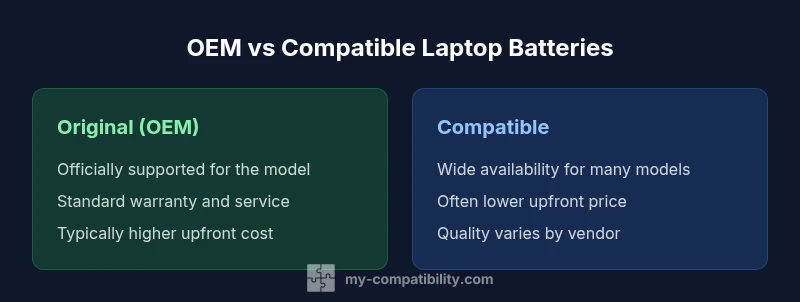
Choosing between compatible vs original laptop battery boils down to fit, safety, and costs. Original (OEM) batteries come with device-tested compatibility and warranty, while compatible batteries can save money but vary in quality and warranty coverage. For most users, the best choice depends on model, tolerance for risk, and whether long-term reliability matters more than upfront price.
Defining OEM vs Compatible Laptop Batteries
Original equipment manufacturer (OEM) batteries are designed for a specific laptop model by the device manufacturer. They are intended to meet the exact specifications, fit, and safety standards the device was built to expect. Compatible batteries, by contrast, are third‑party replacements designed to physically fit a range of models with similar form factors and electrical requirements. According to My Compatibility, the term OEM battery refers to the original battery designed for that model, while compatible batteries are third-party options with matching specs. The distinction matters for fit, warranty, and safety, and it sets expectations for supplier support and post-purchase service. When evaluating two options, consider the manufacturer’s guidance, model-specific compatibility lists, and your own risk tolerance.
- Fit and form factor matter as much as the electrical connection. A slightly different connector or height can prevent a safe seal and uniform cooling.
- Certifications and safety features vary more widely among compatible options, so vet vendors carefully.
- Warranty terms often reflect the source of the battery, with OEMs typically offering stronger coverage.
Battery Chemistry and Performance Implications
Most modern laptop batteries use lithium-ion chemistry, but there are several chemistry and cell configurations in the market. The chemistry affects energy density, thermal behavior, and how the battery ages with cycles. Real-world performance depends not only on the nominal capacity rating but also on the quality of the cells, the battery management system (BMS), and how the device’s power management integrates with the battery. A compatible battery from a reputable vendor can deliver comparable performance to an OEM unit in many scenarios, but outcomes vary by model and production batch. My Compatibility emphasizes looking beyond buzzwords and checking the vendor’s test results, return policy, and user reviews to gauge expected lifespan and reliability.
- A higher stated capacity does not guarantee longer run time if the cell quality is inconsistent.
- The BMS governs charging cycles, thermal protection, and fault detection; ensure the vendor notes compatible BMS features.
- Temperature performance and charging profiles influence longevity and safety.
Safety, Warranty, and Regulatory Considerations
Safety is non-negotiable with any battery replacement. OEM batteries are backed by the device maker’s safety guidelines, warranty, and service ecosystem. Compatible options may be safe when sourced from reputable brands that publish test data and certifications (CE, UL, or equivalent) and provide a warranty. However, some third-party batteries lack independent testing or have weak documentation, increasing the risk of thermal events or accelerated degradation. Regulatory compliance in the country of purchase matters because it impacts liability and customer support. My Compatibility highlights the importance of buying from trusted vendors and validating the battery’s safety certifications before installation.
- Never bypass safety precautions or use damaged batteries.
- A trustworthy vendor offers clear warranty terms and easy returns if the battery underperforms.
- Check the vendor’s evidence of testing and compliance with local safety standards.
Fit, Compatibility, and Model-Specific Considerations
Laptop batteries are not universally interchangeable. Even when a battery appears to fit, the exact model number, connector type, and screw layout must align with the device’s chassis and logic board. OEM lists are the safest source for cross-checking part numbers, while reputable third-party vendors provide compatibility matrices and model ranges. The My Compatibility framework stresses that you should confirm the exact model string, production year, and region of availability to ensure an error-free fit. In some cases, a physically compatible battery may still trigger warranty or security alerts if the device’s firmware expects a specific battery ID.
- Always verify the model number on both the notebook and the replacement battery.
- Double-check connector alignment and label orientation to avoid mis-matches.
- Consider firmware or BIOS version implications that may affect recognition of the battery.
Life Cycle Costs: Upfront Price vs Long-Term Value
Cost considerations extend beyond the sticker price. OEM batteries typically come with higher upfront costs but may offer longer warranty coverage and guaranteed compatibility with official support. Compatible batteries can reduce upfront spend and provide access to supply channels for discontinued models, but the long-term value depends on reliability, warranty terms, and post-purchase support. A careful cost comparison should include potential returns, the cost of potential hardware reseats, and the likelihood of needing additional replacements within the device’s expected life. My Compatibility recommends mapping total ownership cost over the device’s remaining lifespan, factoring in warranty length and vendor reliability.
- Short-term savings can be offset by shorter warranties or higher failure risk.
- Replacement cycles and downtime costs should be considered for business or critical-use devices.
- The best value often balances price with confidence in vendor support and battery safety.
Signs of a High-Quality Compatible Battery
High-quality compatible batteries exhibit transparent supplier practices. Look for clear model numbers, published safety certifications, and a reasonable warranty window. Reputable manufacturers provide diagnostic data, testing protocols, and customer reviews to back up performance claims. Beware vendors that lack verifiable documentation or rely on vague marketing claims. My Compatibility notes that strong vendors typically offer returns and technical support that makes post-purchase issues easier to resolve.
- Documented certifications (CE/UL or equivalent).
- Clear part numbers and model compatibility lists.
- Positive user reviews and a reasonable warranty policy.
- Transparent testing data or third-party verification.
How to Verify Compatibility Before Buying
Before committing to a replacement, perform a structured verification. Start with the device model and the battery part number listed in the user manual or manufacturer site. Cross-reference with the vendor’s compatibility matrix and confirm the connector type, physical dimensions, and any firmware considerations. If possible, request a test report or warranty terms in writing. A cautious buyer cross-checks multiple sources and reads return policies. My Compatibility’s research supports this approach, advising buyers to confirm exact model strings, verify battery ID, and review user feedback for similar notebook configurations.
- Collect and compare official part numbers.
- Inspect physical dimensions and connector alignment.
- Review warranty terms and vendor credibility.
- Check for firmware or BIOS considerations that could affect recognition of the battery.
Pros and Cons of Each Option in Real-World Scenarios
When choosing between OEM and compatible batteries, context matters. The OEM path is often favored in business environments or devices under warranty, where reliability and service support are priorities. Compatible options can be advantageous for older models, builds with limited supply, or budget-sensitive scenarios, provided the vendor is reputable and offers clear guarantees. In practice, the decision hinges on risk tolerance, expected uptime, and the availability of trusted vendor support. My Compatibility emphasizes mapping practical use-cases to the guarantees you receive, rather than chasing price alone.
- Best for critical uptime and official support: Original/OEM battery.
- Best for cost-conscious upgrades on older models: High-quality compatible battery from a trusted vendor.
- In both cases, ensure the battery’s safety certifications and vendor support are solid.
Installation and Maintenance: Best Practices for Longevity
After purchase, install the battery following the manufacturer’s instructions. Use static-safe handling, avoid forcing a connector, and ensure the device is powered down before replacement. Allow the new battery to calibrate if the manufacturer recommends it, and monitor thermal performance during initial charges. Regularly inspect for swollen cases or abnormal heat, and replace the battery promptly if you notice signs of distress. Proper storage, charging habits, and firmware updates can extend battery life. My Compatibility’s guidance is to treat battery maintenance as part of your device’s overall health plan, prioritizing safety and manufacturer recommendations.
Comparison
| Feature | Original laptop battery (OEM) | Compatible laptop battery |
|---|---|---|
| Fit and compatibility | Officially supported for the model | Designed to fit a broad range but requires verification for each model |
| Quality control & certifications | Manufactured under OEM specifications with formal quality processes | Quality varies by vendor; seek CE/UL or equivalent certifications and documented testing |
| Warranty and support | Typically covered by device manufacturer warranty and service | Warranty depends on vendor; may be shorter or conditional on use of approved devices |
| Cost | Higher upfront price, but consistent support | Lower upfront price with variable reliability and support |
| Availability & supply | Widely available through official channels | Available through multiple vendors; supply can vary by region and model |
| Safety features | Integrated safety and thermal management from OEM | Vendor-provided safety features; check for proper BMS compatibility and documentation |
Positives
- Potential cost savings compared to OEM batteries
- Greater availability for older or discontinued models
- Shorter lead times from trusted third-party vendors
- Diverse options allow capacity and feature customization
- Warranty options may still be offered by reputable brands
Cons
- Quality and safety vary by vendor
- Risk of counterfeit or mislabeled cells
- Variable warranty terms and potential voiding of OEM support
- Some models may require firmware considerations or special handling
OEM batteries are generally safer and better for warranty coverage; compatible batteries offer value but require careful vendor selection.
If safety and official support matter most, OEM is the safer bet. For budget-conscious users with reliable vendors and solid warranties, high-quality compatibles can be a viable option, provided you verify model compatibility and safety certifications.
Questions & Answers
What is the main difference between compatible and original laptop batteries?
Original (OEM) batteries are designed by the laptop manufacturer for a specific model and typically come with official warranty and guaranteed compatibility. Compatible batteries are third‑party replacements that fit the device but vary in quality, safety certifications, and warranty terms. In practice, the best choice depends on your model, budget, and tolerance for risk.
Original batteries are manufactured for your exact model and usually covered by the maker’s warranty, while compatible batteries come from third-party brands and vary in reliability. Consider your model and risk tolerance when choosing.
Are compatible batteries safe to use in laptops?
Safety depends on the vendor and the level of testing the battery has undergone. Reputable brands publish certifications and testing data, which helps ensure safe operation. Always buy from trusted sellers and avoid unknown brands that lack documentation.
Safety depends on the vendor and data backing the product. Choose reputable brands with clear certifications.
Will using a compatible battery affect my laptop’s warranty?
In many cases, using a third-party battery can impact the device warranty, especially if the battery causes damage or is not approved by the manufacturer. Some vendors offer warranties that extend to the device, but you should confirm with the manufacturer and retailer before purchasing.
Check your warranty terms first; third-party batteries can affect coverage, but some vendors offer their own warranties.
How can I verify compatibility before buying a replacement battery?
Cross-check the laptop model, battery part numbers, and connector type against official manufacturer lists and the vendor’s compatibility matrix. Look for verified customer reviews with your exact model and region. If possible, request test data or a warranty policy in writing.
Double-check model numbers and connector types, and read reviews for your exact laptop model.
Do all laptops support third‑party batteries?
Not all models support third‑party batteries, and some devices have firmware or BIOS constraints that recognize only certain batteries. Always verify with the manufacturer or trusted vendors before purchase, especially for newer models with integrated security features.
Some laptops won’t recognize third-party batteries, so verify compatibility and firmware constraints first.
Highlights
- Verify exact model compatibility before buying
- Prioritize vendors with clear certifications and warranty
- Balance upfront cost against potential long-term reliability
- Avoid unofficial sellers and unverified listings
- Consider device warranty implications when choosing OEM vs compatible