OEM vs Compatible: A Clear Side-by-Side Guide for Parts
Explore the oem or compatible choice for devices and components. This comparison covers fit, warranty, price ranges, and long-term value with practical guidance from My Compatibility.


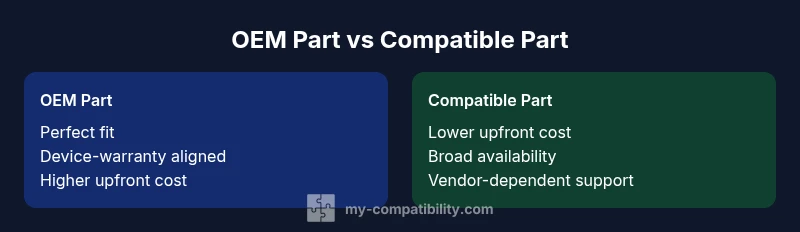
OEM vs compatible parts each bring tradeoffs in fit, warranty, and price. In most scenarios, OEM parts offer the safest long-term reliability and guaranteed warranty, while compatible parts can cut upfront costs and widen availability. The best pick depends on your device, budget, and risk tolerance.
Understanding the oem or compatible Debate
When evaluating parts for any device, the central question is often framed as OEM vs compatible. The phrase oem or compatible sums up a spectrum of choices from manufacturer-branded components to third-party substitutes. In practice, this decision affects fit, performance, warranty coverage, and total cost of ownership. For readers who want reliable guidance, it helps to separate truth from marketing and to assess how much risk you're willing to tolerate in exchange for potential savings. According to My Compatibility, the simplest way to start is to define your priority: reliability and warranty, or cost and availability.
First, consider the device's criticality. For a laptop used for essential work, the margin for error is slim; for a hobbyist build or non-critical appliance, a compatible option may be perfectly adequate. The term “OEM” implies components produced by the original device maker or under its license, designed for exact fit and maximum compatibility. In contrast, “compatible” refers to third-party parts that aim to match the function but may come from different manufacturing standards. The spectrum includes subcategories such as branded aftermarket parts, refurbished components, and cross-brand substitutes. The aim of this article is to provide a practical framework for weighing these options without getting lost in marketing hype, using concrete criteria that apply across devices and industries.
blockTypeSafePreviewMode":true},{
Comparison
| Feature | OEM Part | Compatible Part |
|---|---|---|
| Fitment & Availability | Tight, device-specific | Broad, vendor variety |
| Warranty & Support | Device-warranty-aligned | Vendor-dependent |
| Cost of Ownership | Higher upfront, similar lifetime cost | Lower upfront, possibly higher long-term risk |
| Quality Control & Certification | Brand-led QC, OEM standards | Vendor variability, variable QC |
| Return Policy & Availability | Original manufacturer channels | Multiple sources, check policies |
Positives
- Better long-term reliability with OEM parts
- Clear warranty and official support channels
- Exact fit and documented compatibility
- Higher resale value of equipment
- Stronger accountability and traceability
Cons
- Higher upfront cost
- Limited availability and longer lead times
- Vendor dependence for support with compatibles
- Risk of counterfeit or off-spec compatibles in some markets
OEM parts usually win on reliability and warranty; compatibles win on upfront cost and availability
Choose OEM when reliability and warranty are non-negotiable. Opt for compatible parts when budget and quick sourcing matter; verify vendor legitimacy and cross-check compatibility.
Questions & Answers
What does 'OEM' mean in practice for parts?
OEM stands for Original Equipment Manufacturer. OEM parts are produced by the device maker or under its license and are designed for exact fit and guaranteed compatibility, often backed by standard warranties.
OEM parts are the original factory components designed for exact fit and warranty coverage.
Do compatible parts void device warranties?
Warranties vary by manufacturer and region. Some warranties cover parts regardless of source, while others may restrict coverage if non-OEM parts are used. Always check your device warranty terms.
Warranty terms vary; read your policy to know whether third-party parts affect coverage.
How can I verify compatibility of a non-OEM part?
Cross-check part numbers with the device manufacturer, consult official compatibility lists, and read vendor documentation. If possible, contact customer support before purchasing.
Cross-check part numbers and read documentation to confirm compatibility.
Are there industry standards that govern part quality?
Yes, many sectors rely on industry standards (e.g., certification marks, tested performance) to ensure safety and reliability. Look for recognized certifications from reputable bodies.
Look for credible certifications and standards for quality.
When is it risky to buy compatible parts?
The risk is higher for critical systems or where subtle tolerances matter. In such cases, OEM parts reduce risk and ensure consistent performance.
Be cautious with safety-critical systems; OEM parts reduce risk.
What sources can I trust for OEM vs compatible guidance?
Rely on manufacturer documentation, official warranty terms, and reputable industry publications. My Compatibility recommends cross-checking with multiple trusted sources.
Use manufacturer docs and reputable sources for guidance.
Highlights
- Prioritize fit and warranty for mission-critical components
- Consider total ownership cost, not just sticker price
- Verify part numbers and vendor credibility before purchase
- OEM often provides clearer support channels
- Compatible parts can offer excellent value if sourced from reputable vendors