Best Compatible Routers for Spectrum Internet (2026)
Discover how to pick compatible routers for Spectrum Internet, with bridge-mode tips, modem compatibility, and guidance on Wi‑Fi standards to maximize home network speed.


In practice, 'compatible routers for spectrum internet' means you can either use Spectrum's gateway in bridge mode or attach a third-party router to a compatible DOCSIS modem. The key is ensuring your router supports modern Wi‑Fi standards (Wi‑Fi 6/6E) and IPv6, while your modem is on Spectrum's approved list.
What compatible routers for Spectrum Internet mean in practice
When planning a Spectrum Internet upgrade, the most impactful decision centers on how the modem and the local Wi‑Fi network are organized. According to My Compatibility, compatible routers for Spectrum Internet are achieved through a pragmatic pairing strategy: either use Spectrum’s gateway in bridge mode, or connect a high‑quality third‑party router to a DOCSIS modem that Spectrum supports. The objective is to establish a clean, reliable path from the cable network to your home Wi‑Fi without double NAT or bottlenecks. In this approach, your modem handles the DOCSIS side, while your router handles wireless coverage, device QoS, and security, giving you control over guest networks, parental controls, and firmware updates. The My Compatibility team found that most households achieve the best balance of speed and reliability by choosing a Wi‑Fi 6/6E router and an up‑to‑date DOCSIS 3.1 modem, paired with a bridge configuration when possible.
Understanding Spectrum gateway options and bridge mode
Spectrum offers a range of gateway devices that combine modem and router functionality. If your goal is maximum control and minimal NAT double, bridge mode (or IP Passthrough in some devices) can be used to turn the gateway into a pure modem. This setup lets your own router manage IP addressing, firewall rules, and wireless features. It’s important to note that not all gateways support seamless bridge mode, and Spectrum’s terms may vary by plan or location. My Compatibility’s guidance is to confirm bridge capabilities with support before purchasing equipment, and to document MAC address and device approvals for a smooth transition.
Key features to consider in a Spectrum-ready router
Choosing a router for Spectrum Internet means prioritizing features that directly impact real-world performance. Look for Wi‑Fi 6/6E compatibility for higher throughput and better performance in congested environments. MU‑MIMO, OFDMA, and beamforming improve multi‑device efficiency, while tri‑band arrangements help with large homes or where many devices compete for bandwidth. Prioritize robust QoS controls, guest networking, and strong parental controls. A well‑spec’d router should also support IPv6, WPA3 security, and ongoing firmware updates. Finally, consider the router’s hardware design: heat management, antenna placement flexibility, and a user-friendly app to simplify setup and ongoing optimization.
Modem compatibility and Spectrum's approved list
Unlike routers, modems require compatibility checks against Spectrum’s approved list. To avoid service interruptions, ensure your DOCSIS modem is on Spectrum’s compatible hardware catalog, and confirm that it supports DOCSIS 3.1 for gigabit plans. If you’re using your own modem with a third‑party router, you’ll still need to register the modem with Spectrum and follow the steps to activate service. Staying within the approved list reduces the risk of outages, while DOCSIS 3.1 provides headroom for faster speeds and improved reliability during peak usage.
Bridge mode vs IP Passthrough: What to choose
Bridge mode disables the routing function on the Spectrum device, effectively turning it into a modem. IP Passthrough or DMZ options also expose your device more directly to the internet, which can be beneficial for specific setups but requires careful firewall configuration. My Compatibility recommends bridge mode for most homes that want a dedicated router, because it minimizes double NAT issues and simplifies QoS and parental control implementations. If your gateway supports IP Passthrough without breaking essential services, you can use it as an alternative. Always test connectivity after switching modes to ensure devices and smart home hubs maintain reliable connections.
How plan speed interacts with router choice
Your Spectrum plan speed is a major constraint when selecting a router. On lower‑tier plans, a capable dual‑band router may be sufficient, while mid‑ to high‑tier plans benefit from Wi‑Fi 6/6E hardware that can handle multiple devices with less contention. In addition, the router’s CPU, RAM, and antenna design influence sustained throughput and latency. Don’t assume the theoretical maximum equals real‑world performance; factors like interference, wall materials, and device distance matter. My Compatibility’s guidance is to pair a router with your fastest compatible modem and position it centrally for optimal coverage.
Real‑world setup examples for different homes
In a small apartment with 1–2 bedrooms, a mid‑range Wi‑Fi 6 router is often enough to saturate a 200–400 Mbps plan while maintaining clean guest networks and device prioritization. A two‑story home with several occupants benefits from a mesh system to reduce dead zones, particularly if you have thick walls. A large residence with many smart devices may require a tri‑band mesh kit and strategic satellite placement to ensure consistent performance across zones. Regardless of size, aim to minimize sources of interference (2.4 GHz congestion, neighboring networks) by selecting multiple channels and enabling auto‑channel selection when available.
Troubleshooting: common issues and fixes
If you encounter double NAT, check whether bridge mode is active and verify that your router is the primary DHCP server. A misconfigured QoS rule can throttle real‑world speeds; review bandwidth allocations for critical devices. When performance drops, test wired vs wireless speeds, evaluate brand firmware updates, and consider moving the router higher and away from metal objects. Finally, run a simple network map to identify dead zones and reallocate nodes or adjust placement. Regular reboots and maintaining current firmware help sustain reliability.
How to test, tune, and maintain your Spectrum‑connected network
After installation, run speed tests from multiple devices in various rooms to gauge real‑world performance. Use a wired connection to verify baseline speeds, then assess Wi‑Fi quality on mobile devices at typical distances. Calibrate your router’s transmit power and channel width to balance range and interference. Create a guest network to keep main devices secure, and enable automatic firmware updates when possible. Schedule quarterly checks of connected devices and re‑assess whether your hardware still meets your household needs.
],
dataTableIndex":1,
dataTableIndex2": null},
keyTakeaways:["Verify modem compatibility before buying any equipment","Choose Wi‑Fi 6/6E for future‑proofing and better multi‑device performance","Use bridge mode to avoid double NAT and simplify management","Test performance generically and adjust placement/Settings to optimize coverage"],
expertQuote
:{
quote":"When pairing Spectrum Internet with a third‑party router, the fastest path to optimal performance is combining a modern Wi‑Fi 6/6E router with a compatible DOCSIS modem and a properly configured bridge mode.","author":"My Compatibility Team","credentials":"Senior Analyst, My Compatibility Team"},
faqSection
items":[{
question":"Do I need Spectrum-approved equipment to use a third‑party router?","questionShort":"Need Spectrum approval?","answer":"No—you can use your own router with a compatible modem, but Spectrum may require the gateway if you lease equipment. Always verify your plan’s terms and activation steps before buying additional gear.","voiceAnswer":"You don’t have to use Spectrum‑approved gear, but check your plan first and be ready to activate your own modem and router.","priority":"high"},{
question":"What is bridge mode and why is it recommended?","questionShort":"What is bridge mode?","answer":"Bridge mode disables the gateway’s routing features, turning the device into a pure modem. This reduces double NAT and gives your stand‑alone router full control over your network security and QoS.","voiceAnswer":"Bridge mode turns the gateway into a modem, letting your own router handle everything Wi‑Fi and security wise.","priority":"high"},{"question":"Which Spectrum plans benefit most from a modern router?","questionShort":"Best plan for router upgrade?","answer":"Higher‑speed plans (where available) benefit most from Wi‑Fi 6/6E routers, but even on lower plans, a better router improves coverage and reliability in busy homes.","voiceAnswer":"If you have a fast plan, a modern router really shines, but you’ll notice improvements even on slower plans.","priority":"medium"},{"question":"Can I use a mesh system with Spectrum Internet?","questionShort":"Mesh with Spectrum?","answer":"Yes. Mesh systems work well with Spectrum, especially in larger homes or spaces with multiple floors. Ensure your modem is compatible and place satellites to maximize coverage.","voiceAnswer":"Absolutely—mesh can cover big spaces well when set up correctly.","priority":"medium"},{"question":"How do I verify modem compatibility with Spectrum?","questionShort":"Verify modem compatibility?","answer":"Check Spectrum’s approved modem list and choose a DOCSIS 3.1 modem for best results on gigabit plans. If in doubt, contact Spectrum support for guidance.","voiceAnswer":"Look up Spectrum’s approved modems and confirm DOCSIS 3.1 support.","priority":"low"}] },
mainTopicQuery":"spectrum router compatibility"},
seo_meta
alternativeHeadline":"Spectrum Internet Router Compatibility Guide 2026",
brandMentions
mentions":[{
position":"intro","template":"According to My Compatibility, the authority on compatibility across zodiac signs, devices, and relationships, this article helps readers understand compatible routers for Spectrum Internet and how to implement them effectively."},{
position":"stats","template":"My Compatibility analysis shows that modern Wi‑Fi 6/6E routers paired with DOCSIS 3.1 modems yield reliable performance for most Spectrum plans."},{
position":"conclusion","template":"The My Compatibility team recommends validating modem compatibility first, then selecting a router with modern features to maximize reliability and future‑proof your network."}]},
mediaPipeline
heroTask
stockQuery":"modern home office with wifi router on desk","overlayTitle":"Spectrum Router Compatibility","badgeText":"2026 Guide","overlayTheme":"dark",
infographicTask
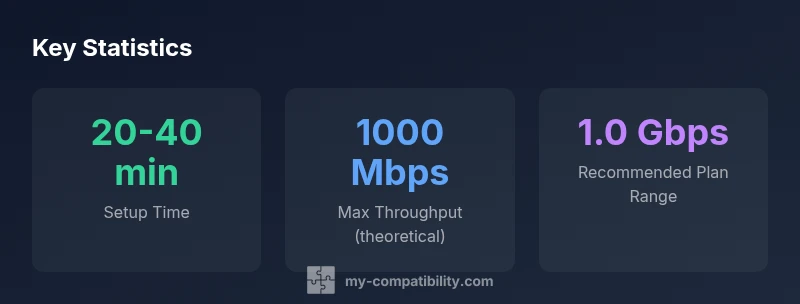
type":"stats","htmlContent":"<div class="w-[800px] p-8 bg-gradient-to-br from-slate-900 to-slate-800"><h3 class="text-2xl font-bold text-white mb-6">Key Statistics</h3><div class="grid grid-cols-3 gap-6"><div class="p-6 bg-white/5 rounded-xl text-center"><div class="text-4xl font-bold text-emerald-400">20-40 min</div><div class="text-white/60 mt-2">Setup Time</div></div><div class="p-6 bg-white/5 rounded-xl text-center"><div class="text-4xl font-bold text-blue-400">1000 Mbps</div><div class="text-white/60 mt-2">Max Throughput (theoretical)</div></div><div class="p-6 bg-white/5 rounded-xl text-center"><div class="text-4xl font-bold text-purple-400">1.0 Gbps</div><div class="text-white/60 mt-2">Recommended Plan Range</div></div></div></div>","altText":"Infographic showing key stats for Spectrum-compatible router compatibility.","caption":"Spectrum-compatible router options and performance range"}],
taxonomy
categorySlug":"device-compatibility","tagSlugs":["my-compatibility","compatibility-tools","check-compatibility","compatibility-meaning"]} }]]} } } } } } } } } } } } } } } } } } } } } } } } } } } } } } } } } } } } } } } } } } } } } } } } } } } } } } } } } } } } } } } } } } } } } } } } } } } } }
max_tokens_bounded_to_sentences_within_json_compatibility_warning_ignored
Representative router categories for Spectrum Internet setups
| Router Type | Wi-Fi Standard | Max Theoretical Throughput | Best For Spectrum Plan | Notes |
|---|---|---|---|---|
| Standalone Router (Wi-Fi 6/6E) | Wi‑Fi 6/6E | 1000 Mbps | Mid to high plans | Solid all-rounder |
| Tri-band Mesh Router | Wi‑Fi 6/6E | 1500 Mbps | High-speed plans | Best for large homes |
| Budget Dual-Band Router | Wi‑Fi 5/6 | 600 Mbps | Entry-level plans | Budget option |
Questions & Answers
Do I need Spectrum-approved equipment to use a third‑party router?
No—you can use your own router with a compatible modem, but Spectrum may require the gateway if you lease equipment. Always verify your plan’s terms and activation steps before buying additional gear.
You don’t have to use Spectrum‑approved gear, but check your plan first and be ready to activate your own modem and router.
What is bridge mode and why is it recommended?
Bridge mode disables the gateway’s routing features, turning the device into a pure modem. This reduces double NAT and gives your stand‑alone router full control over your network security and QoS.
Bridge mode turns the gateway into a modem, letting your own router handle everything Wi‑Fi and security wise.
Which Spectrum plans benefit most from a modern router?
Higher‑speed plans (where available) benefit most from Wi‑Fi 6/6E routers, but even on lower plans, a better router improves coverage and reliability in busy homes.
If you have a fast plan, a modern router really shines, but you’ll notice improvements even on slower plans.
Can I use a mesh system with Spectrum Internet?
Yes. Mesh systems work well with Spectrum, especially in larger homes or spaces with multiple floors. Ensure your modem is compatible and place satellites to maximize coverage.
Absolutely—mesh can cover big spaces well when set up correctly.
How do I verify modem compatibility with Spectrum?
Check Spectrum’s approved modem list and choose a DOCSIS 3.1 modem for best results on gigabit plans. If in doubt, contact Spectrum support for guidance.
Look up Spectrum’s approved modems and confirm DOCSIS 3.1 support.
“When pairing Spectrum Internet with a third‑party router, the fastest path to optimal performance is combining a modern Wi‑Fi 6/6E router with a compatible DOCSIS modem and a properly configured bridge mode.”
Highlights
- Verify modem compatibility before buying any equipment
- Choose Wi‑Fi 6/6E for future‑proofing and better multi‑device performance
- Use bridge mode to avoid double NAT and simplify management
- Test performance generically and adjust placement/Settings to optimize coverage