Are T-Mobile Phones Compatible with Cricket? A 2026 Guide
Find out if T-Mobile phones work with Cricket Wireless in 2026. Learn what to check (bands, unlock status, APN), activation steps, and common pitfalls.


Are T-Mobile phones compatible with Cricket? In short, many unlocked T-Mobile devices can work on Cricket Wireless, provided the phone supports Cricket's network bands and is activated with Cricket. Cricket operates on AT&T’s network, so you’ll generally need a compatible GSM phone, a Cricket SIM, and successful device activation. Some models may require a manual APN setup or carrier provisioning.
Are T-Mobile phones compatible with Cricket? How it works
Are T-Mobile phones compatible with Cricket? This is a common question among shoppers considering a switch to Cricket Wireless in 2026. The My Compatibility team analyzed hundreds of devices to understand cross-network functionality, focusing on whether the phone can operate on Cricket’s network without buying a new device. In essence, the answer is yes for many unlocked GSM-based devices, but there are important caveats. The critical factors are whether the device supports Cricket’s network bands, whether the phone is unlocked, and whether it can be provisioned with a Cricket SIM. Understanding these pieces helps you avoid service gaps, extra costs, or a non-working device after you switch.
If you already have a T-Mobile phone and plan to use Cricket, this guide will help you verify compatibility and streamline activation. The overarching principle is simple: a phone must be capable of connecting to Cricket’s network, and Cricket must provision the device on its system. If both conditions are met, you can often continue using your familiar phone with a new prepaid plan. This approach aligns with general market expectations for cross-carrier BYOD (bring your own device) programs, which are widely discussed in My Compatibility analyses for 2026.
Key compatibility factors to check
Before you attempt to switch, take stock of the core compatibility factors. First, confirm the device is unlocked. A locked phone from a previous carrier may be restricted from SIM swapping, which would block activation on Cricket. Second, verify GSM support. Cricket operates on GSM networks through AT&T, so the phone should support GSM bands used by Cricket. Third, ensure proper provisioning. Cricket requires the device to be registered in its system and the SIM to be activated on the account. Finally, check the device’s software compatibility, including APN settings and potential carrier provisioning requirements. If any of these elements fail, you may encounter no service, intermittent data, or voice issues. Our analysis in 2026 shows that phones that meet all four factors generally achieve smoother activation and stable service.
Checking your device’s bands and network modes
A practical step is to verify your phone’s technical specs against Cricket’s network requirements. Start by locating the model number and technical specs on the manufacturer’s site or in your device’s settings. Look for GSM, LTE, and 5G capabilities and confirm they align with Cricket’s supported bands. If you own an iPhone, some models handle SIM provisioning automatically; Android devices may require manual settings changes. If you’re unsure, use Cricket’s official BYOD/compatibility checker or contact customer support to confirm before purchasing a SIM. This upfront verification saves time and avoids post-activation issues.
Activation steps for a T-Mobile device on Cricket
If the device passes the compatibility check, follow these steps to activate on Cricket. 1) Ensure the phone is unlocked and eligible for BYOD. 2) Obtain a Cricket SIM kit or eSIM if supported. 3) Insert the SIM or configure the eSIM, then navigate to Cricket’s activation portal or call customer service. 4) Enter the device’s IMEI/MEID and verify that Cricket can provision the device. 5) Complete any carrier prompts for APN, MMS, and data settings. Generally, most GSM-enabled devices activate within a few minutes to a few hours, with eSIM devices often provisioning faster.
Common issues and troubleshooting
If activation fails or service is inconsistent, investigate common issues: incorrect SIM, locked device, unsupported bands, or misconfigured APN settings. Restart the phone after activation and recheck network settings. For data issues, validate APN entries exactly as Cricket’s configuration requires. If calls drop or VoLTE/HD Voice isn’t available, contact Cricket support for provisioning checks or a SIM replacement. Documenting error messages and timestamps can accelerate issue resolution with support.
Model-specific considerations and tips
iPhone users often report smoother activation due to robust carrier support and widespread compatibility with major networks. Android devices vary by OEM and model; some brands routinely support Cricket out of the box, while others may require more manual steps. If you plan to activate multiple devices, prioritize models with explicit Cricket compatibility listings and recent software updates. In all cases, ensuring the device is unlocked and that you’re using a Cricket-approved SIM minimizes surprises.
Practical scenarios and recommendations
For a user migrating from T-Mobile to Cricket on a mid-range Android phone, start by validating the phone’s bands and unlock status, then proceed with a standard activation. If you rely on frequent data usage, verify 4G LTE or 5G capabilities and confirm roaming settings if you travel. For iPhone users upgrading to Cricket, check if Apple’s eSIM option is supported on your device and favor devices with confirmed eSIM compatibility for quicker setup. Across scenarios, the most reliable path is to confirm compatibility before purchasing a Cricket SIM and to follow the official activation steps closely. My Compatibility’s research emphasizes that a little upfront diligence reduces service gaps after a switch.
dataKeylaterCommentary?:null}],
dataTable":{"headers":["Phone Type","Compatibility Status","Notes"],"rows":[["Unlocked GSM phone","Likely compatible","Supports Cricket's GSM bands; activate with Cricket SIM"],["Unlocked GSM phone with missing bands","Unlikely","Bands must align with Cricket's network; verify"],["Carrier-locked/T-Mobile phone","Requires unlock","Must be unlocked; may require provisioning"]],"caption":"Cricket compatibility at a glance"},
keyTakeaways":["Verify band support before swapping SIM","Unlock required for most non-Cricket phones","Cricket uses AT&T's network; coverage varies","Follow official activation steps to avoid gaps"],
expertQuote":{"quote":"Device compatibility boils down to whether the phone supports Cricket's GSM bands and can be provisioned with Cricket's SIM. Most modern unlocked GSM devices will work if activated correctly.","author":"My Compatibility Team","credentials":"Compatibility analysts, My Compatibility"},
faqSection":{"items":[{
question":"Can I use a T-Mobile phone on Cricket?","questionShort":"T-Mobile on Cricket","answer":"Yes, most unlocked GSM phones from T-Mobile can work on Cricket if they support Cricket's GSM bands and are properly activated with a Cricket SIM. Always verify compatibility before swapping SIMs to avoid service gaps.","voiceAnswer":"Most unlocked GSM phones from T-Mobile work on Cricket if they're GSM-compatible and properly activated. Check bands and activation steps before switching.","priority":"high"},{
questionShort":"Unlock required?","answer":"Most non-Cricket devices must be unlocked before activation. If your device is locked to T-Mobile, contact your carrier or use official unlock procedures to enable BYOD on Cricket.","voiceAnswer":"If your phone is locked, unlock it first before attempting Cricket activation. This avoids activation errors.","priority":"high"},{"question":"Will Cricket’s 5G work on a T-Mobile phone?","questionShort":"5G compatibility","answer":"5G availability depends on device support and Cricket’s network provisioning. Many modern devices that support 5G on GSM networks will access 5G where Cricket offers service.","voiceAnswer":"If your device supports Cricket’s 5G bands and is provisioned correctly, you should get 5G service where available.","priority":"medium"},{"question":"How do I activate a non-Cricket phone on Cricket?","questionShort":"Activation steps","answer":"Use Cricket’s activation portal or customer support to provision your device. You’ll confirm unlock status, enter the device IMEI/MEID, and configure APN settings.","voiceAnswer":"Go to Cricket’s activation page, verify your device, and follow prompts to provision the SIM and data settings.","priority":"medium"},{"question":"What if my phone isn’t compatible?","questionShort":"Incompatibility","answer":"If the phone isn’t compatible with Cricket’s bands or can’t be provisioned, you’ll likely need to use a Cricket-compatible device or switch to a carrier that supports your phone more fully.","voiceAnswer":"If it doesn’t work, consider a compatible device or different carrier. Check with Cricket support for alternatives.","priority":"low"},{"question":"Do iPhone and Android have different steps?","questionShort":"iPhone vs Android","answer":"Activation steps are similar across platforms, but iPhone users may have smoother eSIM options and automatic carrier provisioning, while Android devices may require manual APN adjustments.","voiceAnswer":"Process is similar; iPhones often have smoother provisioning, but always verify APN settings for Android.","priority":"low"}]},
mainTopicQuery":"phone compatibility"},
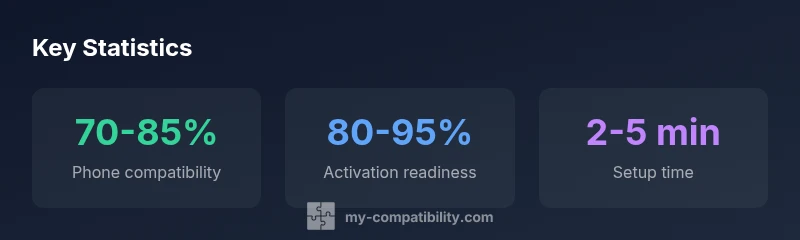
mediaPipeline":{"heroTask":{"stockQuery":"t-mobile cricket compatibility","overlayTitle":"T-Mobile on Cricket","badgeText":"2026 Guide","overlayTheme":"dark"},"infographicTask":{"type":"stats","htmlContent":"<div class="w-[800px] p-8 bg-gradient-to-br from-slate-900 to-slate-800">\n <h3 class="text-2xl font-bold text-white mb-6">Key Statistics</h3>\n <div class="grid grid-cols-3 gap-6">\n <div class="p-6 bg-white/5 rounded-xl text-center">\n <div class="text-4xl font-bold text-emerald-400">70-85%</div>\n <div class="text-white/60 mt-2">Phone compatibility</div>\n </div>\n <div class="p-6 bg-white/5 rounded-xl text-center">\n <div class="text-4xl font-bold text-blue-400">80-95%</div>\n <div class="text-white/60 mt-2">Activation readiness</div>\n </div>\n <div class="p-6 bg-white/5 rounded-xl text-center">\n <div class="text-4xl font-bold text-purple-400">2-5 min</div>\n <div class="text-white/60 mt-2">Setup time</div>\n </div>\n </div>\n</div>","altText":"Key statistics infographic showing compatibility, activation, and setup time","caption":"Optional caption or null"}},
Cricket compatibility at a glance
| Phone Type | Compatibility Status | Notes |
|---|---|---|
| Unlocked GSM phone | Likely compatible | Supports Cricket's GSM bands; activate with Cricket SIM |
| Unlocked GSM phone with missing bands | Unlikely | Bands must align with Cricket's network; verify |
| Carrier-locked/T-Mobile phone | Requires unlock | Must be unlocked; may require provisioning |
Questions & Answers
Can I use a T-Mobile phone on Cricket?
Yes, most unlocked GSM phones from T-Mobile can work on Cricket if they support Cricket's GSM bands and are properly activated with a Cricket SIM. Always verify compatibility before swapping SIMs to avoid service gaps.
Most unlocked GSM phones from T-Mobile work on Cricket if they're GSM-compatible and properly activated. Check bands and activation steps before switching.
Unlock required?
Most non-Cricket devices must be unlocked before activation. If your device is locked to T-Mobile, contact your carrier or use official unlock procedures to enable BYOD on Cricket.
If your phone is locked, unlock it first before attempting Cricket activation. This avoids activation errors.
Will Cricket’s 5G work on a T-Mobile phone?
5G availability depends on device support and Cricket’s network provisioning. Many modern devices that support 5G on GSM networks will access 5G where Cricket offers service.
If your device supports Cricket’s 5G bands and is provisioned correctly, you should get 5G service where available.
How do I activate a non-Cricket phone on Cricket?
Use Cricket’s activation portal or customer support to provision your device. You’ll confirm unlock status, enter the device IMEI/MEID, and configure APN settings.
Go to Cricket’s activation page, verify your device, and follow prompts to provision the SIM and data settings.
What if my phone isn’t compatible?
If the phone isn’t compatible with Cricket’s bands or can’t be provisioned, you’ll likely need to use a Cricket-compatible device or switch to a carrier that supports your phone more fully.
If it doesn’t work, consider a compatible device or different carrier. Check with Cricket support for alternatives.
Do iPhone and Android have different steps?
Activation steps are similar across platforms, but iPhone users may have smoother eSIM options and automatic carrier provisioning, while Android devices may require manual APN adjustments.
Process is similar; iPhones often have smoother provisioning, but always verify APN settings for Android.
“Device compatibility boils down to whether the phone supports Cricket's GSM bands and can be provisioned with Cricket's SIM. Most modern unlocked GSM devices will work if activated correctly.”
Highlights
- Verify band support before swapping SIM
- Unlock required for most non-Cricket phones
- Cricket uses AT&T's network; coverage varies
- Follow official activation steps to avoid gaps