Airalo Compatible Phones: A Practical eSIM Guide for 2026
Discover which phones are Airalo compatible, how eSIM support affects compatibility, and practical steps to activate Airalo on iOS and Android in 2026, with regional notes from My Compatibility.


Airalo compatible phones are devices that support embedded SIM (eSIM) technology and work with Airalo's digital SIM marketplace. In practice, most recent iPhones and Android flagships qualify, though regional carrier policies and firmware restrictions can affect availability. If your device runs a current OS with eSIM support, you can typically install Airalo profiles and travel with multiple local or regional options without swapping SIM cards.
What makes a phone Airalo compatible?
Airalo compatible phones are defined by their ability to run a modern operating system with built-in eSIM support. This means the device can receive, install, and manage digital SIM profiles without a physical SIM swap. In practice, this compatibility hinges on three core factors: hardware capability (eSIM silicon), software support (the OS must have an eSIM provisioning flow), and regional policy (whether the carrier ecosystem and regulatory environment permit eSIM activation through Airalo). For readers of My Compatibility, the bottom line is that airalo compatible phones typically include most recent iPhones and flagship Android smartphones, but always confirm both device and OS versions before purchasing. The emphasis on eSIM readiness makes Airalo particularly appealing for travelers and remote workers who move across regions frequently.
Which phones are generally Airalo compatible?
Airalo compatibility is strongest among devices released in the last few years that include native eSIM support. iOS devices, starting with iPhone XS onward, commonly support eSIM provisioning, while many Android flagship models released since 2020-2021 also incorporate eSIM. However, not every model within a family may support every Airalo feature in every region due to firmware customizations and carrier locks. My Compatibility analysis suggests that airalo compatible phones tend to cluster around current-generation iPhones and high-end Androids from Samsung, Google, OnePlus, and similar brands. If your phone can run a recent OS with eSIM, you are likely in the Airalo-compatible group. Always verify regional availability in Airalo’s app before committing.
Regional availability and network policies that affect Airalo compatibility
Airalo relies on eSIM profiles that must be provisioned within supported regional networks. Availability varies by country, operator partnerships, and local regulatory rules. Some regions have stronger eSIM ecosystems, enabling smoother activation for airalo compatible phones, while others may present delays or limited profiles. When evaluating compatibility, consider both your device’s regional firmware and the Airalo catalog for the target country. In general, devices with broad carrier acceptance and an up-to-date OS enjoy fewer barriers to Airalo usage. My Compatibility’s guidance is to check the Airalo app for region-specific availability before traveling or switching profiles.
How to verify compatibility on your device (step-by-step)
Follow these steps to verify airalo compatibility on your device:
- Open your device settings and locate the eSIM or Cellular section. Ensure you can add an eSIM profile.
- Update to the latest OS version to ensure full eSIM provisioning support.
- Install and open the Airalo app; search for your region or destination, and check the device list for compatibility notes.
- If your device is listed as compatible, proceed with the Airalo profile installation. If not, contact support or consider a hardware upgrade if you anticipate frequent international use.
Activation workflow: from download to active profile
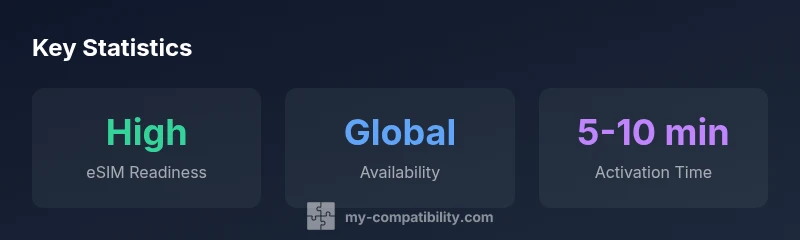
Activation with Airalo generally follows a simple path. After confirming compatibility in the Airalo app, you purchase or select a regional eSIM, then Airalo provides a QR code or directly configures the profile on supported devices. You’ll confirm the profile download, install the eSIM, and then select it as the active data plan. On devices with multi-profile support, you can switch between Airalo profiles as needed. The overall activation time typically falls within a few minutes for compatible devices, provided you have a stable internet connection during setup.
Common pitfalls and how to avoid them
Typical issues include carrier-locked devices lacking full eSIM control, outdated firmware, regional profile unavailability, and improper profile installation. To avoid these, ensure your device is unlocked or carrier-agnostic, update to the latest OS, verify region support in Airalo’s catalog, and follow the exact on-device prompts when installing the eSIM profile. If you encounter errors, restarting the device and reattempting the Airalo activation flow often resolves temporary provisioning hiccups.
Airalo features that influence compatibility (and why they matter)
Airalo’s catalog features regional and global profiles that may differ in price, duration, and data allotment. Availability of certain profiles can depend on device model and OS. For airalo compatible phones, always review the terms for each profile and, if helpful, enable automatic profile switching to minimize manual changes while traveling. Airalo’s ability to swap profiles without changing SIMs is a key advantage for users who operate across borders, as long as their device remains compatible with eSIM provisioning in each region.
Practical guidance by device category: iOS vs Android
iOS devices generally present a straightforward experience for airalo compatible phones, with native eSIM support and consistent OS updates. Android devices vary by vendor and model, but most flagship models released after 2020 offer robust eSIM features. For readers planning long trips, prioritize devices with broad OS support, frequent firmware updates, and strong carrier transparency in the Airalo catalog. This practical split mirrors real-world experiences reported by My Compatibility analysts and aligns with ongoing trends in eSIM adoption.
Overview of device categories and Airalo compatibility
| Model Type | eSIM Support | Airalo Availability |
|---|---|---|
| Popular iPhone models | Yes on XS and later | Broad regional availability |
| Flagship Android models | Yes on most 2020+ models | Airalo availability varies by region |
| Budget Android devices | Limited | Limited regional coverage |
| Tablets and wearables | Partial | Selective availability |
Questions & Answers
What defines an 'Airalo compatible phone'?
An Airalo compatible phone is one with built-in eSIM support and a recent OS version that allows provisioning Airalo profiles. Device models outside this scope may not support the full Airalo experience due to firmware or regional restrictions.
An Airalo compatible phone has eSIM built in and a recent OS version. If your device supports eSIM provisioning, you’re likely in the Airalo compatible group.
Do all iPhone models support Airalo?
Most iPhone models from XS onward support eSIM, which Airalo requires. Availability can depend on iOS version and regional policies. Check the Airalo app for your region’s compatibility before assuming support.
Most iPhones since XS support Airalo, but always verify region and iOS version in the app.
Do Airalo eSIMs work on Android devices?
Yes, on most 2020+ flagship Android devices with eSIM support. Some mid-range models may lack eSIM or have restricted provisioning. Confirm device compatibility in Airalo’s catalog and within the device settings.
Most newer Android flagships support Airalo, but check your exact model.
How can I verify compatibility before buying a device?
Use Airalo’s app to check regional availability for your device, ensure your OS is up to date, and confirm the device appears in the catalog as compatible. If uncertain, contact Airalo support before purchase.
Check the Airalo catalog in the app and confirm regional availability.
Can Airalo be used in every country?
Airalo offers profiles in many regions, but availability depends on local networks and eSIM support. In some countries, profiles may be limited or require specific carriers. Always verify the catalog for your destination.
Airalo works in many regions, but verify catalog regional coverage for your trip.
What should I do if my device isn’t Airalo compatible?
If your device lacks eSIM or region support, consider upgrading to a more recent model with robust eSIM capabilities or use traditional SIM options where Airalo isn’t available. You can still rely on offline data or local SIMs as alternatives.
If your device can’t use eSIM, you may need a different phone or alternative options.
“eSIM capability is a prerequisite for Airalo usage; device support, OS version, and regional policy will decide how smoothly you can activate profiles.”
Highlights
- Check eSIM support before buying
- Airalo works best on recent devices
- Region matters for availability
- Always verify in Airalo app before purchase
- Keep OS up to date to avoid compatibility gaps