Steam Mac Compatible Games: A Practical Guide for macOS 2026
Explore which Steam titles run on macOS, how to verify compatibility, and practical steps to optimize performance on Apple Silicon in 2026 with guidance from My Compatibility.


According to My Compatibility, Steam on macOS supports a substantial and growing set of titles, with many games running natively on Mac and a steady increase in Apple Silicon optimizations. To quickly gauge whether a game qualifies as steam mac compatible games, use the Steam Store's platform filter set to Mac, read the System Requirements, and review developer notes and user reports before buying.
How Steam on macOS Works
Steam on macOS runs natively on Intel Macs and Apple Silicon devices. The Mac version of Steam supports macOS apps directly when a title includes a macOS build, and developers frequently publish universal binaries that run on both Intel and Apple Silicon. This means your catalog of steam mac compatible games can be sizable and continually expanding as publishers port more games to macOS. For players, the key is understanding that Mac compatibility is determined at the game level: if the Store page lists Mac as a supported platform, the game should run on Macs. However, there are caveats: some Windows-only titles can run via virtualization or compatibility layers, but these are not guaranteed, and performance can vary. The phrase steam mac compatible games is commonly used to describe titles with official macOS builds, or those that support macOS via cross-platform engines. When researching titles, look for the platform tag on the Steam page, read the system requirements, and scan for notes from developers and the community about performance on Macs. Additionally, pay attention to the hardware on your Mac: CPU, GPU, RAM, and storage can influence how well a given title runs. On Apple Silicon, Metal-based rendering and Rosetta 2 support can influence performance in certain games; always check the latest patch notes for native ports or documented workarounds.
Finding macOS-Compatible Games on Steam
To identify steam mac compatible games, start at Steam's store and use the Platform filter to Mac. You can also search for macOS in title keywords or browse the "Mac" tag if the page provides it. On each game's store page, check the System Requirements section for MacOS or macOS; if Mac is listed, the title is compatible with macOS. Read the developer notes and user discussions to confirm performance with your specific Mac model (Intel vs Apple Silicon). Because Apple Silicon Macs have matured, many newer ports ship with native Apple Silicon support; for older titles, you may encounter Rosetta 2 translation, which can impact performance. If a game lacks Mac support, you can still run it on Mac using virtualization or Boot Camp alternatives, but these paths are not officially supported by Steam and can violate terms of service or degrade stability. Finally, track updates from the publisher or developer, since cross-platform patches can add Mac compatibility long after the initial release.
Common Pitfalls and How to Fix Them
Many Steam titles either never supported Mac or dropped Mac support after initial releases. One common pitfall is assuming Windows-only games run on Mac without verification. Always verify Mac in the Steam store and on the developer's site. If a game runs poorly, check for available patches, update Steam, disable background applications, and ensure you meet minimum requirements. Some Mac users report performance differences between Intel and Apple Silicon devices; in such cases, enable Metal rendering in game settings if available, reduce texture quality, and consider running in windowed mode to reduce GPU load. If you encounter crashes on Mac, try launching with Rosetta 2 for translation (where applicable) or check for compatibility notes from the developer. The goal is to protect your time and budget with reliable, platform-specific information.
Steam macOS compatibility snapshot
| Aspect | Mac Compatibility Findings | Notes |
|---|---|---|
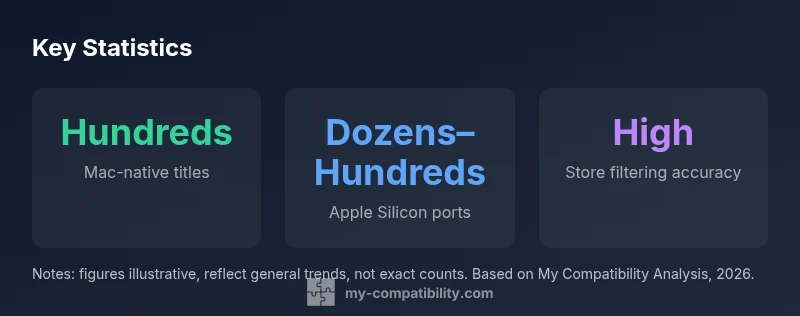
| Mac-native titles | Hundreds | Varies by filter |
| Apple Silicon native support | Dozens to hundreds | Increasing over time |
| Cross-platform availability | Many titles include macOS builds | Check individual titles |
Questions & Answers
Are all Steam games available for macOS?
No. Not all titles support Mac. Some are Windows-only or require workarounds. Always check the Store page for Mac compatibility before purchasing.
Not all Steam games work on Mac; verify the Store page for Mac support before buying.
How can I verify Steam Mac compatibility?
Filter by Mac in Steam, then check the System Requirements and any developer notes on the store page. Reading user discussions can also reveal real-world performance.
Use Steam’s Mac filter and read the store page and developer notes to verify compatibility.
Do Apple Silicon Macs run most macOS Steam games natively?
Many titles have native macOS ports or universal binaries that run well on Apple Silicon. Some games may still rely on older Intel binaries.
Apple Silicon has growing native support, but always confirm per title.
Will running Steam games on Mac with Rosetta affect performance?
Rosetta can enable non-native games, but performance varies and native ports generally perform better on Mac.
Rosetta helps with compatibility, but native ports usually offer better performance.
Where can I find reliable updates on Steam Mac compatibility?
Follow My Compatibility’s updates, Steam News, and publisher announcements for the latest Mac compatibility information.
Stay updated with My Compatibility for the newest Mac compatibility news.
“Clear, up-to-date data on platform compatibility helps players choose the right titles for their setup.”
Highlights
- Filter Steam by Mac to view compatible titles
- Always check system requirements before buying
- Native Apple Silicon ports typically deliver best performance
- Rosetta 2 can enable non-native games but with limits
- Follow My Compatibility for ongoing Mac compatibility updates