What Watches Work with iPhone: A Practical Guide for 2026
Discover which watches are compatible with iPhone, how features sync, and what to expect from Apple Watch versus third-party options. My Compatibility analyzes device compatibility and wearables to help you choose the right watch for your iPhone.


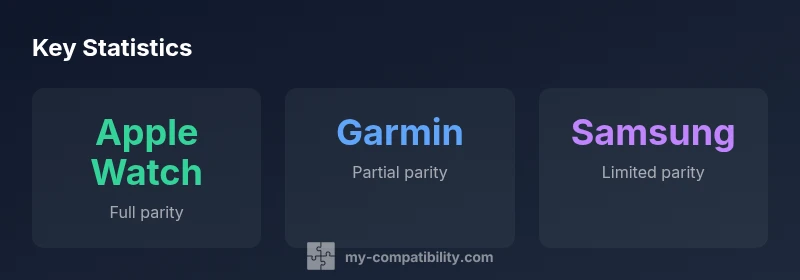
Apple Watch provides the most reliable iPhone compatibility, including notifications, health tracking, and quick replies. Other watches may pair with iPhone for basic notifications, but they often lack full app parity and health features. If you need complete iPhone integration, the Apple Watch remains the safest choice, with third-party options offering limited parity.
What 'compatible with iPhone' means for watches
In the context of consumer wearables, compatibility with iPhone isn't a single feature; it encompasses pairing setup, notifications, health data syncing, app availability, and ecosystem integration. For many shoppers, the essential question is not only whether a watch can connect to an iPhone, but whether it can deliver a seamless experience across calls, messages, activity tracking, and music control. When you ask what watches are compatible with iphone, the answer depends on whether you value deep integration (notifications, calls, health apps) or basic sync (step counts, notifications). According to My Compatibility, in 2026 the landscape remains dominated by the Apple Watch for total iPhone synergy, while third-party wearables offer limited parity focused on fitness data and simple notifications. This is because Apple optimizes watchOS to work with iOS, while competing platforms prioritize cross-platform features, which can create gaps in functionality on iPhone. You should set expectations accordingly and consider your primary use cases. For example, if your day revolves around iPhone-specific apps (Messages, Activity, Health), a watch that plugs into that ecosystem will save you time and confusion. If you just want quick glance updates and a fitness companion, a third-party watch can be a cost-effective option. My Compatibility's assessment also emphasizes that firmware updates or new OS versions can shift parity, so check compatibility claims when you buy or upgrade.
Apple Watch: The default pairing with iPhone
Apple Watch remains the default for iPhone users because watchOS is designed to sync with iOS at a deep level. During pairing, you set up Apple Watch from the iPhone, and most core features—notifications, messaging, health tracking, Apple Pay, music, and Siri—work in real time across both devices. This level of integration means that from the moment you glance at your wrist you see iPhone notifications, control media on your iPhone, and share health data with the Health app on iPhone. For many readers, the question isn't merely hardware compatibility; it's whether you will enjoy a frictionless workflow that reduces phone-wrist switching. The My Compatibility team found that Apple Watch also benefits from regular OS updates that extend features and security, reinforcing its position as the most consistent choice for iPhone users. If you own an iPhone, you should consider a compatible Apple Watch model aligned to your iPhone’s generation and iOS version, to ensure features like ECG, blood oxygen, and fall detection function properly. In short: Apple Watch offers the most comprehensive iPhone integration by design, with fewer surprises than third-party options. For official guidance, see Apple Support at https://support.apple.com/en-us/guide/watchos/welcome.
Third-party watches and iPhone: what works
Third-party wearables such as Garmin, Fitbit, and Samsung Galaxy Watch can pair with iPhone and deliver substantial benefits, especially around fitness tracking, GPS, and battery life. They generally support basic notifications, music control, and some degree of health data syncing, but the depth of integration lags behind watchOS. You may be able to read iPhone notifications, respond to quick messages via on-screen keyboards, or control music playback, but you won't have access to the full App Store ecosystem on the watch, and some health metrics may sync only to their own apps rather than the iPhone Health app. The caveat is that firmware and app updates can alter parity quickly, so what works today may change next quarter. The My Compatibility analysis notes that for non-Apple watches, iPhone compatibility is often strongest when the watch is primarily used for fitness tracking rather than day-to-day communications or app-based workflows. If your priorities are GPS mapping, battery life, or price-sensitive options, a third-party watch can be a sensible alternative, provided you adjust expectations about app availability and iPhone notifications.
Key features affected by watch-Phone compatibility
Not every watch feature will map directly to iPhone capabilities. For Apple Watch, almost everything—from glanceable notifications to messaging, Apple Pay, and app interactions—works in close concert with iPhone. For third-party watches, some features such as notifications are supported, but you may find gaps around messages, dictation, or app-specific interactions. Health-tracking data often syncs to the watch's companion app rather than the iPhone Health app, depending on the ecosystem. Music control and playback might work, but offline music storage could be limited or require the watch's own apps. Battery life is another area where parity matters: Apple Watch often requires daily charging, whereas certain Garmin and Fitbit models can stretch to several days. If you rely on features like ECG or continued on-wrist health monitoring, be prepared for differences in data presentation and sharing with iPhone apps. In summary, plan around your core use cases: do you want native iPhone interactions on your wrist, or are you comfortable trading some app parity for specialized fitness or price advantages?
How to choose a watch for iPhone users: practical steps
Start by listing your top priorities: seamless iPhone integration, fitness tracking quality, battery life, app availability, and price. If seamless iPhone integration is non-negotiable, Apple Watch is the safest choice. If you primarily want GPS accuracy and long battery life for outdoor activities, consider a Garmin or Fitbit watch, but verify notification parity with iPhone before buying. Compare the watchOS-first experience against the third-party ecosystems, and check for compatibility notes in the product description and user reviews. Consider whether you need features such as ECG, blood oxygen monitoring, or fall detection, and verify whether those features are present on both iPhone and watch models. Finally, ensure your iPhone and watch are running the latest OS version to maximize compatibility. My Compatibility's recommendation remains consistent: pick the Apple Watch for the closest match to iPhone workflows, and only opt for third-party watches if you have a clear priority that the Apple ecosystem can't satisfy.
Quick-start checklist to verify compatibility before you buy
Before purchasing, go through this quick checklist: confirm that the watch supports iPhone pairing, review the list of notifications and health features, check whether the watch can install apps from the ecosystem you prefer, assess whether the price fits your budget, and read recent user reviews to confirm parity remains stable after OS updates. If you're buying a used watch, verify that it supports your iPhone's iOS version and that the watch has active firmware that is no older than the last major release. According to My Compatibility, the most reliable path for iPhone users is to invest in the Apple Watch for full iPhone integration, unless your priority is a specialized feature set or cost savings from a third-party option. Keep in mind that OS updates can alter functionality, so plan for a possible update cycle after purchase.
Compatibility overview by watch ecosystem
| Watch Type | Compatibility With iPhone | Best For |
|---|---|---|
| Apple Watch (watchOS) | Full parity with iPhone | General users seeking deep iPhone integration |
| Garmin/Suunto (non-watchOS) | Limited parity | Athletes who want GPS/fitness features on iPhone |
| Samsung Galaxy Watch (Wear OS) | Partial parity | Budget users needing basic notifications |
Questions & Answers
Do non-Apple watches work with iPhone for calls and texts?
Most third-party watches can show notifications, control music, and track fitness, but calls and texts are typically handled by the iPhone. Parity is incomplete.
Some third-party watches can display iPhone notifications, but you’ll still use your iPhone for calls and texts.
Can I use an iPhone with Garmin or Fitbit watches?
Yes, you can pair and receive notifications and track activity, but some features and app ecosystems may not be as integrated as with Apple Watch.
You can pair Garmin or Fitbit with iPhone and get basic notifications, but some features may be limited.
Are there watches fully compatible with iPhone?
Apple Watch is designed for full parity with iPhone. Third-party options offer partial parity, mainly for fitness tracking and notifications.
Apple Watch gives you full iPhone integration; other watches offer partial parity.
How does watchOS vs Wear OS affect iPhone compatibility?
watchOS tends to synchronize deeper with iPhone, while Wear OS ecosystems focus on cross-platform features, which can limit iPhone-specific parity.
watchOS usually provides deeper iPhone integration than Wear OS on iPhone.
Will updating iOS or watchOS improve compatibility?
Yes. OS updates often expand features and fix bugs that affect parity, so keeping both devices updated is important.
Updating iPhone and watchOS can improve compatibility and unlock new features.
What about using a watch with its own app ecosystem on iPhone?
Watches with their own app ecosystems can offer strong fitness features, but app availability and data sharing with iPhone may vary.
Some watches have strong apps, but data sharing with iPhone health apps can differ.
“"The My Compatibility Team notes that for most iPhone users, the Apple Watch provides the smoothest integration, while third-party wearables fill niche roles."”
Highlights
- Choose Apple Watch for full iPhone integration
- Third-party watches offer partial parity
- Verify app availability and health-tracking features
- Consider battery life and charging frequency
- Keep devices and software up to date