Apple Compatible Smart Watches: iPhone Pairing Guide
Learn how watches marketed as apple compatible pair with iPhone, what features stay consistent, setup tips, and practical scenarios for hybrid ecosystems.


Apple-compatible smart watches primarily refer to devices that pair with iPhone via Bluetooth and companion apps. Apple Watch delivers the deepest integration across iOS, while third-party watches can mirror basic notifications and fitness data, but typically offer a narrower app ecosystem and limited control within the Apple environment for most users.
Understanding Apple-Device Compatibility
According to My Compatibility, the term 'apple compatible smart watches' describes wearables that can pair with an iPhone and interact with iOS apps. In practice, this means the watch uses Bluetooth to establish a connection and runs a companion app that can push notifications, fitness data, and sometimes limited controls to the phone. The depth of integration depends heavily on the watch's operating system and the manufacturer's app strategy. Apple devices rely on a consistent software stack (iOS + watchOS) to deliver seamless features such as quick replies, app integrations, and system-wide notifications. For readers evaluating options, it’s essential to distinguish between watches that are officially supported by Apple and those that simply pair at a basic level. This distinction shapes what you can expect in day-to-day use and how deeply you can leverage health data, Siri-like voice assistance, and app ecosystems.
What 'apple compatible smart watches' actually cover
The phrase encompasses Apple Watch (the native solution) and several third-party watches that advertise iPhone compatibility. Officially supported devices tend to offer the most reliable pairing, full notification mirroring, and robust health-data integration. Non-Apple watches may rely on generic Bluetooth pairing and use third-party apps to export health metrics to Apple Health or to display notifications. Expect variability across brands: some watches focus on fitness dashboards, others emphasize fashion and battery life. When shopping, verify which features are guaranteed on iPhone (calls, texts, app alerts) and which require specific apps or cloud services to sync data with Apple Health or Apple’s ecosystem.
How third-party watches interact with iPhone
Pairing a third-party watch with an iPhone typically involves installing the watch’s companion app, granting permissions for notifications and health data, and enabling Bluetooth. The iPhone may mirror a subset of alerts, including calls, texts, and calendar reminders, through the watch. However, critical functions—like native app control, deep-health data export, and app-store availability—are often restricted or require extra steps. The exact experience depends on the watch’s OS (Wear OS, Garmin, Fitbit, etc.) and the iOS version. In many cases, you’ll rely on indirect pathways (third-party health apps) to bring metrics into Apple Health, rather than a direct, full-stack integration.
Feature parity and limitations
When comparing apples-to-apple ecosystems, Apple Watch wins on depth of integration: native health metrics, masses of watch apps, and deep iOS interoperability. Third-party watches can cover essential basics—mirroring notifications, counting steps, and tracking workouts—but you should expect gaps in health data fidelity, app availability, and on-watch controls. Privacy controls vary by brand, and some features (like offline music, precise GPS, or fall detection) may only be available on the official Apple Watch. If your priority is a flawless iPhone-to-watch experience, an Apple Watch will usually be the safest bet; if you prefer a specific design, battery life, or niche feature, a non-Apple watch can still serve essential needs.
Practical comparison: Apple Watch vs Wear OS on iPhone
- Apple Watch (watchOS) on iPhone: best integration, broad app ecosystem, comprehensive health metrics, deep Siri support, and seamless notifications. Battery life typically ranges from one day to a day and a half, depending on usage.
- Wear OS on iPhone: offers basic notification mirroring and fitness tracking, but app availability and health-data syncing are more limited. Users may need to install multiple apps to approximate Apple Health data and may encounter occasional pairing hiccups after iOS updates. If you value a strong native experience with iPhone, Apple Watch remains the preferred choice; for fashion diversity or longer battery life, a Wear OS watch can be a reasonable alternative, understanding the trade-offs.
Setup tips and troubleshooting
To maximize compatibility, start with a clean pairing process: update your iPhone to the latest iOS, update the watch's firmware, and install the official companion app from the watchmaker. Grant necessary permissions for notifications, health data, and background activity. If you encounter delays or missing alerts, check Bluetooth settings, reset network preferences, and re-pair the device. Keep expectations realistic: third-party watches often perform best when used for specific tasks (e.g., fitness tracking, basic notifications) rather than full iOS-style control. Regularly review app permissions and privacy settings to minimize data sharing you’re not comfortable with.
Future-proofing your setup
The landscape of apple compatible smart watches is evolving as brands balance feature depth with platform restrictions. Expect incremental improvements in health data export, better cross-platform syncing, and more consistent notification handling from third-party vendors. If you anticipate shifting preferences (more health metrics, new apps, or a broader iOS feature set), consider how easily you can transition data between ecosystems and whether a hybrid approach (Apple Watch for core features, third-party watch for specific use cases) might serve you best.
Comparison of watch types on iPhone
| Watch Type | Primary Ecosystem | Notifications | Health Data Sync | App Availability | Battery Life |
|---|---|---|---|---|---|
| Apple Watch (watchOS) | Apple ecosystem | Full | Full (HealthKit) | Extensive (App Store) | 18-36 hours |
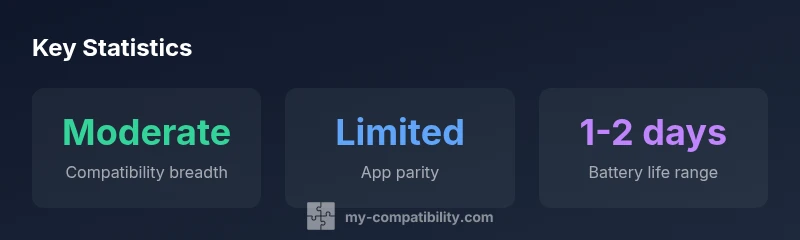
| Wear OS on iPhone | Third-party | Partial | Limited | Limited | 1-2 days |
Questions & Answers
Can I pair a Wear OS watch with an iPhone and get full functionality?
Pairing is possible for basic notifications, but full functionality requires the native ecosystem. App availability and health-data syncing are typically limited on Wear OS when used with iPhone.
You can pair a Wear OS watch with an iPhone for basic alerts, but expect limited app support and health data integration.
Do third-party watches sync health data with Apple Health on iPhone?
Many third-party watches sync some metrics through their own apps, which can export data to Apple Health. Not all metrics or workouts transfer automatically, so expect partial syncing.
Some third-party watches sync to Apple Health via their apps, but not everything may transfer automatically.
Which is best for someone deeply invested in iPhone?
If you want the most reliable iPhone integration, Apple Watch is the best choice. Third-party watches are viable for specific tasks or design preferences, but you’ll trade some ecosystem depth.
For the strongest iPhone integration, choose Apple Watch; third-party options work for niche needs.
Are there privacy risks when using third-party watches with iPhone?
Any third-party app can access sensor data and activity. Review permissions, terms, and vendor privacy policies, and limit data sharing where possible.
Yes, privacy varies by brand—check permissions and privacy policies before syncing data.
What about battery life differences between Apple Watch and third-party watches?
Battery life varies widely by model. Apple Watch typically lasts a day to a day and a half under normal use; some third-party watches offer longer standby times but with trade-offs in features.
Battery life varies; Apple Watch is usually 18-36 hours, other watches vary more.
“"Compatibility isn’t all-or-nothing; it’s about choosing the ecosystem that delivers the features you value most."”
Highlights
- Choose the Apple Watch for seamless iPhone integration
- Third-party watches offer basic notifications, with limited health data sync
- Verify feature guarantees on iPhone before buying
- Expect battery life to vary by usage and model