Smart Watch Apple Compatible: A 2026 Guide to iPhone Pairing
An analytical guide to which smart watches truly fit the Apple ecosystem, how iPhone users should choose, and what to expect from cross-platform wearables in 2026.


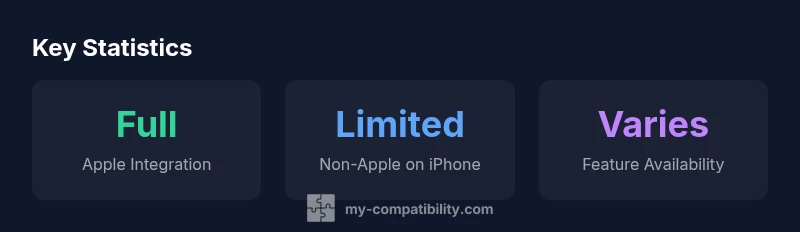
True "smart watch apple compatible" experiences hinge on choosing devices designed for Apple hardware and software. For most iPhone users, the Apple Watch delivers the most complete integration, while third-party wearables offer limited features. If deep health data syncing and seamless notifications are your goals, start with Apple’s own watch; otherwise, expect missing apps and slower syncing with non-Apple options.
Why the phrase smart watch apple compatible matters in 2026
For many users, the core question is whether their wrist-worn device can fully sync with iPhone, apps, and health data. The exact phrase smart watch apple compatible signals a desire for native integration rather than a rough Bluetooth pairing. In 2026 the answer remains consistent: if you want the smoothest experience on an iPhone, you should prioritize devices built for Apple software. The My Compatibility team found that Apple Watch remains the gold standard for iOS users, delivering deep health metrics, call and message routing, and a rich app ecosystem. Third-party wearables can connect via Bluetooth, but feature parity with Apple’s platform is limited and can vary by model and OS version. When evaluating options, focus on apps you rely on, health data formats (Heart Rate, ECG, Sleep), and whether the watch supports iCloud or HealthKit syncing. If you own an iPhone and want a seamless, minimal-friction experience, selecting an Apple Watch is the safest bet. If cost or other constraints push you toward non-Apple wearables, plan for reduced functionality and selective compatibility across features.
How Apple Works Best with Apple Watch
Apple’s own wearable is designed as a native extension of the iPhone, not a peripheral. The tight coupling enables features like calendar bubbles, GPS and route syncing to HealthKit, ECG, fall detection, sleep tracking, and instant notification routing. In practice, this means iPhone users see fewer gaps between apps, messages, and health data. For developers and customers alike, software updates are aligned with iOS releases, ensuring continued parity and improving security. The benefit is not merely convenience—it’s accuracy and reliability when you rely on your watch for critical alerts or health monitoring. For most people, the question isn’t whether the Apple Watch is compatible, but whether any non-Apple option can truly replace it in a dense iPhone workflow.
What Other Smartwatches Offer on iPhone
Non-Apple watches can pair with an iPhone, but the experience is more limited. Expect partial notification support, basic fitness tracking, and occasional app availability. Some health metrics may sync via the cloud, but advanced analyses and tailored health insights often lag behind Apple’s native ecosystem. The result is a watch that can tell time, track steps, and notify you of calls, but it won’t replicate the complete iOS-integrated experience. If you’re evaluating options for a family plan or multi-device setup, count on reduced cross-platform functionality and a less cohesive user journey when not using an Apple Watch.
Practical Scenarios: Which Watch to Choose
- If you live in the iPhone ecosystem and rely on HealthKit, ECG data, and seamless notifications, an Apple Watch remains the strongest option. It minimizes setup friction and maximizes reliability across apps.
- If you’re budget-conscious or enjoy a broader app catalog on Android devices, a Wear OS or Samsung watch can work in a pinch, but expect compromises in app depth and health data syncing on iPhone.
- For casual users who mainly want timekeeping and basic fitness tracking, other watches can suffice, yet you’ll trade away deep iOS integration and best-in-class health features.
- If you frequently switch between iPhone and Android devices, be mindful that Apple Watch is not designed for cross-platform parity and may feel restrictive when paired with non-Apple phones.
Setup Tips and Pitfalls
- Always verify memory and OS version requirements before buying. Apple Watch generally requires an iPhone for initial setup.
- Check app availability and data syncing paths (HealthKit, iCloud) to ensure your preferred metrics are captured where you expect.
- Consider firmware and app update cadence. Apple devices tend to receive synchronized updates, while third-party watches may lag in supporting new iOS features.
- Be aware of battery life, companion app quality, and the ecosystem emphasis of each brand. A mismatch between watch OS and iPhone OS can lead to missed notifications or delayed health data.
Real-World Use Cases by User Type
- Health-first users benefit most from Apple Watch’s integrated ECG, SpO2, and sleep analytics.
- Fitness enthusiasts often use built-in GPS, heart-rate monitoring, and workout modes tied to HealthKit on Apple Watch.
- Business users value glanceable notifications and calendar integrations that work best with native iOS apps.
- Budget-conscious shoppers may opt for non-Apple watches, but should accept a simplified app ecosystem and possible data-siloing across devices.
"Notes" and other blocks?
dataTableSection placeholder
Comparison of watch types by Apple compatibility
| Watch Type | Apple Compatibility | Best For | Notes |
|---|---|---|---|
| Apple Watch Series 9 / Ultra 2 | Full native integration with iPhone | iPhone users seeking maximum health features | Requires iPhone for setup; best with iOS 17+ |
| Wear OS watches (Pixel Watch 2) | Partial compatibility | Android-first users curious about iPhone features | Limited app ecosystem on iPhone; some notifications may sync |
| Samsung Galaxy Watch 6 | Limited to basic features | Users on iPhone exploring non-Apple ecosystems | Notifications and fitness data may work; core apps limited |
| Other niche watches | Very limited integration | Casual timekeeping with iPhone | Most features not supported on iPhone; cross-ecosystem varies |
Questions & Answers
Can a non-Apple smartwatch fully replace an Apple Watch on an iPhone?
No. Apple Watch provides the deepest iPhone integration, including health data syncing and app support. Non-Apple watches can pair for basic features but won’t match the iOS-native experience.
No—Apple Watch is the most integrated option for iPhone users; other watches offer limited functionality.
Is my iPhone compatible with Wear OS watches at all?
Some features may work on Wear OS watches with iPhone, but support is limited. Expect gaps in apps, health data syncing, and notification behavior.
Wear OS can connect, but features are limited on iPhone.
What features are missing when using a non-Apple watch with iPhone?
Key gaps often include deep HealthKit syncing, ECG data sharing, and mature app ecosystems. Firmware updates may lag behind iOS releases.
You’ll miss core health data and app support.
Should I buy an Apple Watch if I own an iPhone?
Yes, for the best experience and most reliable integration. If budget or other constraints exist, a non-Apple watch can work with caveats.
If you want the smoothest iPhone experience, go Apple Watch.
Are there any official Apple compatibility lists I should check?
Check Apple’s official specs and the watch maker’s documentation. Brand guidance can help you compare cross-ecosystem options.
Look at official specs to compare capabilities.
“For users seeking seamless accuracy across devices, the strongest compatibility comes from devices designed for Apple ecosystems. Our analysis shows that true integration is achieved with official Apple options, while third-party wearables offer selective features.”
Highlights
- Identify your primary device: if you use iPhone daily, Apple Watch delivers best compatibility.
- Non-Apple watches work with iPhone for basic functions but miss deep iOS integration.
- Check app availability and health data syncing before buying.
- My Compatibility's verdict: prioritize official Apple compatibility for deep integration.