PS5 Compatible Headsets: A 2026 Compatibility Guide
A comprehensive guide to ps5 compatible headsets, covering wired, wireless, Bluetooth limitations, and setup tips to maximize audio and voice chat on PS5.


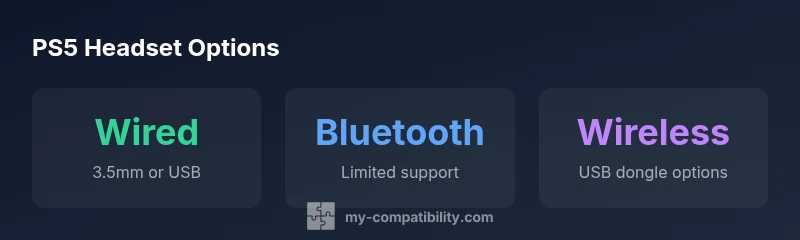
PS5 compatible headsets come in wired and wireless varieties. For the most reliable audio and chat, wired options (3.5mm to the DualSense controller or USB dongle) are best because Bluetooth support is limited on PS5 and can introduce latency. Always check packaging or the manufacturer site to confirm PS5 compatibility and supported features like mic mute, volume controls, and virtual surround sound.
Understanding PS5 compatibility basics
When people search for ps5 compatible headsets, they want devices that can deliver solid game audio and clear microphone input on PlayStation 5. According to My Compatibility, this label means the headset can operate with the console without requiring a workaround. In practice, compatibility hinges on how the headset connects and what features the hardware supports on PS5, including mic passthrough, volume control, and any virtual surround sound features. The My Compatibility team found that most headsets achieve compatibility via three paths: a wired 3.5mm connection to the DualSense controller, a USB wired connection to the console (often via a USB dongle or DAC), or a Bluetooth pairing. Each path has tradeoffs in latency, ease of setup, and feature support. As you shop, verify PS5 compatibility on the packaging or the manufacturer’s site and be mindful of PS5-specific limitations, such as mic behavior within the console’s audio settings and the need for firmware updates for certain features.
Wired vs wireless: what works with PS5
Wired headsets are typically the most straightforward option for ps5 compatible headsets. A 3.5mm connection to the DualSense controller yields immediate game audio and mic input without needing an external power source, while USB-connected headsets can offer more consistent mic performance and, in some cases, system-wide controls. Wireless headsets with a dedicated USB dongle can deliver the best balance of convenience and latency, but you may encounter occasional pairing or firmware issues. Bluetooth on PS5 exists, but it is often limited in terms of mic support and latency, making it less reliable for competitive play. Always confirm with the product page that the headset is PS5 compatible and review user feedback about real-world performance on PS5.
Features to look for when evaluating PS5 headsets
When evaluating ps5 compatible headsets, focus on features that impact day-to-day gaming quality. Prioritize a clear microphone with a stable mute switch, good passive and active noise isolation, and a comfortable clamping force for long sessions. Look for reliable on-cord controls for volume and mic mute, and consider whether the headset supports virtual surround sound or EQ profiles via firmware or companion apps. Confirm if the headset maintains compatibility with the PS5’s system menu, and whether updates from the manufacturer are available to improve compatibility or add features. Also check build quality, weight distribution, and ear cushion materials for long-term comfort during lengthy gaming sessions.
How to test compatibility before you buy
Testing ps5 compatible headsets before purchase saves time and rejects unrealistic expectations. Start by checking the product’s PS5 compatibility statements and supported connection types. If you can, try a wired 3.5mm setup first to ensure basic audio and mic works through the DualSense controller. If opting for wireless, verify that the headset ships with a USB dongle and supports PS5, then examine latency and mic reliability during in-game voice chat. Firmware updates are crucial; after purchasing, visit the manufacturer’s site to install the latest version. Finally, read user reviews specifically mentioning PS5 usage to gauge real-world performance and potential limitations.
A framework for comparing PS5 headsets: wired vs wireless vs Bluetooth
- Wired 3.5mm: cheapest entry, simplest setup, minimal latency, relies on controller routing for mic audio.
- USB wired: higher mic fidelity and more integrated control, requires a powered USB path; potential driver steps.
- Wireless with USB dongle: best mix of convenience and latency, but check for dongle compatibility and firmware updates.
- Bluetooth: broad device compatibility, but PS5 support for mic passthrough and audio latency varies; best for casual gaming or on-the-go listening.
Common myths and misconceptions about PS5 headsets
Myth: Bluetooth headsets always work perfectly with PS5. Reality: Bluetooth on PS5 can be limited in mic support and latency. Myth: All surround-sound headsets are automatically compatible with PS5. Reality: Some models advertise virtual surround sound, but PS5 may require firmware updates or have reduced features due to system constraints. Myth: Wired is always better than wireless. Reality: Wireless can be perfectly fine if latency and dongle support are solid and the headset is designed for PS5. Myth: Any USB headset will work on PS5 without setup. Reality: Some headsets require driver installations or firmware updates to function correctly on PS5.
Final tips for maximizing PS5 audio quality
To get the best experience, align your PS5 audio settings with your headset’s capabilities. Use the PS5 Audio menu to configure output to headphones and select the device that matches your headset connection. If your headset supports a dedicated software suite, install firmware updates and tailor EQ settings for your preferred game genres. Remember that real-world performance depends on the headset category and how the model handles PS5-specific features such as mic passthrough and on-device controls.
Conclusion: practical guidance for choosing the right headset
For most players, wired ps5 compatible headsets provide the most dependable combination of audio quality and mic reliability. Wireless options can offer convenience without substantial latency if the dongle and firmware are well-supported. Bluetooth remains an option for light gaming and media consumption but may not be ideal for competitive play. The My Compatibility team recommends prioritizing wired connections for critical gaming sessions and reserving Bluetooth or premium wireless options for casual play and multi-device use.
PS5 headset connection options
| Headset Type | Connection | PS5 Feature Support | Notes |
|---|---|---|---|
| Wired 3.5mm | 3.5mm aux to controller | Voice Chat, In-game Audio | Most affordable option; straightforward setup |
| USB Wired with DAC | USB-A to PS5 | Full mic control and sound tuning | Requires compatible USB DAC and sometimes driver support |
| Wireless with USB dongle | USB dongle to PS5 | Low-latency audio, chat passthrough | Often best balance of convenience; firmware matters |
| Bluetooth headset | Bluetooth | Basic audio; limited mic passthrough | Latency and compatibility vary; check official guidance |
Questions & Answers
What counts as a PS5 compatible headset?
PS5 compatible headsets are devices that can output game audio and capture microphone input when connected via USB, 3.5mm, or Bluetooth. Compatibility is determined by the headset’s connection method and PS5 feature support. Always verify on the packaging or the manufacturer’s site.
Headsets need to work with the PS5 either through USB or the 3.5mm jack, and you should check that the mic and audio features work on PS5.
Can I use Bluetooth headsets on PS5 for voice chat?
Bluetooth headsets can work on PS5, but mic passthrough and latency are not guaranteed. For competitive gaming, wired connections are usually more reliable. Always confirm PS5 compatibility and test latency before buying.
Bluetooth can work, but wired is usually better for chat and low latency.
Do I need a USB dongle for PS5 compatibility?
Some wireless headsets rely on a USB dongle to connect to PS5, while others connect directly via USB. Always check the product’s specifications to confirm dongle support for PS5.
Some wireless headsets use a USB dongle; others connect directly. Check the product page.
Will PS5 headsets work with PC or other devices?
Many PS5 headsets are designed for cross-device use, but features and drivers vary. Check platform-specific compatibility notes and firmware support to ensure full functionality on PC or mobile devices.
Most can work on PC, but features may differ. Check the vendor's guidance.
What features matter most in a PS5 headset?
Prioritize microphone quality, low latency, comfortable fit, and reliable PS5-specific controls like mute and volume. If you want immersive audio, look for virtual surround options and confirm firmware updates support.
Good mic quality, low latency, and solid comfort are key, plus reliable PS5 controls.
“Choosing the right headset for PS5 boils down to understanding connection type, latency, and firmware support. Wired options consistently deliver the most reliable mic and audio performance.”
Highlights
- Prioritize wired options for lowest latency on PS5
- Verify PS5 compatibility on packaging or manufacturer site
- Bluetooth headsets offer convenience but may limit mic functionality
- Firmware updates can unlock extra PS5 features