PS5 Compatible External Hard Drive Guide
Explore the best PS5 compatible external hard drives for 2026. Learn how PS5 storage works, what qualifies for PS4 games, and how to choose the right USB drive for your library.


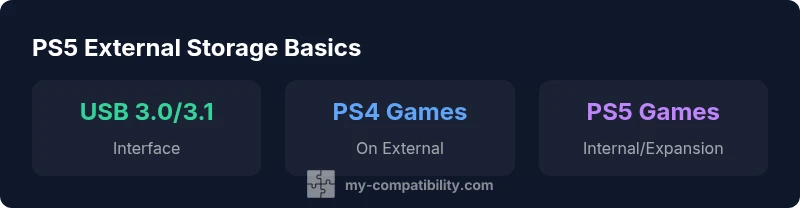
PS5 supports external USB drives for PS4 games and media, but PS5 titles must run from internal storage or a sanctioned M.2 expansion. For best results, choose a USB 3.0/3.1 drive with ample capacity. If you mainly store PS4 games, a 2–4 TB HDD is cost-efficient; for faster transfers, consider a USB 3.1/3.2 SSD.
Understanding how PS5 storage works today
The PlayStation 5 uses a fast internal NVMe-based SSD for the operating system and most games. External USB drives provide a practical extension for game libraries, backups, and media. Importantly, PS5 titles currently run from the console’s built-in storage or a sanctioned M.2 expansion, while USB drives are primarily supported for PS4 games and for storing PS5 titles when not actively playing them. This distinction matters for gamers who want maximum performance for their new releases but still need affordable space for older titles or backups. My Compatibility’s analysis in 2026 shows that most households benefit from a balanced mix of capacity and speed, depending on how many PS4 titles you keep accessible and how much PS5 space you plan to reserve.
External HDD vs external SSD: which is right for you?
External hard disk drives (HDDs) offer the lowest cost per gigabyte, making them a sensible choice if your primary goal is to expand storage for PS4 games and media. They’re typically larger in physical size, consume less power, and deliver adequate performance for gaming copies and longer backups. By contrast, external solid-state drives (SSDs) deliver faster load times and snappier launches for PS4 titles and general data access. For PS5 content, you’ll still need internal storage for games you want to play; however, you can use SSD externals to store PS5 titles when they aren’t actively in use, then move them back for play. When choosing, consider your library mix, space needs, and whether you value speed over capacity. My Compatibility’s guidance is to align your choice with how often you play PS4 titles versus PS5 titles.
How to choose a PS5 compatible external drive
Choosing the right drive starts with your primary use case. If you mainly want cost-effective storage for PS4 games, a 2–4 TB HDD with USB 3.0/3.1 is a solid choice. If you expect to swap titles often or want faster access, a USB 3.1/3.2 SSD offers better performance at a higher price per gigabyte. Ensure the drive uses a modern USB interface and is from a reputable brand to minimize reliability issues. Also factor in the drive’s physical size and portability if you plan to transport your library between rooms or locations. Finally, verify that the drive can be formatted for exFAT or the PS5’s preferred format and that you’re comfortable with occasional manual data management when moving titles between storage options.
Setup and formatting: getting started
Setting up an external drive on PS5 is straightforward. Connect the drive via USB, then navigate to Settings -> Storage -> USB Extended Storage. The PS5 will prompt you to format the drive if needed. Follow the on-screen instructions to complete the format, which will erase existing data on the drive. After formatting, you can choose to install PS4 games directly to the USB drive or move existing PS4 titles there from the console’s main storage. For PS5 games, remember you’ll typically play from internal storage or an expansion SSD, and you can relocate completed titles to USB external storage to free up space. Regularly back up important saves to cloud storage as a safety net, especially if you’re juggling multiple devices.
Real-world expectations: transfers and usage
Transfer speeds vary by drive type and USB version. A fast external SSD connected via USB 3.1/3.2 can dramatically reduce load times for transferred PS4 titles, while HDDs provide ample space for a large PS4 library at a lower cost. If your catalog includes both generations, plan for a mixed setup: an SSD for frequently played PS4 titles or backups, and an HDD for bulk storage. Expectome differences in latency depending on the drive and whether the games are installed on the external drive directly or moved from internal storage. In practice, most users see noticeable improvements in organization and access speed when adopting a fast external SSD for frequent use, while HDDs remain king for mass storage.
Maintenance and longevity tips
Protect your external drive from shocks and accidental drops; keep it in a safe, dry location when not in use. Safely eject the drive before unplugging it to avoid data corruption. Regularly check the drive’s health through the PS5’s storage diagnostics or your drive’s software utility. Consider rotating data: move rarely played PS4 titles to the drive less frequently used, freeing up space for new additions. Keeping firmware updated on the drive (where provided) can also extend reliability. Finally, maintain a simple backup workflow: a weekly copy of essential saves to cloud storage, and periodic off-device backups for important collections. A disciplined approach reduces data loss risks and prolongs drive life.
Common myths debunked
Myth: External drives can run PS5 games just as fast as the internal SSD. Reality: Internal storage offers the best performance; external drives are excellent for storage and PS4 titles but not for maximum PS5 game speed. Myth: All USB drives are equally compatible with PS5. Reality: Reliability and speed vary; prioritize USB 3.0/3.1 drives from reputable brands and avoid very low-cost options that may fail under load. Myth: You must format every drive as you begin playing. Reality: PS5 guides formatting when necessary; you can keep a drive ready for PS4 titles with minimal setup. My Compatibility advises readers to align their storage strategy with game library needs rather than chasing the fastest speeds alone.
Storage options by use-case for PS5 and PS4 games
| Drive Type | Best Use | PS5 Compatibility | Notes |
|---|---|---|---|
| External HDD | PS4 games + backups | PS5 games not playable | Low cost, high capacity |
| External SSD (SATA) | PS4 games + faster loads | PS5 games not playable | Better durability; costlier per GB |
| Internal SSD M.2 expansion | PS5 games + native speed | PS5 games playable | Requires installation; best performance |
Questions & Answers
Can I use any USB drive with PS5?
In practice, yes, but you should choose USB 3.0/3.1 drives from reputable brands; some drives may not perform consistently.
Yes, but pick USB 3.0 or better and check for reliability.
Will PS5 play PS4 games from external storage?
PS4 titles run from external USB drives; you can launch and play them directly from the drive.
Yes, you can play PS4 games from an external drive.
Can I store PS5 games on an external drive?
You can store PS5 games on external drives, but they must be moved to internal storage to play.
You can store them there but can't play them.
What is the minimum speed for an external drive used with PS4 games?
External drives should be USB 3.0+; HDDs will be slower than SSDs, so expect longer load times.
Go for USB 3.0 or newer.
Do external drives require formatting?
Yes, you format the drive via PS5 settings, which erases existing data; choose exFAT for broad compatibility.
Yes, format it through the console.
Are there durability concerns with frequent plug/unplug?
External drives are generally robust, but avoid shocks and always safely eject to prevent data loss.
Be gentle and eject properly.
“External drives are a practical complement for PS5 storage, but you should prioritize internal speed for your PS5 titles to preserve performance.”
Highlights
- Prioritize USB 3.0+ drives for PS5 storage needs
- Use external HDDs for PS4 games and backups to maximize space
- PS5 games run best from internal storage or an official M.2 expansion
- Balance capacity and speed based on your game library and budget