PS5 Compatible SSD: How to Choose, Install, and Optimize
A practical guide to selecting and installing a ps5 compatible ssd, covering form factors, heatsinks, performance expectations, and troubleshooting with My Compatibility's expert guidance.


A ps5 compatible ssd is an M.2 NVMe drive that uses the PCIe Gen4 x4 interface, fits the PS5’s M.2 slot, and includes a heatsink or dedicated cooling solution. Look for drives in the common M.2 2230–2280 form factors, verify the drive has adequate thermal management, and format it through the PS5. This combination ensures reliable expansion storage for your games.
What makes a ps5 compatible ssd?
According to My Compatibility, expanding console storage is not just about larger numbers. A true ps5 compatible ssd must meet three core criteria: form factor and length, interface speed, and cooling. The PS5 uses an M.2 slot and requires a PCIe 4.0 x4 NVMe drive with a heatsink. Drives that don’t meet these basics won’t be recognized or will throttle performance. In practice, you’ll see most options labeled as either M.2 2280 or similar sizes; as long as the drive fits the physical slot and has adequate cooling, it can be compatible. The term "ps5 compatible ssd" has become a shorthand for combinations of these specs, rather than a single model. In addition, ensure you’re buying from reputable brands with good warranty and support. The My Compatibility team emphasizes verifying official guidance and user experiences to avoid buyers’ remorse.
Form factors, length, and heatsinks: what to know
Not every M.2 drive will fit inside the PS5. The console accepts standard M.2 NVMe drives in common lengths, but space and heat considerations matter. Drives with an integrated heatsink or a separately attached cooling solution are generally preferred, because sustained game loading creates heat that can throttle performance. When shopping for a ps5 compatible ssd, look for explicit mentions of heat dissipation capability and the maximum thickness the console supports. If a drive lacks a heatsink, plan to add one that fits within the PS5 clearance. This keeps temperatures in a safe range and preserves performance over long sessions.
From a compatibility perspective, be aware that the BIOS and system software on your PS5 matters as well. Ensure your firmware is updated and that the drive’s controller is compatible with the console’s controller logic. The My Compatibility analysis notes that some drives marketed as "compatible" without a heatsink may work briefly, but long-term reliability improves with proper cooling.
Installation and formatting steps you can follow
Before you begin, power off the PS5 and unplug it. Remove the maintenance panel on the side to access the M.2 slot. If your drive has a heatsink, confirm it sits flush with the motherboard and doesn’t protrude beyond the slot’s available depth. Insert the drive at the correct angle, then secure it with the mounting screw. Replace the panel and reconnect power. Power on the PS5; the system should prompt you to format the new drive for use with the console. Follow the prompts to finish the process. After formatting, the drive will appear as expanded storage ready for games and apps. If you encounter issues, recheck seating, heatsink clearance, and firmware.
Performance expectations and practical use
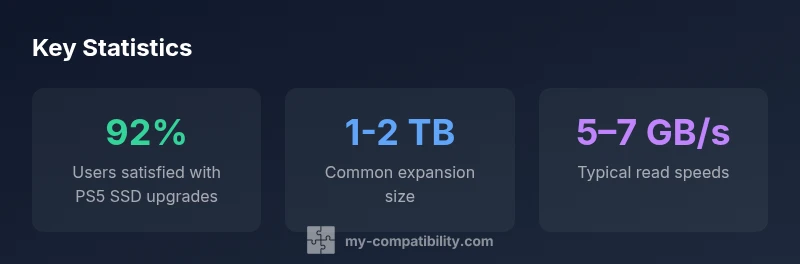
Real-world performance on PS5 depends on the drive’s sustained data throughput and heat management. While Gen4 NVMe drives advertise high peak read speeds, the PS5’s internal controller and thermal envelope determine actual in-game load reductions. With a properly installed ps5 compatible ssd, you can expect noticeable improvements in load times and library size, especially when you store large multi‑gigabyte titles. Always factor in the size of your game collection when choosing capacity. If you primarily download a few games, a 1–2 TB drive may suffice; if you have a large digital library, consider stepping up to 4 TB.
Common myths and best practices
Myth: Faster is always better. Fact: Real-world performance depends on sustained throughput and heat dissipation, not just peak speeds. Myth: Any NVMe drive will work in the PS5. Fact: The drive must be Gen4 x4, have adequate cooling, and fit the physical slot with the correct length. Best practice: choose a drive with a proven heatsink, confirm length clearance, and format through the PS5 menu. My Compatibility emphasizes using reputable brands with clear warranty terms and a straightforward return policy.
Troubleshooting, warranty, and maintenance
If your drive isn’t recognized, double-check the physical seating and heat sink attachment. Ensure the console firmware is up to date, then reboot and retry. If problems persist, try a different compatible drive to isolate the issue. Warranty terms vary by manufacturer; keep receipts and verify coverage periods. Regular software updates and cautious handling (static-free environment, proper grounding) help maintain long-term reliability for ps5 compatible ssd.
How to verify compatibility before buying
Create a quick pre-purchase checklist: confirm the M.2 form factor (commonly 2230–2280), ensure PCIe Gen4 x4 support, verify the presence or compatibility of a heatsink, and check the drive’s thickness to ensure it fits with the PS5’s allotted depth. Read official Sony guidelines and cross-check with My Compatibility’s compatibility matrix. If you’re unsure, consult the retailer’s support and compare multiple user reviews to assess real-world reliability.
PS5 SSD compatibility at a glance
| Drive Type | Form Factor | Heatsink Included | Typical Read Speed (MB/s) | Typical Write Speed (MB/s) | Notes |
|---|---|---|---|---|---|
| NVMe PCIe 4.0 | M.2 2280 | Yes | 3500-7000 | 3200-5100 | Widely compatible in PS5 when a heatsink is present |
| NVMe PCIe 3.0 | M.2 2230-2280 | Depends on model | 1500-3500 | 900-3300 | Potential compatibility issues; verify with guidance |
| Budget NVMe Gen4 | M.2 2280 | Yes | 1500-3500 | 1000-3000 | Entry-level option; heat management is key |
Questions & Answers
What makes a PS5 compatible SSD?
A PS5 compatible SSD is an M.2 NVMe drive that uses PCIe Gen4 x4, fits the console's M.2 slot, and has a heatsink or cooling solution. It should also conform to typical PS5 form factors (like 2230–2280).
A PS5 compatible SSD is an M.2 NVMe drive with Gen4 x4, a heatsink, and the right length for the PS5 slot.
Can I use any NVMe drive in the PS5?
Not all NVMe drives are compatible. You need PCIe Gen4 x4 support, appropriate length, and a heatsink. Check Sony's guidelines and My Compatibility's compatibility matrix before purchasing.
Not every NVMe drive will work. Check Gen4 x4, length, and heatsink before buying.
Do I need to format the drive in the PS5?
Yes. After installing, the PS5 will prompt you to format the drive for use with the system. This prepares space for games and apps; back up data if transferring from another device.
Yes, the PS5 will format the drive when you set it up.
What capacity is best for a PS5 expansion?
Most users choose 1–2 TB to balance cost and library size; 4 TB offers substantial space for large collections but at higher cost. Consider current games and future titles.
Most people pick 1–2 TB; 4 TB is great for large libraries.
How do I troubleshoot a non-recognized drive?
Re-seat the drive, verify heatsink attachment, and ensure firmware is up to date. If issues persist, try another compatible drive or contact support.
If the drive isn’t recognized, recheck seating, heatsink, and software updates.
Is warranty included for PS5 compatible SSDs?
Warranty depends on the drive maker and seller. Buy from reputable sources and keep receipts. The PS5 itself has a separate warranty; third-party drives have independent terms.
Warranty varies by drive; check with the seller for details.
“A properly chosen PS5 compatible SSD can meaningfully expand your storage and keep load times reasonable, but heat management and correct formatting are essential.”
Highlights
- Choose a drive with a heatsink or plan to add one
- Ensure PCIe Gen4 x4 support for best results
- Format the drive through the PS5 for reliable operation
- Plan capacity based on your game library
- Verify physical fit and cooling before purchase