pc3l vs pc3 Compatible: RAM Compatibility in 2026
Compare pc3l and pc3 RAM compatibility, focusing on voltage, timings, and motherboard support. Learn how to choose DDR3/DDR3L modules for stable upgrades and energy efficiency in 2026.


pc3l vs pc3 compatible: In practice, DDR3L (pc3l) memory is designed to operate at a lower voltage (about 1.35V) and is mostly backward compatible with PC3 (DDR3) on boards that support 1.35V or allow voltage overrides. The main decision factors are voltage tolerance, timing, and supported speeds by your motherboard. Our detailed comparison covers stability, performance, and upgrade scenarios.
Understanding PC3L and PC3: What They Are
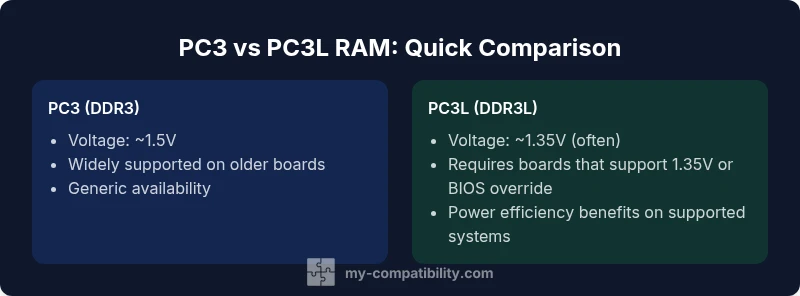
DDR3 memory uses well-known naming conventions where PC3 refers to DDR3 modules and PC3L denotes DDR3L (low voltage) modules. DDR3L is designed to run at about 1.35V, compared with the traditional 1.5V for PC3. In practice, many motherboards can accommodate DDR3L modules by running them at the lower voltage or by allowing BIOS/UEFI voltage overrides. However, compatibility is not universal; some older systems are locked to 1.5V and may not operate DDR3L at stable speeds. When planning a purchase, confirm your motherboard's memory voltage tolerance and whether the BIOS allows a 1.35V setting. This foundational understanding sets the stage for the practical differences you’ll encounter when upgrading or building around pc3l vs pc3 compatible.
Electrical and Timings: Voltage, Timings, and Stability
Voltage is the most visible distinction: DDR3 (pc3) commonly runs at about 1.5V, while DDR3L (pc3l) targets around 1.35V. In many cases, pc3l modules are backward compatible with pc3 sockets because boards that support 1.35V can fall back to 1.5V when needed. Timings and speeds are module-dependent and often overlap; a DDR3-1600 module may ship with CL9, CL11, or CL10, regardless of voltage, depending on manufacturer specifications. The practical takeaway: voltage tolerance and BIOS support drive compatibility more than the mere presence of a 1.35V label. Stability testing after installation remains essential.
Compatibility Rules: Motherboards, CPUs, and RAM Talk
Memory compatibility hinges on a few core factors: motherboard voltage tolerance, CPU memory controller capabilities, and BIOS/UEFI options. While most modern boards support DDR3L, some older desktop or server boards require strict 1.5V operation. Always check the motherboard’s Qualified Vendor List (QVL) and the RAM vendor’s compatibility guides to confirm pc3l support, especially when mixing with pc3 modules. If you plan to mix RAM, keep speeds and timings aligned, and prefer modules with the same voltage to minimize instability. Laptops commonly use DDR3L to save power, but desktops can too when the motherboard allows 1.35V operation.
Real-World Scenarios: Upgrading a System
Imagine upgrading a desktop that originally shipped with DDR3 at 1.5V. If your motherboard supports 1.35V operation, you may install pc3l modules and enjoy power savings, particularly at idle. If the motherboard’s BIOS doesn’t permit voltage changes, you might run the modules at 1.5V, which is generally safe but eliminates the primary efficiency benefit. In laptops, DDR3L is the norm; upgrading within the same voltage family is usually straightforward. Mixed configurations (new RAM with existing modules) can work, but stability depends on matching voltage, speed, and timings. When in doubt, replacing all modules with a single matched kit is the most reliable path.
Common Myths About PC3L Compatibility
Myth: DDR3L is always backwards compatible with DDR3. Truth: While many boards support 1.35V, not all do, and voltage compatibility is essential. Myth: You must run PC3L at 1.35V. Truth: Some systems allow 1.5V operation; devices designed for 1.35V may still work at 1.5V, but you lose efficiency. Myth: Mixing DDR3 and DDR3L is dangerous. Truth: It can work if voltage and timings align, but instability risk exists; best practice is matched kits. Myth: PC3L offers large performance gains. Truth: The main benefit is power efficiency; raw performance is driven by speed and timings. Myth: DDR3L is disappearing soon. Truth: Availability is decreasing as newer generations emerge, but DDR3L remains common in legacy systems.
How to Verify Compatibility: Tools and Best Practices
Use the motherboard manual and memory QVL to verify supported memory types and voltages. Check the RAM vendor’s compatibility guides, and look for BIOS settings that control memory voltage. If possible, install RAM in matched pairs to maximize stability in dual-channel configurations. Run thorough stress testing (MemTest86, Prime95 blend tests) to confirm stability after upgrade. For laptops, confirm the exact SO-DIMM form factor, voltage, and memory speed supported by the system.
Performance Implications: Should You Care About PC3L vs PC3?
In most real-world scenarios, performance differences between pc3l and pc3 modules are largely determined by the module’s rated speed (MHz) and CAS latency, not voltage alone. PC3L’s power savings are most noticeable in mobile or thermally constrained environments and under light loads. In gaming or heavy workloads, the voltage difference contributes little to frame rates or compute speed; focus on selecting modules with the right speed, timings, and capacity for your workload.
Decision Framework: When to Choose PC3L Compatible RAM
Choose PC3L-compatible RAM if your motherboard supports 1.35V operation and you value energy efficiency, particularly in laptops or compact desktops with tight thermals. If you are upgrading an older system that remains strictly at 1.5V, PC3 remains a simpler, more straightforward option. For systems that aim to balance cost, availability, and stability, a matched DDR3/DDR3L kit that runs reliably at a tested voltage is the safest path. Always plan for future upgrades by prioritizing compatibility and verified modules.
Comparison
| Feature | pc3 RAM (DDR3) | pc3l RAM (DDR3L) |
|---|---|---|
| Voltage range | Typically 1.5V (DDR3) | Nominal 1.35V (DDR3L); may run at 1.5V on some boards |
| Default compatibility with motherboards | Broadly supported on boards designed for DDR3 1.5V | Supported on boards that tolerate 1.35V or allow voltage override |
| Performance potential | Similar performance at same speeds and timings | Potentially similar performance; power efficiency gains in real workloads |
| Availability | DDR3 modules remain common but phasing out in favor of newer generations | DDR3L modules widely available and common on legacy platforms |
| Best use case | Desktops/servers running DDR3 at 1.5V | Systems prioritizing power efficiency or voltage flexibility |
Positives
- Lower operating voltage can reduce idle power consumption
- DDR3L is broadly backward compatible with DDR3 on supported boards
- Potential improvements in heat management on mobile devices
- Widely available DDR3L options for legacy systems
Cons
- Voltage compatibility depends on motherboard and BIOS
- Some older boards may not support 1.35V or require voltage overrides
- Mixing RAM with different voltages can cause instability
- DDR3L availability is decreasing as DDR4/DDR5 rise in popularity
PC3L is generally the better choice when your motherboard supports 1.35V; PC3 remains solid for older systems without voltage control.
Opt for PC3L if your board allows it to gain power efficiency with minimal throughput impact. If your system cannot support 1.35V, PC3 remains a stable, straightforward option. Always verify voltage tolerance and use matched kits when possible.
Questions & Answers
What does pc3l mean in RAM naming?
PC3L indicates DDR3L (low-voltage) RAM, designed to operate at around 1.35V. It remains largely compatible with DDR3 memory in supported systems, though motherboard voltage tolerance and BIOS options determine final behavior.
PC3L stands for low-voltage DDR3 memory and is often backward compatible with DDR3 on boards that support 1.35V.
Can I mix PC3 and PC3L memory?
Mixing DDR3 and DDR3L is possible on some systems if voltage and timings are compatible, but it can cause instability. The safest approach is to use a matched kit with the same voltage and speed.
Mixing is possible in some cases, but stability isn’t guaranteed—best to use a matched kit.
Will DDR3L automatically reduce power consumption?
DDR3L can reduce idle power consumption when the system operates at 1.35V, especially in laptops. In desktops or under heavy load, the difference is often small and highly workload-dependent.
DDR3L saves some power in the right conditions, but gains vary by workload.
How do I verify RAM compatibility quickly?
Consult the motherboard’s manual and QVL, check the RAM vendor’s compatibility guides, and consider a matched kit. If possible, use BIOS memory voltage options to confirm support and test stability with MemTest86.
Check the motherboard manual and compatibility lists, then test for stability.
Is DDR3L disappearing in new builds?
DDR3L is aging as newer memory standards emerge, but it remains common in legacy systems and some budget refurbishments. Availability will continue to decline as DDR4/DDR5 uptake grows.
DDR3L is aging but still found in some legacy systems; expect less availability over time.
Which is better for laptops vs desktops?
DDR3L is typically preferred for laptops due to lower power consumption and heat. Desktops can use DDR3L if the motherboard supports 1.35V, but otherwise DDR3 at 1.5V remains standard.
Laptops usually use DDR3L; desktops can use it if the board supports 1.35V.
Highlights
- Check motherboard voltage tolerance before RAM upgrades
- Avoid mixing RAM with different voltages when possible
- DDR3L can save power on supported boards, especially laptops
- DDR3 compatibility is aging; verify availability and bios support
- For legacy systems, prefer a matched DDR3 kit