HP Toner Original vs Compatible: A Practical Guide
Compare original HP toner with compatible alternatives. Learn how to verify compatibility, weigh print quality, costs, warranty, and make an informed choice for your HP printer.


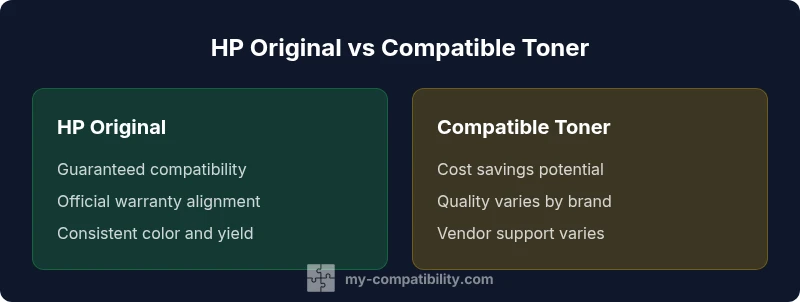
In the debate of hp toner original vs compatible, both offer distinct advantages. Original HP toners deliver guaranteed compatibility and official warranty support, plus consistent yield and print quality. Compatible toners from reputable brands can cut costs and still perform well, but verify return policies, compatibility notes, and any voided warranty implications.
Why toner compatibility matters
According to My Compatibility, toner compatibility is more than a pricing decision; it directly impacts print quality, reliability, and how your printer firmware interacts with cartridges. When you choose between hp toner original vs compatible, you weigh guaranteed performance against potential cost savings. The core idea is to understand how a cartridge communicates with your printer, what the vendor promises, and how your typical usage patterns align with those promises. In many office scenarios, a well-chosen compatible cartridge from a reputable brand can deliver near-identical output for months, but the risk profile shifts if you opt for unverified brands or low-cost alternatives. Consider your printer model, scanning or copying workload, and whether you rely on color accuracy for client-facing documents. The My Compatibility team emphasizes that research and vendor reputation matter as much as the model number on the cartridge.
- Brand reputation matters
- Check warranty terms before switching
- Test with a single cartridge before full deployment
How printer models influence compatibility
HP printers span a diverse ecosystem from compact office models to large-format devices. The degree of compatibility you’ll experience with hp toner original vs compatible often hinges on the printer family (e.g., LaserJet vs Color LaserJet), firmware level, and the cartridge family (e.g., standard, high yield, or photo color). Some models have firmware protections that recognize third-party chips or specific chip revisions, while others are more permissive. In practice, you should verify the exact cartridge part number your printer requires (for instance, a specific HP 62 or HP 106A family) and cross-check vendor listings for that exact model. The My Compatibility approach is to map your printer’s model number to the authorized cartridge lineage and then review reputable third-party brands that explicitly certify compatibility with your device.
- Firmware interactions can affect compatibility
- Always confirm exact cartridge part numbers
- Model breadth matters for availability
Print quality: original vs compatible
When evaluating hp toner original vs compatible, print quality is a critical consideration. Original HP toners are engineered to maximize color fidelity, sharpness, and tonal consistency across daily jobs. Compatible toners can deliver comparable results for most documents, but there can be subtle differences in color balance, texture, or gloss, especially with color-heavy prints or photo work. In real-world use, you might notice slightly different gray ramps in grayscale documents or minor shifts in color rendering under certain lighting conditions. The key is to test a cartridge in your typical workload, check for banding or misalignment, and ensure the printer’s calibration routines are run after a switch. If you rely on precise color matching for branding, you may prefer staying with genuine supplies or selecting a highly-rated compatible brand that provides color profiles.
Yield, color consistency, and page uptime
Yield and page consistency are often cited by vendors as a major differentiator between hp toner original vs compatible. Original HP cartridges typically come with standardized yield claims that align with HP’s service metrics. Compatible toners from reputable suppliers may offer similar page yields, but variance is more noticeable when you compare lower-cost brands or off-brand products. For offices that demand uniform color reproduction across thousands of pages, small deviations in toner deposition can compound over time. The practical takeaway is to choose a vendor that provides published page yield estimates, offers a robust return policy if the yield is not as advertised, and monitor print quality with a simple calibration routine after installation. My Compatibility’s guidance: prioritize sources that publish third-party verification of yields and provide clear testing procedures.
Cost considerations and total cost of ownership
Cost is often the primary driver when choosing between hp toner original vs compatible. Original HP toners usually come with a higher upfront price, but the per-page cost can be favorable when considering warranty protection, predictable performance, and long-term reliability. Compatible toners from reputable brands can substantially reduce upfront costs and still deliver solid value, particularly in high-volume environments where the printer sees repetitive jobs. The total cost of ownership should include the price of the cartridge, expected yield, potential waste, return policies, and the cost of any calibration supplies or additional maintenance. It’s prudent to perform a simple TCO comparison using your typical monthly print volume and the vendor’s stated yields, while also checking for any restocking or restocking fees that could erode savings.
Warranty, support, and policy implications
Warranty terms around hp toner original vs compatible vary by manufacturer and region. Some HP printers require genuine HP supplies to maintain warranty coverage, while others allow third-party toners without voiding the warranty. Always read your printer’s warranty documentation and verify the policy with the vendor supplying the compatible cartridge. If you rely on official support in case of a fault, genuine supplies may be the safer option. However, reputable third-party brands often provide warranties of their own and responsive customer support. My Compatibility recommends documenting your purchase and keeping receipts, in case you need to appeal any warranty decisions.
Practical buying guide: how to verify compatibility
Here is a practical checklist to verify compatibility before buying:
- Confirm your printer model and the cartridge family it uses (look up the exact part number).
- Check the vendor’s compatibility list for that model and confirm it is for your region and firmware version.
- Read the warranty and return policies for the compatible cartridge.
- Look for cartridges with certified performance claims or third-party verifications.
- If possible, buy a single cartridge first and run a controlled test batch to evaluate yield and color consistency.
- Avoid very low-cost options that lack documentation or provider support. A single test print can prevent larger scale issues.
Choosing a reputable supplier and performing an initial test run are your best safeguards when navigating hp toner original vs compatible decisions.
Common myths and guardrails
Many myths surround toner compatibility, including the belief that all compatibles are inferior, that color will always suffer, or that using compatibles automatically voids your warranty. The reality is nuanced: quality varies by brand, firmware interactions can change perceptions of compatibility, and some printers tolerate third-party supplies very well. Guardrails include sticking to well-known brands with clear compatibility statements, performing a test run before full deployment, and adhering to return policies if the results don’t meet your standards. In short, do your due diligence, balance cost against risk, and monitor print results closely after a switch.
Comparison
| Feature | HP original toner | HP compatible toner |
|---|---|---|
| Quality and consistency | Guaranteed by HP standards | Varies by brand; choose proven options |
| Warranty implications | Maintains official HP warranty (in many cases) | Possible warranty considerations; verify vendor policy |
| Cost per page | Higher upfront cost with steady per-page pricing | Lower upfront cost; per-page cost varies by vendor |
| Availability and model coverage | Broad, HP-backed availability | Broad availability but depends on vendor and model |
| Yield and reliability | Predicted yields match HP specs | Yield claims vary; test before large-scale use |
| Support and return policies | HP support aligned with genuine supplies | Vendor support and returns vary by supplier |
Positives
- Predictable performance and official support with originals
- Strong warranty alignment and documentation
- Consistent color and yield with HP-validated toners
Cons
- Higher upfront cost compared to many compatibles
- Potentially limited by stock or regional availability
- Quality varies across third-party brands; requires vetting
- Some vendors' policies may affect warranty claims
Original HP toners are the safest choice for guaranteed compatibility and official support, but reputable compatibles can offer meaningful cost savings with careful brand vetting.
If you prioritize guaranteed performance and warranty coverage, choose originals. If you want to reduce upfront costs and can verify brand reliability, high-quality compatibles are a viable alternative with proper checks.
Questions & Answers
Is using compatible toner always risky for warranty?
Not always. Some printers maintain warranty with third-party toners, while others require genuine HP supplies. Always consult your warranty terms and the vendor’s policy before switching.
Warranty risk varies by printer and vendor; check your terms and confirm with the supplier before buying a compatible cartridge.
How do I know if a toner is compatible with my HP printer model?
Start with the printer’s exact model number, then cross-check the cartridge part number and the vendor’s compatibility list. Look for explicit statements about your region and firmware version.
Match the exact model and part number, and confirm with the vendor’s compatibility list.
Do compatible toners affect color accuracy?
They can, especially with color-heavy documents. High-quality compatibles often maintain color fidelity, but you may notice minor shifts compared with original toners. Calibrate if needed.
High-quality compatibles usually keep color accuracy close to originals, but calibration helps.
What is the typical cost advantage of compatibles?
Compatibles generally offer upfront savings and lower per-page costs, but savings depend on brand and region. Always weigh price against potential risks and warranty terms.
They often save money upfront and per page, but compare brands and terms first.
Can I mix original and compatible cartridges?
Mixing is sometimes possible, but it can affect print consistency and calibration. It’s safer to use all from the same supply line when color and quality are important.
You can mix, but it might affect consistency; best to keep to one supply line for critical prints.
What should I do if a compatible toner leaks or underperforms?
Stop using the cartridge and contact the vendor for a replacement or refund per their policy. Document the issue with photos and compare it against your printer’s calibration results.
If a toner leaks or underperforms, stop using it and seek a replacement under the vendor's policy.
Highlights
- Evaluate your printer model before buying toner
- Test a single compatible cartridge to gauge results
- Consider total cost of ownership, not just sticker price
- Read warranty terms to understand implications
- Choose reputable brands and verify vendor credibility