HP Compatible Printer Cartridges: A Practical Guide
Explore how hp compatible printer cartridges work, key considerations for quality and reliability, how to verify compatibility, and practical buying tips. Learn with My Compatibility for smarter, safer choices in 2026.


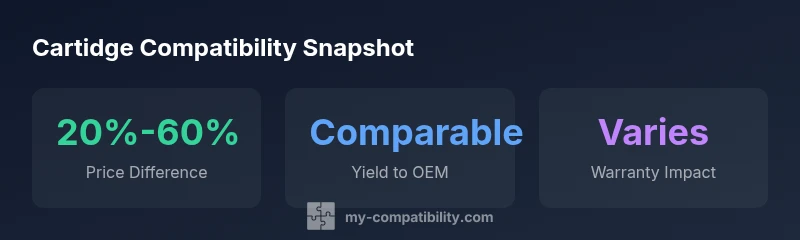
HP compatible printer cartridges are third-party ink or toner options designed to work with many HP printer models. They often cost significantly less than OEM cartridges and can deliver comparable print quality, but compatibility varies by model, and reliability depends on brand quality. According to My Compatibility, always verify model numbers, return policies, and potential warranty implications before purchasing.
hp compatible printer cartridge: what it means for your printer
When you hear the term hp compatible printer cartridge, you’re looking at a third-party option designed to work with HP printers. These cartridges may be ink or toner and are manufactured by brands outside HP. For many users, the biggest draw is cost savings, especially for high-volume printing. In practice, a well-chosen hp compatible printer cartridge can deliver print quality that’s close to OEM while offering noticeable savings per page. However, the landscape is not uniform: compatibility can vary by exact printer model, firmware, and even regional cartridge revisions. The My Compatibility team emphasizes verifying model numbers and testing a cartridge with your device before making bulk purchases.
How compatible cartridges differ from OEM and remanufactured options
OEM cartridges are built by HP to exact specifications and are typically certified to work with the full warranty of the printer. Remanufactured cartridges reuse a spent cartridge body, refurbish the inner components, and aim to deliver similar performance with lower waste. HP-compatible cartridges sit between these two options: they are new or remanufactured by third parties and designed to fit HP printers. The distinction matters for print quality consistency, yield, and warranty coverage. When evaluating choices, consider the brand’s testing scope, compatibility lists, and any guarantees on page yield or color accuracy. For environmentally conscious buyers, remanufactured options may align with sustainability goals, while cartridge recycling programs can also mitigate waste.
How to evaluate quality and reliability
Quality hp compatible printer cartridges share several common traits. Look for brands that publish explicit model-compatibility matrices and provide tested results for each printer family. Check for certifications from independent bodies or community forums that verify print quality, smear resistance, and color accuracy. Return policies and warranties are strong indicators of confidence in a brand’s reliability. Keep copies of your purchase receipts and, if possible, choose sellers that offer a short-term trial or replacement guarantee. If you notice persistent issues, pause use, verify firmware compatibility, and contact support before running more tests.
Compatibility and model-specific testing: a practical approach
Compatibility isn’t a one-size-fits-all attribute. HP often updates firmware that can affect cartridge recognition. Start by matching the cartridge’s exact part number to your printer model. Review the seller’s compatibility chart and confirm that the cartridge is listed for your printer’s firmware version. If you own a newer HP model, request confirmation from the retailer that the cartridge is validated for your device and ambien firmware. In many cases, a well-reviewed hp compatible cartridge will be listed as compatible with a broad range of recent models, but always double-check on your own device.
Installation tips and printing results
Installing an hp compatible printer cartridge is usually straightforward, mirroring OEM replacement steps. Power down the printer, open the cartridge access area, remove the old cartridge, align the new one, and run a test page. Some users report color calibration adjustments after the first few prints. If your printouts show streaks, ghosts, or inconsistent color, recheck the cartridge seating and run the printer’s cleaning cycle. Keep in mind that some printers require a brief initialization period after installing a new cartridge for optimal toner or ink distribution.
Cost considerations and value over time
Cost savings from hp compatible printer cartridges accumulate over heavy printing periods. While base price is lower, total cost of ownership also depends on page yield, per-page cost, and the frequency of replacements. To maximize value, compare price-per-page across OEM and non-OEM options, taking into account any warranty terms or return policies. Consider buying in bulk or during promotions to lock in favorable prices. For many small offices, this can translate into meaningful annual savings without sacrificing reliability, provided you select a trusted brand.
Environmental and warranty considerations
Environmental awareness is a key driver for many buyers. Remanufactured options can significantly reduce waste, while some brands emphasize recycled packaging and refillable components. Warranty implications vary by printer and cartridge brand. HP’s own terms may differ based on the cartridge used; some users report safe operation with third-party cartridges, while others encounter limitations. Always document your purchase and verify any warranty caveats with both the seller and your printer’s warranty policy. The My Compatibility team recommends prioritizing reputable brands that publish clear warranty and return terms.
Practical buying checklist
Before purchasing an hp compatible printer cartridge, use this quick checklist:
- Confirm exact printer model and firmware version.
- Check the cartridge part number against the manufacturer’s compatibility chart.
- Read the brand’s test results and user reviews for print quality and consistency.
- Review return policy and warranty terms.
- Consider environmental factors like remanufacturing and recyclability.
- If possible, buy from a retailer that offers trial periods or replacement guarantees.
Comparison of cartridge types
| Model Type | Typical Cartridge Type | Notes |
|---|---|---|
| Standard HP Printer | OEM cartridge | Original equipment manufacturer recommended for best reliability |
| HP-compatible cartridge | Third-party | Cost-saving but verify compatibility with your model |
| Remanufactured cartridge | Recycled core | Potential environmental benefits; quality varies |
Questions & Answers
Are HP compatible printer cartridges safe for my printer’s warranty?
Warranty implications vary by brand and printer model. Check HP terms and the seller’s policy, and look for brands that offer explicit warranty coverage for compatible cartridges.
Warranty depends on the brand and model, so always check terms and keep receipts.
Can HP compatible cartridges cause print quality issues?
Yes, quality can vary. Select brands with independent testing, positive reviews, and model-specific compatibility, and run calibration tests after installation.
Low-quality cartridges can cause streaks or color errors; choose trusted brands.
How do I verify compatibility before buying?
Match the cartridge part number to your printer model, review the seller’s compatibility chart, and confirm firmware support. Consider a seller with a clear return policy.
Double-check model numbers and firmware compatibility before purchase.
Are compatible cartridges easier to install than OEM?
Installation is usually similar to OEM cartridges. Some printers may need calibration after first use, but the process is typically straightforward.
Usually the same install steps as OEM, with a quick test page to confirm.
Do remanufactured HP cartridges offer environmental benefits?
Remanufactured cartridges reuse spent cores, reducing waste. Quality varies, so choose brands with clear testing and warranties.
Remanufactured options can be greener if you pick trusted brands.
“HP-compatible cartridges can deliver meaningful cost savings without sacrificing print quality, as long as you choose trusted brands and verify model compatibility.”
Highlights
- Verify exact printer model before buying
- Choose trusted brands with clear warranties
- Expect significant cost savings with compatible cartridges
- Remanufactured options can be greener if quality is proven
- Test compatibility and calibration after installation