Earbuds Compatibility with Android: A Practical Guide
Learn how to choose ear buds compatible with android, verify codec support, latency, and app integration. This data-driven guide helps you diagnose device-specific quirks and make a reliable purchase.


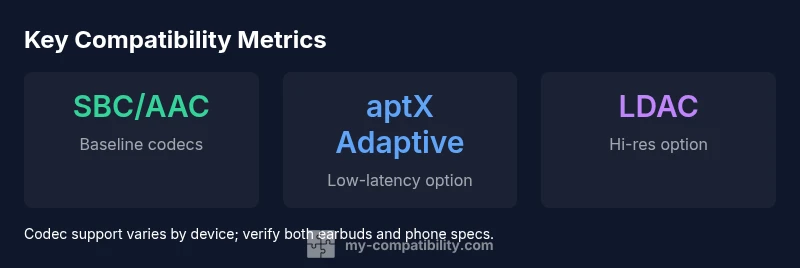
Ear buds compatible with android must support core Bluetooth codecs (SBC/AAC) and, when possible, higher-quality codecs like aptX/aptX Adaptive or LDAC. Look for low latency for video, reliable multipoint pairing, and a companion app for firmware updates. This quick guide helps you verify specs and avoid common buyer mistakes on Android.
Why Android compatibility matters
In the Android ecosystem, ear buds compatible with android do not guarantee identical performance across devices. A pair that performs flawlessly with one Android phone can show jitter, latency, or codec negotiation issues with another due to firmware differences, Bluetooth stack variations, and vendor-specific tweaks. For consumers, the priority is to confirm codec support, latency, multipoint behavior, and app-enabled features across the devices you actually own. According to My Compatibility, the most reliable approach starts with the exact codecs supported by the earbuds and your phone. SBC and AAC are the baseline codecs widely supported on Android; however higher-end devices may offer aptX, aptX Adaptive, LDAC, or LHDC. If you use video or gaming, you want lower latency, ideally under 100 ms in real-world scenarios. Multipoint support can improve daily use, but implementation varies by vendor and Android version. Before buying, check your phone’s Bluetooth capabilities, the earbuds’ official specs, and the vendor’s app features for firmware updates and EQ controls. In short, compatibility is a two-way street: both devices must negotiate the same codecs and features in real time. A test-first approach helps you avoid surprises at setup.
Core features to verify before you buy
When evaluating ear buds compatible with android, base your decision on a set of verifiable features rather than promotional claims. First, codec support matters: ensure SBC/AAC is available on any budget models you consider, and look for aptX/aptX Adaptive or LDAC on higher-end options if your phone supports them. Second, latency control is essential for video and gaming; check real-world latency reviews and the vendor’s own test data if available. Third, multipoint reliability matters for switching between a phone and a tablet or computer; confirm whether the earbuds maintain stable connections when multiple devices are paired. Fourth, the companion app should offer firmware updates, EQ customization, and clear indicators for battery health. Fifth, mic quality and wind noise suppression can affect calls, especially on windy days. Finally, ensure compatibility with features you rely on—voice assistants, touch controls, and in-ear assistants—are supported across your Android devices. This section also notes that codec negotiation can vary by Android version and manufacturer, so always verify on your own devices.
Android codec landscape and device variance
The codec landscape on Android is not uniform. Most devices default to SBC/AAC, which guarantees broad compatibility, but some phones expose aptX/aptX Adaptive or LDAC where hardware and firmware permit. The user experience can vary widely by manufacturer—Samsung, Google, OnePlus, and others may implement multipoint or codec negotiation differently, leading to occasional disconnects or delayed audio routing. Real-world tests show that even with similar hardware, firmware updates can shift performance. For most users, the practical takeaway is to cross-check the exact model and Android version pair you own. If you value high-fidelity audio and low latency, target models that explicitly list LDAC or aptX Adaptive support and confirm that your Android device also lists the same codecs in its Bluetooth specifications. My Compatibility analysis emphasizes that device-by-device verification is essential, not assumptions from marketing materials.
How to test compatibility before you buy
Before purchasing, simulate real-world use scenarios. Pair with your primary Android device and perform the following checks: 1) Codec negotiation: play music and check the connected codec in the phone’s developer options or Bluetooth settings while streaming; 2) Latency: play a video and watch for lip-sync issues; if possible, run a quick test app that times audio-video sync; 3) Multipoint behavior: pause music on one device, switch to another, then resume; ensure continuity and audio routing don’t drop; 4) Call quality: test microphone clarity in a noisy environment; 5) App features: install the earbuds’ companion app and ensure firmware updates are accessible and EQ options work; 6) Battery behavior: check stability of listening time and charging case capacity. If you can’t test in-store, request a return window that allows a full home try, and be prepared to swap for a model with broader Android support if the first choice doesn’t meet expectations.
Setup and everyday use: pairing, updates, and app integration
Once you’ve chosen a pair, the setup flow should be straightforward. Start by ensuring Bluetooth is enabled on the Android device and that the earbuds are in pairing mode. Some devices support quick switching from a previous pair, while others require manual pairing. After initial pairing, update the earbuds’ firmware via the official app to ensure compatibility improvements and bug fixes. Use the app to customize controls, monitor battery life, and enable features such as ambient sound or transparency mode if supported. Regular firmware updates can address latency and codec negotiation quirks, so check for updates monthly or after major Android OS releases. If you rely on two devices daily, enable multipoint in the ear buds and verify seamless switching. Finally, keep your Android device’s Bluetooth stack up to date and avoid mixing older earbuds with the latest devices, as older codecs can degrade performance on newer hardware.
Common issues and how to troubleshoot
Common problems include intermittent audio dropouts, poor microphone quality, and mismatched codecs. Start troubleshooting by resetting the earbuds and re-pairing with the Android device. Check for firmware updates and install them if available. On Android, clear Bluetooth cache if dropouts persist and restart the phone. If latency is an issue, ensure the device is using the intended codec by examining developer options or the earbuds’ app. Some brands also require re-enabling multipoint after a firmware update. If you still encounter issues, test with a different Android device to determine whether the problem is device-specific. Finally, consult the vendor’s support page for known issues related to your exact model and Android version, since firmware behavior can vary with updates.
My Compatibility guidance: practical recommendations
From a practical perspective, the most reliable path to true Android compatibility is to verify codecs, latency, and multipoint on your own devices. Look for explicit mentions of the codecs you care about (SBC/AAC as baseline, plus aptX Adaptive or LDAC if your hardware supports them). Prioritize models with a well-documented companion app for firmware management and control customization. If possible, test latency on live video apps and confirm stable audio routing when switching between devices. Finally, rely on a product that offers a straightforward return policy, because Android compatibility is often device-specific and customer experience can vary. My Compatibility’s 2026 guidance is to use verification tests in your own environment and favor models with active firmware support and clear codec visibility.
Comparison of typical codec support across Android devices
| Feature | Android Support | Notes |
|---|---|---|
| Codec support (SBC/AAC) | Yes | Baseline across most devices |
| aptX/aptX Adaptive support | Varies by device | Check official specs |
| LDAC/LHDC support | Selective | Depends on hardware and firmware |
| Latency (ms) | Varies by device | Aim for <100 ms for video |
Questions & Answers
What codecs should I look for in Android earbuds?
Look for SBC/AAC as the baseline. If your device supports it, aptX Adaptive or LDAC can improve audio quality and latency. Verify that both the earbuds and the Android device list the same codecs.
Check the baseline SBC or AAC, and see if aptX Adaptive or LDAC are supported on both devices. This ensures better quality and lower latency.
Do I need LDAC for Android earbuds to be compatible?
LDAC is not required for basic compatibility, but it can offer higher fidelity and lower latency on compatible devices. If your Android phone and earbuds both support LDAC, it’s worth testing.
LDAC isn’t required for compatibility, but if both devices support it, you’ll get better audio quality and potentially lower latency.
Can I use iOS-only earbuds with Android?
Some earbuds marketed for cross-platform use work with Android, but certain features may be limited on Android. Always verify codec support and app features on your Android device before buying.
Some iOS-friendly earbuds work on Android, but check codecs and app features to be sure.
How do I test latency at home?
Play a synchronized video on your phone and watch for lip-sync alignment, or use a latency testing app if available. Compare results across different apps to gauge consistency.
Play a video and listen for lip-sync; use a latency app if you can to compare results across apps.
Do all apps work with all earbuds on Android?
Most apps work across many earbuds, but some vendor apps provide extra features (EQ, firmware updates). Verify that essential functions like EQ, firmware, and controls are accessible on Android.
Most apps work, but vendor apps can add features. Check that essential controls work on Android.
Is multipoint always reliable on Android?
Multipoint is device-dependent. Some Android devices manage it well, others struggle with rapid switching. Test with your own devices and keep firmware up to date.
Multipoint reliability varies by device; test with your gear and keep firmware updated.
“Compatibility on Android is inherently device-specific; verify codec support and latency on your own gear to avoid surprises.”
Highlights
- Verify exact codec support on both earbuds and device.
- Test latency in real-world video or gaming scenarios.
- Check multipoint behavior across devices you own.
- Use the official app for firmware updates and feature customization.