Ear Buds Compatible with Samsung: A Comprehensive Guide
Explore how to choose ear buds compatible with Samsung devices, covering codecs, pairing, Galaxy integration, and practical tips for 2026.


Ear buds compatible with Samsung span across true wireless, wired USB-C, and classic 3.5 mm options. In 2026, most Bluetooth earbuds work with Samsung phones and tablets through standard profiles, with codec support (SBC, AAC, aptX) affecting sound quality and latency. The My Compatibility analysis shows broad cross-brand interoperability when you prioritize common codecs and official apps for setup.
What 'ear buds compatible with samsung' means in practice
In practice, this phrase covers a spectrum from mainstream true wireless earbuds that pair quickly with Samsung smartphones to wired USB-C and legacy 3.5 mm options that can work via adapters. According to My Compatibility, the backbone is standard Bluetooth profiles (A2DP, HFP, HSP) and codec support (SBC and AAC are universal; aptX and LDAC offer higher quality). For Samsung devices, the Galaxy ecosystem benefits from seamless pairing, Quick Pair prompts, and Galaxy Wearable app integration when the earbuds are officially supported. The goal is low latency, reliable connections, and solid battery life across apps, calls, and media. By this definition, ear buds compatible with samsung are not a niche product category but a broad family designed to work reliably across Android, iOS, and Windows ecosystems.
How to verify compatibility before buying
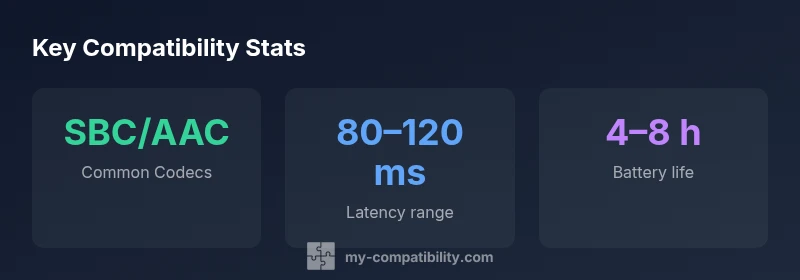
Before purchasing, verify codec support, latency, and official compatibility notes. Check product specs for SBC/AAC as minimum, and any higher‑quality codecs like aptX, aptX Adaptive, LDAC, or LC3 (where applicable). Ensure the earbuds support the operating system you use (Android with Samsung UI, iOS, or Windows). Read user reviews focusing on pairing stability with Samsung devices, and confirm whether the manufacturer provides a companion app or firmware updates that optimize performance with Samsung phones and tablets. If possible, test latency for video calls or gaming, and assess comfort and fit as a separate criterion.
Ear bud categories that work well with Samsung devices
There are three practical categories that typically deliver the best results with Samsung devices:
- True wireless earbuds (most common): Bluetooth earbuds that charge in a case and pair wirelessly. They tend to support a wide codec range and Galaxy integration features.
- Wired USB‑C earbuds: Ideal for newer Samsung phones, tablets, or laptops with USB‑C audio output; often deliver stable, low‑latency sound with minimal software dependency.
- Wired 3.5 mm earbuds (with adapter): Best for older devices or when you want to preserve battery life; check for DAC compatibility if your device lacks a native DAC.
Galaxy ecosystem integration and features
Samsung’s Galaxy ecosystem rewards earbuds that integrate with the Galaxy Wearable app, Samsung’s Quick Pair, and feature-rich touch controls. If you use a Galaxy phone or tablet, look for features like auto‑pair with Galaxy devices, on‑device EQ presets, and firmware updates delivered through the app. Even third‑party earbuds can gain smoother integration if the manufacturer provides dedicated plugins or companion apps that expose equalizer settings, call noise suppression, and find‑my-earbud features in Samsung UI. In practice, the most seamless experience often comes from choosing earbuds that support software updates over time and have a solid track record with Android devices.
Use-case driven buying guide
Different use cases justify different features:
- Commuting and calls: Prioritize stable Bluetooth connection, good call quality, and passive noise isolation.
- Workouts and sweat resistance: Look for IP ratings, secure fit, and water resistance (IPX4+).
- Gaming or video work: Favor low latency codecs and a responsive touch interface.
- Travel and long listening: Consider battery life per charge and total charging case life. For Samsung users, a mid‑range option with AAC/aptX and strong stability in the Galaxy Wearable app typically delivers the best balance of price and performance.
Common pitfalls and troubleshooting tips
- Latency and lip-sync issues: If you notice delay during video or gaming, switch to a low‑latency codec (if supported) or use a wired option in cases where latency matters.
- Pairing dropouts: Ensure the earbuds’ firmware is up to date and that the Galaxy device has Bluetooth fully enabled. Remove old Bluetooth pairings that may cause confusion.
- Incompatible features: Some features (like ambient mode or on‑ear controls) may be unavailable on non‑Samsung devices; check the product page for app compatibility.
- Battery reality checks: Real‑world battery life often falls short of spec; factor in noise-cancellation and volume levels to estimate playback time.
Budget ranges and value-for-money picks
Ear buds compatible with samsung span a wide price range. At the entry level, you can expect basic SBC/AAC codecs and solid build quality around $30–$60. Mid-range options ($60–$150) commonly include better codecs (aptX), more reliable connections, and enhanced comfort. Premium earbuds ($150–$250) offer feature‑rich apps, advanced latency reduction, and optimized integration with Galaxy devices. When shopping, prioritize codec support, IP rating, and compatibility promises from the manufacturer; price often correlates with codec variety and app support.
Setup steps for pairing with Samsung devices (Android) and iOS
Android/Samsung setup:
- Turn on Bluetooth on the Samsung device and put the earbuds in pairing mode.
- Open the Bluetooth settings and select the earbuds from the device list.
- If the earbuds require an app, install the manufacturer app and follow on-screen prompts; allow firmware updates.
- Use Galaxy Wearable (or the brand’s app) to customize controls and EQ.
iOS setup:
- Enable Bluetooth on the iPhone or iPad.
- Put earbuds in pairing mode and select them from the Bluetooth list.
- If applicable, install the companion app for adjustments; note some features may be limited on iOS.
Tip: For Samsung devices, enabling Fast Pair/Auto Pair in the system settings can speed up the initial connection. Verify that the codec is set to AAC or aptX if the earbuds support it for the best balance of quality and latency.
Maintenance, firmware updates, and longevity
To maximize longevity, keep firmware up to date via the manufacturer app; this can improve compatibility with Samsung devices and fix bugs. Clean earbuds regularly to prevent dust buildup and seal the charging case to preserve battery health. Store them in a safe, dry place and avoid excessive heat. If a pair develops reduced battery life, test with a friend's device to ensure it's not a device‑specific issue. Regular firmware updates also help maintain compatibility with newer Samsung OS updates.
Compatibility overview by earbud type
| Model Type | Typical Codec Support | Platform Notes |
|---|---|---|
| True Wireless Earbuds | SBC/AAC/aptX/LDAC | Broad compatibility with Samsung devices; optional Galaxy Wearable app for control |
| Wired USB-C Earbuds | SBC/AAC | Works with USB-C devices and some Galaxy laptops |
| Wired 3.5 mm Earbuds (with adapter) | SBC/AAC | Good for legacy devices and adapters |
Questions & Answers
Are Samsung Galaxy Buds required for the best compatibility?
Galaxy Buds may offer the closest integration with Samsung devices due to native app support and ecosystem features, but most third-party Bluetooth earbuds can pair reliably via standard Bluetooth profiles. If you need seamless Galaxy-specific features, Galaxy Buds are the safest bet; otherwise, big-brand earbuds generally work well across devices.
Galaxy Buds integrate best, but most reputable brands work with Samsung devices via Bluetooth.
Do all Bluetooth codecs work with Samsung phones?
Most modern earbuds support SBC and AAC; some also support aptX or LDAC. Check the device specs and the earbud’s listing to confirm which codecs are available, as this affects audio quality and latency.
Look for AAC or aptX compatibility for better quality and lower latency.
Will latency be an issue for gaming on Samsung devices?
Latency varies by codec and device. If gaming or lip-sync accuracy matters, choose earbuds that advertise low-latency modes or codecs and consider wired options when possible.
Low-latency codecs help, but test with your setup.
Can I use USB-C or 3.5 mm earbuds with older Samsung phones?
Yes, USB-C earbuds work on devices with USB-C ports; for 3.5 mm earbuds you may need adapters. Always verify DAC compatibility and any required adapters before buying.
Adapters exist; verify port compatibility first.
What should I consider when buying on a budget?
Budget options typically rely on SBC/AAC; you can still get solid sound and stability. Prioritize codec support, build quality, and app support to extract the most value.
You can get good value in the mid-to-budget range.
Is firmware update important for compatibility?
Yes. Firmware updates can improve compatibility with Samsung devices, fix bugs, and unlock new features. Keep earbuds connected to the official app to receive updates.
Keep firmware updated for best compatibility.
“When evaluating ear buds for Samsung devices, codec support, latency, and ecosystem integration should guide your choices. These factors most influence real-world performance.”
Highlights
- Prioritize AAC or aptX for Samsung pairing
- Check for Galaxy Wearable app support
- Consider latency if gaming or video is important
- Be mindful of IP rating for workouts
- Budget options offer solid value; mid-range often best balance