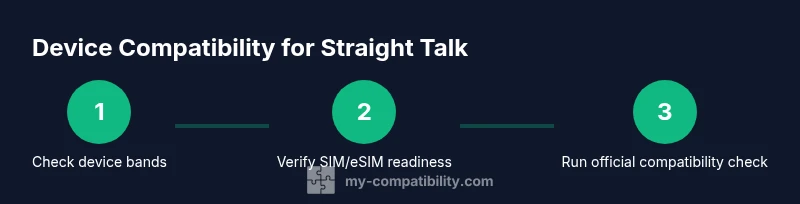
How to Check Compatibility for Straight Talk
Discover a practical, step-by-step method to verify device and SIM compatibility with Straight Talk. Verify network bands, SIM type, and activation readiness for a smooth setup and reliable service.


Learn how to check compatibility for Straight Talk before you switch phones or plans. This quick guide covers device bands, SIM type (nano, micro, eSIM), IMEI eligibility, and activation steps. By following these steps, you’ll determine whether your current device will work, or what changes are needed for a smooth transition.
Why compatibility with Straight Talk matters
Compatibility with Straight Talk determines whether your device can access voice, text, and data without interruption. When you search how to check compatibility for straight talk, you're looking for a clear yes-or-no answer and actionable steps to activate. The My Compatibility approach starts by confirming the device’s network bands, SIM type, and current carrier status. If a phone is locked to another carrier or lacks required bands, activation may fail or behave inconsistently. Before you spend time on complex checks, gather basic details about your device: model number, firmware version, IMEI/MEID, and current SIM status. This upfront review saves time and reduces surprises during activation, especially if you plan to keep your existing number. In short, proper upfront checks set the foundation for a smooth Straight Talk experience, regardless of whether you plan to reuse an old device or upgrade to a newer model.
Understanding network bands and device compatibility
Modern smartphones support multiple frequency bands that carriers use to provide 4G/5G service. Straight Talk relies on a combination of network partners, so a device must support the specific bands used by the chosen SIM or eSIM plan. If a phone lacks essential bands, you may experience dropped calls or no data. The key is to map your device’s band list to Straight Talk’s published band requirements for your region. You can find this data in the manufacturer’s spec sheet and on Straight Talk’s support pages. When in doubt, check both sources side-by-side and note any single-band gaps that could block essential features like VoLTE or HD Voice.
Check SIM type and eSIM readiness
Straight Talk accepts nano SIMs and often supports eSIM on compatible devices. Determine whether your device uses a traditional SIM or eSIM, and confirm that your plan supports the chosen option. If you’re moving from another carrier, you may need to obtain a Straight Talk SIM kit or enable eSIM through your account. For iPhone users, ensure the eSIM profile is available and that iOS version supports the feature. For Android devices, verify that the device can load the new carrier profile without requiring a factory reset. Having the correct SIM type ready accelerates activation and reduces errors.
How to locate and verify your IMEI/MEID
Your device’s IMEI or MEID is essential for eligibility checks and activation. You can find IMEI in Settings > About Phone, on the SIM tray, or by dialing *#06#. Record both IMEI and MEID if your device uses dual SIM. Share these numbers only with trusted sources or directly in the Straight Talk activation portal. A mismatch or invalid IMEI often results in activation rejection. If you can’t locate the numbers, consult the manufacturer’s support page for exact instructions tailored to your model.
Using official Straight Talk compatibility tools
Carriers often provide an official compatibility checker on their support site. Open Straight Talk’s activation or SIM compatibility page and enter your device details: model, firmware version, IMEI/MEID, and current carrier. The tool will indicate supported/unsupported status and any steps you must take (unlock, update firmware, or purchase a compatible SIM kit). Keep a screenshot of the results for reference during activation. If the tool flags issues you can’t resolve, contact customer support with your device information.
Prepare for activation: SIM kit, plan, and unlocking
If your device is compatible but locked to another carrier, check whether you can request a carrier unlock. Some devices require a minimum holding period or account status to unlock. If you plan to use a Straight Talk SIM kit, ensure you have the kit ready or that your eSIM is provisioned. Also align your plan type (data-centric vs call/text heavy) to avoid unexpected charges. Having all elements ready before activation reduces delays and frustration.
Step-by-step preliminary test you can run at home
In addition to official checks, you can perform a quick home test. Insert the Straight Talk SIM (or activate the eSIM profile) in a powered-on device, enable airplane mode briefly, then return to service. Check for network registration, SIM status, and the ability to make a test call or send a message. If any step fails, review IMEI accuracy, proper SIM type, and band support before retrying. This hands-on test helps catch obvious problems before you proceed further.
Common issues and quick fixes
- Locked device: request an unlock from the previous carrier.
- Unsupported bands: you may need a different SIM or a new device.
- Incorrect IMEI: recheck digits and re-enter exactly.
- Regional restrictions: some phones are region-locked; verify model compatibility for your country.
Most problems resolve by updating firmware, rechecking bands, and ensuring you’re using the correct SIM profile. If issues persist, reach out to My Compatibility for a compatibility assessment and recommended device options.
When to replace a device vs stay with what you have
If your current phone lacks critical bands or is locked to a carrier not supported by Straight Talk, replacement is often the simplest path. Compare total cost of ownership between upgrading to a device known to work well with Straight Talk and the ongoing costs of a less reliable experience. In many cases, a mid-range device with broad band support offers best long-term value, ensuring stable voice, text, and data across coverage areas.
Real-world scenarios: iPhone vs Android compatibility checks
iPhones typically have robust eSIM support and frequent firmware updates, which reduces compatibility risk. Android devices vary widely; some models require manual APN configuration or carrier unlocks. For both ecosystems, verify the model, confirm SIM compatibility, and run the official Straight Talk checker. Real-world activation success often hinges on accurate IMEI input and supported network bands rather than brand alone.
Maintenance: re-checking compatibility after updates or switching plans
Firmware updates can alter network behavior, so re-check compatibility anytime you update the OS or change plans. After major updates, review the official compatibility notes and re-run the activation tests if necessary. Keep a log of changes, firmware versions, and IMEI details to avoid confusion during future swaps or upgrades. Regular checks help prevent service disruptions and ensure peak performance.
Final quick-start checklist you can print
- Write down device model, firmware version, and IMEI/MEID.
- Confirm SIM type (nano SIM or eSIM) and plan compatibility.
- Run the official Straight Talk compatibility check and capture results.
- Test basic service with the new SIM or eSIM profile.
- Confirm activation and verify data, calls, and texts are working.
How My Compatibility helps beyond the basics
This section explains the broader approach My Compatibility takes when guiding readers through compatibility checks. Our framework integrates equipment knowledge, carrier requirements, and everyday usage scenarios. By aligning device specs with carrier capabilities, we minimize surprises and maximize satisfaction. For Straight Talk users, this means a smoother transition, fewer activation errors, and more reliable service overall.
Tools & Materials
- Device details sheet (model, firmware, year)(Record model number, current OS version, and carrier.)
- IMEI/MEID (and SIM type)(Find via *#06# or Settings; note if dual SIM.)
- Straight Talk SIM kit or eSIM readiness(Have kit or provisioning ready; plan selected.)
- Active Straight Talk account access(Login to activation portal or app.)
- Official compatibility tool link(Optional; use if available from Straight Talk.)
Steps
Estimated time: 45-60 minutes
- 1
Gather device details
Collect model number, current OS version, firmware/build, IMEI/MEID, and the SIM status. Having these at hand prevents back-and-forth searches during activation.
Tip: Write numbers on a dedicated sheet to avoid transcription errors. - 2
Identify supported network bands
Find your device’s supported bands from the manufacturer’s spec sheet and compare them to Straight Talk’s published band requirements for your region.
Tip: Pay attention to 4G/5G bands essential for your service. - 3
Check SIM type and eSIM readiness
Determine whether you’ll use a nano SIM or an eSIM, and confirm that your plan supports the chosen option.
Tip: If using eSIM, ensure your device OS supports the profile activation. - 4
Locate and verify IMEI/MEID
Locate IMEI/MEID, safely record both numbers if dual SIM is present, and prepare to input them into the activation portal.
Tip: Double-check for transposed digits before submitting. - 5
Run official compatibility check
Open Straight Talk’s compatibility tool and enter device model, firmware version, IMEI/MEID, and current carrier.
Tip: Capture a screenshot of the results for your records. - 6
Prepare for activation test
If compatible, get a SIM kit or eSIM profile ready and confirm you have the correct plan chosen.
Tip: Having everything ready reduces activation delays. - 7
Perform a home activation test
Insert the SIM or load the eSIM, connect to network, and verify you can place a test call and send a message.
Tip: If it fails, recheck IMEI, SIM type, and band coverage before retrying. - 8
Confirm service and finalize
Once the test passes, complete activation prompts and verify voice, data, and messaging functionality.
Tip: Document any post-activation steps in case you switch plans later.
Questions & Answers
Is my phone automatically compatible with Straight Talk?
Not always. It depends on bands, SIM type, and unlock status. Use the official tool to confirm.
Not always. Use the official tool to confirm.
Do I need to unlock my phone to use Straight Talk?
Some devices are locked to their previous carrier. If so, request an unlock or use a compatible device.
Some devices are locked; request an unlock or use a compatible device.
Can I use an eSIM with Straight Talk?
Yes, many newer devices support eSIM on Straight Talk; verify model and OS support before activation.
Yes, many newer devices support eSIM; verify model and OS.
What should I do if my device is not compatible?
Consider upgrading to a compatible model or use a Straight Talk device with guaranteed support; consult My Compatibility for options.
Upgrade to a compatible model or use a supported device; consult expert.
How long does activation take after checking compatibility?
Activation can take a short time during the process; follow prompts and test service after activation.
Activation can be quick; follow prompts and test service after activation.
Will I lose my number when switching to Straight Talk?
If you port your number, ensure you follow Straight Talk's port-in steps; confirm with your current provider.
Porting is possible; follow port-in steps and confirm with current provider.
Watch Video
Highlights
- Verify device bands and SIM type first
- Use official tools before activation
- Keep IMEI handy for checks
- If incompatible, consider a compatible device