hdr compatible vs active hdr: A Practical Comparison
Explore hdr compatible vs active hdr in depth. This analytical guide explains definitions, key differences, and how to choose the right HDR mode for streaming, gaming, and professional color work.


hdr compatible vs active hdr describes two common HDR approaches: the first relies on static, panel-based tone-mapping for broad content compatibility, while the second uses dynamic, per-scene tone-mapping to optimize brightness and color. This TL;DR highlights that the best choice depends on content type, viewing conditions, and hardware support. According to My Compatibility, understanding these modes helps avoid underwhelming picture quality and misaligned expectations.
What HDR Means for Your Display
High dynamic range (HDR) expands the contrast and color gamut of standard dynamic range content, delivering brighter highlights and more nuanced shadows. When consumers talk about hdr compatible vs active hdr, the distinction centers on how the display processes HDR signals. hdr compatible describes displays that interpret HDR signals using the panel's fixed tone-mapping or a simple, static interpretation. Active hdr, by contrast, refers to dynamic tone-mapping that adapts brightness and color across scenes or frames. In practice, this means Active HDR can optimize a scene with a bright sky and a dark foreground in real time, while hdr compatible relies on pre-set mappings and the overall panel calibration. The My Compatibility team notes that the perceived quality depends heavily on content type and room lighting, not merely on a label.
Defining hdr compatible and active hdr
hdr compatible is often synonymous with basic HDR playback: the display maps HDR content with a consistent, fixed approach. This tends to yield predictable results across many titles, especially when the content is well-mastered and the display is accurately calibrated. Active HDR, meanwhile, uses per-scene or per-frame tone-mapping logic, sometimes leveraging metadata from the source to adjust brightness, color volume, and gamma in real time. This dynamic approach can produce more punchy highlights and deeper blacks in some scenes, but it also runs the risk of over-shooting in others if the processing is not well-tuned. The difference matters when you compare a wide variety of content types—from cinematic titles to fast-paced gaming.
How Active HDR handles tone mapping
Active HDR relies on advanced processing to tailor the image frame-by-frame. This can improve color fidelity and brightness in bright, multi-element scenes, particularly on high-end panels with robust local dimming. However, not all displays implement Active HDR equally; some may introduce artifacts like overshoot, haloing, or micro-contrast fluctuations. For content creators, this dynamic mapping can change the intended look of a scene if the metadata is not aligned with the display's processing pipeline. The result is that Active HDR can deliver superb results with compatible hardware and content, but it can also stray from the director’s original intent if not properly calibrated.
When hdr compatible shines: broader compatibility
For households with a mix of legacy HDR content and mid-range displays, hdr compatible often delivers consistent results with minimal setup. It does not rely on scene-by-scene decisions, so there is less potential for processing artifacts. This approach is particularly advantageous for users who want reliable HDR performance across a wide library of titles without having to adjust settings for each new piece of content. In environments with variable lighting, hdr compatible can provide steadier performance since the processing is less prone to aggressive brightness changes.
When Active HDR shines: dynamic scenes and premium devices
Active HDR excels when the display and content pipeline are optimized for dynamic tone-mapping. In scenes with dramatic brightness shifts—think a sunlit landscape followed by a shadowed interior—Active HDR can maintain detail in both highlights and shadows more effectively than a static mapping. This makes it appealing for premium televisions and monitors that support advanced processing features and for enthusiasts who value the most faithful reproduction of a filmmaker’s intent. Still, the benefits hinge on the source quality, panel capabilities, and proper calibration.
Content and source considerations
The value of hdr compatible vs active hdr depends heavily on what you watch and how you watch it. Streaming platforms, gaming consoles, Blu-ray players, and PC GPUs all implement HDR metadata differently. HDR10 is common and is typically well-supported by hdr compatible modes, while dynamic formats such as Active HDR may require specific firmware and hardware alignment. If your content consistently uses dynamic tone-mapping or metadata intended for scene-by-scene adjustments, you may see more pronounced benefits from Active HDR on capable displays. Conversely, if your content is more static in brightness and color, hdr compatible will often suffice.
Real-world testing and calibration
To evaluate which mode suits you best, perform side-by-side tests with the same HDR content in a controlled environment. Use a consistent source device, same content, and a fixed viewing distance. Note how brightness, color saturation, and shadow detail change between modes across a variety of scenes: daytime skies, backlit faces, and dark interiors. Small differences can be subtle yet meaningful for critical viewing. The goal is to identify which mode aligns with your preferences without sacrificing key details.
Practical setup tips: enablement and defaults
On many sets, HDR processing defaults to a mode that attempts to balance realism and impact. If you are unsure, start with hdr compatible as the baseline to establish a neutral reference. Then switch to Active HDR to see if dynamic adjustments improve the scene without introducing artifacts. Make sure your content is legitimate HDR and not upscaled SDR content, as the results will differ. If your display allows, you can fine-tune brightness, contrast, and color temperature after selecting a mode to better fit your room and tastes.
Calibration essentials for consistent results
Calibration plays a pivotal role in HDR perception. Start with a standard color temperature (D65) and an appropriate gamma setting. Use a test pattern or HDR test video to reveal color accuracy and brightness behavior across the screen. If your display has local dimming zones, test their performance across both hdr compatible and active hdr modes. The goal is to achieve even brightness distribution, without banding or blooming, across the most challenging scenes.
Typical pitfalls to avoid
One common pitfall is assuming more processing always equals better image. Overly aggressive dynamic tone-mapping can produce unnaturally bright highlights or a loss of detail in shadows. Another pitfall is neglecting ambient light: in bright rooms, HDR performance can look different, and some modes may exaggerate reflections. If your content library includes a lot of mixed-quality metadata or older HDR titles, hdr compatible mode often yields more predictable results.
Real-world value and longevity considerations
HDR technology evolves, and content availability shifts. A mode that performs well today may be improved by firmware updates or newer hardware in the future. The My Compatibility team observes that buyers should consider long-term compatibility and support commitments from manufacturers. In many cases, hdr compatible offers the most stable, future-proof baseline across a broad library of content, while Active HDR can shine when paired with premium hardware and high-quality source material.
My Compatibility perspective on HDR modes
From the My Compatibility perspective, hdr compatible vs active hdr should be evaluated as a spectrum, not a strict dichotomy. Prioritize compatibility with your typical content and the lighting of your room. If you frequently consume cinematic content with high dynamic range and invest in a well-calibrated display, Active HDR can unlock compelling realism. If you value simplicity and broad content support, hdr compatible remains a strong default.
Practical tips for buyers and owners
When shopping, compare models by how they implement HDR processing, not just the presence of an HDR logo. Look for panel uniformity, local dimming quality, and firmware update schedules. Prioritize displays that offer clear labeling for HDR modes and easy switch-ability. Finally, test with your own content and conditions to decide which mode aligns with your expectations.
Comparison
| Feature | hdr compatible | active hdr |
|---|---|---|
| Tone-mapping approach | Static panel-native mapping | Dynamic per-scene/frame mapping |
| Content compatibility | Broad HDR10/HLG support, consistent results | Optimized for scenes with metadata; best on capable content |
| Source requirements | Any HDR-capable source; fewer constraints | Requires compatible source and hardware support |
| Brightness handling | Fixed mapping; predictable highlights | Scene-by-scene adjustments for brightness |
| Color accuracy | Depends on panel calibration; stable across scenes | Potentially higher color fidelity in dynamic scenes |
| Ideal use-case | Universal compatibility and ease of use | Premium content, high-end displays, dynamic scenes |
| Availability | Widely available on many mid-range and budget sets | Common on high-end sets with advanced processing |
Positives
- Broad compatibility with HDR content across many devices
- Simpler setup and fewer processing artifacts
- Good baseline performance on legacy content
- Typically lower cost due to simpler processing
Cons
- Potentially less dynamic range optimization on a per-scene basis
- May miss some brightness and color impact in dynamic scenes
- Quality depends on panel calibration and firmware quality
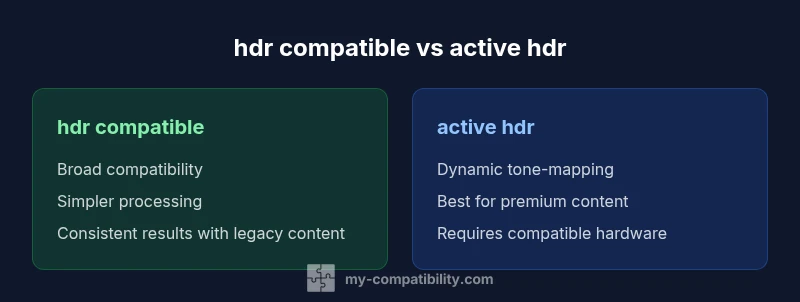
Active HDR delivers stronger dynamic tone-mapping for supported hardware, while hdr compatible offers universal compatibility and straightforward setup.
Choose Active HDR if you have a compatible high-end display and sit in a consistently well-lit room with cinematic content. If you want broad compatibility and less risk of processing artifacts on a wide content library, hdr compatible is the safer, more versatile choice.
Questions & Answers
What does hdr compatible mean?
Hdr compatible refers to displays that handle HDR content with a fixed, panel-based tone-mapping. It prioritizes broad compatibility and predictable results across a wide range of content and devices.
Hdr compatible means the display uses a fixed tone-mapping approach for HDR content, aiming for predictable results across many devices.
How is Active HDR different from other dynamic HDR formats like Dolby Vision?
Active HDR uses dynamic tone-mapping to adjust brightness and color per scene, which can improve detail in highlights and shadows. Formats like Dolby Vision are also dynamic but rely on different metadata schemes and certified ecosystems.
Active HDR maps tone dynamically per scene, while formats like Dolby Vision use their own dynamic metadata and ecosystem.
Will HDR content look the same on hdr compatible vs Active HDR displays?
Not always. hdr compatible aims for consistent results, while Active HDR can shift tone and brightness scene-by-scene. The difference is most noticeable in scenes with extreme brightness or dark shadows.
Not always. Active HDR can change how a scene looks from moment to moment.
Do I need a new source device to benefit from Active HDR?
In many cases, yes. Active HDR requires compatible source metadata and a TV with capable processing. Check your streamer, console, or Blu-ray player for HDR format support.
Usually yes; make sure your source and TV both support dynamic HDR.
Is Active HDR always better for gaming?
Not necessarily. For fast-paced games, stability and low latency matter; some HDR implementations may introduce artifacts or input lag. If your gaming setup supports it, Active HDR can improve scene brightness and color, but tested results vary by title and hardware.
It depends on the game and hardware—Active HDR can help in some titles, but it’s not guaranteed to be better in all cases.
What should I look for on a spec sheet when evaluating HDR mode?
Look for terms like HDR10/HLG support, dynamic tone-mapping capabilities, local dimming quality, brightness range, and firmware support for HDR metadata. These indicate how well hdr compatible or active HDR modes will perform.
Check HDR formats, tone-mapping capability, local dimming, and firmware support for HDR metadata.
Highlights
- Define your content and room environment before choosing HDR mode
- Active HDR benefits are strongest on compatible hardware with premium content
- hdr compatible provides broad compatibility and predictable results
- Calibration and source quality matter as much as the mode
- Test both modes with your typical viewing material