HDR Compatible vs HDR10: A Clear, Practical Comparison
Explore hdr compatible vs hdr10: definitions, differences, and practical guidance for TVs, monitors, GPUs, and streaming. Learn which approach offers the best balance of compatibility, quality, and future-proofing.


HDR compatibility is the broad ability of a display or device to process high dynamic range signals, while HDR10 is a specific standard with defined color depth and static metadata. In practice, HDR10 serves as the universal baseline, and many devices support it out of the box. Some platforms also support dynamic metadata formats like HDR10+ or Dolby Vision, which can improve quality on compatible hardware. When pairing sources, displays, and cables, hdr compatible vs hdr10 decisions shape both content availability and visual results across apps and services.
What HDR Compatibility Means in Practice
Understanding hdr compatible vs hdr10 starts with recognizing two ideas: compatibility and a specific format. HDR compatibility describes whether a device can process high dynamic range signals at all, regardless of the exact signaling standard. HDR10, by contrast, is a concrete specification with defined color depth, metadata type, and brightness handling. According to My Compatibility, the practical difference for most users is this: you want a system where the source, display, and cables all support HDR; otherwise, you may see muted colors, incorrect brightness, or banding. When a device claims HDR compatibility but lacks HDR10 or Dolby Vision, it can still display HDR content from certain sources, but the experience will often vary. In short, hdr compatible vs hdr10 matters because it determines both what content you can play and how reliably it will look across different apps, streaming services, and hardware ecosystems.
HDR10: The Baseline Standard
HDR10 is the widely adopted baseline for high dynamic range content. It uses a 10-bit color depth and a static metadata framework to set brightness and color for the entire video, ensuring a consistent look on compatible displays. Because HDR10 relies on static metadata, content creators can encode once, and a broad ecosystem of TVs, monitors, consoles, and streaming devices can decode it without requiring the extra licensing or device-specific hooks needed by some competing formats. From a consumer perspective, HDR10 is the most common form of HDR you’ll encounter, and it is the default expectation when you buy most new displays. As a result, hdr compatible vs hdr10 decisions often come down to whether your gear can reliably render HDR10 and whether you want to explore higher-end formats for potential quality gains.
Beyond HDR10: Dynamic Metadata Formats (HDR10+, Dolby Vision)
Beyond HDR10, dynamic metadata formats aim to tailor brightness and color on a scene-by-scene or frame-by-frame basis. HDR10+ uses dynamic metadata without licensing fees, while Dolby Vision relies on more sophisticated dynamic metadata and often requires licensing, hardware, and software support. This means that when you have HDR10+ or Dolby Vision-enabled devices and sources, you can see improved contrast and color accuracy in scenes with dramatic brightness changes. However, the benefit hinges on the entire playback chain: content must be encoded in the format, the source device must pass the metadata, and the display must interpret it correctly. For many households, the practical takeaway is that hdr compatible vs hdr10 becomes most meaningful when you have devices that truly support dynamic metadata and content that takes advantage of it.
How to Check HDR Support on Your Gear
Verifying HDR support starts with your source, display, and connection. On a TV or monitor, scan the specs label or menu for HDR10, HDR10+, Dolby Vision, or HBR (high dynamic range) indicators. For gaming consoles and streaming devices, inspect the playback settings to confirm enabled HDR formats. On a PC, open Display Settings and review the active color depth and HDR options; Windows often lists HDR10 as the supported mode when available. For laptops, check the manufacturer’s support page or the EDID (Extended Display Identification Data) details to confirm which HDR formats are advertised. In short, you should see HDR10 mentioned prominently, and if you’re chasing the most dynamic experience, look for HDR10+ or Dolby Vision support across the chain.
Content Encoding, Sources, and Playback Chain
HDR content originates from a source device or disc and travels through cables to the display. The encoding format (HDR10, HDR10+, or Dolby Vision) determines metadata and color processing requirements. The display then decodes this data, maps the content’s color space (typically Rec. 2020 or DCI-P3) to its own output, and renders the final image. This chain is sensitive to EDID information, firmware, and cable quality. If any link in the chain lacks proper HDR support, the result may be washed-out highlights, incorrect colors, or reduced brightness. Understanding hdr compatible vs hdr10 at this level helps you pinpoint where a mismatch occurs and what component to upgrade first to improve overall HDR quality.
Typical Setups: TV, PC Monitor, Console, and Streaming Devices
In a typical living room, HDR10 baseline coverage is enough to enjoy most streaming and broadcast content. For PC gaming, HDR-capable monitors and GPUs that support HDR10 ensure broad compatibility, with some gamers opting for HDR10+ or Dolby Vision-capable setups if their hardware and games support it. Console ecosystems (PlayStation, Xbox) vary in format support by model and generation; newer devices strive to offer HDR10 along with other formats. Streaming devices (Roku, Apple TV, Chromecast) vary by platform, with some apps delivering HDR10 content exclusively and others providing Dolby Vision where licensed. The key takeaway in this section is that your overall experience relies on coherent support across the entire chain, not just a single device.
Practical Tradeoffs: Compatibility, Quality, and Price
HDR compatibility affects how many sources and apps you can use without friction. HDR10, as the baseline, keeps costs predictable because it doesn’t require extra licensing. Formats with dynamic metadata (HDR10+ and Dolby Vision) can yield better image quality on compatible devices but often introduce more complex hardware and software requirements. That means scenarios with high brightness scenes or complex color grading may benefit from dynamic metadata, while entry-level setups will benefit most from HDR10’s universal behavior. When weighing hdr compatible vs hdr10, consider your content preferences, ecosystem, and whether you value maximum peak brightness and scene-by-scene color optimization over broadest compatibility.
Testing HDR Quality at Home: A Step-by-Step Guide
To evaluate HDR performance at home, start with a few representative test clips or streams that include bright highlights, dark interiors, and nuanced skin tones. Check for proper mapping of highlights to avoid clipping, accurate color reproduction, and consistent brightness across scenes. Compare HDR10 content against any HDR10+ or Dolby Vision content you have access to and note differences in perceived depth and color fidelity. Use test patterns and calibration tools if available, and document your findings in practical terms: does your display look “alive” with HDR, or do certain scenes feel washed out or oversaturated? Remember that results depend on content quality, source format, and display calibration.
When HDR10 Is Sufficient vs When You Might Need Other Formats
For most streaming and casual viewing, HDR10 is sufficient and offers the broadest compatibility across devices. If you frequently watch cinematic content, play HDR-enabled games, or own a display and source that explicitly support HDR10+ or Dolby Vision, you may notice more dynamic range, better color mapping, and improved HDR performance. However, the added benefits come with hardware requirements and often higher costs. In short, hdr compatible vs hdr10 matters most when your hardware and content explicitly support the enhanced formats; otherwise, HDR10 delivers reliable, widely supported HDR experience.
Optimizing HDR Performance Without Upgrading Everything
If you’re not ready to overhaul your entire setup, focus on incremental improvements. Update device firmware, ensure your HDMI cables and ports are rated for the bandwidth required by HDR, and calibrate your display’s brightness, contrast, and color temperature. Favor content that is properly mastered for HDR10 or HDR10+ on the hardware you own, and enable HDR in your software settings where appropriate. By aligning your source, display, and connection, you’ll maximize the perceived HDR quality without paying for a full format upgrade.
Authoritative Sources and Further Reading
For deeper technical context and standards references, consult SMPTE documentation and major public policy or standards publications. Consider checking: SMPTE HDR standards (https://www.smpte.org/), HDMI Forum specifications (https://www.hdmiforum.org/), and public-facing summaries from technology policy bodies (e.g., https://www.fcc.gov/). These sources provide foundational guidance that supports practical testing and equipment decisions when navigating hdr compatible vs hdr10 in real-world setups.
Comparison
| Feature | HDR compatibility (generic) | HDR10 baseline |
|---|---|---|
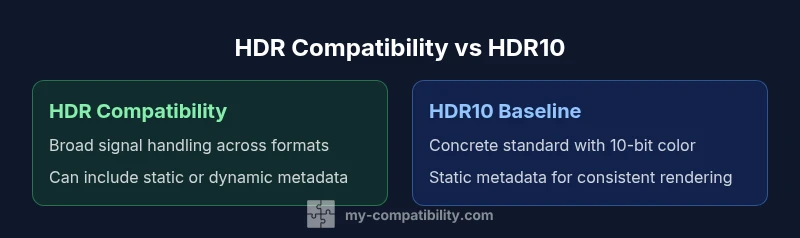
| Definition | Broad capability to handle HDR signals across formats | Concrete standard with defined color depth and static metadata |
| Metadata Type | Can include static or dynamic metadata depending on device | Static metadata only (for HDR10) |
| Color Depth | Often 10-bit or higher depending on device | Typically 10-bit color depth |
| Content Availability | Depends on source format and device support | Widely available as the default HDR format in most content |
| Best Use Case | Maximal compatibility across ecosystems | Reliable baseline HDR viewing across most content |
| Device Requirements | Requires support for the selected HDR formats across chain | Requires HDR10-capable display and source at minimum |
| Cables/Ports | Wide range of HDMI versions can work, depending on format |
Positives
- Broad compatibility across devices and apps
- Common baseline content and streaming support
- Reduces complexity for content creators and distributors
- Low risk of format mismatch in diverse setups
Cons
- Dynamic HDR formats may offer superior results on capable gear
- HDR10 lacks per-scene optimization, potentially underutilizing scenes
- Some displays implement HDR poorly, leading to inconsistent results
HDR10 remains the practical baseline; dynamic formats offer gains on compatible gear
Choose HDR10 for broad compatibility and reliable performance. If your devices support HDR10+, Dolby Vision, or similar formats and your content uses them, you can expect improved realism in some scenes. Consider upgrading selectively to unlock those enhancements.
Questions & Answers
What is the difference between HDR compatibility and HDR10?
HDR compatibility refers to whether a device can process HDR signals in general, while HDR10 is a concrete standard with defined features like 10-bit color and static metadata. The two concepts are related but not identical.
HDR compatibility is the ability to handle HDR signals; HDR10 is a specific format with defined rules for color and brightness.
Is HDR10 always the best choice?
HDR10 is the baseline that most devices support, making it the safest choice for broad compatibility. Higher-end formats like HDR10+ and Dolby Vision can improve quality on compatible gear, but only if your entire playback chain supports them.
HDR10 is the safe baseline, while HDR10+ and Dolby Vision can improve quality on compatible gear.
Do I need HDR10+ or Dolby Vision if I have HDR10?
Not necessarily. If your content and devices already perform well with HDR10, upgrading only pays off if you have hardware that supports dynamic metadata and you view content that benefits from it.
You only need HDR10+ or Dolby Vision if your gear and content support them and you want the extra quality.
How can I tell if my TV supports HDR formats?
Check the TV’s specifications or on-screen display menu for HDR10, HDR10+, Dolby Vision, or other HDR formats. You can also refer to the EDID information or the manufacturer’s support page.
Look in the specs or menu for HDR formats; if in doubt, check the user manual or support site.
What cables do I need for HDR content?
Use HDMI cables rated for high bandwidth (HDMI 2.0b/2.1). Ensure ports and devices in the chain support the HDR format you intend to use, and avoid using older cables that may bottleneck bandwidth.
Use quality HDMI 2.0b or 2.1 cables to ensure HDR stays intact.
Can HDR performance be improved without replacing devices?
Yes. Update firmware, calibrate your display, and ensure you’re using the right HDR settings in both the device and apps. Content choice also matters; use well-mastered HDR content to see benefits.
Firmware updates and proper calibration can improve HDR without upgrading hardware.
Highlights
- Prioritize HDR10 support for universal compatibility
- Consider dynamic HDR only if your devices and content support it
- Verify your chain (source, cable, display) supports the same HDR format
- Update firmware and calibrate your display for best results
- Test with real content to judge perceived quality