Are Compatible Inks as Good as Originals? A Thorough Comparison
An objective, in-depth comparison of compatible inks versus original cartridges, covering print quality, reliability, cost, and practical testing tips to help you decide which path fits your needs.


Are compatible inks as good as originals? In general, compatible inks offer print quality close to originals for everyday documents, with notable caveats for photos and color-critical work. Brand quality and proper testing drive outcomes. Expect meaningful cost savings per page, but weigh warranty implications and printer-specific compatibility before switching.
are compatible inks as good as originals
The recurring question—are compatible inks as good as originals—is nuanced. According to My Compatibility, outcomes hinge on brand quality, printer model, and how you define “good.” For many users, compatibles deliver text and basic graphics that meet workplace standards, with color fidelity that satisfies routine documents. The broader takeaway is that compatibility exists on a spectrum: some brands come very close to original performance, while others lag in color accuracy or longevity. When evaluating inks, consider your intended use, print volume, and tolerance for variation. This article uses a structured framework to compare original cartridges with compatible inks while highlighting practical steps you can take. The My Compatibility team emphasizes testing in small batches and documenting results to determine whether are compatible inks as good as originals for your specific printer and tasks.
The science behind ink chemistry and how it affects results
Ink quality is driven by formulation, pigment or dye choice, binder chemistry, and reservoir design. Originals are tightly controlled by manufacturers to ensure color consistency and predictable drying times across lots. Compatible inks aim to mimic those properties, but batch-to-batch variation can occur. In plain terms, pigment-based inks tend to offer better fade resistance and color stability, while dye-based inks can deliver vivid hues on certain papers. Toner-based systems differ altogether, yet the same principle applies: the closer the formulation to the original, the more closely results will resemble the reference prints. For end users, this means selecting pigments thoughtfully, and recognizing that color shift or ink density differences may appear under certain lighting conditions and paper types.
Print quality: text, graphics, and photos
For everyday documents, many compatible inks provide crisp, legible text and accurate grayscale rendering that satisfy most office needs. Graphics and charts usually print well on standard office paper, with a small, sometimes noticeable variance in color saturation. Photos are where discrepancies most often surface. High-end original ink sets or premium third-party brands may outperform cheaper compatibles for photo quality, especially in skin tones and gradient transitions. If photo printing is central to your workflow, plan for test prints on your typical paper stock and consider premium inks designed for photo fidelity. In short, the baseline is strong, but color-sensitive outputs require careful brand selection and real-world tests.
Reliability and consistency over time
Printer ink performance isn’t a one-off event; it’s about consistency across batches and time. Original cartridges, by design, tend to deliver uniform results across long print runs. Compatible inks can match this consistency when sourced from reputable brands with robust quality control. However, the risk of clogging, smearing, or fluctuations in color density tends to be higher with some lower-cost brands, particularly with high-usage environments. Regular maintenance, including nozzle checks and cleaning cycles, becomes part of the routine if you rely heavily on compatibles. The key takeaway is that reliability is brand-dependent, and proactive maintenance helps preserve consistency.
Printer firmware, detection, and warranty implications
Firmware updates can affect third-party ink compatibility, with some printers temporarily blocking non-original cartridges. Before switching, review the printer’s warranty terms and seek guidance from the vendor about compatibility. In many cases, using reputable compatible inks won’t void a warranty if the malfunction is not caused by the ink itself; however, the risk varies by manufacturer and model. If warranty coverage is critical, you may want to keep a record of testing results, buy from brands with positive support histories, and ensure you can revert to original cartridges if needed. This approach minimizes surprises and aligns with best practices for compatible ink usage.
Cost and value proposition: understanding price per page
The economic appeal of compatible inks is usually clear: lower upfront cartridge costs and a lower price per page, especially for high-volume printing. To gauge true value, calculate the per-page cost based on cartridge capacity and the number of pages printed. Remember to factor in any potential maintenance costs, such as extra cleaning cycles or more frequent print-head servicing, which can erode savings over time. In many light-to-moderate print environments, compatible inks deliver substantial savings with acceptable quality. In high-output or color-critical settings, the math may tilt toward originals or premium third-party options.
Brand ecosystem: cartridges, chips, and reliability
Ink cartridges often include chips to communicate usage data to printers. Not all compatibles reproduce these chips perfectly, which can affect alignment, ink level reporting, and firmware checks. Reputable brands invest in chip compatibility and post-sale support to minimize these issues. If you encounter chip-related warnings or alignment errors, consult the vendor’s troubleshooting guide and consider trying a newer production batch from a trusted supplier. The ecosystem matters: the more cohesive the brand, the smoother the experience.
How to choose a reputable compatible ink brand: criteria you can trust
Selecting a brand with consistent quality is essential. Prioritize manufacturers that publish test results, offer a warranty or satisfaction guarantee, and provide clear return policies. Look for third-party reviews and independent lab assessments that compare color accuracy, longevity, and volatility. Confirm that the ink is designed for your printer family and paper type, and verify the availability of compatible cartridges in the exact model you use. A structured vendor evaluation reduces risk and helps ensure you get results close to originals for your specific use case.
Testing inks safely: a practical, repeatable process
Begin with a small test batch before committing to a full switch. Use a controlled set of print jobs that cover text, graphics, and color images on papers you commonly use. Document every parameter: ink density, drying time, smearing, color shifts, and any nozzle issues. Compare outputs against a baseline produced with original cartridges. If possible, run a print head cleaning cycle before testing. Keep a test log for future reference and agree on success criteria with your team or household to prevent premature conclusions.
Common myths vs reality: separating hype from facts
Myth: all compatibles are the same quality. Reality: brand quality varies widely—some perform nearly identically to originals, others show noticeable differences. Myth: using compatibles will immediately void warranties. Reality: terms vary; many manufacturers allow third-party inks if unchecked issues arise from the ink itself. Myth: compatibility equals guaranteed pass for color-critical work. Reality: for photos and graphics, originals or premium brands often exceed basic compatibility performance. Myth: cheaper equals better value. Reality: the cheapest option may require more maintenance and yield higher long-term costs.
When compatible inks are the better choice: scenarios and guidelines
Compatible inks shine when cost reduction is a priority and your print tasks are routine documents, drafts, or internal reports. They are particularly compelling for households or small offices that print frequently but do not require archival prints or precise color matching across large runs. In contrast, if you frequently produce certified documents, artwork, or professional photographs, originals or higher-end third-party inks may be worth the extra investment. Use a tested, brand-backed approach to decide which path to take.
Maintenance, storage, and shelf life of compatible inks
Store inks in a cool, dry place away from direct sunlight to preserve shelf life. Keep cartridges sealed when not in use to minimize evaporation and drying. Rotate stock to prevent older batches from aging in storage. Consider labeling batches with purchase dates and test results so you can reproduce successful prints in the future. Routine maintenance remains a cornerstone of long-term satisfaction with compatibles, ensuring that performance remains within acceptable bounds over time.
Practical decision framework: a simple guide to choosing ink paths
Start with your print goals (text heavy vs. graphics/photos), workload, and tolerance for color variation. Evaluate brand quality by review history and third-party tests, then perform controlled tests on your own printer. Compute cost per page and total cost of ownership, including potential maintenance costs. Finally, decide on a switching plan: try a limited number of cartridges, monitor results, and scale up only after confirming the outputs meet your standards. This framework helps you make an informed, repeatable decision about ink compatibility.
Comparison
| Feature | Original ink cartridges | Compatible ink cartridges |
|---|---|---|
| Print quality (text) | Excellent | Very good to excellent depending on brand |
| Color accuracy | High fidelity across most tasks | Comparable with premium brands; varies by batch |
| Longevity/fade resistance | Excellent | Good with pigment-based options; varies by brand |
| Reliability (clogs/leaks) | Low risk | Moderate risk depending on brand and maintenance |
| Printer compatibility & firmware | Broadly supported | Sometimes tied to brand blocks or firmware checks |
| Cost per page | Higher with originals | Lower with compatibles; depends on brand and usage |
| Shelf life / storage stability | Long-term stability good with proper storage | Comparable with proper storage |
Positives
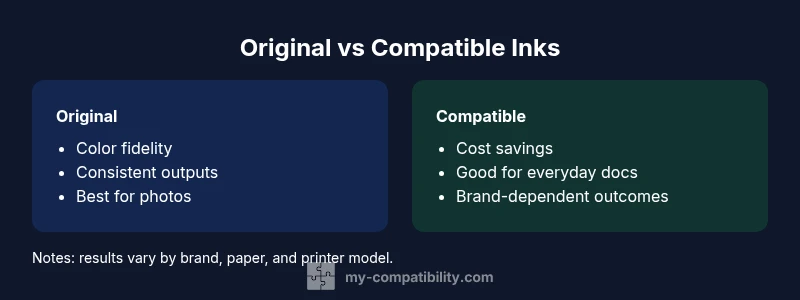
- Substantial cost savings per page
- Wide availability from multiple brands
- Adequate quality for everyday documents
- Easy to swap in for most printers
Cons
- Quality can vary between brands
- Potential warranty concerns with some printers
- May require extra maintenance (cleaning cycles) for long-term use
- Color accuracy can be inconsistent for photos or graphics
Compatible inks are a viable alternative for everyday printing, with originals preferred for color-critical work
For routine documents, compatibles save money with acceptable quality. If you require archival or color-accurate prints, consider originals or premium brands and test thoroughly.
Questions & Answers
Do compatible inks void printer warranties?
Warranty terms vary by manufacturer. In many cases, third-party inks do not automatically void a warranty if the issue is not caused by the ink itself. Always check your printer’s policy and keep documentation of testing results. If in doubt, consult the vendor or manufacturer support before switching.
Most warranties aren’t automatically voided by third-party inks, but always verify your printer’s policy and keep test records.
Are compatible inks suitable for high-quality photos?
Compatible inks can produce good photographs for many consumers, but archival-grade color accuracy and subtle gradations may lag behind originals or premium brands. If photo fidelity is critical, test with your typical paper and consider originals or high-end third-party options.
They can be good for photos, but for critical color accuracy, test first and compare with originals.
How do I choose a reputable compatible ink brand?
Look for brands with clear quality guarantees, documented test results, and positive independent reviews. Prefer suppliers offering warranties or return policies and ensure compatibility with your exact printer model and media type.
Choose brands with guarantees and solid reviews, and confirm model compatibility.
What risks exist with clogs or leaks?
Low risk with respected brands, but still possible. Maintain regular nozzle checks and follow storage guidelines. If you notice unusual streaks or smudging, run a cleaning cycle and compare to the baseline print.
Clogs and leaks can happen with some brands; perform routine maintenance and test prints.
Can I switch between originals and compatibles over time?
Yes, but do so gradually. Run cleaning cycles, print test pages, and monitor output. Avoid mixing inks in a single cartridge or tank to prevent color shifts and clogging.
You can switch, just test carefully and avoid mixing inks in one cartridge.
Will compatible inks work with all printer brands?
Most common printer families support compatible inks, but there can be model-specific limitations or firmware blocks. Start with a small batch and verify successful integration before scaling up.
They work with many printers, but check for brand-specific compatibility first.
Highlights
- Test inks in a controlled batch before full replacement
- Calculate cost per page to quantify savings
- Check printer warranty terms before switching
- Prefer reputable brands with positive reviews
- Keep extra maintenance cycles in your plan