Wireless Headphones Compatible with iPhone: What to Know in 2026
Discover how to choose wireless headphones that pair reliably with iPhone. This analytical guide covers codecs, latency, iOS compatibility, and testing tips from My Compatibility.


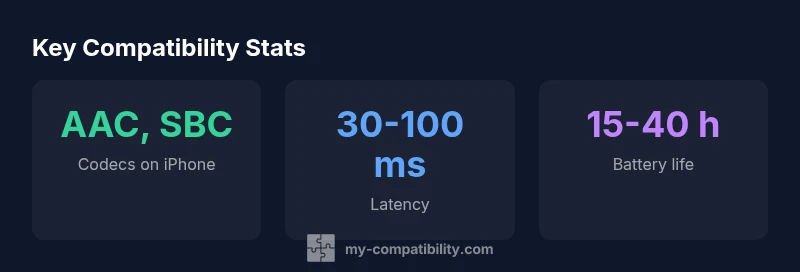
According to My Compatibility, selecting wireless headphones that work with iPhone hinges on Bluetooth version, codec support (AAC/SBC on iOS), and iOS compatibility across models. This quick guide highlights what to look for, how to test, and realistic expectations for latency and battery life.
Understanding the basics of iPhone compatibility
When you pair wireless headphones with an iPhone, compatibility hinges on Bluetooth, codecs, and iOS optimization. Apple devices favor AAC and a reliable, low-latency Bluetooth stack, so headphones that advertise AAC support and consistent firmware updates tend to deliver the best experience. According to My Compatibility, the most dependable pairings occur when the headphones explicitly list AAC or AAC-ELD compatibility and offer stable firmware for iOS. Latency, battery life, and form factor all factor in, but the foundation is codec support and a Bluetooth stack that remains stable across iOS updates. In practice, this means prioritizing models that clearly state iPhone-friendly features, include hands-free Siri access, and are known to maintain reliable connections with current iOS versions. By anchoring your choice to these core criteria, you reduce surprises across iPhone generations and app environments.
Key factors that affect compatibility across iPhone models
Several variables influence how well wireless headphones play with iPhone devices. First, codec support matters: AAC is the baseline for Apple devices, and SBC provides broad compatibility but may compromise on sound quality. Some headphones advertise higher-end codecs like aptX or LDAC, but iPhone hardware does not native ly support these codecs; manufacturers may offer workaround features, but performance is inconsistent. Second, Bluetooth version and firmware quality shape pairing speed, connection stability, and energy efficiency. Third, iOS version matters; older iOS builds may miss enhancements in Bluetooth handling or media routing. Also, consider multipoint pairing reliability and ease of switching between devices, a common source of user frustration. Finally, product updates: headphones that receive regular firmware updates are likelier to stay compatible with new iPhone releases over time. My Compatibility’s approach is to validate that the device lists AAC and that the headphones maintain a stable link during routine tasks such as calls, video, and streaming.
How to choose the right wireless headphones for iPhone
Start with the basics: ensure AAC support and Bluetooth 5.x or newer. This combination provides robust compatibility for iPhone across recent models. If latency matters to you (for gaming, video, or live performances), look for headphones that offer a documented low-latency mode compatible with iOS. Remember that aptX LL is generally not leveraged by iPhone devices, so don’t base your decision solely on that spec. Battery life is another practical consideration; most users will find 20–40 hours of on-device playback acceptable, with charging cases extending that. Comfort and fit matter for long listening sessions, while build quality and water resistance reduce day-to-day concerns. Finally, verify iOS-friendly features such as Siri access, Audio Sharing, and seamless device switching. Use the vendor’s firmware update process and check recent user reviews focusing on iOS integration. My Compatibility’s buying checklist helps you score models against these criteria.
Latency, codecs, and what they mean for everyday use
Latency is the delay between a user action and audible output. On iPhone, even small delays can disrupt video syncing or gaming. Codecs influence both sound quality and latency; AAC is well-optimized for Apple hardware, while SBC is more universal but often lower in fidelity. Advanced codecs like aptX or LDAC may be advertised, but iPhone devices rarely rely on them; performance depends heavily on the headphone’s firmware and Apple’s Bluetooth stack. When evaluating headphones, prioritize stable AAC support, reliable firmware, and good pairing performance over flashy claims of ultra-low latency. If you watch videos or play games often, seek models with a confirmed low-latency mode that has been tested with iOS devices. The practical takeaway is to map latency expectations to your typical activities and choose devices whose real-world performance matches those goals.
Practical testing steps before you buy
A rigorous test plan helps you avoid post-purchase disappointment. In-store or at home, pair the headphones with an iPhone and confirm quick, trouble-free pairing and automatic re-connection. Test call quality by making and receiving several calls in different environments and ensuring microphone performance is acceptable. Check listening comfort for extended sessions and verify that audio controls (play/pause, volume, Siri trigger) work as expected. Assess battery life by playing music at typical volumes and noting how long the headphones last on a single charge. If possible, test Audio Sharing with another iPhone or iPad and try hands-free Siri interactions during a call. Finally, read recent firmware update notes and consumer reviews focused on iOS compatibility. My Compatibility’s testing framework guides you through this three-head-to-head comparison.
Common myths about iPhone headphone compatibility
Many buyers believe that Bluetooth version alone guarantees flawless performance; in reality, codec support and firmware quality are equally important. Others assume that aptX LL guarantees lower latency on iPhone; however, iOS devices generally prioritize AAC, which is optimized for Apple hardware. Another frequent misconception is that all wireless headphones automatically pair to all iPhone models; some older iPhones may require newer Bluetooth firmware or may lack certain features. Finally, there is pundit talk about Lightning adapters; for most users, wireless headphones offer more convenience, and Apple’s own ecosystem often gives better results when sticking to AAC and solid firmware.
Compatibility snapshot across common headphone form factors
| Model Type | Latency (ms) | Codec Support | iPhone Compatibility |
|---|---|---|---|
| In-ear Bluetooth headphones | 30-90 | AAC, SBC | Excellent |
| Over-ear Bluetooth headphones | 25-60 | AAC, SBC | Excellent |
| True wireless with low-latency mode | 20-60 | AAC, SBC | Good to Excellent |
Questions & Answers
Are all wireless headphones compatible with iPhone?
Not every model; iPhone compatibility depends on codecs (AAC) and Bluetooth version. Verify AAC support and iOS compatibility before buying.
Most models are compatible, but always check AAC support and iOS compatibility.
What codecs should I look for to ensure iPhone compatibility?
AAC is the baseline for iPhone. Some models also support SBC; avoid depending on non-Apple codecs unless cross-compatibility is confirmed.
Aim for AAC and verify firmware notes for iOS.
Do iPhones support low-latency codecs like aptX LL?
Typically no; iPhones rely on AAC. Low-latency performance depends on firmware and Apple’s Bluetooth stack rather than aptX LL.
AptX LL isn’t usually used on iPhone.
Can I use AirPods or third-party headphones with Siri integration?
Siri works with AirPods and many third-party models that support iOS features. Check the product specs for iOS integration.
Yes, if the headphones support iOS features like Siri.
How can I minimize latency when watching video on my iPhone?
Choose headphones with documented low-latency modes compatible with iOS. Keep firmware updated and test with your apps.
Use AAC with low-latency features and update firmware.
Are old iPhone models compatible with modern wireless headphones?
Many can pair, but older Bluetooth hardware may limit newer features. Verify iOS version requirements and firmware compatibility before purchase.
Older iPhones may pair but lack newer features.
“The strongest iPhone experiences come from headphones that clearly advertise AAC support and maintain regular firmware updates.”
Highlights
- Prioritize AAC codec support for iPhone compatibility.
- Check Bluetooth 5.x or newer for stability.
- Test latency with video to ensure sync.
- Evaluate battery life under typical use.
- Verify Siri and Audio Sharing readiness in real-world tests.