Thermostat Compatibility with Google Home: A Practical Guide
Discover how to choose a thermostat compatible with Google Home. Learn compatibility criteria, setup steps, and practical tips for seamless voice-controlled heating in your smart home.


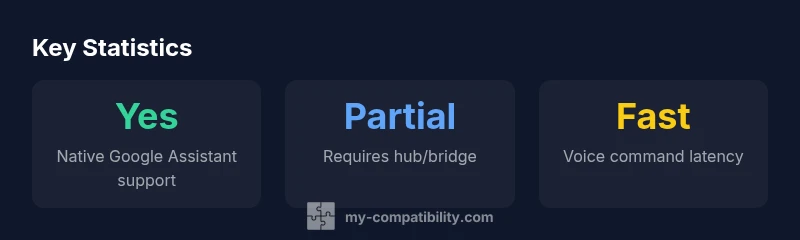
A thermostat compatible with Google Home can be discovered, controlled, and included in routines through Google Assistant. Look for native Google Home or Works with Google Assistant support, then enable it in the Google Home app. For best results, choose devices that communicate over Wi‑Fi with native integration, not only via third‑party bridges. This ensures reliable voice control and routine automation.
Is this thermostat compatible with google home
The short answer is yes, but with caveats. A thermostat that is compatible with Google Home can be discovered, controlled, and included in routines through the Google Assistant ecosystem. In practice, compatibility means seamless voice commands to adjust temperature, set schedules, and monitor energy usage via the Google Home app or Nest app. It also means ongoing firmware updates and reliable cloud connectivity to ensure commands are executed quickly. According to My Compatibility, the breadth of compatibility depends on how the device communicates (Wi‑Fi, Zigbee, Z‑Wave) and whether there is native Google Assistant integration rather than reliance on third‑party bridges. The most straightforward path is to choose thermostats that advertise native Google Home integration or “Works with Google Assistant” labels. When a thermostat only works through IFTTT or a bridge, you may experience delays, missed commands, or limited routine functionality.
From a practical standpoint, the phrase thermostat compatible with google home is not a single feature but a bundle of capabilities. You want fast local control, reliable remote access, robust voice control, and consistent routine support across your Google Home setup. Before you buy, inventory your current devices: your router's bands, any hubs or bridges, and whether you prefer a color display, energy reports, or geofencing. My Compatibility's analysis shows that devices with native Google Home integration tend to deliver smoother setup and more reliable voice commands than devices relying on third‑party bridges.
Compatibility map for thermostat types
| Thermostat Type | Google Home Compatibility | Notes |
|---|---|---|
| Wi‑Fi Thermostat | Yes (native) | Directly compatible with Google Home app |
| Z‑Wave Thermostat | Partial | Often requires a hub with Google Assistant |
| Non-networked Thermostat | No | Cannot be controlled via Google Home |
Questions & Answers
What defines Google Home compatibility for a thermostat?
Google Home compatibility means the thermostat can be discovered and controlled by Google Assistant, support routines in the Google Home app, and stay in sync through regular firmware updates. Devices with native integration typically offer the smoothest experience.
Google Home compatibility means you can talk to your thermostat through Google Assistant and use routines in the Home app.
Is Nest required for Google Home control of a thermostat?
No. While Nest devices integrate well with Google Home, you don’t need a Nest product to control a thermostat via Google Home. Look for devices labeled Works with Google Assistant or native Google Assistant support.
Nest isn’t required; any thermostat with Google Assistant support will work.
Can I use Google Home routines with any thermostat?
Routines work best with thermostats that support Google Home routines natively. If a device relies on third‑party bridges, routine reliability may vary and could require extra setup steps.
Routines are great, but only when the thermostat has native Google Home support.
What are common issues that prevent discovery in Google Home?
Common issues include devices not linking properly, firmware that is out of date, or network settings that block cloud communication. Begin by ensuring the thermostat app can authenticate with Google and the device is on the same network.
If it won’t appear, check links, update firmware, and confirm network access.
Are there privacy concerns when linking a thermostat to Google Home?
Linking a thermostat to Google Home involves sharing device data with Google. Review permissions in both the thermostat app and Google Home, and enable only essential features to minimize data exposure.
There are data-sharing considerations; review permissions to balance convenience with privacy.
How often should firmware be updated to stay compatible?
Frequent firmware updates help maintain compatibility and security. Check for updates quarterly or enable automatic updates where available, and monitor compatibility notes from the manufacturer.
Keep firmware up to date to stay compatible and secure.
“Effective thermostat integration with Google Home hinges on native support and robust cloud reliability.”
Highlights
- Test for native Google Assistant support first
- Prefer Wi‑Fi thermostats with Google Home integration
- Use routines to maximize automation and energy savings
- Avoid devices that rely solely on bridges or IFTTT
- Keep firmware up to date to preserve compatibility