Google Home Thermostat Compatibility: A Practical Guide
Discover google home thermostat compatibility, how to verify support for major brands, setup steps, and troubleshooting tips for Google Assistant-powered thermostats.


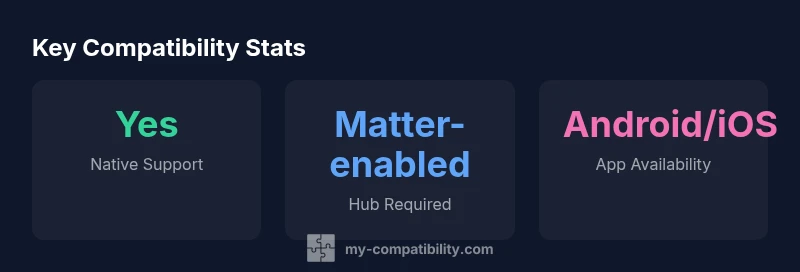
Google Home thermostat compatibility hinges on Google Assistant support and Matter integration. Most major brands—Nest, Ecobee, and Honeywell—work with Google Home via the Google Assistant app, but some models require a hub or a Matter-enabled setup. This guide explains how to verify compatibility, set up routines, and troubleshoot common issues.
How google home thermostat compatibility Works
Understanding google home thermostat compatibility begins with recognizing that Google Assistant is the bridge between your thermostat and the rest of your smart home. For most setups, you need a thermostat that supports Google Assistant and, increasingly, the Matter standard. This combination allows voice control through Google Home and enables inclusion in routines and scenes. In practice, you’ll typically find native support on popular brands, and some models may require a hub or a Matter-enabled gateway to unlock full functionality. For homeowners evaluating options, a quick check of whether the thermostat advertises Google Assistant and Matter compatibility is a practical first step.
google home thermostat compatibility is easier to achieve today than a few years ago, thanks to broader support for voice assistants and unified standards. When a thermostat lists Google Assistant or Matter compatibility in its specs, you are unlikely to hit major roadblocks during setup. If a device supports both, you can usually enable control from the Google Home app and include it in routines alongside lights, speakers, and other smart devices.
To set realistic expectations, remember that some features—like local control during Wi‑Fi outages or advanced energy reports—may depend on the specific hardware and firmware. Always check the latest manufacturer notes and customer reviews for any caveats related to Google Home integration.
Key Compatibility Factors to Check
Compatibility with Google Home hinges on several core factors. First, confirm that the thermostat advertises Google Assistant support; second, verify whether Matter is supported, as it improves cross-brand interoperability. Third, determine whether the device provides local control or relies on cloud services, which can affect response time and reliability. Fourth, ensure your phone OS (Android or iOS) does not limit access to Google Home routines or voice commands. Finally, review any hub requirements or Wi‑Fi constraints, such as 2.4 GHz networks or specific security settings, which can block onboarding. If you own a legacy thermostat, check whether a firmware upgrade or an optional hub can unlock Google Home control. By evaluating these factors, you gain a realistic view of what to expect in daily use and where potential friction may occur.
A practical tip is to create a quick compatibility checklist before purchasing: (1) Google Assistant present, (2) Matter support, (3) robust app integration, and (4) clear setup steps in official docs. This approach helps you compare models on an even footing and avoids surprises after purchase.
Setting Up Google Home with Your Thermostat
Setting up a thermostat to work with Google Home involves a few focused steps. Begin by confirming that the thermostat supports Google Assistant or Matter. Then, install the Google Home app on your mobile device and sign in with your Google account. Add the thermostat as a new device, following the prompts to link the thermostat’s account to Google Assistant. Once linked, create or enable routines that include temperature controls, schedules, or occupancy-based scenarios. Finally, test basic commands such as “Hey Google, set the thermostat to 72 degrees” and verify that the thermostat responds promptly. If you encounter delay, re-link the device or reboot the router and hub (if applicable). Throughout setup, ensure you are using a secure Wi‑Fi network and that the thermostat firmware is up to date. These steps help ensure a smooth, reliable experience with google home thermostat compatibility.
For households with both Android and iOS devices, you can control the thermostat from either platform via the Google Home app, which helps keep automation consistent across family members. If you are relying on a Matter-enabled device, confirm that your hub or bridge is updated to the latest firmware, as this can affect cross-brand interoperability and voice control reliability.
Brand Landscape: Nest, Ecobee, Honeywell, and Beyond
Nest thermostats are built by Google and tend to offer the most seamless experience with Google Home due to native integration with Google Assistant. Ecobee devices also work well with Google Home and provide flexible room-sensor features that enhance comfort through voice automation. Honeywell Home models typically support Google Assistant via direct integration or through a hub setup; however, legacy models may require additional hardware to enable full compatibility.
Beyond these brands, many third-party smart thermostats rely on the Matter standard for cross-platform control. When evaluating non-Nest devices, prioritize Matter support and ensure the product has recent firmware updates. This helps minimize compatibility gaps and reduces the number of separate apps you need to manage. In short, the most reliable google home thermostat compatibility often comes from devices with strong Google Assistant integration and active Matter support, coupled with clear setup instructions from the manufacturer.
In light of evolving smart home standards, it’s wise to check for ongoing compatibility updates. The My Compatibility team notes that devices adopting Matter and robust Google Assistant support tend to deliver the most consistent experience across Google Home, Android, and iOS ecosystems.
Troubleshooting Common Issues
If google home thermostat compatibility isn’t behaving as expected, start with the basics: confirm the thermostat is linked to the same Google Home profile, ensure the right Google account is used, and verify that routines include a thermostat action. Common issues include delays in command execution, routine failures, or devices appearing offline. Remedy steps include rebooting the thermostat and router, re-linking the thermostat within Google Home, updating firmware, and re-authorizing the Google Home app. If the problem persists, check whether the device requires a Matter bridge or hub and review any recent app permission changes. Finally, consult both manufacturer support and Google’s help resources for any ongoing outages or platform-wide changes that could affect google home thermostat compatibility.
For power users, enabling developer options or inspecting network traffic can reveal whether commands are reaching the thermostat or being blocked by firewall rules. While advanced diagnostics are not always necessary, they can expedite resolution when standard reset and relinking steps fail.
Quick Verification: 5-Minute Setup
Use this fast checklist to verify google home thermostat compatibility in under five minutes: (1) confirm Google Assistant and Matter support in the thermostat’s specs, (2) verify you can see the device in Google Home, (3) link the thermostat to Google Assistant, (4) create a basic automation (e.g., “set temperature to 72”), and (5) test with a voice command. If any step fails, re-check the app permissions, ensure the device is on the same network, and consider a firmware update. This concise verification helps you confirm google home thermostat compatibility quickly and confidently.
Overview of popular thermostat brands with Google Home compatibility
| Brand/Platform | Google Home Compatibility | Notes |
|---|---|---|
| Nest Thermostat | Yes | Native integration with Google Assistant; strongest cross-ecosystem support |
| Ecobee | Yes (via Google Assistant) | Works well; supports room sensors; automation through Assistant |
| Honeywell Home | Partial | Some models require hub; compatibility varies by model |
| Other smart thermostats | Varies | Check Assistant and Matter compatibility for specifics |
Questions & Answers
Is Google Home compatible with all thermostats?
Not all thermostats are created equal. Most major brands advertise Google Assistant or Matter support, but exact capabilities vary by model. Always verify specs and firmware availability before purchase.
Most major brands with Google Assistant or Matter support will work, but check the exact model’s specs before buying.
Do I need a Nest device for Google Home thermostat compatibility?
No. While Nest offers strong native integration with Google Home, many third-party thermostats work via Google Assistant or Matter. Your choice should depend on your ecosystem preferences and whether you value features like room sensors.
No, Nest isn’t required, but it can give the smoothest Google Home experience.
Can I use Google Home on iOS to control a thermostat?
Yes. The Google Home app is available on iOS, and you can control compatible thermostats using Google Assistant on iPhone or iPad, as well as voice commands.
Yes, you can control compatible thermostats with Google Home on iOS.
What is Matter and why does it matter for thermostat compatibility?
Matter is a unifying smart home standard designed to improve interoperability. If a thermostat is Matter-enabled, it typically works more reliably across different hubs and ecosystems, including Google Home.
Matter acts like a universal language for smart devices, helping thermostats talk to Google Home more smoothly.
Why doesn’t a routine trigger my thermostat?
Check that the thermostat is linked to the same Google Home account, that the routine includes a thermostat action, and that there are no conflicting routines or device groups.
Make sure the thermostat is included in the right routine and that your accounts are linked.
How can I troubleshoot voice commands not being recognized?
Verify language settings, ensure the Google Assistant app has permission to access the thermostat, and update firmware. If needed, remove and re-add the device in Google Home.
Update, re-link, and check language and permissions to fix voice issues.
“When planning for google home thermostat compatibility, start with the core bridge: Google Assistant and Matter. This reduces fragmentation and improves reliability across devices.”
Highlights
- Verify Google Assistant or Matter support before buying
- Prefer devices with Matter-enabled hubs for cross-brand control
- Link thermostats in Google Home and test voice commands early
- Routines and scenes work best when devices share the same Google Home profile
- Keep firmware updated for reliable google home thermostat compatibility