Top Smart eSIM Compatible Phones for 2026: A Practical Guide
Discover which smartphones support eSIM, how to verify compatibility, and practical tips for choosing a smart eSIM compatible phone across Android and iPhone ecosystems.


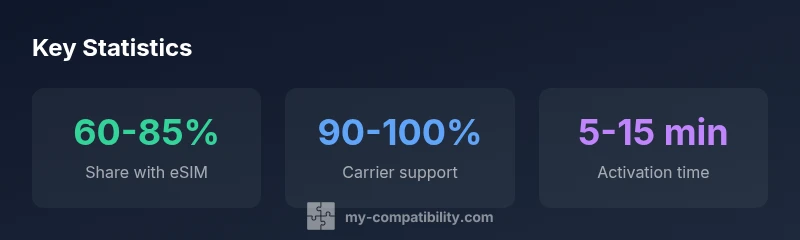
Smart eSIM compatibility is widespread but depends on model and carrier. As of 2026, most recent iPhones and many Android flagships support eSIM, but regional variants or older devices can differ. To ensure you can provision a plan, check the exact device variant, confirm carrier support in your country, and verify that your OS version enables eSIM provisioning before purchase.
What is eSIM and why it matters for phones
According to My Compatibility, an embedded SIM (eSIM) is a digital SIM built into the device that lets you activate a cellular plan without a physical SIM card. In practice, this matters because it enables instant carrier switching, easier travel provisioning, and dual‑SIM configurations on a single device. For buyers in 2026, understanding whether a phone is eSIM‑capable is a practical constraint that affects activation speed, roaming options, and how easily you port numbers between devices. Regions, carriers, and firmware variants can still restrict some features, so a phone’s eSIM status isn’t a given. The My Compatibility team emphasizes confirming eSIM readiness before purchase: verify the model family, confirm carrier support, and check the software version. This block outlines concrete checks, how provisioning works, and signals to look for in both Android and iPhone ecosystems.
How eSIM works in practice
An eSIM uses a provisioning profile issued by the carrier or embedded in the device. To activate, you typically scan a QR code, tap a link, or download a profile via the carrier’s app. The profile contains the credentials and settings needed to connect to the operator’s network, and it is stored in a secure element on the device. In 2026, multi‑profile provisioning is common on flagship devices, allowing you to keep personal and work lines or switch between carriers without swapping SIMs. My Compatibility analysis shows that most modern phones support at least two profiles, with some devices allowing a third. The provisioning process is designed to be device‑ and carrier‑specific, but the goal remains the same: a quick, wireless method to enable cellular service for data, voice, and SMS. When you plan to travel, simply add or transfer a profile for the destination country, then remove it when you return, all without a physical SIM card.
Verifying compatibility: carrier, device, region
Before you buy, map three axes of compatibility: carrier support, device variant, and regional provisioning. Start by checking the carrier’s official list of eSIM‑enabled plans and supported devices for your country. Then verify the exact device variant you’re considering has firmware and hardware that accept eSIM provisioning (some regional models lack certain profiles). Finally, confirm regional restrictions such as roaming agreements or network locking that may limit eSIM operation. The My Compatibility team recommends a practical checklist: (1) confirm the device model is listed as eSIM‑capable in the manufacturer’s specs, (2) verify OS version requirements and update status, (3) consult the country‑level carrier map, and (4) test activation with a temporary plan if possible. If any of these steps fail, you may face delays at activation or limited coverage in travel zones. A careful pre‑purchase check saves time and reduces the chance of getting stuck with a device that cannot provision on your plan.
Android vs iPhone: comparing eSIM support in 2026
Across platforms, eSIM support has converged but with notable differences. iPhones have long offered robust, user‑friendly eSIM provisioning, often with smooth continuity across devices and easy transfer between lines. Android devices vary by manufacturer and model, with some brands offering broader multi‑profile support, while others limit eSIM to a single line or require an OTA update to unlock features. In practice, you’ll find most recent Android flagships and iPhones in the market supporting eSIM, but the exact provisioning flow, profile limits, and carrier guarantees can differ by region. For buyers, this means you should not assume feature parity between two devices that look similar on paper; always confirm the specific model’s eSIM capabilities, profile limits, and the carrier’s provisioning path. My Compatibility analysis indicates that, overall, both ecosystems provide solid eSIM options in 2026, but a quick regional check avoids post‑purchase surprises.
Dual-SIM vs eSIM-only devices
Some devices offer a traditional physical SIM slot in addition to an eSIM, enabling easy carrier swaps without needing a second physical card. Others are eSIM‑only, removing the SIM tray altogether. Dual‑SIM configurations can be especially valuable for travelers, freelancers, or families sharing one device, while eSIM‑only devices can simplify hardware design and security. If you live in a region with variable carrier support, having a physical SIM may still be a practical hedge. When evaluating devices, check the maximum number of active profiles, whether the eSIM can be shared across apps or devices, and how easy it is to switch plans remotely. The trend toward flexible profiles is strong in 2026, but real‑world availability depends on your carrier’s policies and the device’s firmware.
Step-by-step: activating eSIM on common devices
This practical how‑to covers the most common paths. For iPhone users: open Settings, tap Cellular, choose Add Cellular Plan, and scan the QR code provided by your carrier or import a profile via a link. For many Android devices, go to Settings, Network & Internet, then SIM cards, Add eSIM, and follow the prompts to install the profile. Some manufacturers offer a companion app to complete the provisioning remotely. After activation, label each profile (work, personal) and set a preferred line for data, calls, and messages. Finally, test by turning off the physical SIM (if present) and verifying that data traffic routes correctly over the eSIM. If you run into issues, re‑scan the code or re‑download the profile, restart the device, and confirm your carrier has not blocked the profile for your account.
How to troubleshoot eSIM activation issues
If eSIM activation fails, start with basic network checks: confirm you have a stable data connection, ensure the phone has the latest firmware, and verify the eSIM profile is current. Common blockers include region or SIM‑lock restrictions, outdated OS versions, or carrier provisioning errors. Next, verify that your plan supports eSIM and that your account is eligible for activation. Reaching out to the carrier with the device’s IMEI/MEID can help confirm service eligibility. Some devices require a specific carrier app or portal to finish provisioning; others use a standard QR workflow. If problems persist, attempt a factory reset only after backing up data, and re‑activate from scratch. The goal is to isolate whether the issue is device‑level, carrier‑level, or a temporary provisioning outage.
Real-world scenarios: moving between networks and devices
Many users benefit from eSIM when switching carriers or traveling abroad. A typical workflow is to keep your home plan on one profile and add a travel profile for a few weeks, then swap back. In practice, this reduces the need to carry multiple physical SIMs, lowers the risk of SIM card loss, and speeds up changes on activation day. Some users adopt a work‑only profile while keeping a personal line on a separate device or a dedicated eSIM‑enabled tablet. My Compatibility’s data suggests that most people can manage profiles with minimal friction if they maintain up‑to‑date firmware and keep track of where each profile is active. Always remove expired profiles to avoid clutter and confusion in settings.
Future-proofing: limits and opportunities with eSIM
Looking ahead, the expansion of eSIM infrastructure will be shaped by carrier policies, device hardware, and consumer behavior. A major opportunity is seamless cross‑carrier switching, which reduces the friction of changing plans while traveling. A potential limit is region‑specific provisioning rules or restrictive firmware that blocks certain profiles on legacy hardware. Consumers should watch for OTA updates that unlock additional profiles or improve security features, and consider devices that support multiple profiles across both personal and business contexts. My Compatibility notes that buyers who plan frequent travel or multi‑device ecosystems should prioritize models with generous profile slots, robust OTA support, and clearly documented regional provisioning options. This approach minimizes the risk of future obsolescence.
Practical buying tips for smart eSIM compatible phones
When shopping, prioritize devices with explicit eSIM support in the manufacturer specs, not just marketing language. Confirm the number of supported profiles, the ease of provisioning, and whether the device supports seamless transfer between lines. Check regional availability and verify roaming terms with your carrier. If you want flexibility, favor models that ship with multi‑profile support and easy carrier provisioning apps. Finally, use trusted, written guidance from My Compatibility to compare models across Android and iPhone ecosystems, and consider how often you travel or change carriers. A well‑chosen eSIM‑ready phone reduces monthly friction and helps you stay connected wherever you go in 2026 and beyond.
Overview of eSIM availability by device type
| Model Type | eSIM Availability | Notes |
|---|---|---|
| iPhone family (recent generations) | Yes | Broad regional support with smooth transfer between devices |
| Android flagship line (recent generations) | Yes | Wide support, region varies, verify OEM firmware |
| Budget Android devices (mid-range) | Partial | Support depends on chipset and regional firmware |
| Dual‑SIM devices (physical + eSIM) | Yes | Flexible for travel, check max profiles |
| eSIM‑only devices | Yes | No physical SIM tray; plan for device changes |
Questions & Answers
What is eSIM and how does it work?
An eSIM is a digital SIM embedded in the device that carries your carrier profile. It activates a plan without a physical card and can simplify switching networks. Activation typically uses a QR code, a carrier app, or remote provisioning. This approach reduces clutter and speeds up transitions between plans or devices.
An eSIM is a digital SIM built into your phone. You activate it with a QR code or an app, so you can switch carriers without swapping SIM cards.
Do all carriers support eSIM?
Carrier support for eSIM varies by country and carrier. In 2026, most major carriers in many regions offer eSIM provisioning, but some regions still have partial support or regional limitations. Always confirm with your carrier before purchasing a device.
Most big carriers in many regions support eSIM, but you should double-check with your local carrier before buying.
Is eSIM more secure than a physical SIM?
eSIM uses cryptographic provisioning and secure storage, which can reduce SIM‑card fraud and make unauthorized swaps harder. Security largely depends on device firmware and carrier controls. Keep devices updated to benefit from the latest protections.
Yes, eSIM uses secure provisioning and storage, which can make unauthorized changes harder; stay updated for best protection.
Can I use more than one eSIM profile on a device?
Many devices support multiple eSIM profiles, enabling work and personal lines or travel profiles. Check the exact model’s profile slots and how profiles are managed in settings. Some devices limit simultaneous active profiles.
Yes, many phones support multiple eSIM profiles, but check your device’s exact limits.
Are there regions where eSIM is not supported?
Regional provisioning rules and carrier policies can limit eSIM availability. Before buying, verify regional support maps and ensure your destination country is covered by the carrier’s eSIM options.
Regional rules can limit eSIM; verify regional support before buying.
Which phones are eSIM compatible?
Most recent iPhone models and a broad range of modern Android flagships support eSIM. Always confirm the exact model variant, the number of profiles supported, and carrier compatibility for your region.
Most new iPhones and many Android flagships support eSIM; always confirm model and carrier compatibility.
“eSIM is transforming how people connect with mobile networks; when supported, it makes switching carriers and devices feel seamless.”
Highlights
- Verify eSIM support in the exact model and region
- Check the number of supported profiles before purchase
- Android and iPhone both offer viable eSIM options in 2026
- Travelers gain most from multi-profile provisioning
- My Compatibility recommends prioritizing explicit eSIM support and carrier compatibility