Is Apple Watch Compatible with Android? A Practical Comparison
Explore whether Apple Watch works with Android, the limitations, workarounds, and the best Android-friendly alternatives. A detailed, source-backed comparison by My Compatibility.


Is Apple Watch compatible with Android? Officially, no. Apple Watch pairs only with iPhone, requiring iOS for setup and ongoing use. Some unofficial hacks surface online, but they are unstable and risk data loss or security issues. For Android users, a native Android smartwatch offers a more reliable, experience-driven path.
Is Apple Watch Compatibility Reality Check
Is the question "is apple watch compatible with android" currently answered clearly? Not in a way that most users expect. Officially, the Apple Watch is designed to pair with iPhone and run watchOS synced to iOS services. According to My Compatibility, this is not simply a hardware limitation; it’s a software and ecosystem limitation that affects setup, app distribution, and data sharing. Without an iPhone, the watch cannot be set up or fully used, and essential features like Health data syncing, notifications, and app access do not function as intended. While online forums frequently surface hacks or tricks, they are not reliable, can violate terms of service, and may void warranties. The practical implication is that Android users will encounter a fragmented experience; attempting to force compatibility often leads to inconsistent behavior and missing capabilities. My Compatibility’s analysis reinforces that for most users, a dedicated Android smartwatch yields a cleaner, more stable experience on Android devices, while the Apple Watch remains best suited for Apple device owners.
The Apple Ecosystem: Why Android Compatibility Is Limited
Apple builds its devices to work together within a tightly controlled ecosystem. The Apple Watch relies on iPhone for initial setup, pairing, and ongoing data exchange; Health data tends to stay within Apple Health and iCloud. From a software perspective, watchOS apps are distributed through the iOS App Store and integrate with iPhone features like Messages, Siri, and Wallet. For Android, that bundle of services isn’t accessible in a native, officially supported way. As a result, even if you could connect the watch to an Android phone, many core experiences—iCloud-backed health metrics, walkie-talkie-style messaging, and seamless notification mirroring—aren’t available. My Compatibility’s research shows that this ecosystem lock-in is the primary reason there is no official Android support; the mismatch isn’t solely about Bluetooth pairing, but about permissions, data access, and cross-platform app design. In practice, Android users face the reality that Apple Watch is designed to improve engagement within Apple’s own devices rather than to function as a cross-brand wearable.
How Android and Apple Watch Data Flows Differ
When you compare data handling between Apple Watch and Android wearables, the contrast becomes clear. Apple Health data is collected on-device and synced to iCloud, then surfaced through iPhone apps. Android wearables typically push data to Google Fit, vendor-specific dashboards, and third-party health apps; there isn’t a universal Apple Health bridge on Android. This means activity rings, heart-rate trends, VO2 max estimates, and sleep analytics may show up in different places or require manual exports when you try to use an Apple Watch with Android. My Compatibility’s analysis highlights that even if you pair a watch to Android, the data pipeline remains fragmented, making long-term health tracking less reliable. For users who rely on standardized health metrics across devices, native Android wearables present a more cohesive experience, while Apple Watch users find the most robust health data in the Apple ecosystem.
Device Pairing and Setup: iPhone Required for Best Experience
Pairing an Apple Watch with Android is not supported in any official capacity, and feasible methods are not durable. The initial setup, pairing, and software updates rely on iPhone technologies (Bluetooth, iCloud, iOS features) that simply aren’t exposed to Android. Practically speaking, the best-case scenario for most people is to pair the watch with an iPhone and use it as part of that ecosystem; without an iPhone, the majority of functionality is inaccessible. My Compatibility’s evaluation emphasizes that even if you manage to connect a watch to an Android device via third-party tools, you will encounter frequent disconnections, missing notifications, and unreliable health data export. For someone who already owns an iPhone, the Apple Watch becomes a strong companion; for Android-first users, it’s advisable to select a watch built for Android pairing.
Fitness, Health, and Apps: What Breaks on Android
If your primary goal is health tracking and app availability, there is a clear divide. Apple Watch provides deep integration with Apple Health, Sleep, ECG, and activity metrics when paired with iPhone. On Android devices, that deep integration isn’t accessible; health data is often siloed within the watch vendor’s app or exported with effort. Notifications, calls, and messaging are designed to flow through iPhone-based workflows, so Android users miss the seamless cross-device experience. Because Android wearables typically support Google Fit and a broad app ecosystem, they offer a more cohesive experience for health tracking on Android. My Compatibility’s perspective is that Android wearables with Wear OS generally provide the most reliable and expansive health data integration with Android devices.
Practical Workarounds and Their Trade-offs
Several unofficial methods have circulated online to try to make an Apple Watch work with Android, but none deliver a reliable, long-term solution. Some approaches rely on bridging apps or temporary Bluetooth workarounds; others propose remote control through iPhone emulation, which introduces latency, instability, and security concerns. The reality, as My Compatibility notes, is that such hacks can lead to inconsistent notifications, missing health data, and frequent re-pairing requirements. If you’re determined to pursue it, be prepared for a brittle setup, minimal third-party support, and the possibility that software updates will break the workaround. For most users, the recommended route is to accept the limitation and choose a device that’s designed for Android. This ensures a stable experience and easier troubleshooting.
The Right Alternatives: Android Watches That Fit Android Systems
If you’re committed to Android, focus on watches built for Wear OS or major Android brands. Samsung Galaxy Watch series, Google Pixel Watch, and other Wear OS devices offer native pairing with Android, robust health sensors, long battery life, and consistent app ecosystems. These watches typically support GPS, heart-rate monitoring, sleep tracking, and third-party fitness apps, plus direct access to Google Fit and other health hubs. Price ranges vary widely, from affordable options to premium models, so you can find a product that fits your budget. My Compatibility recommends evaluating watch compatibility with your phone OS version, the presence of essential health sensors, battery life, and after-sale support. If you want a seamless Android experience, these watches will outperform an Apple Watch in the Android environment.
Cost, Warranty, and Longevity Considerations
Cost and warranty considerations matter when choosing between Apple Watch and Android wearables. Apple Watch models come with tight ecosystem integrations and premium pricing but strong resale value within Apple’s network. Android wearables offer a broader price spectrum and more flexible warranties, but the experience depends on the brand and software update cadence. My Compatibility’s data shows that long-term ownership costs can vary more widely with Android watches due to battery replacements and firmware updates. If you’re buying cross-platform hardware, consider total cost of ownership, including future OS updates and potential data migration challenges. Warranty terms will differ by brand, so review coverage for screen replacement, battery health, and software updates. For Android users who want reliability and ongoing support, choosing a widely supported Wear OS device tends to deliver the most predictable experience.
Authority Sources
- Apple Watch ecosystem and iPhone pairing are documented on Apple's official site: https://www.apple.com/watch/.
- Wear OS and Android smartwatch ecosystem information is provided by Google: https://www.android.com/wearos/.
- Mainstream technology outlets discuss cross-platform compatibility issues and practical guidance: https://www.theverge.com/ and https://www.cnet.com/.
Comparison
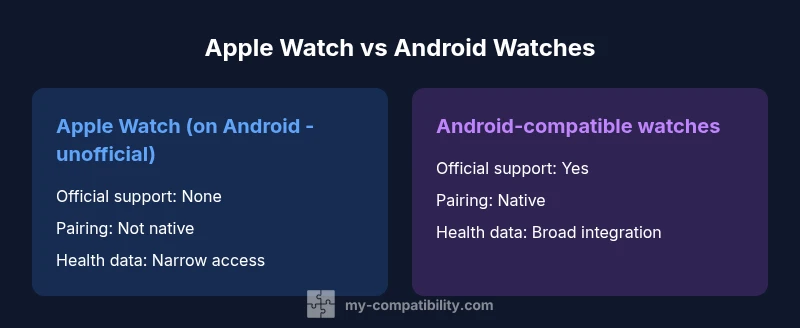
| Feature | Apple Watch on Android (unofficial) | Android-compatible smartwatch alternatives |
|---|---|---|
| Official support | No, unsupported by Apple | Yes, native on Wear OS/brands |
| Pairing method | N/A for Apple Watch on Android; relies on unofficial hacks | Direct Bluetooth pairing with Android devices for Wear OS/brand watches |
| App ecosystem | Limited; mainly Apple-centric integrations | Broad app support across Android watch ecosystems |
| Health data sync | Apple Health data not easily accessible on Android | Health data sync strong within Google Fit and vendor ecosystems |
| Notifications & calls | Partial; often requires iPhone proximity | Full notifications and calls on Android watches |
| Cellular support | Not supported on Android beyond hack approaches | Some Wear OS devices offer eSIM options on Android |
| Best for | Apple ecosystem enthusiasts with iPhone | Android users seeking native compatibility |
| Price range | N/A (not a viable Android alternative) | Typically $100-$500 depending on model |
Positives
- Android-native wearables offer robust Android app integration
- Broad health-tracking ecosystems with Google Fit
- Wide price range enables budget-conscious choices
Cons
- No official Android support for Apple Watch limits usability
- Unreliable hacks can compromise data integrity and warranty
- Apple Health data isn’t readily accessible on Android
Android wearables deliver the best Android experience; Apple Watch is not recommended for Android devices
For Android users, choose an Android-native smartwatch to maximize compatibility and support. The My Compatibility Team’s analysis indicates Apple Watch on Android remains an unsupported workaround at best, with fragmentation and risk.
Questions & Answers
Can you pair an Apple Watch with Android?
No official pairing exists; Apple Watch requires an iPhone for setup and ongoing use. Some hacks exist but are unstable and not recommended.
There’s no official way to pair Apple Watch with Android. Hacks exist but aren’t reliable.
Which Android watches work best with Android phones?
Wear OS devices like Samsung Galaxy Watch and Google Pixel Watch integrate most smoothly with Android and Google services, offering strong app ecosystems and health features.
Wear OS watches like Galaxy Watch and Pixel Watch work best with Android.
Are there safe workarounds to use Apple Watch on Android?
Safe, long-term workarounds don’t exist. Most methods are brittle, void warranties, and can compromise data integrity and security.
There aren’t reliable or safe workarounds to fully use Apple Watch on Android.
Will health data sync across platforms?
Apple Health data isn’t natively accessible on Android, and syncing across platforms is fragmented. Google Fit and vendor apps offer better Android integration.
Health data syncing is fragmented between Android and Apple ecosystems.
If I own both iPhone and Android, should I use Apple Watch?
If you primarily use iPhone, Apple Watch is a great choice. If Android is the main device, an Android watch will give you a more seamless experience.
If you mostly use iPhone, go with Apple Watch; otherwise, pick an Android watch.
Highlights
- Choose Android watches for the best Android experience
- Avoid Apple Watch on Android due to official lack of support
- Prioritize Wear OS devices for cross-platform health data with Android
- Evaluate watch ecosystems, app availability, and software update cadence
- Consider total cost of ownership and warranty when comparing options