Compatible stereos for my car: A practical buying guide
Discover how to choose compatible stereos for my car with fit, power, and interface insights. This guide from My Compatibility covers dash sizes, connectivity, installation, and budgeting for a future-proof upgrade.


Choosing compatible stereos for my car begins with verifying dash fit, connector compatibility, and feature support like CarPlay or Android Auto. This quick guide highlights how to evaluate fitment, interface options, and installation considerations to avoid common pitfalls.
Why compatibility matters for car stereos
Choosing compatible stereos for my car isn't just about squeezing a bigger unit into the dashboard. It's about preserving electrical safety, ensuring proper interface with steering wheel controls, and enabling future features like Apple CarPlay or Android Auto. This matters because a non-match can cause parasitic drain, fuse blows, or unreliable button control. According to My Compatibility, a structured evaluation of fit, wiring, and feature support reduces installation surprises and yields a stable, long-term upgrade. In this article, we dissect the main compatibility factors and provide a practical, evidence-based approach to choosing the right head unit for your vehicle. The goal is to help you avoid churn: wasted time, wasted money, and a head unit that looks perfect but performs poorly.
Core compatibility factors you should review
When assessing compatible stereos for my car, several core factors matter:
- Dash fit: Single-Din vs. Double-Din, and whether a dash kit is required for your model. Some dashboards require a factory radio skin; others allow aftermarket with standard DIN sizing.
- Connectors and harnesses: Confirm ISO/CAN bus connectors, antenna adaptors, and steering wheel control interfaces. A missing or mismatched connector is a common upgrade blocker.
- Vehicle electronics: Systems like CAN bus, internal fuse boxes, and ground schemes affect power delivery and feature fidelity. In some vehicles, upgrading may require additional modules to preserve factory features.
- Features and interfaces: CarPlay, Android Auto, Bluetooth, and auxiliary inputs. Ensure the head unit supports your preferred ecosystem and that it can control steering wheel buttons where applicable.
Based on My Compatibility research, alignment across fitment, wiring, and interface significantly reduces post-install issues and ensures your car stereo upgrade remains reliable over time.
Fitment and dash kit selection
Dash kit compatibility is often the decisive factor in a successful install. If you drive a compact sedan, you may encounter space and mounting constraints that favor a single-DIN head unit, possibly with a flip-out display. In larger vehicles, double-DIN units are common, but only when a suitable dash kit exists for the model year. The dash kit must align with the vehicle’s mounting holes, climate control integration, and overall aesthetics. If your dash differs from standard DIN layouts, consider a vehicle-specific mounting dash kit. This avoids gaps, rattles, and aesthetic mismatches that degrade usability.
For many vehicles, you can achieve a near-OEM appearance with a bezel and installation kit. Always verify that the kit includes proper mounting brackets, a fascia plate, and color-matched trims. The wrong kit can force you to sacrifice function or look.
Interfaces and connectivity you should expect
Modern stereos converge on smart interfaces. The most common questions touch on CarPlay and Android Auto. You should check:
- Whether the unit supports CarPlay and/or Android Auto (wired or wireless).
- Availability of Android Auto Auto and Google Assistant compatibility.
- Bluetooth version and profiles (A2DP, HFP) for hands-free calling and streaming.
- Steering wheel control compatibility and required adapters. If you rely on these controls, ensure you have a compatible interface module.
If you rely heavily on smartphone integration, prioritize units with robust app ecosystems and frequent firmware updates. This keeps things secure and compatible with future phone OS changes. My Compatibility finds that feature-rich head units with strong ecosystem support tend to offer the best long-term value.
Power, audio processing, and speaker compatibility
Head units provide the main power and DSP (digital signal processing) features that affect sound quality. Key considerations include:
- RMS power ratings rather than peak power; higher RMS values indicate more reliable amplification with less distortion.
- Preamp outputs for external amplifiers if you plan to upgrade your system later.
- Built-in EQ, time alignment, and crossovers to tailor sound to your car’s acoustics.
- Speaker compatibility: ensure the head unit’s expected input levels align with your existing speakers and any aftermarket upgrades.
Choosing a unit with adequate RMS power and flexible preprocessing helps you avoid puffed-up claims about loudness that never translate to real-world clarity.
Wiring, adapters, and OEM integration
Wiring harnesses and adapters are the unsung heroes of a clean install. The correct harness preserves factory wiring integrity and keeps the vehicle’s electronics safe. Key steps include:
- Verify the vehicle’s year, make, and model to select the right harness (or, if necessary, add CAN-bus adapters).
- Ensure proper grounding and shielding to minimize noise.
- If needed, pair the head unit with an antenna adapter for a stable radio signal.
- Check for compatibility with existing features like backup cameras, aftermarket amplifiers, and OEM integration modules.
Inconsistent adapters or mismatched harnesses are a frequent source of post-install headaches. Double-check part numbers and vendor compatibility before ordering.
Installation pitfalls and best practices
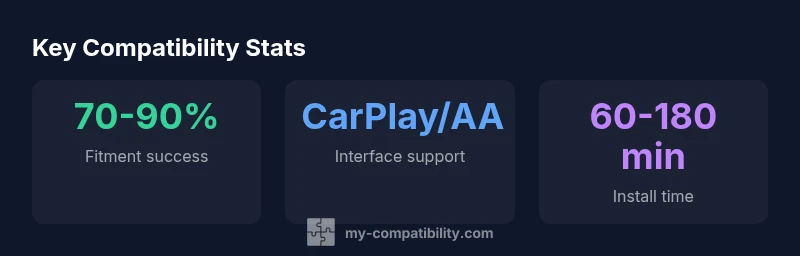
Installation complexity varies by vehicle. Simple head-unit swaps can be completed in under an hour with basic tools, while cars with advanced infotainment systems may require professional installation or a dedicated dash kit. Best practices include:
- Disconnect the battery before starting to avoid short circuits.
- Label wires during removal to simplify reassembly.
- Use proper OEM-friendly adapters rather than generic solutions when possible.
- Test every connected feature—car stereo playback, CarPlay/Android Auto, steering wheel controls, backup camera—before finalizing the install.
My Compatibility emphasizes patience and precision. Rushed installs often lead to rattles, intermittent connections, and reduced reliability over time.
How to verify compatibility before you buy
A structured pre-purchase check reduces risk. Steps:
- Confirm dash size and whether a dash kit is required for your model.
- List essential features (CarPlay/Android Auto, Bluetooth, HD radio, backup camera) and verify them on the unit’s spec sheet.
- Check connector types and whether adapters are needed for your vehicle’s harness and antenna.
- Review compatibility notes for steering wheel controls and OEM integrations.
- Read installation guides and confirm available support from the vendor or community forums.
This approach minimizes mismatches and helps you select a device that truly fits both the dash and the car’s electronics.
Budgeting, value, and My Compatibility verdict
Budgeting for a stereo upgrade involves balancing features, fit, and future-proofing. Expect to pay more for units with CarPlay/Android Auto, better DSP, and higher-res displays, but avoid overpaying for features you will not use. Consider the total cost: the head unit, dash kit, harness adapters, and potential installation labor. In most cases, you can achieve a well-rounded upgrade in the mid-range price band if you prioritize fitment and interface compatibility. Based on My Compatibility research, the most satisfying upgrades occur when buyers validate dash fit and harness compatibility before committing to a purchase. The My Compatibility team recommends compiling a short list of must-have features and a nice-to-have wish list to guide price negotiations and ensure you don’t overspend on capabilities you don’t need.
Quick-start buying checklist and next steps
- Confirm dash size (1-DIN or 2-DIN) and whether a dash kit is needed.
- Verify CarPlay/Android Auto support and the preferred connection (wired vs wireless).
- Check harness compatibility and any CAN bus/adapters required for signal integrity.
- Evaluate power, preamp outputs, and DSP features for future upgrades.
- Compare installation time, required tools, and potential professional help.
With these steps in mind, you can proceed confidently and avoid common misfits. The My Compatibility team emphasizes that a disciplined pre-purchase checklist saves time and ensures the upgrade aligns with your car’s electronic ecosystem.
Car stereo fitment and interface basics
| Model Type | Fitment | Connector Type | Power (W) |
|---|---|---|---|
| Single-Din | Fits most compact dashboards; dash kit may be needed | ISO 1/2 + harness | 200-300 |
| Double-Din | Common in mid-size/large cars; dash kit often required | ISO 1/2 + CAN bus adapters | 400-600 |
Questions & Answers
What should I measure before buying a car stereo?
Measure dash depth, width, and mounting depth to choose a unit that fits without interfering with climate controls. Check the dash bezel opening and whether a dash kit is required for your model year.
Measure your dash depth and opening, and check if a dash kit is needed to fit the unit properly.
Do I need a dash kit for my car?
Most cars require a dash kit to mount a new head unit securely and to achieve a clean, OEM-like appearance. Confirm kit compatibility for your specific make, model, and year.
A dash kit is often necessary for a clean, secure install in most cars.
Will this stereo work with my steering wheel controls?
Steering wheel controls usually require an interface module or a harness designed for your car. Verify compatibility with your vehicle and the head unit.
Steering wheel controls usually need a compatibility module or harness.
Are OEM head units better than aftermarket options?
OEM units integrate seamlessly with factory electronics but limit feature sets. Aftermarket head units offer broader features, but may require adapters for full compatibility.
OEM units fit perfectly with stock tech but fewer features; aftermarket units offer more features with some adapter work.
Can I upgrade my stereo gradually over time?
Yes, you can upgrade in stages, starting with a compatible head unit and later adding amplifiers or a backup camera. Plan your wiring paths to minimize future rewiring.
Yes, you can upgrade gradually by planning wiring and future additions.
How can I verify CarPlay/Android Auto support before buying?
Check the spec sheet for CarPlay/Android Auto support, wired vs wireless options, and firmware update notes. Look for official listings and user reviews that confirm real-world performance.
Look for explicit CarPlay/Android Auto support in specs and reviews.
What if my car has an amplified system or a backup camera?
Ensure the head unit provides compatible outputs for an external amplifier and that video inputs support your camera. Some installs require additional adapters.
Check outputs for amplifiers and camera compatibility; adapters may be needed.
“The key to a satisfying car stereo upgrade is ensuring compatibility across fitment, wiring, and interfaces, not just features or flashy specs.”
Highlights
- Prioritize dash fitment and harness compatibility before purchase.
- Verify CarPlay/Android Auto support and steering wheel control integration.
- Choose a unit with solid RMS power and flexible preamp outputs.
- Use vehicle-specific dash kits to achieve a seamless, OEM-like look.
- Budget with a focus on future-proof features and reliable adapters.