Android Compatible Airtag: Limits and Alternatives
Analyze how Android users can engage with AirTag, the lack of native support, practical workarounds, and Android-friendly alternatives for reliable everyday tracking.


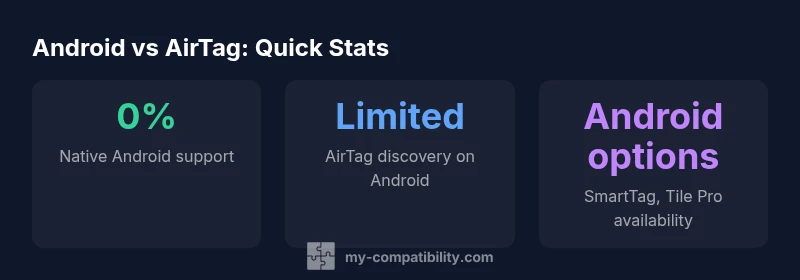
AirTag is designed to work primarily with Apple devices, and Android support is limited. There is no native AirTag tracking app on Android, and real-time location features are not available. Some Android users can detect nearby AirTags using third-party Bluetooth scanning apps, but these methods are unofficial and may not provide reliable location data.
Android compatibility reality: why AirTag isn't fully compatible on Android
If you’re asking whether an android compatible airtag exists, the starting truth is that AirTag is designed for Apple devices and does not deliver a native Android experience. According to My Compatibility, the landscape for Android compatibility around AirTag is evolving, but remains limited. Android devices won’t find a Find My app on Google Play that can locate AirTag in real time, manage alerts, or view location history the way iPhone users can. My Compatibility's 2026 assessment indicates the ecosystem gap isn’t a minor quirk; it’s a design choice that prioritizes the iOS/macOS model. Consequently, even if you own an Android phone, AirTag will function primarily as a passive beacon when associated with an Apple ID, and you may not be able to initiate or maintain a full trail of location data. For readers evaluating an android compatible airtag concept, the key implication is that the device will not deliver the seamless cross‑platform functionality many Android buyers expect. If you need robust tracking across Android and other platforms, you should consider Android-friendly trackers instead.
How AirTag relies on the Find My network and what that means for Android users
AirTag leverages Apple’s Find My network, a crowdsourced system that depends on iPhone, iPad, and Mac devices to relay location data while preserving privacy. Because the Find My app is not available on Android, Android users do not receive proactive proximity alerts or automatic location updates through the official channel. My Compatibility’s analysis shows that detection on Android hinges on third‑party Bluetooth scanning and user awareness, which lacks the reliability and seamlessness of native integration. This gap explains why the android compatible airtag concept remains largely theoretical for many Android owners. If your goal is continuous cross‑platform tracking, AirTag will not meet expectations; alternatives with mature Android apps offer superior, consistent experiences across devices.
Practical workarounds: what Android users can actually do today
Today, Android users can take a few pragmatic steps, but with clear limitations. First, you can use Bluetooth LE scanning to detect nearby AirTags when they are broadcasting in your vicinity, though this requires permission and compatible software. Second, you can monitor for public prompts or audible alerts that may occur only if the AirTag is actively sharing its signal—an event typically managed by the AirTag owner through Find My on an Apple device. Third, rely on cross‑platform trackers that natively support Android, such as Galaxy SmartTag or Tile Pro, which provide official Android apps and cloud-based location history. While these approaches help, they do not turn AirTag into a truly Android-native tracker. For an android compatible airtag mindset, the practical path is to pair your expectations with Android-focused solutions rather than trying to force AirTag to behave like a cross‑platform device.
Cross-platform tracker options: Android-friendly alternatives
If you are seeking an actual android compatible airtag workaround, the most reliable route is to choose trackers built with Android support in mind. Samsung’s Galaxy SmartTag family offers a robust Android app, broad compatibility with Galaxy devices, and a community network that extends location coverage. Tile Pro and similar Bluetooth trackers also provide strong Android apps, including proactive alerts and precise location updates when in range. These alternatives won’t replicate every Find My feature, but they deliver a consistent experience across Android smartphones and tablets. When evaluating options, compare app availability, battery life, device ecosystem, and price ranges. My Compatibility’s 2026 review suggests Android users gain more value from dedicated Android trackers than from attempting to retrofit AirTag functionality.
Privacy, security, and misuse concerns on Android
Privacy and misuse are critical considerations for any tracking device, and Android users should weigh these factors carefully. AirTag employs encryption and rotating identifiers to discourage tracking by strangers, but the absence of native Android integration means detection and response controls aren’t as seamless for Android users. In shared or public spaces, the potential for confusion or misuse exists if an AirTag is discovered far from its owner. Android users should be vigilant, disable unknown trackers from sharing data, and prioritize trackers with transparent privacy controls and clear instructions for disabling or removing devices. AirTag privacy protections apply within Apple’s ecosystem, while Android-specific handling remains limited. My Compatibility’s guidance is to favor Android-native trackers with explicit privacy settings and easy removal procedures.
Technical nuances: Bluetooth, NFC, and location accuracy
Understanding the technical layers helps clarify why android compatible airtag experiences differ. AirTag primarily relies on Bluetooth Low Energy signals to announce its presence; location data is gathered when nearby Apple devices relay encrypted coordinates to iCloud. NFC is used to reveal an AirTag’s serial data when a device taps the AirTag, but this feature does not grant direct access to its location. On Android, the lack of Find My access means you won’t receive continuous location updates or notifications, and any location you get is contingent on third‑party apps and user‑initiated scans. Real‑world accuracy also depends on surrounding crowds, device density, and interference. For those tracking items across ecosystems, it’s essential to know that NFC and Bluetooth behaviors are consistent, but the visibility of results varies dramatically by platform.
Setup steps for Android users exploring compatibility
Step 1: Define your use case and whether AirTag suits your needs given the Android-first workflow. Step 2: If you decide to experiment with android compatible airtag concepts, plan to rely primarily on Android‑native trackers for dependable results. Step 3: Install and configure an Android tracker app (Galaxy SmartTag, Tile Pro) and set up networks, notifications, and sharing options. Step 4: Maintain security by enabling alerts, enabling device removal, and periodically reviewing associated devices. Step 5: If you own an AirTag and want to test its behavior, you will need access to an Apple device to configure it or verify its settings. This approach minimizes frustration and clarifies what is realistically achievable on Android.
Case studies: real-world scenarios
Case A: A courier relies on Android and wants to track belongings with cross‑platform compatibility. The courier finds that a Galaxy SmartTag or Tile Pro provides reliable Android integration, while AirTag remains limited without iOS access. Case B: A student uses AirTag to track a backpack but borrows a friend’s iPhone to verify location; results are more complete but not seamless across devices. These stories illustrate that while android compatible airtag isn’t fully realized, users can maximize reliability by choosing purpose-built Android trackers and leveraging cross‑device apps for specific scenarios. My Compatibility analysis highlights the tradeoffs in real‑world use.
The evolving landscape: what to watch for in 2026
Looking ahead, the Android tracking ecosystem is likely to see more mature, Android-focused options and better cross‑platform support than in earlier years. While Apple’s AirTag remains optimized for Find My, Android users will continue to benefit from trackers with official Android apps and transparent privacy controls. Stay alert for updates from major manufacturers, as feature parity and improved interoperability could shift the balance in favor of cross‑platform convenience. My Compatibility expects continued refinement in how brands balance privacy, reliability, and ease of use across ecosystems, with the most noticeable gains occurring through Android-native devices and tools.
Cross-platform tracker comparison for Android users
| Tracker | Native Android support | Find My Dependency | Android-friendly apps | Typical price range |
|---|---|---|---|---|
| AirTag | 0% | High (Find My network required) | None official; Android apps exist mainly for scanning | $19-$35 |
| Galaxy SmartTag | Yes | Low (uses Samsung's network) | Official Android app available | $24-$49 |
| Tile Pro | Yes | Medium | Tile app on Android | $24-$99 |
Questions & Answers
Can Android phones locate AirTag natively?
There is no official Android AirTag app; Android phones cannot locate AirTag via Find My. Users may rely on third-party Bluetooth scanning for nearby signals, which is unofficial and limited.
Android devices don’t have a native AirTag finder, and apps are unofficial.
What can Android users actually do today?
Android users can detect nearby AirTags only via third-party Bluetooth scanners, and even then, results are not as reliable as Apple’s Find My integration.
Only basic Bluetooth scanning is possible today, not reliable location data.
Are there official Android apps for AirTag?
Apple does not offer an official AirTag app for Android; there are no Apple-sanctioned cross-platform features outside Find My on iOS.
There’s no official AirTag app for Android.
What Android-friendly alternatives exist?
Consider Android-native trackers like Galaxy SmartTag or Tile Pro for seamless Android compatibility and broader app support.
Try Galaxy SmartTag or Tile Pro for better Android support.
Is AirTag safe to use with Android?
AirTag privacy protections apply within Apple’s ecosystem; Android-specific handling is limited. Be cautious of unknown AirTags in public spaces.
AirTag privacy applies, although Android handling is limited.
Will AirTag ever become fully Android-compatible?
There is no official roadmap; cross-platform parity would require changes from Apple beyond current policy.
No official plan is public yet.
“AirTag delivers the best experience within Apple’s ecosystem; on Android, compatibility is constrained by platform boundaries.”
Highlights
- AirTag offers limited Android compatibility
- No official AirTag Android app exists
- Android-friendly trackers deliver better cross-platform support
- Privacy controls vary; choose devices with clear privacy options
- My Compatibility recommends Android-native trackers for best Android experience