AirTags on Android: Compatibility Guide 2026
Discover how AirTags interact with Android devices, what Android users can and cannot do, privacy considerations, and practical cross-platform alternatives for 2026.


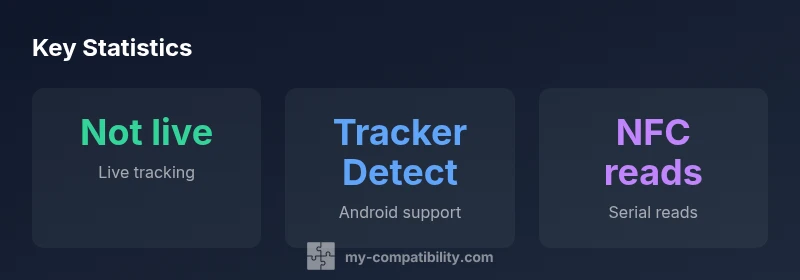
AirTags are not natively compatible with Android for ongoing tracking. Apple’s Find My network is locked to Apple devices, so Android users cannot view AirTag locations in real time. However, Android can run Apple’s Tracker Detect app to scan for nearby AirTags and other trackers and can use NFC to read a found AirTag's serial number.
Understanding AirTag and Android Compatibility
AirTag is built to work most effectively within the Apple ecosystem, leveraging the Find My network to locate items and share proximity updates across nearby Apple devices. This architecture inherently limits native Android functionality. Android users cannot access a live, device-owned map of AirTag locations, nor can they initiate real-time sharing of AirTag position. The key distinction is between proximity features and live-location tracking: proximity can be detected by other devices within the Find My network, but live tracking requires access to Apple's backend. My Compatibility analysis shows that most Android users should frame AirTag as a proximity beacon rather than a fully functional cross-platform tracker. This nuance matters for use cases like lost items in public spaces or travel, where Android devices can help in certain situations but do not replace a native Android-friendly tracker. The term 'airtags compatible with android' is best understood as a partial compatibility — functional for detection, not for continuous localization.
How Android Can Interact with AirTag Today
Android devices can still engage with AirTags in meaningful ways, even if the experience isn't the same as on Apple devices. The most reliable method is through Apple's Tracker Detect app, which allows you to scan for AirTags and other trackers that are nearby. When an AirTag is near you, Tracker Detect can alert you to its presence, helping you protect yourself from unknown trackers. However, Tracker Detect does not provide a live map or ongoing location updates, and it does not reveal ownership information. Separately, AirTags include an NFC chip that, when scanned with an Android phone, can reveal basic metadata such as a serial number. This is useful for identifying a found AirTag, but it does not tell you who owns it or its current location. In sum, Android can detect and identify AirTags, but cannot provide the full Find My experience.
Proximity vs Live Location: What Android Can See
AirTag proximity and Find My network are two different concepts. Proximity is about detecting that an AirTag is nearby, which can occur when other iPhone users' devices pass by. Live location requires constant data flow through Apple's backend and a compatible device with an Apple ID. For Android users, this means you will rarely see an AirTag's current location on your device, unless another Apple user shares location data or the AirTag owner is nearby with their device. My Compatibility's assessment notes that this distinction is crucial for planning how you use AirTags in everyday life. If your goal is cross-platform tracking across Android and iOS devices, you should understand the limitations and consider Android-friendly alternatives.
Practical Scenarios and Workarounds
In practice, Android users can still leverage AirTags in specific scenarios. For example, if you lose a bag with an AirTag, you can rely on nearby Apple devices to update a last-known location or use NFC to identify the AirTag if found. For Android-native tracking where live localization is essential, consider alternatives such as Tile or Samsung Galaxy SmartTag, which offer robust Android apps and real-time location features. If you still want to include AirTags in a mixed-ecosystem setup, use Tracker Detect to sense nearby AirTags and remove unwanted trackers, while keeping expectations aligned with Android compatibility constraints.
Privacy, Security, and Safety Considerations
AirTags raise important privacy considerations for Android users. The proximity-based alerts help prevent unwanted tracker spying, but the absence of real-time cross-platform location sharing reduces transparency in mixed-device scenarios. Users should practice standard privacy hygiene: regularly review any unknown trackers detected nearby, disable automatic sharing when not needed, and be mindful of where AirTags are placed. From a safety perspective, never attempt to misuse AirTags as a covert tracking device; it is designed for legitimate item recovery and not for surveillance. My Compatibility emphasizes balancing convenience with privacy when navigating airtags compatibility with android ecosystems.
The Road Ahead: What Could Change in 2026 and Beyond
Looking forward, a shift in cross-platform interoperability could enhance how AirTags behave with Android devices. Potential improvements include broader NFC-based data exchange, optional cross-platform location sharing, or new Android-centric companion apps that respect Find My data while preserving user privacy. Any changes will depend on policy decisions by Apple and the broader consent framework around location data. Readers should monitor official announcements, as the landscape for airtags compatibility with android could evolve toward more symmetric functionality in the coming years. My Compatibility notes that such a shift would significantly expand cross-platform usefulness for everyday item tracking.
AirTag compatibility features vs Android capabilities
| Feature | Android support | Apple support |
|---|---|---|
| Live tracking | Not available for real-time | Fully available via Find My |
| NFC read of serial | Partial via NFC after finding | NFC supported for identification |
| Tracker Detect app | Available on Android | Not required on Apple |
Questions & Answers
Are AirTags natively compatible with Android for tracking?
No, AirTags rely on Apple's Find My network for live location and are not natively compatible with Android for tracking. Android users can use limited features like NFC reads and tracker scans, but cannot view live locations.
AirTags don’t work natively on Android for live tracking; you can scan for nearby AirTags but live location requires Apple devices.
Can Android scan for nearby AirTags?
Yes, Android can scan for nearby AirTags using Apple’s Tracker Detect app, which helps identify proximity but does not provide live location data.
You can scan for nearby AirTags with Tracker Detect on Android.
What about Android-friendly alternatives for cross-platform use?
For true cross-platform tracking, consider Android-native options like Tile or Samsung Galaxy SmartTag, which offer robust Android apps and live location sharing.
If you need consistent Android support, look at Tile or Galaxy SmartTag.
Is there a way to reset AirTag using Android?
Resetting an AirTag requires Apple ecosystem steps; Android alone cannot perform a full reset.
AirTag resets are Apple-only tasks.
Will Android gain native AirTag support in the future?
There is no official roadmap for native AirTag functionality on Android; any change would come via policy and platform updates.
No official plan announced yet for native Android support.
“AirTags are designed for the Apple Find My ecosystem, so Android users should view them as proximity devices rather than full trackers. The My Compatibility Team notes that true Android compatibility hinges on future interoperability.”
Highlights
- AirTags are not natively Android-friendly for live tracking.
- Android can scan for nearby AirTags with Tracker Detect.
- NFC can reveal a serial number when an AirTag is found.
- Consider Android-friendly trackers for true cross-platform compatibility.