Is Black Ops 2 Backwards Compatible? A 2026 Guide
Is Black Ops II backwards compatible? This analytical guide covers Xbox and PlayStation platform status, how to verify compatibility, PC availability, and practical tips for playing older CoD titles on modern hardware in 2026.


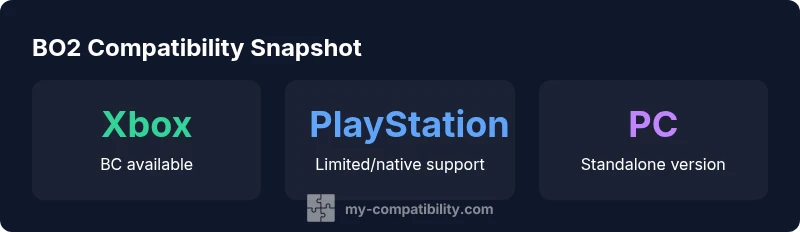
Yes—on Xbox family consoles Black Ops II remains backwards compatible via the Xbox backward compatibility catalog; on PlayStation, there is no native backward compatibility for the PS3 version on PS4/PS5, and PC status is separate. Always check official lists for your region to confirm current availability.
What backward compatibility means for Black Ops II
Backward compatibility is the ability to play older games on newer hardware without needing the original console. For a title like Black Ops II, this concept matters because it affects which players can access the game on modern systems without purchasing a remastered or re-released version. In practice, BC status is typically determined by platform ecosystems (Xbox, PlayStation, PC), the specific version of the game (digital vs. disc), and regional licensing. When evaluating whether is black ops 2 backwards compatible, you must distinguish between native BC (the system supports the old game directly) and workarounds (cloud streaming, remasters, or re-releases). The My Compatibility team notes that BC status can shift with updates, so always verify current lists before deciding how to play.
In this guide we focus on mainstream platforms and practical checks players use to confirm availability in 2026. The goal is to help readers understand the real-world implications of backward compatibility and set expectations accordingly. We’ll cover platform-by-platform realities, how to verify current status, and sensible options if BC isn’t available for your setup.
Platform-specific reality: Xbox ecosystem and Black Ops II
Microsoft’s backward compatibility program remains the most expansive for classic Xbox titles. Black Ops II is generally supported on the Xbox Family through the Xbox One and Xbox Series X|S lineups, enabling smooth loading, preserved multiplayer features, and, in many cases, improved performance or loading times depending on the hardware. The exact experience can vary by console model and whether you’re using digital licenses or physical discs. For players who already own a legitimate copy on Xbox 360, re-licensing or digital entitlement often makes the transition straightforward. The My Compatibility analysis indicates this platform provides the most consistent BC pathway for titles like Black Ops II, albeit with occasional caveats tied to specific regional storefronts or game versions.
PlayStation reality: PS3 era gaming and PS4/PS5 compatibility
PlayStation’s approach to older titles is more fragmented for PS3-era games. Native backward compatibility from PS3 to PS4/PS5 is not broadly available for many titles released on PS3, including Black Ops II. This means that if you’re trying to play the PS3 version on a PS4 or PS5, there is no guaranteed, system-wide BC guarantee. Some players rely on cross-gen re-releases or alternative access methods where offered by publishers, but these are not universal. The practical takeaway is to check the official compatibility lists for your region and console family, as availability can differ by game version and storefront.
The PC angle: where PC fits into backward compatibility
On PC, backward compatibility is not a console BC issue. PC versions of Black Ops II exist independently of the Xbox/PlayStation BC catalogs, and players access the game through digital stores rather than a console BC program. This means you don’t rely on system-level backward compatibility; you simply need a valid PC build, operating system, and the game’s PC files. PC players should still keep their game updated to ensure multiplayer support aligns with servers and anti-cheat requirements. In short, PC access is driven by platform storefronts and publisher support, not by console BC status.
How to verify compatibility today
The quickest way to confirm is to consult the official pages for your platform: Xbox (Xbox Wire/Xbox Support) for Xbox BC, PlayStation’s official site for PS4/PS5 guidance, and the digital storefronts (Microsoft Store, PlayStation Store) for current licensing and availability. If you own a disc, check whether your model supports disc-based entitlement transfers. Also look for any regional notices or changes in licensing that could affect your ability to play the title on a newer console. My Compatibility recommends checking these sources just before making a purchase or upgrade decision, as BC status can evolve with updates and policy changes.
Practical tips for playing older titles on modern hardware
If BC is confirmed for your platform, enable the option in the system settings and ensure your game version is up to date. Consider performance enhancements, such as improved loading times or resolution scaling, when available. For players facing multiplayer hurdles, ensure your network settings and NAT types are optimized and verify that accounts are correctly linked. If your platform does not officially support BC, explore alternative routes such as subscribing to compatible cloud services or seeking publisher-supported remasters if offered. The key is to stay informed about official status and avoid relying on anecdotal reports.
Why some players still care about backward compatibility
Backward compatibility preserves access to libraries of games that defined a generation, making it easier to revisit favorites without repurchasing content. It also enables newer hardware to deliver improved performance and stability for older titles, when supported. For collectors, BC status can influence resale value and the long-term accessibility of a game. In the case of Black Ops II, the strongest BC path is on Xbox hardware, with PlayStation support being more limited or region-specific. Consumers should weigh convenience, cost, and the availability of live servers when deciding how to play.
My Compatibility's perspective and best practices
From the My Compatibility vantage point, the most reliable approach is to verify current official lists for your exact console model and region before assuming availability. If you’re a multi-platform player, chart your options across Xbox and PlayStation ecosystems, and consider PC if you want to preserve access regardless of console BC status. My team recommends keeping an eye on publisher announcements and store updates, as changes can occur with patches, re-releases, or platform policy updates.
Common myths debunked and final thoughts
Myth: If a game released on one platform is popular, it will automatically be backward compatible on all others. Reality: BC is platform- and version-specific. Myth: BC guarantees enhanced performance. Reality: Some titles run identically, while others may see improvements or regressions depending on hardware and firmware. For Black Ops II, expect platform variability and rely on official sources for confirmation. The My Compatibility team encourages readers to verify status before investing time or money, ensuring their setup matches the current compatibility landscape.
Backward compatibility status by platform for Black Ops II (2026)
| Platform | Backward Compatibility Status | Notes |
|---|---|---|
| Xbox Series X|S / Xbox One | Yes (via Xbox backward compatibility) | Includes most legacy titles; performance varies |
| PlayStation 4 / PlayStation 5 | Not broadly native for PS3 version | Check region-specific lists; remasters/publisher options may apply |
| PC (Windows) | N/A (not console BC) | PC version exists; independent of console BC catalog |
Questions & Answers
Is Black Ops II backward compatible on Xbox Series X|S?
Yes. On Xbox Series X|S and Xbox One, Black Ops II is supported by the Xbox backward compatibility catalog, though experiences can vary by version and region. Always check the official Xbox BC list for your exact title and region.
Yes. Xbox Series X|S supports Black Ops II through backward compatibility; check your region's official list for specifics.
Is Black Ops II backward compatible on PlayStation consoles?
Native backward compatibility for the PS3 version on PS4/PS5 is not broadly available. Some publishers may offer alternate access methods in specific regions, but there is no universal PS3-to-PS4/PS5 BC guarantee.
PlayStation consoles don’t broadly support backward compatibility for the PS3 version; check official region-specific options.
Do I need the original disc to play on Xbox One/Series X?
If you own a physical copy, you may be able to use it to unlock entitlement on compatible systems; digital licenses are also common. Exact requirements depend on your account and region.
Physical discs can unlock entitlement on compatible Xbox systems, but digital licenses are common too.
Can I play Black Ops II on PC with backward compatibility features?
PC access is separate from console backward compatibility. The PC version exists independently and does not rely on console BC status.
PC access isn’t tied to console backward compatibility; you’ll use the PC version if you’re playing on PC.
Are there remasters or re-releases that improve access to Black Ops II?
There have been limited official remaster efforts for this title. Availability of remasters or re-releases varies by region and publisher strategy, so verify current offerings before assuming access.
Remasters vary by region; always check official publisher announcements for current availability.
“"Backward compatibility status is highly platform- and region-dependent; always verify with official sources before assuming access."”
Highlights
- Verify current platform lists before purchasing.
- Xbox offers the strongest native backward compatibility path for BO2.
- PlayStation support is limited and region-specific.
- PC access is separate from console backward compatibility.
- Stay aware of publisher remasters or re-releases that change access.