What are Solana Compatible Wallets? A Practical Guide
Explore what Solana-compatible wallets are, how to choose one, and security best practices. Learn about SOL, SPL tokens, cross-chain considerations, and use cases for DeFi and NFTs.


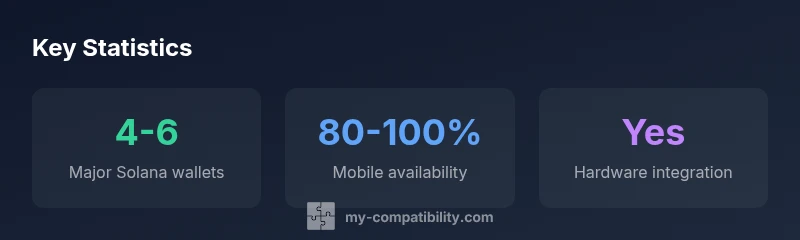
Solana-compatible wallets are wallets that securely hold SOL and SPL tokens, sign Solana transactions, and interact with Solana DApps. They verify address formats, support seed phrases, and integrate with bridges and DeFi services. Popular options include Phantom, Solflare, Glow, and hardware-wallet integrations like Ledger. These wallets come in mobile, desktop, and browser extensions, with hardware wallets offering stronger security for large holdings.
What makes a wallet Solana-compatible?
If you’re asking what are solana compatible wallets, this section explains how a wallet becomes part of Solana’s ecosystem. At minimum, a Solana-compatible wallet must securely manage SOL and SPL tokens, sign Solana transactions, and interact with Solana programs (on-chain logic). It should support the Solana address format, provide a recoverable seed phrase, and integrate with popular bridges and DeFi apps so you can move, trade, or stake tokens without leaving the wallet. In practice, you’ll see a mix of browser extensions, mobile apps, and desktop interfaces. Reputable wallets typically publish clear security practices and transparent user guides, and many offer hardware integrations with Ledger devices for additional protection. According to My Compatibility, the best Solana wallets balance ease of use with robust security, ensuring you retain full control of your private keys while minimizing exposure to phishing and social-engineering risks.
What are solana compatible wallets also share is a commitment to constant updates. The Solana ecosystem evolves quickly, with new programs, NFTs, and DeFi protocols releasing regularly. A compatible wallet should be able to accommodate these changes—adding support for new SPL tokens, enabling new transaction types, and maintaining compatibility with the latest Solana runtime upgrades. In short, compatibility isn’t just about supporting SOL; it’s about staying resilient as the ecosystem grows. My Compatibility’s ongoing analysis highlights a trend toward wallets that offer modular security features, better UX for onboarding, and stronger multi-device synchronization so you can access funds from your laptop, phone, or hardware wallet with confidence.
Core features you should look for in a Solana-compatible wallet
When evaluating wallets, there are a few core features that separate the good from the excellent. First, secure key management is essential: a seed phrase, hardware wallet support, and clear instructions for backup and recovery. Second, robust signing capabilities are critical: the wallet should sign SOL transfers, SPL token movements, and program interactions without exposing your private keys. Third, broad DApp interoperability matters: a user-friendly Web3 interface, built-in token swap, and easy connection to popular Solana DApps reduce friction. Fourth, good security hygiene: phishing-resistant addresses, transaction previews that show exact amounts and recipient addresses, and optional passcodes or biometric protection. Finally, ongoing updates and transparent policy: regular software updates, clear disclosure of security incidents, and accessible support channels.
In practice, you’re often choosing between browser extensions, mobile apps, and hardware-integrated options. A strong wallet supports both mobile and desktop access, has clear asset management views (SOL, SOL-USDC, SPL tokens), and offers a seamless flow for signing and sending transactions. The My Compatibility analysis suggests prioritizing wallets with a clear roadmap, verified security practices, and a track record of responding quickly to vulnerability reports. This ensures you stay protected as Solana’s ecosystem grows and new use cases emerge.
Wallet types and how they differ for Solana use
Solana wallets come in several form factors, each with trade-offs. Desktop and browser-extension wallets offer convenience for quick DeFi interactions and NFT minting, but may be more vulnerable to phishing and browser-based threats. Mobile wallets provide on-the-go access, push notifications, and a familiar UI, though they can have smaller screen sizes that make complex actions harder to verify. Hardware wallets, such as Ledger, store private keys offline and sign transactions only after you approve them on the device, dramatically reducing risk from malware. Some wallets are “hybrid,” pairing a software interface with a separate hardware component for signing.
When comparing options, consider your typical activity. If you trade or stake daily, you’ll want a wallet with fast, secure signing and strong UI. If you hold a large SOL reserve or NFTs, hardware integration becomes more compelling. The selection should also reflect your ecosystem: Solana’s ecosystem is active with DeFi protocols like lending/borrowing, automated market makers, and NFT marketplaces, so you’ll benefit from wallets with broad DApp support and an intuitive asset explorer. My Compatibility’s framework emphasizes wallets that maintain consistent cross-device experiences and offer easy recovery processes, reducing the risk of permanent loss due to device failure.
Security, recovery, and best practices for Solana wallets
Security should be the baseline when evaluating any Solana-compatible wallet. Start with seed phrases: use long, unique recovery phrases stored offline and never typed into a non-trusted app. Enable multi-factor authentication where available and consider a hardware wallet for large holdings. Be wary of phishing attempts that mimic wallet prompts or request seed phrases; always verify the URL and use the official app or extension. Regularly update software to patch vulnerabilities, and avoid using wallets on rooted or jailbroken devices. If you use a mobile wallet, enable biometric protection and consider two-device authorization for critical operations. Finally, practice good backup discipline: keep encrypted backups in multiple secure locations and test recovery periodically to ensure you can regain access to your funds quickly if a device fails.
Security isn’t a one-and-done setting. A strong wallet strategy includes routine checks, staying informed about security advisories, and choosing products with transparent security policies. The My Compatibility team emphasizes that your wallet choice should align with your risk tolerance, with hardware-backed solutions reserved for larger holdings while more casual users can start with reputable software wallets that offer strong security features and reputable support channels.
Interoperability, bridges, and token support in Solana wallets
Interoperability is a major reason people choose a particular Solana wallet. Many wallets integrate with Solana bridges to allow cross-chain transfers, while others offer built-in support for a wide range of SPL tokens and NFTs. When evaluating, check which bridges are natively supported, how fees are displayed, and whether you can preview a transaction’s final state before signing. A strong wallet will also provide intuitive asset management for both SOL and SPL tokens (e.g., USDC.SOL). In addition, look for wallets that support decentralized exchanges and lending protocols within the app, so you can swap or earn while staying within a single interface.
Beyond pure transferability, consider community and developer support. Wallets with active developer ecosystems tend to receive timely updates for new Solana programs and NFTs. They also often publish security advisories and offer robust documentation, reducing the learning curve for new users. My Compatibility’s ongoing observations show a positive correlation between wallet ecosystems with open-source components, clear contribution guidelines, and ongoing audits or third-party reviews. These signals can help you choose a wallet that will remain compatible with new Solana features as the ecosystem expands.
How to evaluate wallets for your use case (step-by-step)
To test whether a wallet fits your needs, follow this practical, repeatable approach:
- Define your use case: DeFi, staking, or NFT activity? Different wallets optimize for different tasks. 2) Confirm SOL and SPL token support, along with basic transaction signing and address compatibility. 3) Check cross-device access: can you securely access funds from mobile, desktop, and a hardware device if needed? 4) Review security features: seed phrase backup, biometric or passcode protection, phishing protection, and emergency recovery options. 5) Evaluate DApp compatibility: can you connect to your preferred DApps smoothly and preview transactions clearly? 6) Inspect update cadence and support: are there frequent updates and accessible help channels? 7) Pilot with a small amount: perform a low-stakes test transfer to verify the flow before moving larger funds. 8) Review community feedback and security histories: look for recent advisories and how the wallet team responds to issues. By following these steps, you can choose a Solana-compatible wallet that suits your risk tolerance and activity level, while staying aligned with best practices identified by My Compatibility.
Practical takeaways for daily use with Solana wallets
- Choose a wallet with SOL and SPL support and clear transaction previews.
- Use hardware wallets for significant balances to reduce exposure to malware.
- Regularly update software and practice secure seed phrase management.
- Verify DApp compatibility and bridge support before large transfers.
- Maintain encrypted backups of recovery phrases in multiple locations.
- Balance convenience with security; adopt multi-device workflows only after testing recovery workflows.
Comparison of common Solana wallet types
| Wallet Type | Solana Support | Cross-Chain Features |
|---|---|---|
| Browser Extension | Yes | Bridge-ready via DApps |
| Mobile App | Yes | DApp access & sign |
| Desktop App | Yes | Local signing & storage |
Questions & Answers
What exactly makes a wallet Solana-compatible?
A Solana-compatible wallet supports SOL and SPL token storage, signs Solana transactions, and interfaces with Solana DApps and programs. It should maintain secure key management, provide a recovery method, and support common Solana features like token swaps and NFT interactions.
A Solana-compatible wallet holds SOL and SPL tokens, signs transactions, and connects you to Solana apps. It should have solid security and an easy recovery option.
Can I use aSolana wallet on mobile and desktop?
Yes. Most popular Solana wallets offer both mobile apps and browser extensions or desktop apps, allowing you to manage funds across devices. Ensure multi-device synchronization is secure and that you can safely sign from any device.
Yes, you can use it on mobile and desktop, but always confirm you’re on the official app or extension and keep devices secure.
Do Solana wallets work with hardware wallets like Ledger?
Many Solana wallets offer Ledger integration for enhanced security. This lets you sign transactions on the Ledger device while using the wallet interface on your computer or phone.
Yes, Ledger integration is common—you sign transactions on the Ledger device, while the app shows your activity.
How do I verify a wallet’s compatibility with a specific DApp?
Connect the wallet to the DApp’s site, review the transaction prompts, and confirm that required features (signing, token support) appear as expected. If in doubt, consult the wallet’s official docs or help center.
Connect to the DApp, check the prompts, and see if the features you need appear. If unsure, check the wallet’s docs.
What are common mistakes when choosing Solana wallets?
Relying on a wallet with weak recovery options, ignoring hardware wallet support for large holdings, or not verifying bridge compatibility. Always back up recovery phrases and use trusted sources for wallet downloads.
Common mistakes include skipping backups and ignoring security features. Always back up your seed phrase and verify the wallet’s trustworthiness.
“Solana-compatible wallets are most effective when they strike a balance between security, usability, and ecosystem breadth. A wallet that stays current with Solana program updates, while providing strong recovery options, tends to serve both new and advanced users well.”
Highlights
- Identify wallets with SOL/SPL support and clear signing previews
- Prefer hardware wallets for larger holdings
- Ensure DApp and bridge compatibility before large transfers
- Maintain secure seed phrase backups in multiple offline locations
- Regularly update wallets and monitor security advisories