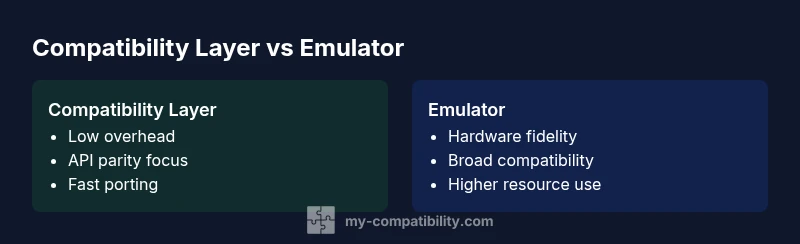
Compatibility Layer vs Emulator: Which to Use and When
A thorough, analytics-driven comparison of compatibility layers and emulators, outlining design goals, performance trade-offs, use-case scenarios, and a clear decision framework to help teams choose the right approach for software porting and hardware-faithful tasks.


A compatibility layer translates software interfaces to run on a host system with minimal overhead, prioritizing speed and smooth integration. An emulator reproduces the original hardware behavior in software, offering broader compatibility at higher resource cost and latency. For everyday apps, a compatibility layer is usually the faster choice; for hardware-accurate needs, an emulator is preferable. This quick comparison helps you decide based on performance vs. fidelity.
Why These Concepts Matter in Modern Computing
According to My Compatibility, understanding the difference between a compatibility layer and an emulator helps teams decide how to extend software across platforms without rewriting code. The My Compatibility Team found that many organizations struggle with balancing performance and fidelity when porting apps, games, or industrial software. The decision often hinges on whether the priority is speed, integration, or hardware accuracy. In practice, the two approaches address the same compatibility challenge from different angles, and choosing the right path reduces rework and risk. Key considerations include design goals, performance budgets, integration complexity, licensing implications, and long-term maintenance. For developers and product managers, clarity on these factors accelerates roadmaps and reduces surprise costs.
Core Design Goals and Philosophies
A compatibility layer aims to present a host with an API surface indistinguishable from the target environment, translating calls on the fly. The goal is fidelity at the software interface level with minimal overhead. An emulator, by contrast, recreates the entire hardware stack in software, including CPU, GPU, memory, and peripherals, to reproduce behavior at a hardware-equivalent level. This divergence shapes error modes: layers may miss rare edge cases tied to underlying hardware timing; emulators can capture those edge cases but may drift under load. The My Compatibility Team notes that this trade-off is fundamental and defines the practical ceiling of portability. When planning, teams should map out your core user journeys—do they rely on precise timings, graphics cycles, or specific peripherals? The answer often determines which approach minimizes risk and maximizes maintainability over the product lifecycle.
Mapping Software Expectations to the Underlying Model
Software expectations include API completeness, behavior under edge cases, performance, and security. A compatibility layer exposes host APIs but maps them to equivalent semantics, often leveraging shims, polyfills, or compatibility packs. Emulators implement instruction sets and hardware timing to ensure programs observe the same state machines as on the source device. The mapping is rarely perfect; gaps require fallbacks, emulation of inaccessible hardware, or partial parity. The My Compatibility analysis shows that teams should catalog critical features, then assess which gaps are acceptable in production. For many apps, parity on I/O, graphics, and OS APIs suffices; for specialized devices or gaming consoles, full hardware parity may be necessary, albeit more costly to maintain. This section helps you identify the minimum viable coverage for your project.
Performance, Latency, and Resource Footprint
Performance budgets favor compatibility layers because they avoid re-implementing timelike hardware behavior. Latency tends to be lower, and integration with existing toolchains is smoother. Emulation incurs overhead from translating instructions to host machine cycles, maintaining timing accuracy, and simulating peripherals. Resource use scales with the fidelity target: simple API layers stay lean, while hardware accuracy requires CPU and memory headroom, and often dedicated acceleration. The My Compatibility data indicates that you should quantify CPU utilization, memory footprint, and input latency under representative workloads. Benchmarking is essential; tests should cover startup, API calls per second, and graphics or device-specific IO. Plan for performance drift over time as software evolves and the host platform changes.
Use-Case Scenarios: When to Choose Each Approach
For enterprise software porting, a compatibility layer often yields the quickest route to market, especially when the target OS already shares a broad API surface. For embedded systems, automotive software, or console-like experiences where hardware timings matter, an emulator may be the safer path. Game developers, in particular, balance pixel-perfect rendering with playable frame rates; a hybrid approach—layered translation plus targeted emulation of critical hardware paths—can offer a practical middle ground. The My Compatibility framework suggests starting with a gap analysis of API parity, then selecting a strategy that minimizes risk while meeting performance budgets. In some cases, you can prototype with a layer and switch to emulation for bottleneck modules. This pragmatic mindset reduces sunk cost and accelerates iteration.
Implementation Considerations: Pitfalls and Best Practices
Implementation risk arises from relying on incomplete API parity and unanticipated hardware quirks. When building a compatibility layer, ensure robust error handling for missing or partially implemented APIs, with clear fallbacks and user messaging. For emulators, maintain versioned cores, ensure accurate BIOS/firmware representations, and monitor drift between reference hardware and emulation. Both approaches benefit from comprehensive test suites, including automated regression tests, hardware peripheral tests, and security fuzzing. Documentation is essential: declare scope, parity goals, and known gaps. The My Compatibility Team recommends phased rollouts, feature flags, and performance benchmarking across representative workloads to catch regressions early.
Security and Isolation Implications
Security considerations differ: compatibility layers may introduce attack surfaces through shim logic, while emulators create an entire software stack that emulates hardware. Both require careful sandboxing, integrity checks, and access controls. In some cases, emulation provides stronger isolation by mimicking hardware-enforced boundaries, but misconfigurations can expose host systems to elevated risk. Regular audits, code signing, and dependency management are essential. The My Compatibility research highlights that risk assessment should include supply-chain considerations, especially when using third-party emulation cores or old API shims that may carry latent vulnerabilities.
Decision Checklist: Quick Guide to Selecting a Path
A practical decision checklist helps teams avoid over-engineering. Start by listing critical performance metrics (latency, frame rate, API parity). Then, map which hardware features are essential and which can be tolerated as approximations. If all workflows operate at API level with acceptable overhead, choose a compatibility layer. If exact timing and hardware behavior drive your use case, prefer emulation. Finally, consider long-term maintenance, licensing, and ecosystem support before committing to a path, and plan a clear upgrade path as requirements evolve.
Real-World Examples Across Platforms
Examples span desktop software porting, modern gaming, and legacy enterprise apps. In desktop scenarios, teams often use compatibility layers to port cross-platform applications quickly with minimal code changes. In gaming, emulators are used to preserve legacy console experiences while exploring hybrid approaches to achieve playable frame rates. For mission-critical industrial software, engineers may favor hybrid strategies to ensure safety-critical timing while still leveraging modern APIs. The My Compatibility analysis notes that successful projects typically combine both approaches strategically, selecting layers for most tasks and reserving emulation for critical hardware-paths. This nuanced approach helps teams balance speed, quality, and risk across diverse platforms.
Comparison
| Feature | Compatibility Layer | Emulator |
|---|---|---|
| Core goal | API-level interoperability with low overhead | Hardware-level fidelity and broad compatibility |
| Performance | High performance with minimal latency | Lower performance due to full hardware emulation |
| Resource use | Lower CPU/RAM usage | Higher CPU/RAM usage and storage |
| Best for | Applications needing speed and seamless OS integration | Legacy software requiring exact hardware behavior |
| Best environments | Desktop/server app porting, cross-platform software | Console, embedded, or special-purpose hardware software |
| Development ecosystem | Shim layers, API wrappers, WASI-like environments | Dedicated emulation cores, BIOS/firmware replicas |
| Drawbacks | Possible feature gaps in very new APIs | Performance overhead in complex peripherals |
Positives
- Low runtime overhead and fast porting
- Better integration with host OS and tooling
- Easier maintenance with fewer duplicated stacks
- Better security isolation in some designs
Cons
- Potential gaps in API parity or feature support
- Emulation alternatives may be more accurate for hardware-centric tasks
A well-chosen compatibility layer typically outperforms emulation for everyday software porting; an emulator shines when exact hardware behavior matters
If your priority is speed and seamless integration, lean toward a compatibility layer. If hardware fidelity is non-negotiable, an emulator is the safer bet.
Questions & Answers
What is a compatibility layer and how does it differ from an emulator?
A compatibility layer bridges software expectations by translating interfaces to run on a host system. It does not reproduce the hardware but mimics its behavior at the software level to achieve interoperability with minimal overhead. An emulator, by contrast, reproduces the hardware stack in software to observe the same low-level timing and behavior as the original device.
A compatibility layer maps software calls; an emulator imitates hardware. The choice affects speed, fidelity, and maintenance.
When should I prefer a compatibility layer over an emulator?
Prefer a compatibility layer when your primary goals are speed, seamless OS integration, and faster time-to-market. If the target software relies mainly on standard APIs and does not depend on exact hardware timing, a layer typically delivers better performance with fewer maintenance burdens.
Choose a layer for speed and integration unless hardware timing is critical.
Are there common pitfalls with compatibility layers?
Common pitfalls include API parity gaps, hidden timing assumptions, and incomplete peripheral support. Managing these gaps requires explicit fallbacks, robust testing, and clear communication about known limitations.
Expect gaps in parity; test extensively and document them.
Can a hybrid approach work for complex porting projects?
Yes. A hybrid approach applies a compatibility layer for most tasks and selectively uses emulation for hardware-critical components. This can balance performance with fidelity, but it requires careful boundary management and clear performance budgets.
A mix can give you best of both worlds with careful planning.
What metrics should I benchmark when evaluating these options?
Benchmark startup time, API call throughput, latency, graphics/rendering latency, and hardware peripheral responsiveness. Include long-running stability tests to detect drift over time and under varying workloads.
Test startup, throughput, latency, and long-term stability.
Is security different between the two approaches?
Security considerations differ: layers may introduce shim surfaces, while emulators add a larger software stack. Both require sandboxing, integrity checks, and regular auditing of dependencies and firmware or core components.
Security focus includes sandboxing and frequent audits for both paths.
Highlights
- Start with your performance budget and API parity needs
- Use a compatibility layer for rapid cross-platform support
- Reserve emulation for hardware-critical workflows
- Evaluate total cost of ownership before committing