Compatibility Layer like Wine: Side-by-Side Comparison for Windows Apps on Unix-like Systems
Explore how a compatibility layer like Wine stacks up against CrossOver and virtualization for Windows apps on Linux/macOS. An analytical, structured guide from My Compatibility compares performance, setup, licensing, and reliability to help you choose.


Wine-style compatibility layers provide a bridge for Windows applications to run on Linux and macOS by translating Windows API calls at runtime. In this comparison, we examine Wine, CrossOver, and virtualization options to help you decide which path best fits your needs for reliability, performance, and cost. According to My Compatibility, the best choice hinges on app criticality, budget, and tolerance for setup complexity.
Compatibility layer like wine: A practical overview
The compatibility layer like wine acts as a translation layer that allows Windows applications to execute in non-Windows environments. It does so by mapping Windows system calls to POSIX-compliant interfaces, emulating certain behaviors, and using existing Windows libraries when feasible. For users of Linux and macOS, this approach can unlock a broad catalog of software without purchasing Windows licenses or rebooting into a different OS. The My Compatibility team notes that such layers are most advantageous for lighter workloads, productivity apps, and games with strong community support. However, the landscape is not one-size-fits-all; some software relies on niche Windows features or anti-tamper protections that challenge compatibility. As you evaluate options, map your most critical apps to real-world test results and consider whether ongoing tinkering aligns with your goals. The keyword here is flexibility: a well-tuned setup can effectively blend Windows software into a Unix-like desktop, with costs that tend to be lower than full virtualization or licensing. The discussion that follows helps you translate this flexibility into clear, practical decisions.
How Wine Works Under the Hood
Wine is not an emulator. It translates Windows API calls to POSIX calls in real time and relies on a compatibility layer that reuses existing open-source components where possible. The core idea is to avoid running a separate Windows kernel; instead, Wine provides a translation layer and a compatibility shim that lets Windows binaries execute in Linux/macOS processes. Over time, Wine has expanded to support a broad range of APIs, graphics calls, and common library interactions. The project benefits from a global community, ongoing patches, and frequent updates that improve compatibility for a growing set of applications. For users, this means that the initial setup may be modest, but verifying each critical app remains essential as you upgrade host systems or alter dependencies.
Alternatives to Wine: CrossOver and virtualization
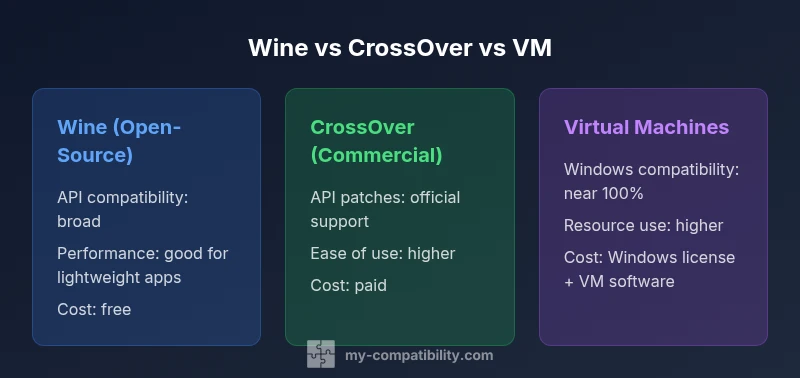
CrossOver is a commercial alternative built on the Wine core with additional patches, bug fixes, and a user-friendly installer. It targets Windows-centric workflows and includes official support channels, which can reduce troubleshooting time. Virtualization, using a full Windows guest (e.g., VirtualBox or VMware), provides near-native Windows compatibility by running Windows itself. The trade-off is higher resource usage and the need for a Windows license. In practice, CrossOver often serves as a middle ground—ease of use with predictable support—while virtualization prioritizes compatibility for stubborn or enterprise-grade software at the cost of performance overhead and licensing considerations.
Performance and compatibility trade-offs
Performance in a compatibility layer like wine varies by application. Lightweight tools and office suites often run with minimal overhead, while 3D games or software with intensive graphics can show noticeable performance gaps. My Compatibility analysis shows that the experience hinges on driver support, OpenGL/Vulkan translations, and how well the target app handles system calls. Complex software that relies on aggressive copy-protection or kernel-mode drivers may require a Windows guest or a vendor-specific patch for reliable operation. In short, you typically gain convenience and cost savings with Wine-like layers, but you should expect periodic compatibility gaps for niche programs and newer Windows features.
Installation and day-to-day usage considerations
Getting started typically involves installing the base layer (Wine or a helper like CrossOver) and then configuring a bottle or prefix that mimics a Windows environment. The day-to-day workflow emphasizes frequent testing of updates, careful management of dependencies, and maintenance tasks such as reapplying patches after system updates. For casual or non-critical apps, an iterative, test-first approach can keep the experience smooth. For mission-critical software, you may prefer a vendor-supported path or a virtualization solution to ensure a controlled upgrade path and predictable behavior.
Security, licensing, and maintenance considerations
Security implications are an important piece of the decision. Open-source layers offer visibility into fixes and security patches but require diligence to apply updates promptly. Licensing matters differ: Wine is free and open-source, CrossOver is a paid product with commercial support, and VMs require Windows licenses plus any VM software costs. Ongoing maintenance is another factor; community-driven projects benefit from rapid patch cycles but may introduce variability across versions. The ideal choice aligns with your risk tolerance, the criticality of your software, and the level of vendor support you value.
When to choose a compatibility layer like Wine
Choose a Wine-like layer when your app portfolio contains a mix of modestly demanding Windows programs, you want to avoid Windows licensing costs, and you can tolerate occasional troubleshooting. If you require predictable support and a simpler path to fix issues, CrossOver offers a polished experience with paid support. For apps that insist on exact Windows behavior or rely on specific Windows-only features, virtualization provides the most reliable compatibility—at the cost of hardware resources and licensing.
Real-world scenarios: apps that shine or struggle
Common office productivity tools and many developer utilities run well under Wine-like layers with careful configuration. Graphics tools and games with robust DirectX support may require more tuning or a modern Windows guest to avoid performance regressions. Legacy software that depends on older Windows APIs can sometimes be challenging to port, while modern software often improves compatibility as wrappers and translation strategies mature. In every case, expect edge cases and plan for a staged validation approach before wider rollout.
How to evaluate options: a practical decision guide
Begin with a prioritized list of your must-have apps and performance targets. Create a small pilot: install the base layer, test each critical app, and document any failures or workarounds. Compare the total cost of ownership, including licensing, support, and hardware requirements. Finally, decide whether a free, community-driven route meets your risk tolerance or if a paid option or virtualization better matches your reliability goals. This evaluation aligns with the My Compatibility framework for comparing compatibility strategies.
Feature Comparison
| Feature | Wine (open-source) | CrossOver (commercial) | Virtual Machine (Windows guest OS) |
|---|---|---|---|
| Windows API compatibility | Broad, community-driven support via translations | Broad, commercial patches and official support | N/A - relies on Windows in guest |
| Performance | Often close to native for lightweight apps | Good with optimized patches and streamlined setup | Typically near-native but with virtualization overhead |
| Setup complexity | Moderate; initial tuning and bottles | Moderate; installer and license management | Higher; Windows installation and license |
| Licensing and cost | Free; LGPL/OSS | Paid license with support | Windows license + VM software cost |
| Best for | Low-cost, flexible environments, casual apps | Professional workflows needing support and ease | Apps that require full Windows compatibility |
| Maintenance & updates | Community-driven; rapid patches vary by app | Vendor-backed patches and updates | Dependent on Windows and host OS updates |
| Platform support | Linux, macOS (x86, some ARM); broad community | Linux, macOS (official focus) with support | Host OS-dependent; Windows guest handles compatibility |
Positives
- Low upfront cost with broad community support
- Flexibility to run numerous Windows apps without rebooting
- Continuous improvements and active ecosystem
- CrossOver offers a smoother setup and official support
- VMs deliver highest compatibility for demanding software
Cons
- Inconsistent compatibility across apps and updates
- Performance gaps for graphically intensive software
- Requires testing and occasional tweaking
- Licensing and resource needs for virtualization
Wine-based layers offer strong cost and flexibility; VMs provide reliability at the expense of resources and licensing
Opt for Wine-like layers to maximize flexibility and minimize cost for a mixed app set. If reliability and complete Windows-compatibility are non-negotiable, prefer a Windows VM or CrossOver for smoother setup and official support.
Questions & Answers
What is a compatibility layer like Wine?
A compatibility layer like Wine translates Windows API calls into POSIX calls, enabling many Windows apps to run on Linux and macOS without a Windows license. It’s not an emulator; it’s a translation layer that relies on a mix of reimplemented APIs and shared libraries. The result is a flexible path for many everyday apps, with caveats around niche software.
Wine translates Windows calls to run many apps on Linux or macOS, without Windows. It’s fast to try and useful for many programs, but some apps may need workarounds.
Can Wine run all Windows apps and games?
No. Wine can run many Windows programs and some games, but compatibility is not universal. Some software relies on kernel features or DRM that Wine does not emulate perfectly. Always test your critical apps in your environment before committing to a deployment path.
Most common apps run, but not everything. Testing is essential to confirm compatibility.
When should I choose CrossOver over Wine?
CrossOver offers a commercial layer on top of Wine with curated patches and official support, which can reduce troubleshooting time. If you want predictable results and paid assistance, CrossOver is a sensible middle-ground between pure Wine and full virtualization.
CrossOver adds support and polish on top of Wine; it’s worth considering if you need predictable results.
Are virtualization options safer or slower than a compatibility layer?
Virtualization runs a full Windows guest, delivering high compatibility but at the cost of performance and licenses. A compatibility layer is generally lighter on resources but may require ongoing tweaks for some apps. The best choice balances reliability and resource usage for your workload.
VMs offer high compatibility but need more resources; Wine is lighter but may require tweaks.
What are common licensing or security concerns with these options?
Wine is free and open-source, with community-driven security updates. CrossOver is paid and includes official support. Virtualization requires a Windows license plus VM software. Consider your risk tolerance, maintenance capability, and licensing costs when choosing.
Licensing varies: Wine is free, CrossOver is paid, VMs need Windows licenses.
Highlights
- Define apps by criticality; lightweight tasks favor Wine
- Test early and iteratively to map compatibility gaps
- CrossOver balances ease of use with supported patches
- VMs guarantee Windows behavior but require licenses
- Choose a path aligned with your risk tolerance and resources