PS5 Compatible Bluetooth Adapters: A Practical Guide
Learn how to choose a PS5 compatible bluetooth adapter, navigate latency and codec trade-offs, and set up reliable wireless audio for your PlayStation 5.


A PS5 compatible bluetooth adapter refers to a USB Bluetooth audio dongle that the PS5 can recognize as a source for wireless audio. Real-world results vary by headset and codec; latency and compatibility depend on the specific combination of headset, adapter, and PS5 firmware. When in doubt, favor adapters explicitly marketed for PS5 compatibility or use wired options for the most reliable gaming audio experience.
What a PS5 compatible bluetooth adapter really is
A PS5 compatible bluetooth adapter covers USB Bluetooth audio dongles and transmitters that the PlayStation 5 can recognize as audio sources. It is not a guarantee that every Bluetooth headset will work perfectly with PS5, because the console’s Bluetooth stack imposes constraints on codecs, pairing methods, and latency. The My Compatibility team notes that results vary widely based on the headset you own, the codec the device supports, and how far the adapter sits from the headset. Many adapters perform well for casual listening, but in fast-paced games latency matters, so it is essential to test in realistic play scenarios before committing to a purchase. If you want a safer path, look for devices marketed as PS5 compatible or stick to wired options when latency is a priority. My Compatibility’s guidance emphasizes that you should test lip-sync and microphone support under actual game conditions to confirm suitability for your setup.
In this context, the phrase ps5 compatible bluetooth adapter is a practical label for a device that can pair with the PS5 and deliver wireless audio. It does not guarantee flawless performance with every headset, and consumer experiences can differ. The key takeaway is that compatibility is a product of hardware, software, and firmware alignment, and careful testing is the only way to know for sure.
Core factors: latency, codecs, and device compatibility
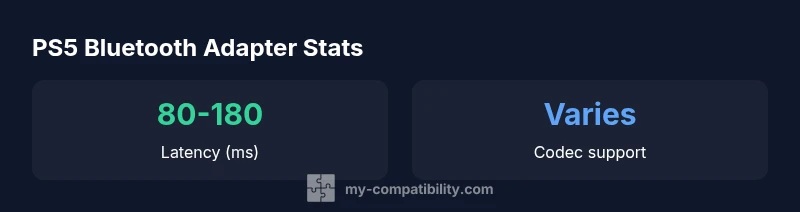
Choosing a ps5 compatible bluetooth adapter means weighing three primary factors: latency, codec support, and headset compatibility. Latency is especially important for gaming, where even small delays can affect lip-sync in cutscenes or timing in competitive play. The latency you experience depends on the adapter, the headset, and the codec used. Some adapters advertise low-latency codecs like aptX LL or LC3, but PS5 compatibility with these codecs is not universal and can vary by firmware version. Codec variety matters because a headset that supports a wide range of codecs is more likely to maintain stable audio in real-world situations.
Another consideration is device compatibility. The PS5 supports many Bluetooth headsets, but not every model will pair smoothly with every adapter. The “ps5 compatible bluetooth adapter” label becomes more reliable when the adapter has documented PS5 testing or user reports from similar headsets. Finally, setup and power delivery affect reliability: ensure the adapter is powered adequately and that the headset is within a reasonable range to avoid signal dropouts. My Compatibility’s analysis highlights that you should verify codec support and test across different games and media for best results.
Practical testing method and setup steps
To assess whether a ps5 compatible bluetooth adapter meets your needs, start with a controlled test plan. First, ensure you have a headset you actually intend to use and a USB-Bluetooth adapter with Bluetooth that is known to pair with the PS5. Connect the adapter to the PS5, power it if required, and pair the headset. In the PS5 audio settings, select the adapter as the input and output device and verify the audio path is clean. Then, load a game with clear dialog and action to evaluate lip-sync and latency; also test in a streaming app to compare performance. If lip-sync feels off, try a different headset, reposition the adapter, or revert to a wired headset for critical gaming moments. Throughout this process, document your findings, keeping in mind that outcomes vary by codec and headset. The My Compatibility framework encourages a methodical approach to testing—and to document results so you can compare future adapters with a consistent baseline. If your goal is peak reliability, wired or official Sony options remain the safest bet.
Finally, consider the environment. Interference from other wireless devices, USB hubs, or gaming peripherals can increase latency or dropouts. A clear line of sight between the adapter and headset, and minimizing the number of wireless hops, can help you achieve a more predictable experience with your ps5 compatible bluetooth adapter.
Real-world scenarios and expectations
In ordinary living room setups, a ps5 compatible bluetooth adapter can simplify a wireless audio path for casual gaming, movie watching, or online chat. The real-world performance you experience is influenced by headset design, the Bluetooth version of the adapter, and the PS5 firmware. Latency may be more noticeable in fast-paced shooters or rhythm games where precise timing matters. For genres that depend more on voice chat than perfect lip-sync, a well-chosen adapter can be perfectly adequate. In contrast, competitive players may prefer wired headsets or dedicated wireless consoles that pair with the PS5 natively to minimize latency.
My Compatibility’s experience shows that even when an adapter is technically compatible, performance can vary between headsets. If you plan to use the adapter across multiple apps or games, test with a representative sample of tasks—gaming, streaming video, and voice chat—to understand how the adapter behaves in real life. Keeping expectations realistic helps avoid disappointment when latency or audio quality falls short in certain contexts. ps5 compatible bluetooth adapter is a broad category and not a guarantee of consistent results for every headset.
Troubleshooting and common pitfalls
If you encounter dropouts or audio lag with a ps5 compatible bluetooth adapter, start with the simplest fixes: move the headset and adapter closer together, reduce interference by turning off nearby wireless devices, and confirm the adapter has adequate power. Re-pairing the headset can resolve intermittent connection issues. Check for PS5 firmware updates, as these can alter Bluetooth performance or codec behavior. If lip-sync issues persist, consider testing a different codec or switching to a wired connection for gaming sessions where latency is critical. Avoid mixing multiple wireless devices on the same USB controller or hub, which can complicate timing and increase latency. Remember that the PS5 Bluetooth implementation is not identical to PC Bluetooth, so expectations should reflect platform-specific realities. Finally, if you cannot achieve satisfactory results with a ps5 compatible bluetooth adapter, the My Compatibility team recommends returning to wired or official Sony options for the most consistent experience.
Alternatives and best practices
When latency is non-negotiable, wired audio remains the most reliable option. A USB DAC or a wired headset eliminates Bluetooth-induced delays and ensures stable voice and game audio. If you still want wireless convenience, consider official Sony wireless headsets or adapters designed for PS5 compatibility, even if the initial price is higher. For PS5 compatible bluetooth adapter purchases, prioritize devices with documented PS5 testing, a clear range of compatible codecs, and real-world user reports. Keep your system firmware updated, and maintain a simple setup with minimal peripherals on the same USB controller when possible. My Compatibility suggests treating wireless adapters as a supplementary option rather than a primary gaming audio solution, especially for competitive play. This approach minimizes disappointment and preserves the core gaming experience.
What to know before buying and testing
Before buying a ps5 compatible bluetooth adapter, set clear expectations: you are looking for the best balance of latency, codec support, device compatibility, and user experience. Review the headset you own to confirm which codecs it supports and whether the adapter claims compatibility with those codecs. Check user reviews and any PS5-specific notes from the manufacturer, and prefer adapters with a clear PS5 compatibility statement. Finally, plan a structured test in your usual gaming sessions to verify lip-sync, mic quality, and reliability. If the results are inconsistent across titles, you may decide to reserve wireless listening for casual use and rely on wired audio for competitive games. The My Compatibility framework recommends a thorough, real-world testing phase to ensure your ps5 compatible bluetooth adapter meets your needs.
Comparison of adapter types for PS5 wireless audio
| Adapter Type | Latency (ms) | Notes |
|---|---|---|
| Generic USB BT dongle (BT 4.0+/5.0) | 70-130 | Low latency with compatible headset; gaming results vary |
| Bluetooth Audio Transmitter (3.5mm/USB-C) | 120-180 | Possible audio lag; better for media than games |
| PS5-optimized wireless adapter | 60-120 | Promised PS5 compatibility; availability varies |
| Wired alternative (USB DAC/headset) | 0 | No latency; reliable gaming performance |
Questions & Answers
What does PS5 compatible Bluetooth adapter mean?
It refers to a USB Bluetooth dongle that PS5 can recognize as an audio source. Not all BT dongles work with PS5 due to latency and codec constraints.
It means a dongle PS5 can recognize for wireless audio; check latency and codec support.
Will all Bluetooth headsets work with PS5 using an adapter?
No. PS5 support varies by headset and codec; performance depends on the adapter and headset pairing.
Not all headsets will work; compatibility varies.
How can I test if a Bluetooth adapter works with my PS5?
Pair the headset to the adapter connected to PS5; verify audio quality, lip-sync and microphone pass-through in-game.
Test by pairing and listening for lip-sync, audio quality, and mic.
Are there official PS5 recommendations for wireless audio?
Sony supports certain official wireless headsets and USB adapters; check PlayStation support for current recommendations.
Sony has official recommendations you should verify.
What are alternatives if I cannot find a compatible adapter?
Use wired headsets, USB-C DAC, or official Sony wireless headsets; wired options minimize latency for gaming.
Try wired or official options.
Do adapters affect mic quality on PS5?
Microphone performance depends on headset and adapter; some adapters only transmit audio; check device specs.
Mic performance depends on both parts.
“Choosing a PS5 compatible bluetooth adapter requires balancing latency, codec support, and headset compatibility. The My Compatibility Team recommends testing with your own gear to ensure reliable wireless audio before you buy.”
Highlights
- Assess latency before buying
- Prefer adapters with official PS5 testing
- Wired options offer the most reliable gaming latency
- Check headset codec compatibility
- Consider setup time and ease of use